


 Video Converter Ultimate
 Skjermopptaker
 Videoreparasjon
 Sikker nedlasting
En enestående applikasjon for å endre størrelse på bilder - FastStone Photo Resizer
Det er enkelt å søke etter et bilde‑skalaverktøy på internett. Spesielt i dag finnes det mye bilderedigeringsprogramvare tilgjengelig på nettet. Når det gjelder å endre størrelse og konvertere bilder, kan du finne mange utmerkede verktøy både online og offline. Men hvis du har vanskeligheter med å velge ett, skal vi gjøre det enklere for deg. FastStone er en plattform for bilderedigering som du kan bruke til å endre størrelsen på bildene dine. Og i dette innlegget gir vi deg fullstendig informasjon om FastStone og hvordan du bruker FastStone Photo Resizer.

Del 1. FastStone Photo Resizer Review
FastStone Photo Resizer er et bilderedigeringsprogram du må bruke. Du kan bruke den på Windows-skrivebordet og laste den ned enkelt. I tillegg har den et rent og brukervennlig grensesnitt, noe som gjør det til et brukervennlig verktøy. FastStone Photo Resizer støtter ulike bildeformater, som JPEG, BMP, PNG, TIFF og GIF. Den inneholder også mange redigeringsfunksjoner som du kan bruke til å konvertere, gi nytt navn, beskjære, legge til tekst, endre farge, legge til vannmerke og mer.
Videre tilbyr den batchbehandling, hvor du kan behandle to eller flere bilder samtidig. Og hvis du vil forhåndsvise konverteringen du gjør, lar FastStone deg gjøre det. Du kan laste ned FastStone image resizer gratis på din Windows-datamaskin, men du må kjøpe appen for å bruke dens eksplisitte funksjoner. Følg veiledningen nedenfor hvis du vil vite hvordan du endrer størrelse på bilder ved hjelp av FastStone.
Fordeler
- Den tilbyr en rekke redigeringsfunksjoner og verktøy.
- Den har en lav pris.
- Den har et enkelt brukergrensesnitt.
- Den har en enkel fildelingsprosess.
Ulemper
- Den har bare et begrenset støtte- og hjelpetilbud.
- Det er ikke gratis å bruke.
- Kun tilgjengelig på Windows-programvare
Slik bruker du FastStone Photo Resizer til å endre størrelse på bilder:
Trinn 1. Last først ned og installer FastStone Photo Resizer på Windows‑datamaskinen din. Etter at du har installert appen, starter du den på skrivebordet. Klikk deretter på Batch Convert-knappen i Menu i hovedgrensesnittet for å laste opp bildet du vil endre størrelsen på.
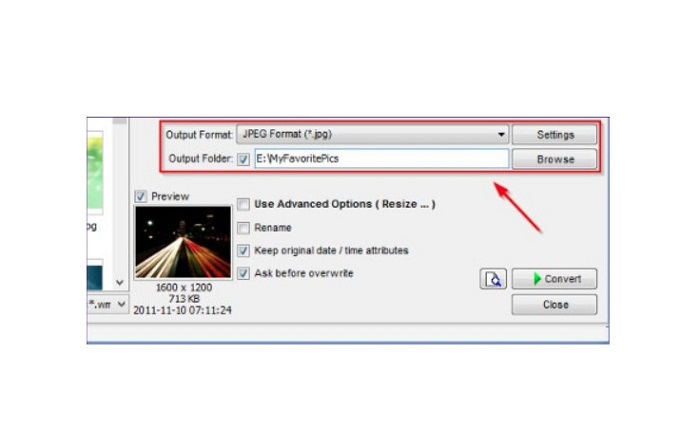
Trinn 2. Etter at du har importert bildet/bildene dine, vises det på grensesnittet. Klikk deretter på Output Format-nedtrekkspilen for å velge ønsket filutdataformat. For å velge hvor filen skal lagres, klikker du på Browse-knappen ved siden av Output Folder.
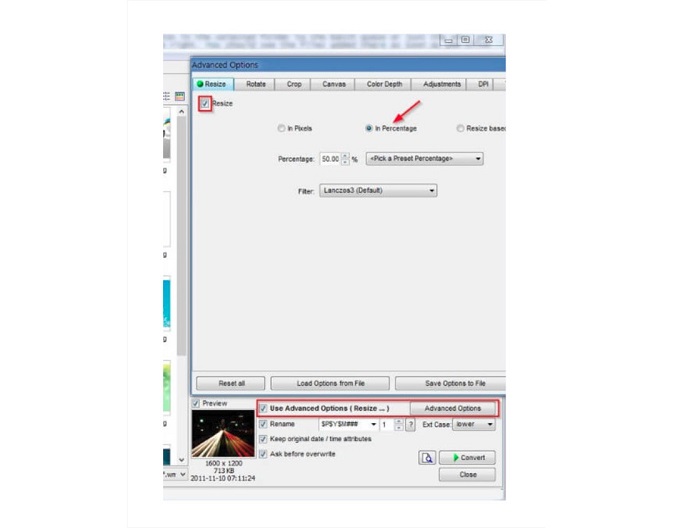
Trinn 3. Klikk deretter på Advanced Options, og en ny fane vises. Gå til Resize-fanen og merk av for In Percentage for å endre bildestørrelsen i prosent. Du kan velge et filter ved å klikke på nedtrekkspilen ved siden av Filter.
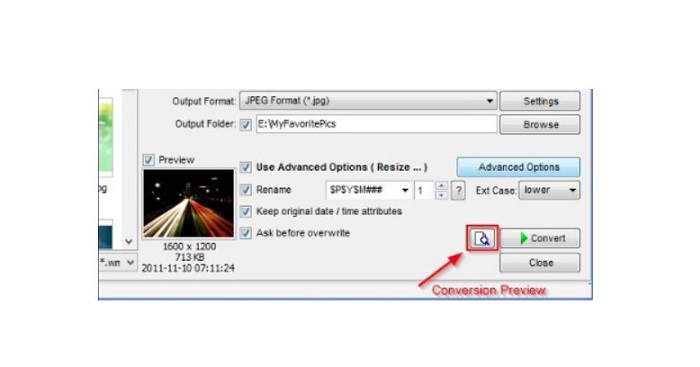
Trinn 4. Deretter kan du forhåndsvise bildet ditt og sammenligne det med originalfilen ved å klikke på Preview-ikonet ved siden av Convert-knappen.
Trinn 5. Til slutt klikker du på Convert-knappen for å starte prosessen med å endre størrelse. Bildet ditt blir også konvertert til filformatet du valgte i forrige trinn. Når FastStone er ferdig med å endre størrelsen på bildet, vises et nytt vindu der du ser bildefilen og størrelsene deres.
Og det er slutten på FastStone Photo Resizer-opplæringen. Ved å følge trinnene ovenfor kan du enkelt endre størrelsen på bildet ditt ved å bruke FastStone.
Del 2. Alternativer til FastStone Photo Resizer
FastStone Photo Resizer er bare tilgjengelig på Windows-stasjonære datamaskiner. Og et annet tilbakeslag er at du må kjøpe appen før du får tilgang til de andre redigeringsfunksjonene. Så hvis du foretrekker å bruke en videotrimmer-app tilgjengelig på Windows-, Mac- eller Linux-enheter og tilgjengelig online, les denne delen grundig.
FVC Free Image Upscaler
FVC Free Image Upscaler er et av de mest brukte bilde‑skalaverktøyene som er tilgjengelig på nettet og i alle nettlesere, inkludert Google, Firefox og Safari. Dette nettverktøyet kan også hjelpe deg med uklare bilder. Hvis du har et uskarpt eller bilde med lav kvalitet, kan du bruke dette nettverktøyet til å fjerne uskarphet og forbedre kvaliteten. I tillegg kan du forstørre bildet ditt med 2x, 4x, 6x og 8x. Det imponerende med FVC Free Image Upscaler er at det bruker en AI‑teknologi som automatisk oppdager de uskarpe delene av bildet ditt og forbedrer dem.
Dessuten støtter den alle bildeformater, som PNG, JPG, JPEG og BMP. Du trenger heller ikke å registrere deg eller logge på for en konto for å bruke dette verktøyet. Og hvis du vil sjekke forhåndsvisningen av utdataene dine før du lagrer den, kan du gjøre det mens du bruker denne applikasjonen. I tillegg er det trygt å bruke og praktisk å bruke. Og til tross for at det er en internettavhengig applikasjon, har den et raskt prosesseringsgrensesnitt der du ikke vil ha problemer med å laste opp bilder for å endre størrelse.
Trinn 1. Åpne nettleseren din og skriv inn FVC Free Image Upscaler i søkefeltet. Klikk på den oppgitte lenken for å gå direkte til hovedsiden.
Trinn 2. Start programmet på datamaskinen ved å klikke på Upload Photo-knappen. Etter at du har startet appen, klikker du på Upload Photo-knappen for å laste opp bildet du vil skalere/fjerne uskarphet fra.
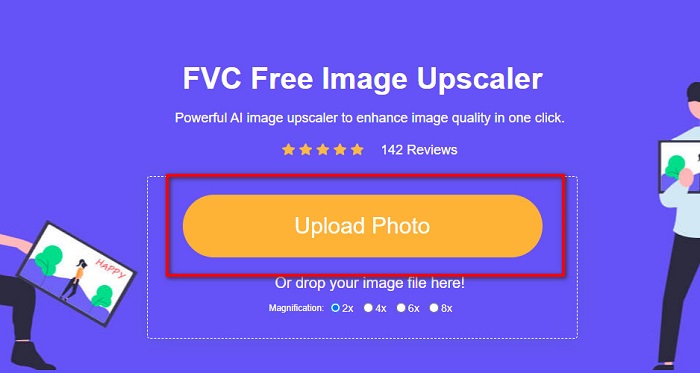
Trinn 3. Deretter ser du forhåndsinnstilte forstørrelser du kan velge mellom. Du kan velge mellom 2x, 4x, 6x eller 8x.
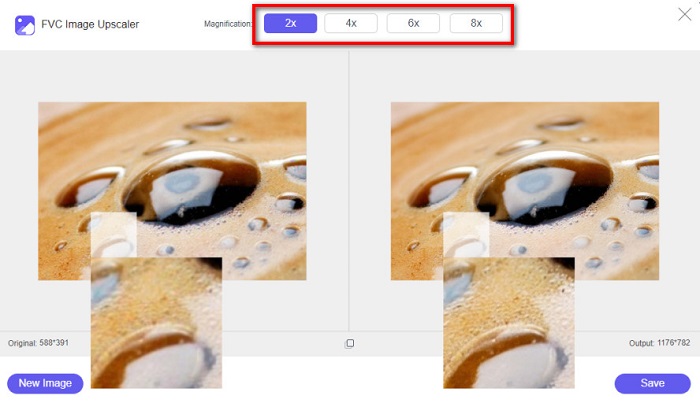
Trinn 4. Flytt markøren for å se forhåndsvisningen av bildet ditt. Hvis du er fornøyd med resultatet, klikker du på Save-knappen nederst til høyre i grensesnittet.
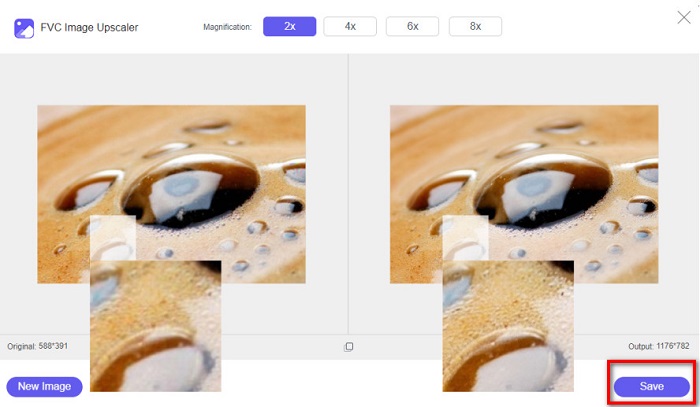
Image Resizer.com
Et annet fantastisk nettbasert verktøy for å endre bildestørrelse du kan bruke, er Image Resizer.com. Med Image Resizer.com kan du endre størrelsen på bildet ditt ved å justere dimensjonene. I tillegg har det en funksjon for å beskjære eller rotere bildet ditt. Det er også et nybegynnervennlig verktøy fordi det har et brukervennlig grensesnitt. Imidlertid inneholder det mange plagsomme annonser som kan virke distraherende.
Trinn 1. Søk etter Image Resizer.com i nettleseren din. På hovedgrensesnittet klikker du på Select Image-knappen for å laste opp bildet du vil skalere.
Trinn 2. På det neste grensesnittet kan du endre bildedimensjonene etter mål eller prosent. Skriv deretter inn Width and Height du ønsker for bildet.
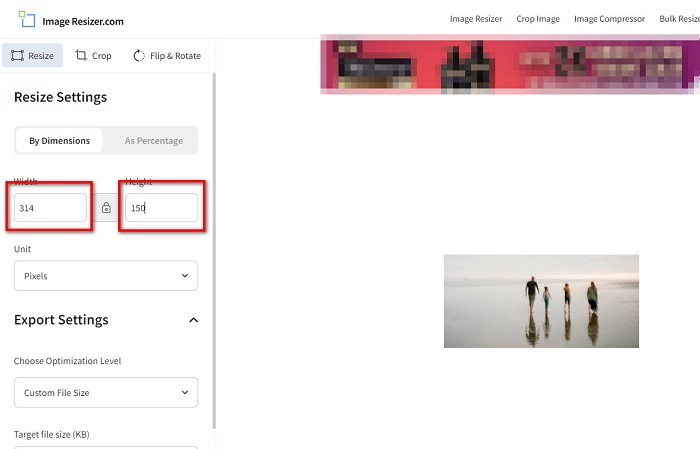
Trinn 3. Når du er ferdig med å endre størrelsen på bildet, klikker du på Resize Image-knappen for å fullføre prosessen.
Del 3. Vanlige spørsmål om FastStone Photo Resizer
Hvor mye koster FastStone Photo Resizer?
Du kan kjøpe fullversjonen av FastStone Photo Resizer for $19.95 (livstidslisens)
Er FastStone-visningen gratis?
FastStone Image Viewer er en bildeviser som brukes for Microsoft Windows. Du kan bruke FastStone Image Viewer gratis og uten kostnad.
Ødelegger FastStone Photo Resizer bildekvaliteten?
Nei. Når du optimaliserer bildet ditt med FastStone Photo Resizer, mister du ikke bildekvalitet.
Konklusjon
FastStone Photo Resizer er et utmerket program hvis du vil skalere bildene dine på en Windows‑datamaskin. I tillegg har det mange redigeringsfunksjoner og er også et brukervennlig verktøy. Men hvis du lurer på om det finnes en FastStone Photo Resizer for Mac, er svaret nei. Så hvis du vil ha et bilde‑skalaverktøy som er tilgjengelig på alle plattformer, kan du bruke FVC Free Image Upscaler nå.
-
 Komplett guide for Imglarger – løsning for fotodesignere
 Imglarger er et av de mest eminente bildeløsningsverktøyene. Klikk på denne siden for å lære de fullstendige beskrivelsene, fordeler og ulemper, pris og alternativer til Imglarger.
-
 Beste Photo Resizer-app online, offline, Android og iPhone
 Hva er de beste appene for bilderesizer? Klikk på siden for å lære de fem mest kraftfulle appene for bildeforbedring du kan bruke til å forbedre eller endre størrelse på filen.
-
 6 måter å fornye et bilde på nettet og offline [100% fungerer]
 Med opplæringen vi legger til her, kan du nå enkelt endre størrelsen på et bilde basert på ønsket størrelse. Lær hvordan du gjør det her!
