


 Video Converter Ultimate
 Skjermopptaker
 Videoreparasjon
 Sikker nedlasting
Mest effektive online og offline metoder for å konvertere MTV til MKV
Det finnes enkelte tilfeller der MTV-filformatet ditt er inkompatibelt med enheten eller programmet du bruker. Den beste løsningen er å endre videoens filformat. Heldigvis har vi de beste metodene for deg. Dette innlegget vil presentere flere programmer du kan bruke til å konvertere MTV til MKV umiddelbart. Ikke hopp over denne artikkelen hvis du vil finne den beste MTV til MKV‑konverteren.

Del 1: Detaljert informasjon om MTV og MKV
Hva er MTV?
MTV står for Music Television. Den 1. august 1981 ble MTV lansert som en amerikansk kabelkanal. Dette filformatet ble laget for å gi videovisning på rimelige, kinesiskproduserte bærbare MP4‑spillere uten å øke prisen på disse spillerne med lisenser. MTV‑spilleren ble produsert i Kina og kunne vise video, tekstfiler og bilder. Til slutt fungerer den ved å vise en serie rå, ukomprimerte rgb565/555‑bildeframes samtidig som den spiller av MP3‑lyd.
Hva er MKV?
MKV står for Matroska Video. Det er en multimediabeholder, på samme måte som MOV‑ og AVI‑formatene. Men den støtter flere undertekstspor og lydspor i én og samme fil. Denne Matroska‑multimediabeholderen brukes for video. Den er også basert på Extensible Binary Meta Language. Forskjellen mellom MKV‑formatet og andre videoformater er at andre formater er kodeker, mens MKV er en beholder.
Del 2: Hvordan konvertere MTV til MKV tapsfritt
Å konvertere MTV til MKV uten kvalitetstap er enkelt med Video Converter Ultimate. Dette programmet kan konvertere mange filer, som MOV, MTS, XVID, FLV, AVI, MP4 og flere. Når det gjelder prosessen, har det en 30x raskere konverteringshastighet, som er uten sidestykke sammenlignet med andre konvertere. Du kan også konvertere flere filer samtidig, siden det tilbyr batch‑konvertering. I tillegg kan du bruke dette verktøyet hvis du vil forbedre videoen din og gjøre den mer attraktiv. Det har mange funksjoner du kan bruke til å redigere og forbedre videoen, som en videoforsterker der du kan oppskalere oppløsningen på videoen, fjerne støy, optimalisere lysstyrke og kontrast og redusere risting i videoen. Med disse funksjonene kan du være sikker på at videoen din blir mer tilfredsstillende. Dessuten, hvis du vil legge til en vannmerking i videoen, kan du bruke dette verktøyet, siden det kan legge til vannmerker i videoen. Dette er noen av funksjonene i verktøyet, men hvis du vil oppdage flere gode funksjoner, bør du prøve å bruke Video Converter Ultimate.
Funksjoner:
◆ Kan lage en collage.
◆ Tilby videoredigeringsverktøy, som Enhancer, Watermark Remover, Compressor, etc.
◆ Lar deg lage musikkvideoer.
◆ Konverter mange videofilformater.
Fordeler
- Har en 30x raskere konverteringsprosess.
- Perfekt for ikke-profesjonelle brukere.
- Kan konvertere flere filformater, for eksempel MP4, MOV, MTV, MKV, etc.
- Ikke brukt vannmerke.
- Tilgjengelig for Windows og Mac.
Ulemper
- Du må kjøpe applikasjonen for å oppleve flere flotte funksjoner.
Følg disse detaljerte guidene for å konvertere MTV til MKV umiddelbart.
Trinn 1: Last ned Video Converter Ultimate på Windows‑ eller Mac‑datamaskinen din ved å klikke på Last ned-knappen nedenfor. Installer deretter programvaren på enheten, og åpne programmet.
Gratis nedlastingFor Windows 7 eller nyereSikker nedlasting
Gratis nedlastingFor MacOS 10.7 eller nyereSikker nedlasting
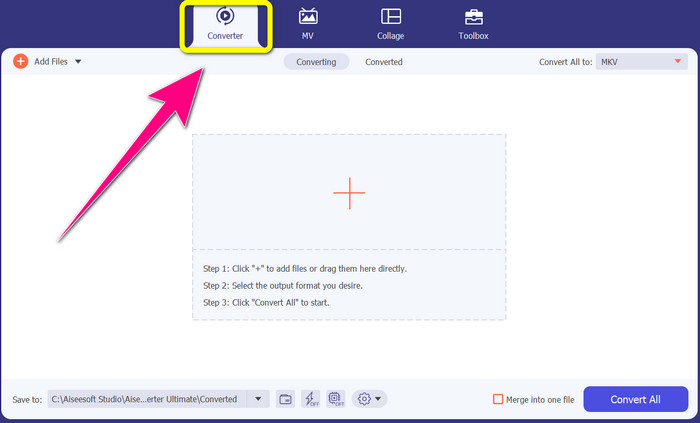
Trinn 2: Du vil se fire alternativer øverst i grensesnittet: Converter, MV, Collage og Toolbox. Velg Converter-panelet.
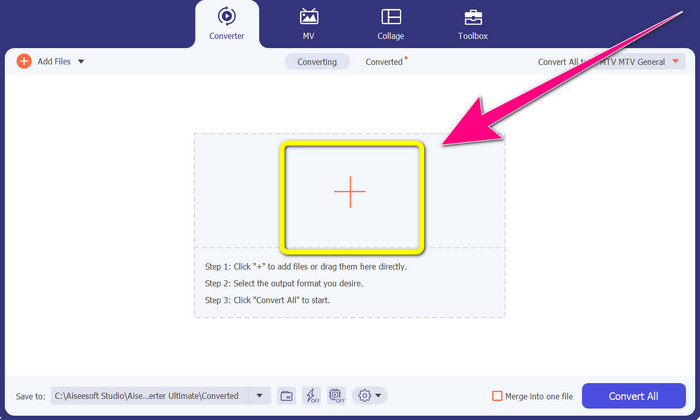
Trinn 3: Klikk deretter på +-ikonet for å legge til MTV‑videofilen du vil konvertere.
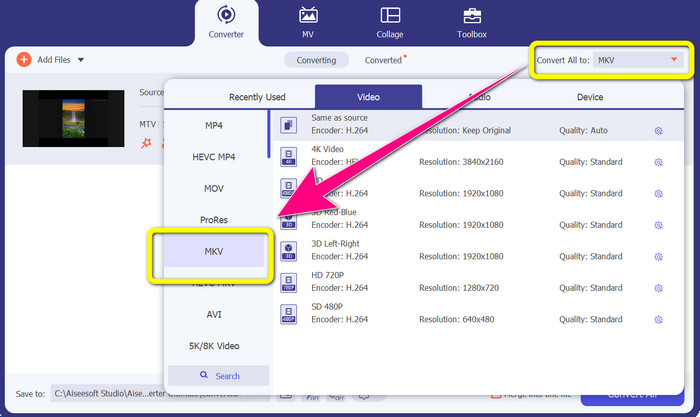
Trinn 4: Når du har lagt til videoen, klikker du på alternativet Convert all to. Finn deretter MKV-filformatet i formatlisten, og klikk på det.
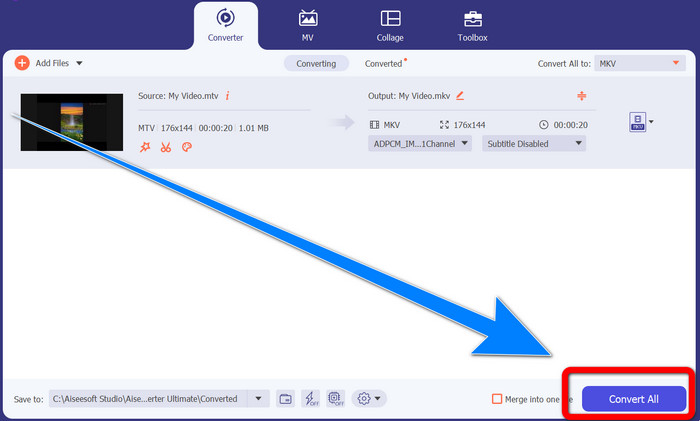
Trinn 5: Etter at du har valgt MKV‑filformatet, kan du klikke på Convert All-knappen for å konvertere og lagre den endelige videoen din.
Del 3: Online programvare for å konvertere MTV til MKV
Bruker Converthelper
Du har lært hvordan du konverterer MTV til MKV på Windows og Mac. Nå skal du lære hvordan du konverterer filer på nett. En av de nyttige konverterne du kan bruke er Converthelper. Dette nettverktøyet er et gratis verktøy du kan bruke til å konvertere ulike filformater, som MTV, MKV, DDAT, AVE, PS GFP, WMF osv. I tillegg har det få trinn i konverteringsprosessen, noe som passer godt for nybegynnere. Og du kan konvertere mange filer uten begrensninger med Converthelper. Denne gratis nettbaserte konverteren er imidlertid treg i selve konverteringen, og det kan ta en stund å konvertere filer helt. Dessuten avhenger ytelsen til dette verktøyet av internettforbindelsen din. Så for å konvertere filer med Converthelper må du ha en god internettforbindelse. Følg trinnene nedenfor for å konvertere MTV til MKV på nett.
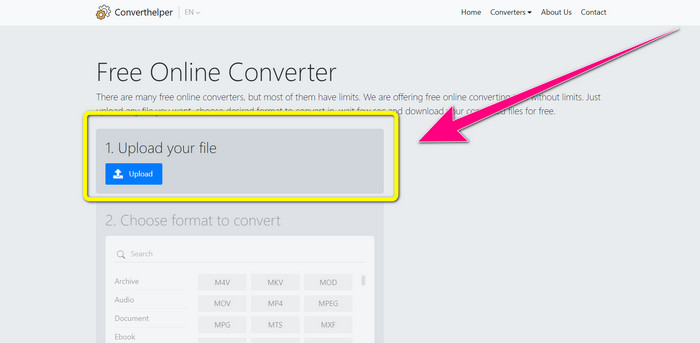
Trinn 1: Gå til Converthelper-nettstedet i nettleseren din. Klikk deretter på opplastingsknappen og legg til videoen med MTV‑fil.
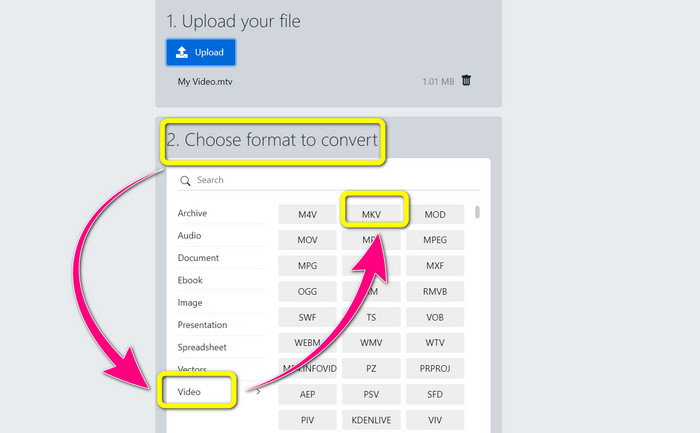
Trinn 2: Etter at du har lastet opp filen, går du videre til nummer 2. Velg formatalternativene. Klikk på Video-knappen, finn MKV-filen og klikk på den.
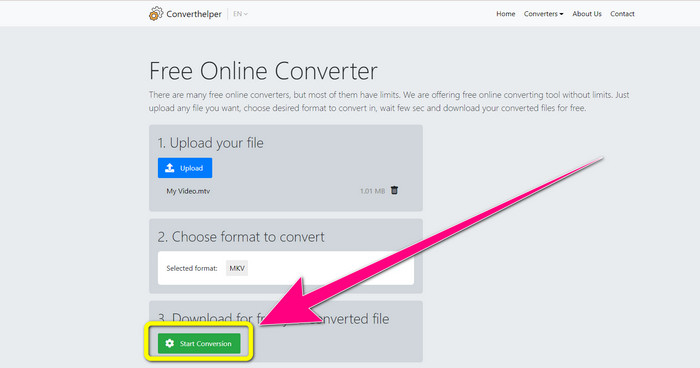
Trinn 3: Til slutt klikker du på Start Conversion-knappen for å konvertere MTV‑filen din til MKV‑format. Vent til den siste konverteringsprosessen er ferdig, og last deretter ned den endelige videoen din i MKV‑filformat.
Bruke Online Convert
Et annet nettverktøy du kan bruke til å konvertere MTV til MKV er Online Convert. Bortsett fra MTV- og MKV-formater, støtter den flere formater, for eksempel MP4, AVI, GIF, FLAC, FLV, VOB, DIVX, MOV, WMV og mer. Det er ikke bare pålitelig når det gjelder konvertering av videofiler. Du kan også konvertere bilder, dokumenter, lyd og andre formater. Dette nettbaserte verktøyet er også bra for nye brukere fordi det er enkelt å bruke og har bare noen få trinn for å konvertere forskjellige filer. Dette nettbaserte verktøyet har imidlertid en filstørrelsesgrense, som er maksimalt 3 Mb. I likhet med de andre nettbaserte verktøyene kan du heller ikke bruke det hvis du ikke har en internettforbindelse. Det er tider at denne programvaren ikke fungerer bra. For å konvertere MTV-filen til MKV-filformat, bruk disse trinnene nedenfor.
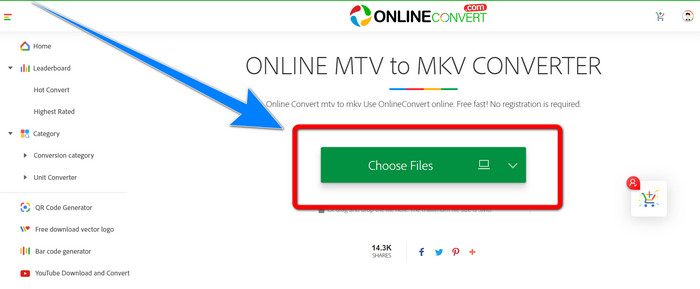
Trinn 1: Gå til nettstedet Online Convert. Klikk på Choose Files-knappen for å importere videoen din med MTV‑filformat.
Trinn 2: Når du har lastet opp videoen med MTV‑filformat, går du til formatalternativene og velger MKV -formatet.
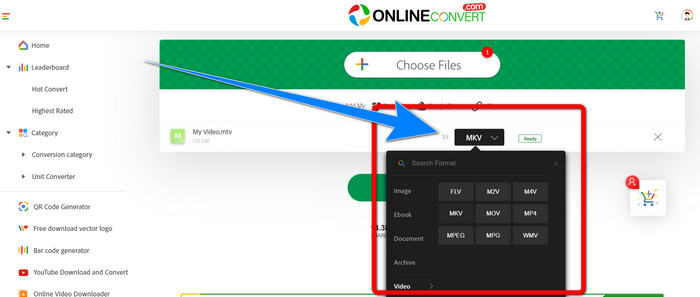
Trinn 3: For det siste trinnet klikker du på Convert -knappen for å konvertere MTV‑formatet til MKV‑filformat. Vent deretter på konverteringsprosessen og lagre den konverterte videoen din.
Mer lesing:
De beste metodene for hvordan du konverterer AMV til MKV gratis
[Online & Free] How Can I Convert MKV to MP4 on Windows/Mac
Del 4: Vanlige spørsmål om konvertering av MTV til MKV
Er MKV-formatet det samme som MP4?
Nei, det gjør de ikke. MKF har flere ekstra funksjoner som flere undertekster og lydspor, så MKV har en større filstørrelse enn MP4-format. MKV har også en høyere oppløsning enn MP4 fordi den har en avansert kodek med høyere komprimeringsforhold.
Kan jeg også konvertere MKV til et annet format?
Absolutt, ja! Du kan konvertere MKV til andre formater ved hjelp av programvare som støtter MKV‑filformat, for eksempel Video Converter Ultimate. Last ned appene på Windows eller Mac, og kos deg med å konvertere filene dine.
Er MKV-formatet bra?
Ja, det er det. Den har ingen lisenskrav. Den støtter utmerkede funksjoner, som flere spor og undertekster og mer.
Konklusjon
Dette er de beste metodene for å konvertere MTV til MKV med utmerkede konvertere. Hvis du vil konvertere flere filer enkelt og uten kvalitetstap, bruk Video Converter Ultimate.
-
 Gratis MP4 til MKV Converter - Hvordan konvertere MP4 til MKV med letthet
 Når du vil konvertere MP4 til MKV gratis, kan du lære mer om de 4 mest effektive metodene for å gjøre MP4-filene til en MKV-video for forskjellige scenarier.
-
 Hvordan konvertere MKV til DivX online og offline gratis
 Leter du etter de beste måtene å konvertere MKV til DivX-format gratis. Fortsett å lese for å vite de beste MKV til DivX online og offline omformere
-
 4 av de beste MKV til 3GP-konvertererne for Windows og Mac
 Hvis du ser etter MKV til 3GP-omformere som er enkle å bruke, er du heldig! Vi fant de beste og gratis MKV til 3GP-konvertererne du må prøve
