


 Video Converter Ultimate
 Skjermopptaker
 Videoreparasjon
 Sikker nedlasting
Konverter DIVX til 3GP med de mest effektive prosedyrene
Får du ikke spilt DIVX‑videoen på enheten din fordi den ikke støttes? De fleste opplever det samme problemet. Men du er heldig, for her går vi gjennom den mest effektive og enkleste metoden for å konvertere DIVX til 3GP. Gå ikke glipp av denne muligheten, og lær mer om hvordan du konverterer ulike filer ved hjelp av forskjellige pålitelige og utprøvde programmer vi skal introdusere.

Del 1: Beste programvare for å konvertere DIVX til 3GP
Vil du konvertere DIVX til 3GP på enheter som Windows‑ og Mac‑datamaskiner? Da er problemet ditt allerede løst. For å konvertere DIVX‑filen din kan du bruke Video Converter Ultimate. Som navnet antyder, er dette et komplett verktøy der du kan konvertere over 1000 videoformater, inkludert DIVX, 3GP, MP4, MOV, MTS, WEBM og flere. Du kan også konvertere to eller flere filer samtidig fordi dette verktøyet tilbyr batch‑konvertering. I tillegg har Video Converter Ultimate en rask konverteringsprosess, noe som er perfekt hvis du planlegger å konvertere mange filer.
Videre kan du fortsatt bruke denne offline-applikasjonen hvis du er interessert i å redigere DIVX-filen din før du konverterer den. Forutsatt at du vil korrigere fargen på videoen din, kan du fortsette til Toolbox-panelet og velge fargekorrigeringsverktøyet for å justere videoens lysstyrke, kontrast og metning. Anta dessuten at du vil synkronisere lyd i DIVX-videofilen din før du konverterer den. I så fall kan du gjøre det fordi den tilbyr en Audio Sync-funksjon, så det er enkelt for deg å synkronisere lyd med video.
Funksjoner:
◆ Konverter videofilformater, inkludert MP4, M4V, FLV, AVI, etc.
◆ Kan lage musikkvideoer med forskjellige temaer.
◆ Verktøykassen inneholder en videoforsterker, vannmerkefjerner, kompressor og mer.
◆ Kan lage en collage.
Fordeler
- Den støtter ulike filformater, for eksempel MP4, AVI, FLV, MOV, MTS, DIVX, 3GP, etc.
- Har et vennlig brukergrensesnitt som passer for nybegynnere.
- Har en 30x raskere konverteringsprosess
- Tilgjengelig på både Windows og Mac.
- Den kan konvertere flere videoer på en gang.
Ulemper
- Kjøp Video Converter Ultimate for å nyte flere unike funksjoner.
For å konvertere DIVX til 3GP enkelt, må du følge disse enkle veiledningene nedenfor.
Trinn 1: Last først ned Video Converter Ultimate på enheten din, for eksempel på en Windows‑ eller Mac‑datamaskin. Gå deretter gjennom installasjonsprosessen og åpne programmet.
Gratis nedlastingFor Windows 7 eller nyereSikker nedlasting
Gratis nedlastingFor MacOS 10.7 eller nyereSikker nedlasting
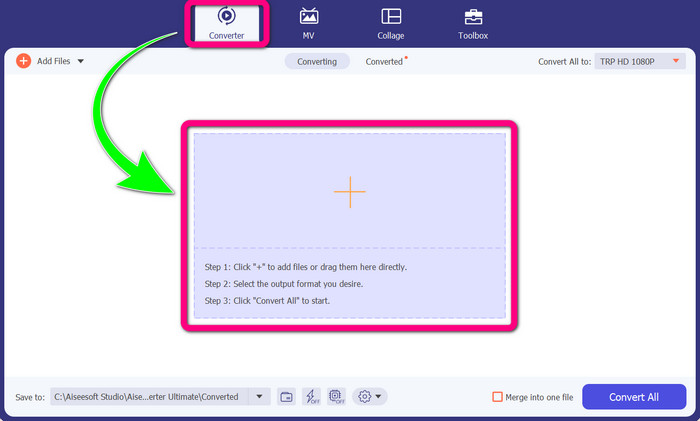
Trinn 2: Når du har åpnet Video Converter Ultimate på enheten din, velger du Converter-fanen. Klikk deretter på +-ikonet for å legge til DIVX‑videofilen din.
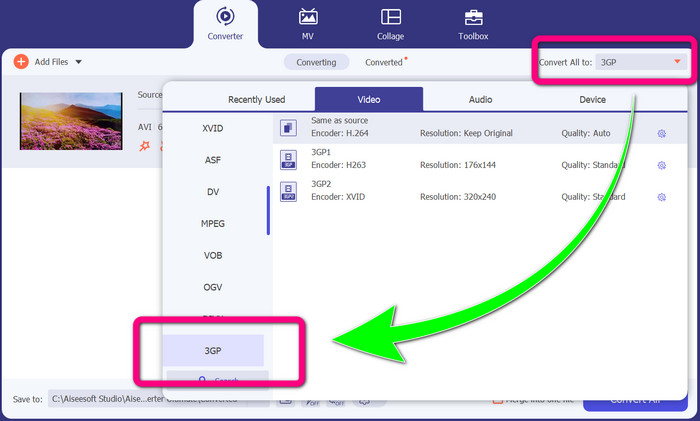
Trinn 3: Etter at du har lagt til videofilen, klikker du på alternativet Convert all to, finner filformatet 3GP og velger det.
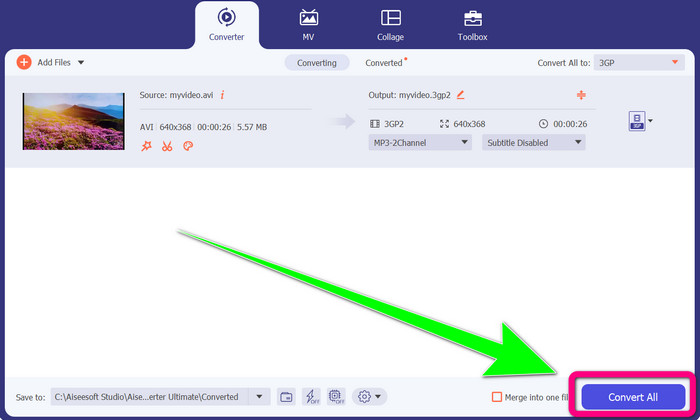
Trinn 4: Når du er ferdig med å velge filformatet 3GP, klikker du på Convert All-knappen. Vent til konverteringsprosessen er ferdig, og lagre den ferdige videoen på enheten din.
Del 2: Utmerkede online-omformere for å konvertere DIVX til 3GP
Bruke FVC Free Video Converter Online
Ett av de beste nettbaserte verktøyene for å konvertere DIVX til 3GP er FVC Free Video Converter Online. Dette verktøyet kan hjelpe deg med å konvertere ulike filformater med bare noen få klikk. Det støtter nesten alle vanlige video‑ og lydformater til MP4, MOV, MKV, FLV, VOB, MP3, AAC og flere. FVC Free Video Converter Online er enkelt og brukervennlig. Selv nybegynnere kan bruke dette programmet. I tillegg, enten du er Windows‑ eller Mac‑bruker, kan du stole på dette verktøyet fordi det er tilgjengelig på begge plattformene. Følg de enkle metodene nedenfor for å konvertere DIVX til 3GP.
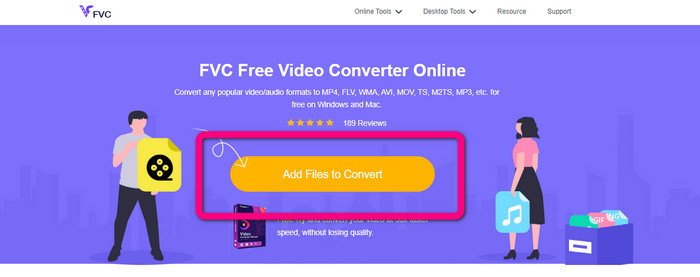
Trinn 1: Gå til FVC Free Video Converter Online. Klikk deretter på knappen Add Files to Convert for å importere DIVX‑filen du vil konvertere.
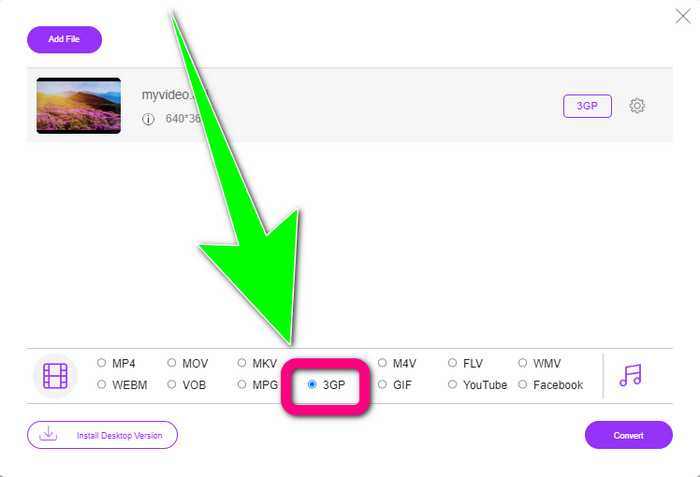
Trinn 2: Etter at du har lagt til DIVX‑filen, klikker du på filformatet 3GP blant formatvalgene nedenfor.
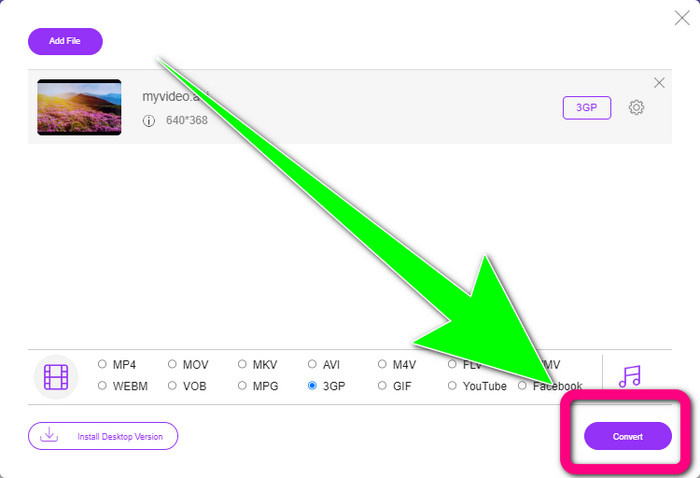
Trinn 3: Gå videre ved å klikke på Convert-knappen. Vent til konverteringsprosessen er ferdig, og lagre den konverterte videoen.
Bruker Convertio
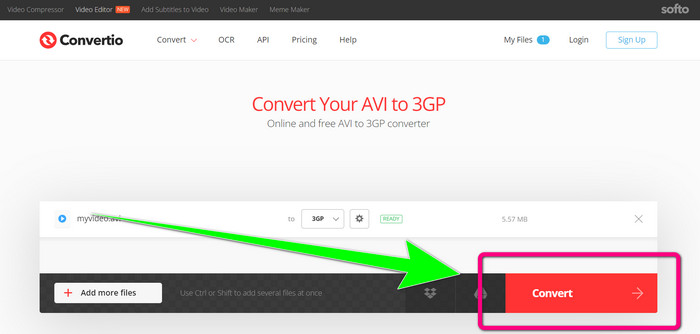
Hvis du vil konvertere DIVX til 3GP på nett, er Convertio et av verktøyene du kan bruke. Det støtter mange formater, som 3GP, DIVX, XVID, AVID, MP4, M4V, ASF, HEVC og flere. I tillegg til videokonvertering kan du også konvertere bilder, lyd, dokumenter, arkiver og andre filer. Convertio er også enkelt å bruke, fordi du kan konvertere i noen få trinn, slik at du slipper å streve med å konvertere DIVX‑filen din til en 3GP‑fil. Men som med andre nettbaserte verktøy kan du ikke bruke dette programmet uten internettilgang. Det hender også at dette nettverktøyet ikke yter optimalt. Gratisversjonen av Convertio har en begrensning: Du kan bare konvertere filer med en maksimal filstørrelse på 100 MB. Du må kjøpe programmet for å øke maksimal filstørrelse og få bedre ytelse. Følg trinnene nedenfor for å konvertere DIVX‑filen til 3GP‑filformat.
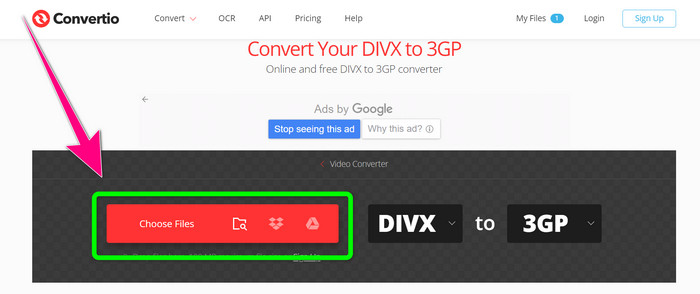
Trinn 1: Gå til Convertio-nettstedet. Klikk på knappen Choose Files og legg til videoen din med DIVX‑filformat.
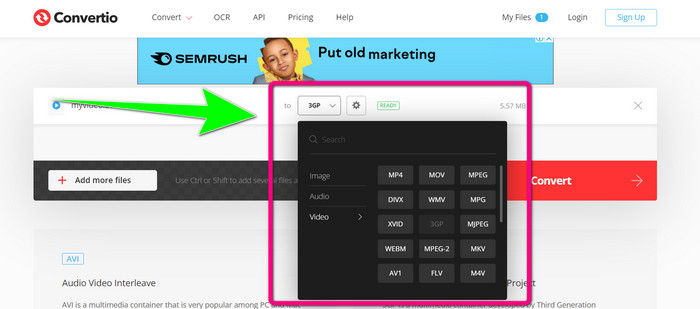
Trinn 2: Etter at du har lagt til videoen, går du til formatvalgene og velger filformatet 3GP.
Trinn 3: Når du har valgt filformatet 3GP, klikker du på Convert-knappen, venter på at konverteringsprosessen fullføres, og lagrer 3GP‑videofilen din.
Del 3: Oversikt over DIVX- og 3GP-filformater
DIVX
DIVX er en videokomprimeringsprogramvare som kan komprimere videofiler ned til en tolvdedel av den opprinnelige størrelsen med minimal kvalitetstap. Dette videoformatet er vanlig hos store filmselskaper som Disney, DreamWorks SKG, Universal og Paramount.
3GP
3GP er en multimediebeholder. Den ble utviklet i 1998 av Third Generation Partnership Project for GSM‑baserte (Global System for Mobile Communications) mobiltelefoner. 3GP‑beholderen krever lite lagringsplass, databruk og båndbredde, noe som gjør den velegnet for mobiltelefoner.
Videre lesning
Konverter enkelt MTV til MKV med disse komplette konverteringsverktøyene
Slik konverterer du TRP til MKV uten å miste kvalitet
Del 4: Vanlige spørsmål om konvertering av DIVX til 3GP
Hva er en DIVX-omformer?
Det er et utmerket verktøy som kan konvertere ulike filtyper til en rekke andre filformater. Disse inkluderer AVI, MP4, MPEG, MOV, FLV og flere. Når du er ferdig med å konvertere, kan du spille av videoen i hvilken som helst mediespiller som støtter det aktuelle formatet. FVC Free Video Converter Online er en av de beste konvertererne du kan bruke.
Er DIVX-filformatet det samme som AVI?
DIVX-filformatet er basert på AVI-beholderen, men det kan inneholde flotte funksjoner som kapitler og undertekster. I tillegg kan både AVI- og DIVX-filformater spilles av på DIVX-sertifiserte enheter.
Kan jeg konvertere DIVX-filen til 3GP uten å miste kvaliteten?
Ja, selvfølgelig kan du det. Med Video Converter Ultimate kan du konvertere DIVX‑filen til 3GP uten å bekymre deg for om kvaliteten endres. Denne utmerkede konverteren kan konvertere ulike filer uten at videokvaliteten blir dårligere.
Konklusjon
Som du ser, finnes det flere effektive metoder for å konvertere DIVX til 3GP med både offline‑ og nettbaserte verktøy. Men noen ganger kan nettbaserte løsninger være upraktiske, spesielt hvis du har dårlig internettforbindelse, så da kan du bruke et nedlastbart program. Hvis du leter etter et fremragende offline‑verktøy, kan du prøve Video Converter Ultimate.
-
 4 av de beste MKV til 3GP-konvertererne for Windows og Mac
 Hvis du ser etter MKV til 3GP-omformere som er enkle å bruke, er du heldig! Vi fant de beste og gratis MKV til 3GP-konvertererne du må prøve.
-
 5 beste ultimate MOV til 3GP-konverterere du ikke må gå glipp av
 Hvis du ser etter de beste online og offline MOV til 3GP-konvertererne, så er du på rett spor. Les denne artikkelen for å konvertere din MOV til en 3GP-fil.
-
 3 måter å konvertere MPG til 3GP på Windows og Mac [Gratis]
 Hvis du leter etter måter å konvertere MPG til 3GP på, les denne artikkelen for å vite de beste måtene å konvertere MPG til 3GP på Windows og Mac.
