


 Video Converter Ultimate
 Skjermopptaker
 Videoreparasjon
 Sikker nedlasting
Testede og utprøvde metoder for å konvertere MXF til MKV
Har du problemer med å spille av MXF-filen din i VLC Media Player og andre programmer? Det betyr bare at VLC knapt gjenkjenner filen din. Da må du konvertere MXF-filen til andre filformater. Du kan konvertere den til en MKV-fil, siden du kan spille denne i VLC Media Player og andre programmer. I så fall vil vi vise deg de beste og mest effektive måtene å konvertere MXF til MKV raskt på. Les denne artikkelen for å finne flere viktige detaljer du trenger.

Del 1: Mest fremragende måte å konvertere MXF til MKV
Hvis du er på utkikk etter en av de mest avanserte videokonvertererne, kan du prøve Video Converter Ultimate. Den hjelper deg med å konvertere MXF til MKV-filformat. I tillegg støtter den en rekke filformater, inkludert M4V, SWF, MTS, MP4, WMV, FLV, AVI, 3GP og over 100 til. Den beste opplevelsen du kan få med dette verktøyet, er at du kan konvertere MXF-filen din opptil 30 ganger raskere enn med andre konvertere. Dessuten kan du konvertere flere videofiler samtidig, siden den har en funksjon for batchkonvertering. Men det stopper ikke der. Hvis MXF-videoen din har en vannmerke, kan du fjerne det ved hjelp av funksjonene i Verktøykasse før du konverterer. Under Verktøykasse-fanen finner du funksjonen for fjerning av videovannmerke. Og hvis du i noen tilfeller ønsker å spille av videoen baklengs, er Video Converter Ultimate også løsningen! Dette verktøyet tilbyr også en funksjon for å reversere video, slik at du enkelt kan spille av videoene baklengs.
Funksjoner
◆ Konverter ulike videofilformater.
◆ Bra for å lage musikkvideoer.
◆ Perfekt for å lage en video eller fotokollasje.
◆ Kan konvertere bildeformater, som JPG, PNG, GIF, etc.
◆ Tilbyr Toolbox-alternativ for å forbedre en video.
◆ Kan komprimere videoer og lyd.
◆ Den kan bremse en video til 0,125x langsommere og øke hastigheten opp til 8x raskere enn normal hastighet.
Fordeler
- Den har en ultrahastighets konverteringsprosess, som er 30 ganger raskere enn andre applikasjoner.
- Kan konvertere flere filer med ett klikk.
- Gjør det mulig for brukere å tilpasse GIF-er fra bilder eller videoer.
- Passer for nybegynnere og har et enkelt grensesnitt.
- Kan konvertere 1000+ filformater, som MP4, AVI, FLV, WMV, WEBM, MOV og mer.
Ulemper
- Flere flotte funksjoner kan oppleves på den betalte versjonen.
Følg de enkle trinnene nedenfor for å konvertere MXF-filen til MKV-format.
Trinn 1: Klikk på Last ned-knappen nedenfor for å laste ned Video Converter Ultimate på Windows eller Mac. Gå gjennom installasjonsprosessen og start programmet.
Gratis nedlastingFor Windows 7 eller nyereSikker nedlasting
Gratis nedlastingFor MacOS 10.7 eller nyereSikker nedlasting
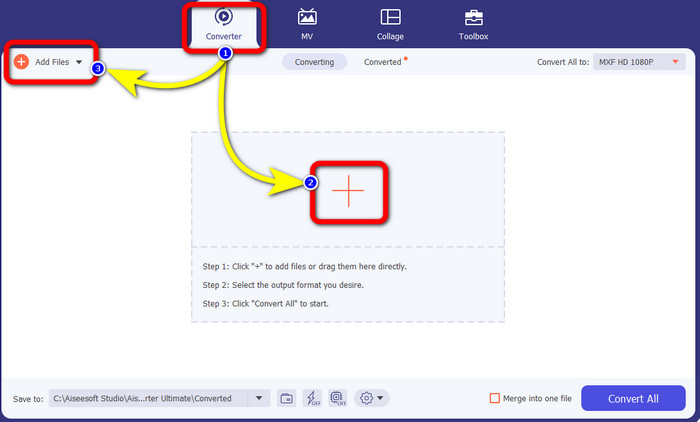
Trinn 2: Velg Converter-panelet når grensesnittet vises. Trykk på Pluss-ikonet for å legge til MXF-videoen du vil konvertere. Du kan også klikke på knappen Legg til filer for å legge til videoen din.
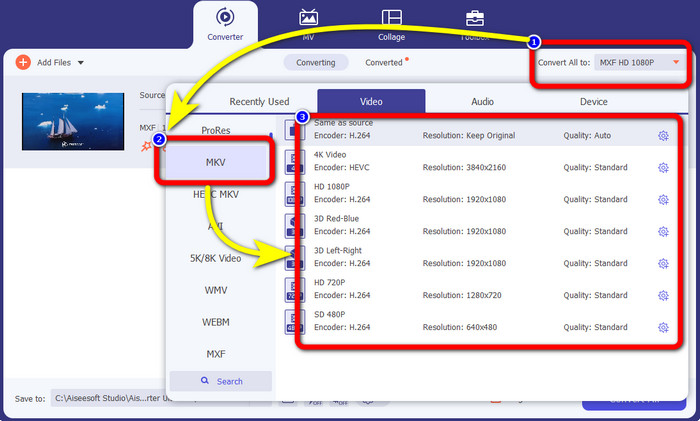
Trinn 3: Etter at du har lagt til filen, klikker du på alternativet Konverter alle til. Formatalternativene vil vises, og deretter velger du MKV-filformatet.
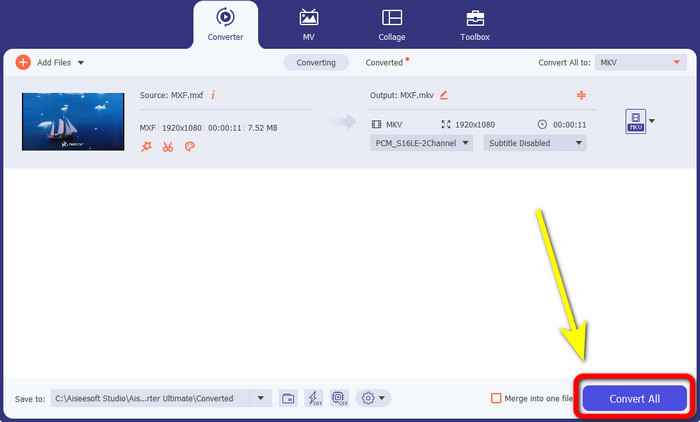
Trinn 4:Til slutt kan du klikke på knappen Konverter alle for å konvertere MXF-filen din til MKV-format.
Del 2: Online metoder for å konvertere MXF til MKV
Bruke FVC Free Video Converter Online
Når det gjelder å konvertere MXF til MKV-format på nettet, er FVC Free Video Converter Online noe for deg. Dette nettbaserte verktøyet kan konvertere flere filtyper, inkludert MP4, MOV, FLV, GIF, MPG, 3GP, MKV, VOB, WEBM osv. Du trenger ikke bekymre deg for hvordan du bruker det, siden det bare kreves tre enkle trinn for å konvertere filer, noe som er perfekt for alle brukere, spesielt nybegynnere. I tillegg støtter dette nettverktøyet videokvalitet opptil 1080p. Det er også tilgjengelig i mange nettlesere, som Google Chrome, Mozilla Firefox, Microsoft Edge og flere. Dessuten kan du ikke bare konvertere videoformater, men også lydformater som MP3, M4A, AAC, AC3, WMA, FLAC osv.
La oss konvertere MXF-filen din til MKV ved hjelp av FVC Free Video Converter Online.
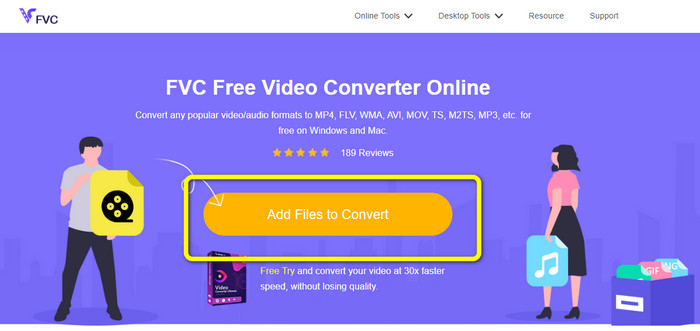
Trinn 1: Gå til nettsiden til FVC Free Video Converter Online. Klikk på knappen Add File to Convert i midten for å laste opp MXF-videoen din.
Trinn 2: En liten boks dukker opp på skjermen etter at du har lastet opp MXF-filen. Deretter vil du se formalternativene nederst. Velg ønsket format, som er MKV-filformatet.
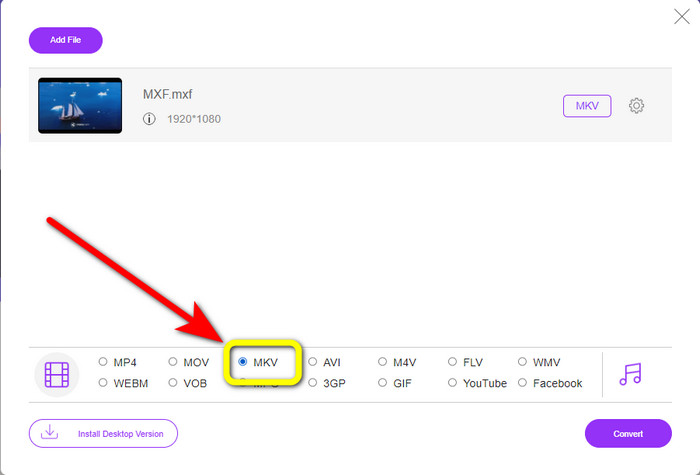
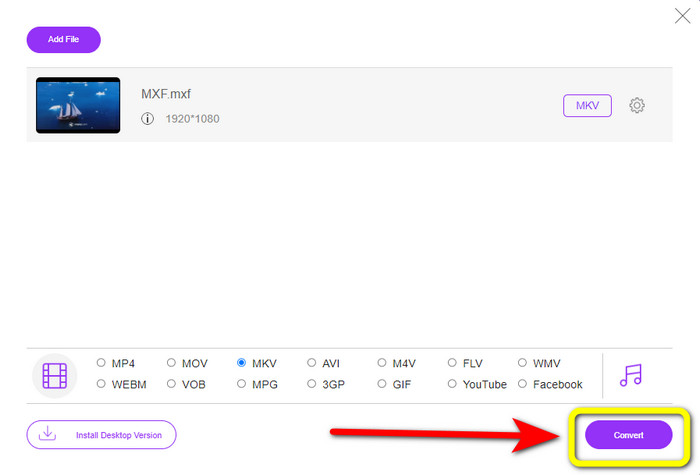
Trinn 3: Til slutt trykker du på knappen Convert for å konvertere MXF-filen til MKV. Vent på konverteringsprosessen og lagre videoen. Du kan også bruke dette verktøyet til å konvertere MXF til WMV.
Bruker Convertio
Convertio er et annet nettverktøy du kan bruke til å konvertere MXF til MKV-filformat. Denne nettbaserte programvaren kan konvertere videofilen din til 37 formater, inkludert MP4, MOV, WEBM, AVI, MTS, MPEG, XVID, DIVX og mer. Du kan også konvertere bilde- og lydformater som GIF, MP3, AAC, FLAC, M4R osv. I tillegg til konvertering lar Convertio deg komprimere video, legge til undertekster i en video, lage meme og redigere videoer. Men selv om det har mange gode verktøy og funksjoner, har denne nettprogramvaren begrensninger i gratisversjonen. Du kan dessverre bare konvertere filer med en maksimal filstørrelse på 100 MB. Det betyr at du må kjøpe et abonnement for å konvertere ubegrensede filer og få tilgang til flere funksjoner i dette verktøyet. Følg de enkle trinnene nedenfor for å konvertere MXF-filen til MKV-format.
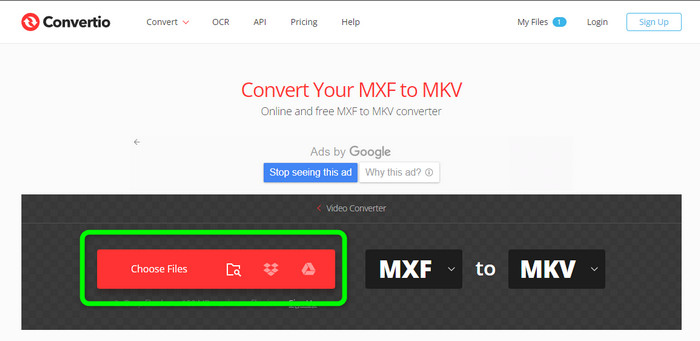
Trinn 1: Gå til nettsiden til Convertio. Klikk på knappen Choose Files for å legge til MXF-filen din.
Trinn 2: Når filen er lastet opp, klikker du på formalternativene og velger MKV-filformatet.
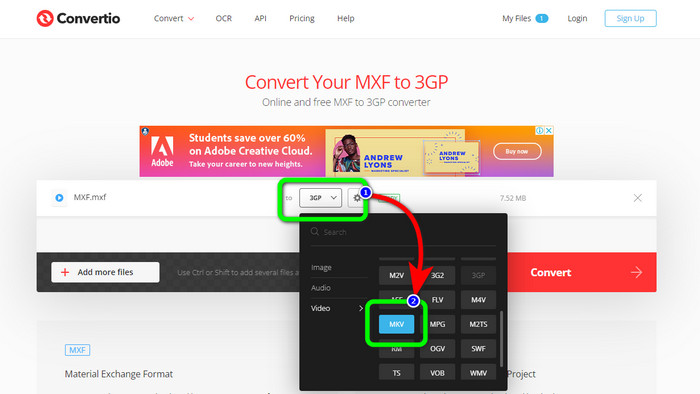
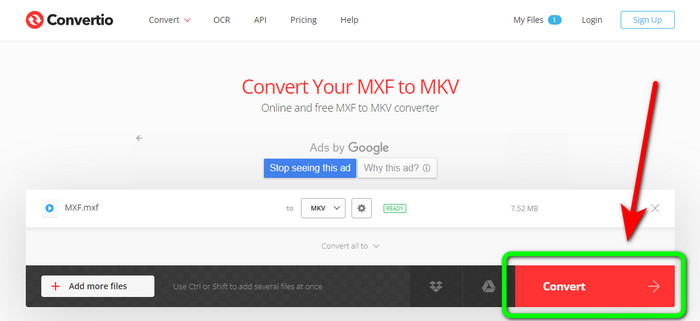
Trinn 3: Etter at du har valgt ønsket filformat, MKV-filen, kan du klikke på knappen Convert. Vent på konverteringsprosessen og lagre filen på enheten din.
Bruker Cloudconvert
Hvis du fortsatt leter etter en annen nettbasert konverter for å konvertere MXF til MKV, bør du besøke Cloudconvert. Dette nettverktøyet er bra for å konvertere ulike filer, som MKV, FLV, AVI, WEBM, WMV osv. I tillegg kan du konvertere mange filer uten å miste videokvaliteten. Du kan imidlertid bare konvertere 25 filer per dag med gratisversjonen av denne programvaren. I dette tilfellet må du kjøpe et abonnement hvis du vil konvertere flere filer. Det hender også at konverteringsprosessen går tregt, avhengig av hastigheten på internettforbindelsen din. Men Cloudconvert har bare åtte støttede utdataformater, noe som ikke er ideelt for brukere. Hvis du er klar til å konvertere videoen din fra MXF-fil til MKV-format, følger du trinnene nedenfor.
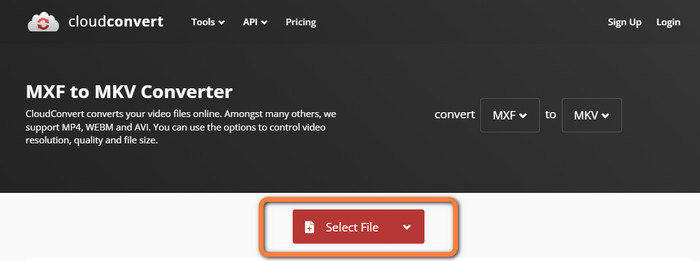
Trinn 1: Gå til nettsiden til Cloudconvert. Klikk på knappen Select File for å sette inn MXF-filen du vil konvertere til MKV.
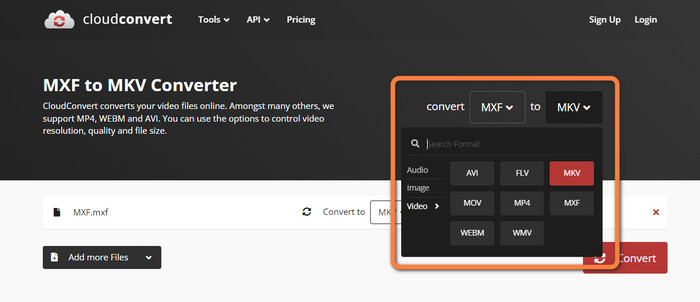
Trinn 2: Etter at du har satt inn MXF-filen, går du til formalternativene og velger MKV-filformatet.
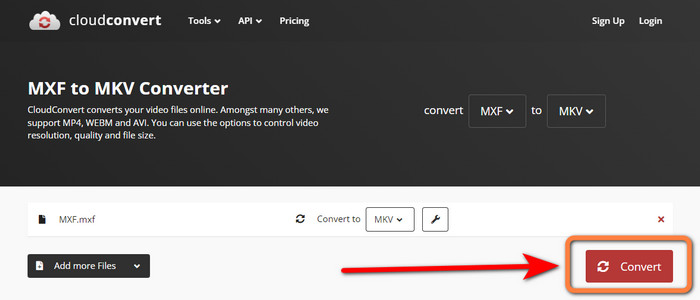
Trinn 3: Det siste trinnet er å trykke på knappen Convert. Vent deretter på konverteringsprosessen og lagre den ferdige videoen. Dette verktøyet hjelper deg også med å konvertere TRP til MKV.
Del 3: Sammenlign MXF vs. MKV
| MXF | MKV | |
| Filutvidelse | .mxf | mkv |
| Beskrivelse | Et multimediebeholderformat kalt MXF inneholder video, lyd og metadata for å øke hastigheten på utvekslingen av videoer mellom forskjellige datamaskiner. MXF-filer brukes ofte til filmer og TV-reklamer som vises på kino. | Matroska multimediebeholderformat, eller MKV, kombinerer andre typer video-, lyd- og undertekstspor (som USF eller SRT) til en enkelt fil. Online distribusjon av kortfilmer og lydprøver bruker ofte MKV-filer. |
| Utvikler | Society of Motion Picture and Television Engineers | CoreCodec, INC. |
| MIME-type | søknad/mxf | video/x-matroska |
| Videokodeker | MPEG-4 AVC/H.264, MPEG-1, MPEG-2, MPEG-4 Visual, etc. | MPEG-1, Theora, Real Video, Microsoft MPEG4 V2, VP8, MVC, etc. |
| Tilknyttede programmer | File Viewer Plus Adobe Premiere Pro Windows Media Player | VLC Media Player DIVX Player MX Player GOM Player KMPlayer PotPlayer |
Del 4: Vanlige spørsmål om konvertering av MXF til MKV
1. Er MKV en container eller en kodek?
Multimediebeholderformatet for video brukt av Matroska er kjent som en MKV-fil. Extensible Binary Meta Language er grunnlaget for MKV, som støtter flere video- og lydkomprimeringsformater. MKV er en beholder, ikke en kodek, som er hovedforskjellen mellom den og andre videoformater.
2. Er MKV bedre enn MP4?
De er begge praktfulle. For å spille av video i en nettleser er MP4 mer støttet og har lavere filoverhead. MKV-beholderen er mye brukt for å konvertere Blu-Ray-plater og DVD-er til videofiler.
3. Er MXF en videofil?
Definitivt ja. MXF er et filformat for lyd og video. MXF-filer består av informasjon om mediene inne. Informasjonen er også kjent som metadata, inkludert bildestørrelse, bildefrekvens, opprettelsesdato osv.
Konklusjon
Denne artikkelen gir de beste, testede og pålitelige metodene for å konvertere MXF til MKV ved hjelp av skrivebordsverktøy og nettbaserte applikasjoner. Hvis du vil konvertere ubegrenset med filer enkelt og umiddelbart, kan du gå til FVC Free Video Converter Online.
-
 Hvordan konvertere MKV til DivX online og offline gratis
 Leter du etter de beste måtene å konvertere MKV til DivX-format gratis. Fortsett å lese for å vite de beste MKV til DivX online og offline omformere
-
 Beste prosedyrer for hvordan du konverterer AMV til MKV gratis
 Vil du enkelt konvertere AMV til MKV gratis? Vi vil gi deg nok informasjon og den beste applikasjonen med en omformer du kan bruke. La oss fortsette!
-
 Konverter enkelt MTV til MKV ved å bruke disse ultimate omformerne
 Vil du vite den utmerkede metoden for å konvertere MTV til MKV? Dette innlegget gir tre ukompliserte måter å konvertere filer online og på Windows/Mac
