


 Video Converter Ultimate
 Skjermopptaker
 Videoreparasjon
 Sikker nedlasting
Beste teknikker for å fjerne Alamy-vannmerker fra bilder online og offline
Alamy er et nettsted som selger arkivbilder, filmer og annet visuelt innhold. Bildene deres blir tatt av frilansere og byråer, eller satt sammen fra nasjonale arkiver, museer og materiale i det offentlige rom som er hentet fra Wikimedia Commons. Noen bilder har imidlertid et Alamy‑vannmerke i seg, noe som virker forstyrrende for seerne. I så fall viser vi deg den beste måten å fjerne Alamy‑vannmerker på, både på nett og uten nettilgang. Les artikkelen for flere detaljer.

Del 1: Slik fjerner du Alamy vannmerke fra bilder på nettet
Bruker FVC Free Watermark Remover
Hvis du vil bli kvitt Alamy‑vannmerkene på bildene dine, kan du bruke FVC Free Watermark Remover. Dette er det ultimate nettbaserte verktøyet du kan bruke. Alamy‑vannmerker er virkelig forstyrrende, og de er spredt over alle deler av bildet. Men i dette nettverktøyet er det enkelt å fjerne Alamy‑vannmerket. Selv barneskoleelever kan bruke dette programmet fordi det har detaljerte veiledninger du kan følge. I tillegg tilbyr FVC Free Watermark Remover to metoder for å fjerne Alamy‑vannmerkene. Den første metoden er å bruke verktøyene for vannmerkefjerning. Disse verktøyene er Polygonal, Brush og Lasso. Med disse verktøyene kan du slette uønskede objekter fra bildene dine. Den andre metoden er å bruke beskjæringsverktøyet. Hvis Alamy‑vannmerket er i hjørnet eller langs kanten av bildet ditt, kan du enkelt kutte det bort. Dette nettverktøyet støtter også vanlige bildeformater, som PNG, JPG og BMP, slik at du kan importere bildet ditt i dette verktøyet. La oss fjerne disse vannmerkene ved å bruke denne Alamy‑vannmerkefjerneren. Følg de enkle trinnene nedenfor.
Ved å bruke verktøyene for vannmerkefjerning
Trinn 1: Første trinn er å gå til nettstedet til FVC Free Watermark Remover. Klikk på knappen Upload Image. Mappen din vil dukke opp, og du velger bildet med et Alamy‑vannmerke som du vil fjerne.

Trinn 2: I den gule boksen kan du bruke ulike verktøy for å markere Alamy‑vannmerkene i bildet ditt. Du kan bruke Lasso, Polygonal og Brush‑verktøyene. Du kan klikke på + og ‑‑ikonet i den røde boksen for å zoome inn og ut av bildet.
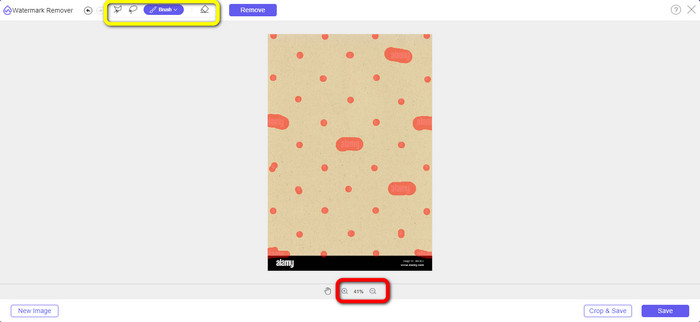
Trinn 3: Etter at du har markert alle Alamy‑vannmerkene i bildet ditt, klikker du på knappen Remove. Vent på at fjerningsprosessen blir ferdig.
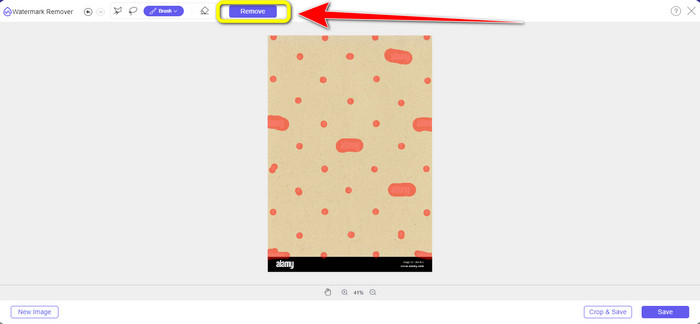
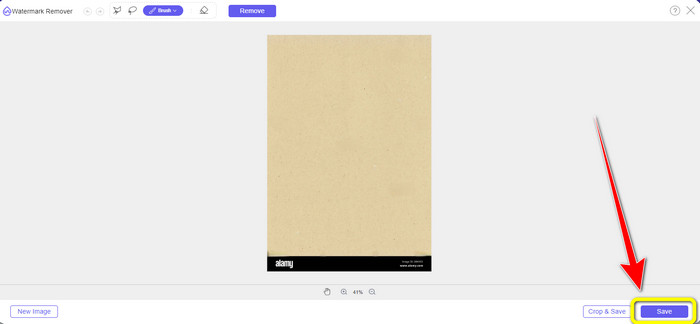
Trinn 4: Når alle Alamy‑vannmerkene er borte, klikker du på knappen Save for å lagre og laste ned bildet ditt uten Alamy‑vannmerker.
Ved å bruke beskjæringsverktøyet
I denne delen vil vi fjerne Alamy-vannmerket fra bildet ved hjelp av beskjæring. Følg de enkle trinnene nedenfor.
Trinn 1: Sett inn bildet med et Alamy‑vannmerke ved å klikke på knappen Upload Image.

Trinn 2: Etter at du har lagt til bildet, trykker du på knappen Crop nederst til høyre i grensesnittet.
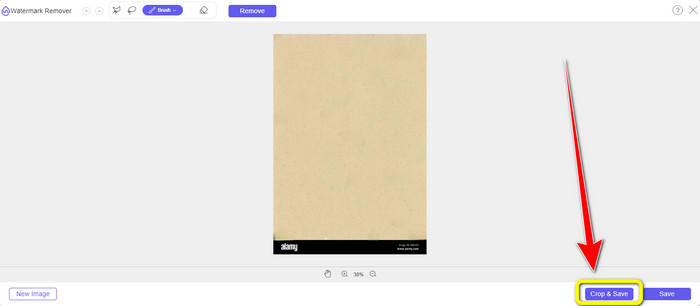
Trinn 3: Etter å ha klikket på Crop‑knappen kan du flytte musen for å kutte bort kantdelen av bildet, spesielt området der Alamy‑vannmerket er. I den røde boksen ser du mange alternativer for hvilken størrelse du vil ha på bildet ditt, så du kan også velge ett av dem.
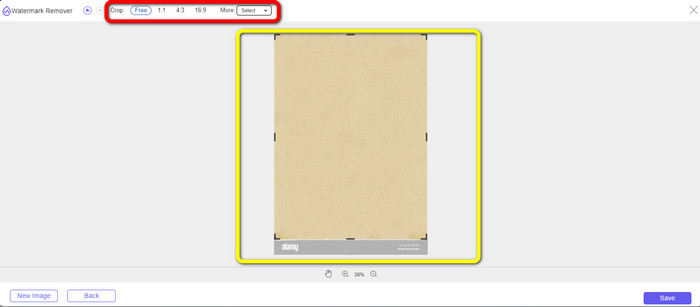
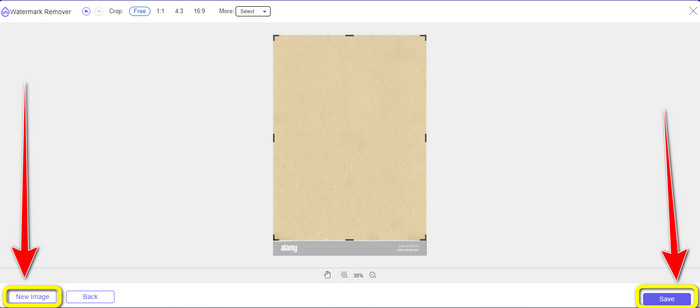
Trinn 4: Når du er ferdig med å beskjære bildet, kan du klikke på knappen Save nederst til høyre i grensesnittet og lagre det. Hvis du også vil beskjære et annet bilde, klikker du på knappen New Image nederst til venstre i grensesnittet.
Bruk av Apowersoft Online Watermark Remover
Apowersoft Online Watermark Remover kan også fjerne Alamy‑vannmerket fra bildet ditt. Dette verktøyet kan fjerne alle irriterende objekter fra bildene dine, som vannmerker, logoer, tekst osv. I tillegg støtter det mange filformater, inkludert JPG, TIFF, PNG, BMP osv. På den måten kan du være sikker på at du kan laste opp nesten alle bilder til dette verktøyet. Dessuten kan Apowersoft Online Watermark Remover også fjerne vannmerker fra en video, noe som gjør det mer praktisk for alle brukere. Det er enkelt å bruke dette programmet. Du kan fjerne Alamy‑vannmerkene på bare noen få trinn. Filene dine er trygge her fordi filen blir slettet etter at du har fjernet vannmerkene fra bildene dine. Dette programmet garanterer sikkerheten til filen din. Men når du bruker dette nettverktøyet, kan du støte på noen utfordringer. Noen ganger leser eller gjenkjenner ikke programmet bildet du laster opp. I tillegg er selve prosessen med å fjerne vannmerker fra et bilde tidkrevende. Og du må ha en rask internettforbindelse. Hvis du ikke har det, vil dette verktøyet ikke fungere like bra.
For å fjerne Alamy-vannmerkene fra bildet ditt, følg de enkle veiledningene nedenfor.
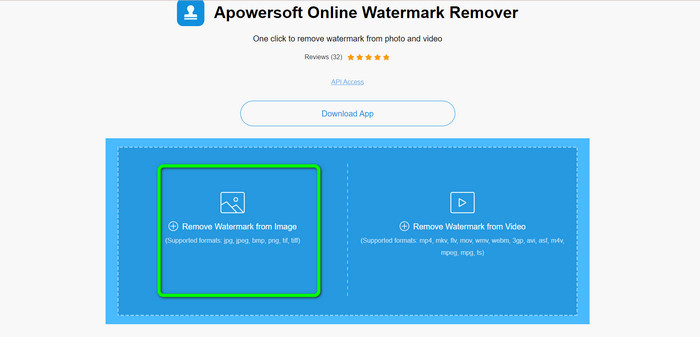
Trinn 1: Gå til nettstedet til Apowersoft Online Watermark Remover. Klikk på symbolet Gallery for å legge til bildefilen din med et Alamy‑vannmerke.
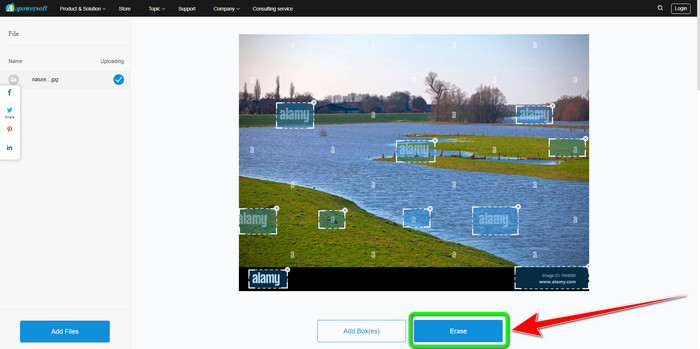
Trinn 2: Etter at du har lagt til bildet, klikker du på knappen Add Boxes. Du kan legge til så mange bokser du vil. Bruk deretter disse boksene til å dekke alle Alamy‑vannmerkene.
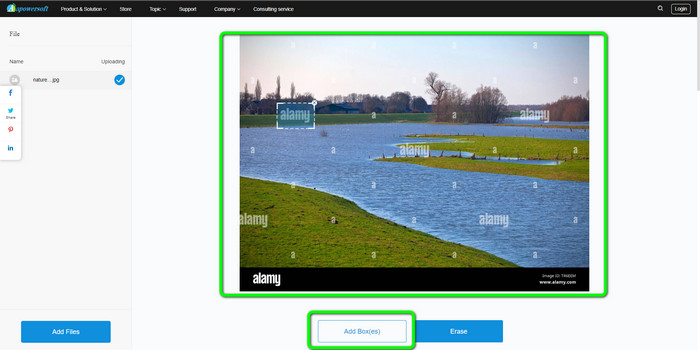
Trinn 3: Du kan klikke på knappen Erase når du har dekket alle Alamy‑vannmerkene i bildet ditt. Vent på fjerningsprosessen, og deretter kan du laste ned bildet til datamaskinen din.
Del 2: Slik fjerner du Alamy-vannmerker ved hjelp av Photoshop
Adobe Photoshop er et av verktøyene du kan bruke til å fjerne Alamy‑vannmerker fra bildene dine uten nettilgang. Det tilbyr rask fjerningsprosess og et jevnt sluttresultat. Med hjelp av dette redigeringsprogrammet kan du slette alle uønskede elementer fra objektene dine, inkludert Alamy‑vannmerker. Adobe Photoshop kan også gjøre mer enn bare å fjerne vannmerker. Du kan bruke det til å retusjere bildet ditt, for eksempel ved å fjerne mørke flekker, kviser og mer. Du kan også bruke det til å forbedre bilder generelt. Men å bruke Photoshop er ikke egnet for nybegynnere. Det er et avansert redigeringsprogram som passer best for erfarne brukere. Hvis du ikke er profesjonell bruker og ønsker å bruke dette programmet til å fjerne Alamy‑vannmerker, må du se etter veiledninger eller be om hjelp fra profesjonelle. I tillegg er Adobe Photoshop dyrt. Du må kjøpe programmet for å kunne bruke det over tid. Det tilbyr bare en gratis prøveperiode på sju dager.
Bruk følgende trinn nedenfor for å fjerne Alamy-vannmerkene fra bildet ditt.
Trinn 1: Last ned Adobe Photoshop og gå gjennom installasjonsprosessen. Start deretter programmet på datamaskinen din.
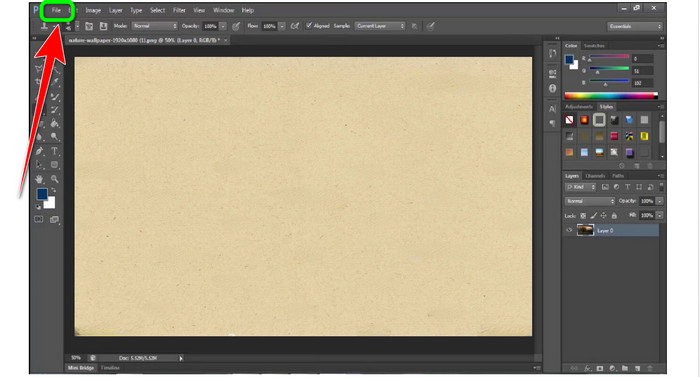
Trinn 2: For å legge til bildet med et Alamy‑vannmerke går du til menyen File, og klikker deretter på Open.
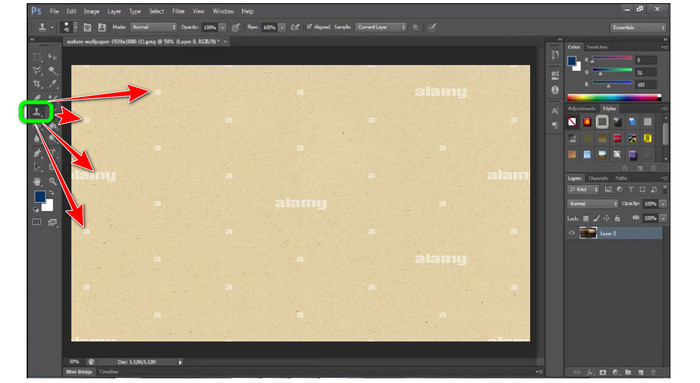
Trinn 3: Etter at du har lagt til filen din, velger du Clone Stamp Tool. Mens du holder inne Alt‑tasten, klikker du med musen på hvert vannmerke i bildene dine. Du vil se at vannmerkene forsvinner litt etter litt.
Trinn 4: Når alle Alamy‑vannmerkene er borte, går du til menyen File og klikker deretter på knappen Save as for å lagre det endelige bildet ditt uten Alamy‑vannmerke.
Del 3: Vanlige spørsmål om fjerning av Alamy-vannmerker
Hvorfor er det et vannmerke fra bildet du lagret på Alamy?
Det er fordi nettsiden ønsker å beskytte dem, og fordi de ikke er patentfrie, har det opplastede visuelle materialet et vannmerke. Så hvis du vil ha et bilde uten vannmerke fra Alamy, må du kjøpe det.
Er det trygt å vise kortnummeret mitt for å kjøpe et bilde fra Alamy?
Ja, det er det. Nettstedet vil ikke lekke informasjonen din, så du trenger ikke å bekymre deg for informasjonen på kortet ditt.
Er det greit å refundere betalingen fra Alamy?
Dessverre ikke. Alamy tillater ikke refusjon. Så du må tenke deg om to ganger om du vil bruke pengene dine eller ikke.
Konklusjon
Nå vet du den beste måten å fjerne Alamy‑vannmerker fra bilder på nettet og ved hjelp av Photoshop. Men vi vet at Photoshop er vanskelig å bruke. I så fall kan du bruke FVC Free Watermark Remover. Det har et brukervennlig grensesnitt, noe som er bra for nybegynnere.
-
 Komplette guider for enkelt å fjerne iFunny vannmerker
 Oppdag den mest eksepsjonelle iFunny vannmerkefjerneren for deg. Lær også disse enkle metodene for å fjerne iFunny vannmerker fra bildene dine.
-
 Slik fjerner du vannmerke i Lightroom Mobile [Løst]
 Vil du lære hvordan du fjerner vannmerker fra bilder i Lightroom? Her er de enkleste metodene du kan prøve ved å bruke mobiltelefoner og datamaskiner.
-
 Ærlig anmeldelse av Inpaint Watermark Remover og Alternative
 Vil du vite hvordan du bruker Inpaint for å fjerne et vannmerke? Å lese denne artikkelen er det riktige valget. Du vil også lære de beste alternativene du kan bruke.
