


 Video Converter Ultimate
 Skjermopptaker
 Videoreparasjon
 Sikker nedlasting
Enkleste prosedyrer ved å bruke Pixlr for å fjerne vannmerker
Hvis du er her for å lære hvordan du kan bruke Pixlr til å fjerne vannmerker fra bildene dine, er du i riktig artikkel. Personlig synes jeg det er irriterende å få et bilde med vannmerke på, så det er bedre å fjerne dem. Fra begynnelsen til slutten av dette innlegget vil du lære mange ting – ikke bare hvordan du bruker Pixlr‑applikasjonen, men også hvordan du bruker utmerkede alternativer for å fjerne vannmerker fra bildene dine. Så hvis du er her for å få løst problemet ditt, kan du fortsette å lese denne artikkelen og lære noen fremgangsmåter for å fjerne plagsomme vannmerker fra bildene dine.

Del 1: Fjern vannmerker fra bilder ved hjelp av Pixlr
Pixlr er et redigeringsverktøy du kan bruke for å forbedre bildene dine. Det tilbyr også ulike maler som gjør bildet ditt vakkert og unikt. Utenom disse funksjonene – visste du at Pixlr kan fjerne vannmerker fra bildene dine? Ja! Du hørte riktig! Pixlr kan umiddelbart fjerne alle forstyrrende objekter du ikke vil ha på bildet ditt, inkludert vannmerker, klistremerker, emojis, tekst og mer. I tillegg er dette nettbaserte programmet gratis, så du trenger ikke å tenke på betalinger eller abonnementer. Likevel er det ikke så enkelt å bruke Pixlr. Det har mange valg og kompliserte prosedyrer du kan støte på, noe som gjør det lite egnet for uerfarne brukere. For å bruke denne applikasjonen må du se veiledninger eller få hjelp fra avanserte brukere. Dessuten er det nettbasert programvare, så det er nødvendig å ha en rask internettforbindelse; ellers vil det ikke fungere godt. Følg den enkle veiledningen nedenfor for å fjerne vannmerker med Pixlr.
Trinn 1: For å bruke Pixlr må du først gå til nettsiden til Pixlr. Klikk deretter på knappen Open Image for å laste opp et bilde med vannmerke som du vil fjerne. Du kan også sette inn bildet via en URL.

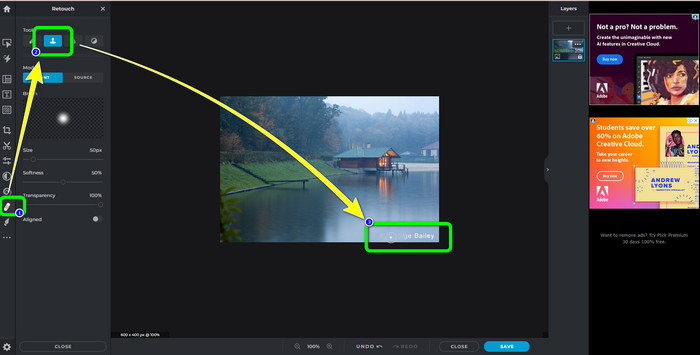
Trinn 2: Etter at du har lastet opp ønsket bilde, velger du knappen Retouch på venstre side av grensesnittet. Deretter vises verktøyene. Velg Clone Stamp‑verktøyet. Etter at du har valgt det, kan du allerede klikke på området med vannmerket med musen for å viske bort vannmerkene.
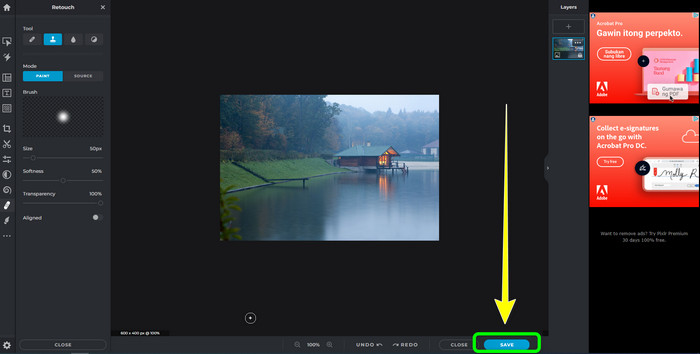
Trinn 3: Når du har fjernet alle vannmerkene du vil bli kvitt, klikker du på knappen Save. Deretter lagrer du det på ønsket plassering.
Del 2: Utmerkede Pixlr-alternativer for å slette vannmerker fra bilder
FVC Free Watermark Remover
Som du ser, er det vanskelig å bruke Pixlr, spesielt for nybegynnere. Hvis du vil ha en enklere vannmerkefjerner, er det beste alternativet vi kan tilby FVC Free Watermark Remover. Dette nettbaserte programmet har enkle metoder og et enkelt grensesnitt, noe som er perfekt for nybegynnere. Denne applikasjonen kan enkelt slette alle uønskede objekter fra bildene dine, som vannmerker, logoer, datostempler osv. Det er også 100% gratis, og du kan fjerne flere vannmerker fra bildene dine.
Men vent, det er mer. FVC Free Watermark Remover tilbyr deg to måter å fjerne vannmerker på. Den første måten er å bruke verktøyene for fjerning av vannmerker. Disse verktøyene er Brush, Lasso og Polygonal. Du kan bruke disse verktøyene til å fremheve og fjerne vannmerker fra bildet ditt. Den andre måten er å bruke beskjæringsverktøyet. Hvis vannmerkeområdet er på kanten av bildet ditt, trenger du bare å beskjære dem med musen. Hvis du vil ha et eksempel på fjerning av vannmerker ved hjelp av disse to metodene, følg trinnene nedenfor.
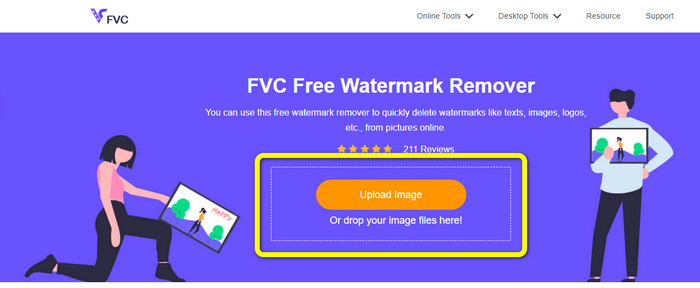
Trinn 1: Åpne nettleseren din og gå til nettsiden til FVC Free Watermark Remover. Deretter velger du knappen Upload Image og laster opp ønsket bilde med vannmerke.
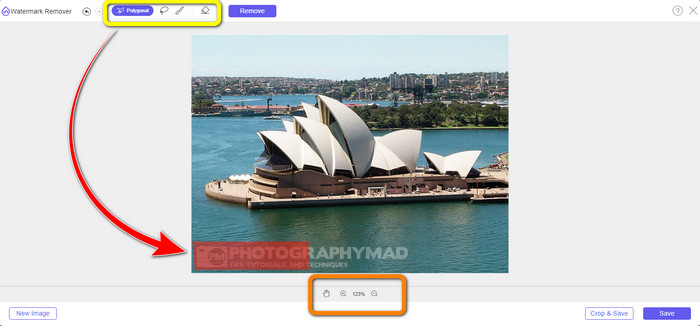
Trinn 2: Etter det kan du bruke verktøyene for å fjerne vannmerker, som Polygonal, Lasso og Brush. Du kan også bruke Eraser‑verktøyet for å slette overflødige markeringer. Du kan også bruke forstørrelsesverktøyet under bildet ditt for å zoome inn og ut for å se små vannmerker.
Trinn 3: I denne delen, når du er ferdig med å markere alle vannmerkene på bildet ditt, kan du allerede fjerne dem ved å klikke på knappen Remove. Vent deretter på at fjerningsprosessen blir fullført.
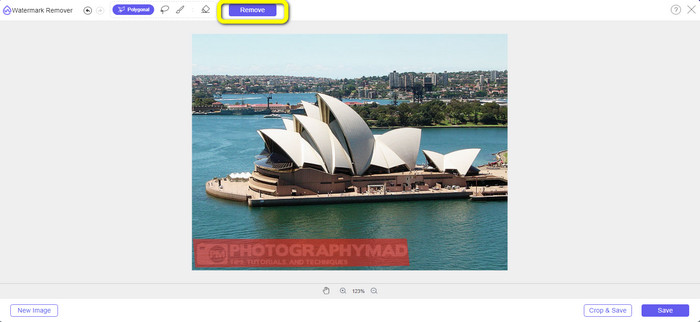
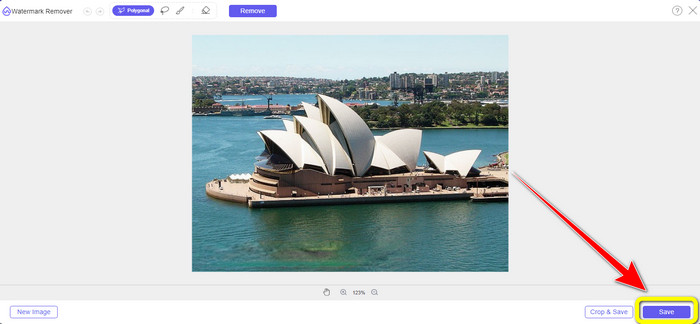
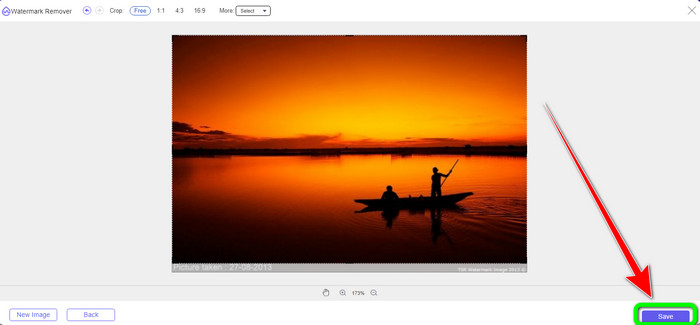
Trinn 4: Nå kan vi gå videre til siste trinn. Etter at du har fjernet alle vannmerker fra bildet ditt, klikker du på knappen Save for å laste ned det endelige resultatet.
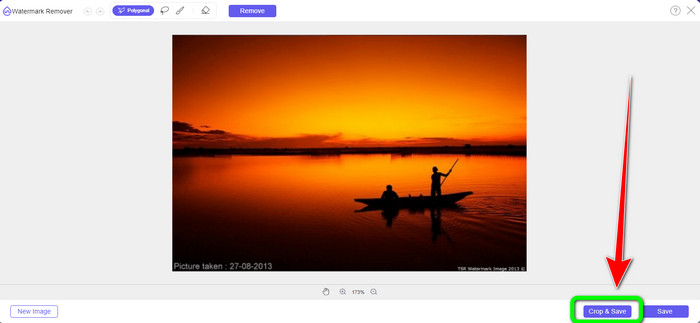
Trinn 5: En annen måte å fjerne vannmerket på er å bruke beskjæringsverktøyet. Velg knappen Crop & Save etter at du har satt inn bildefilen.
Trinn 6: I dette trinnet kan du beskjære bildet ditt for å fjerne vannmerker ved å flytte musen mens du klikker på kanten av bildet. Som du kan se i den gule boksen, finner du mange alternativer for hvordan du vil beskjære bildet ditt. I den røde boksen kan du skalere bildet opp eller ned.
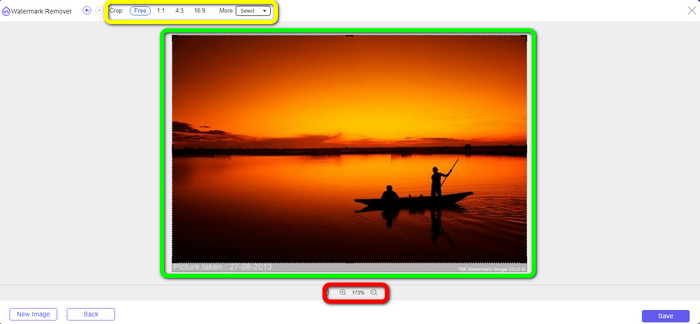
Trinn 7: For siste trinn, når du er ferdig med å beskjære bildet, klikker du på knappen Save for å lagre filen. Deretter kan du åpne den for å se bildet uten vannmerke.
Watermark Remover.io
En annen enklere måte å fjerne et vannmerke fra et bilde på er å bruke Watermark Remover.io. Denne nettbaserte applikasjonen er mye enklere enn Pixlr. Den har et oversiktlig grensesnitt og grunnleggende trinn, slik at selv en ny bruker enkelt kan betjene den. Den kan også fjerne flere vannmerker samtidig. Det beste her er at den støtter flere farger, noe som betyr at selv om vannmerkene har ulike farger, kan den fortsatt fjerne dem umiddelbart.
Men dessverre har Watermark Remover.io begrensede funksjoner. På én måned er det maksimale bildet du kan laste opp kun 50 bilder. Dessuten kan den bare tilby 25 GB lagringsplass, noe som ikke er nok. Hvis du vil at denne applikasjonen skal fungere godt, må du ha en rask internettforbindelse.
Følg trinnene nedenfor for å slette vannmerker fra bildet ditt.
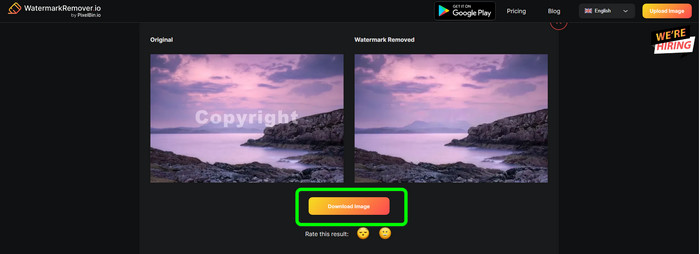
Trinn 1: Gå til nettsiden til Watermark Remover.io i nettleseren din. Klikk deretter på knappen Upload Image. Den vil automatisk fjerne vannmerkene fra bildet ditt, så vent på at prosessen blir ferdig.

Trinn 2: Hvis vannmerkene på bildet ditt allerede er borte, klikker du på knappen Download Image for å lagre det på datamaskinen. Du kan bruke dette verktøyet til å fjerne Alamy‑vannmerker fra bilder.
Del 3: Vanlige spørsmål om fjerning av vannmerker ved hjelp av Pixlr
1. Hva er den beste gratis vannmerkefjerneren?
Den beste vannmerkefjerneren du kan bruke gratis, er FVC Free Watermark Remover. Denne applikasjonen kan fjerne alle irriterende objekter fra bildet ditt uten at du betaler en krone.
2. Hvordan legger jeg til et vannmerke i Pixlr?
Du må logge inn på din Pixlr-konto. Gå deretter til "Pixlr Editor" og start den. Deretter klikker du på "Opprett nytt bilde." Da kan du allerede lage et vannmerke på bildet ditt og angi høyden og bredden på bildet.
3. Er Pixlr et juridisk verktøy?
Definitivt ja! Pixlr er en legitim applikasjon. Alle funksjonene er tillatt og autorisert til bruk. Så du kan bruke denne nettapplikasjonen uten å bekymre deg.
Konklusjon
Det er virkelig tilfredsstillende å se et bilde uten vannmerker, ikke sant? Dette er den beste grunnen til at denne artikkelen viser deg hvordan du kan bruke Pixlr til å fjerne et vannmerke. Vi har også introdusert deg for andre nettbaserte verktøy du kan bruke som har enklere metoder. Men hvis du ønsker nyttig og praktisk programvare, kan du bruke FVC Free Watermark Remover.
-
 3 beste måter å fjerne vannmerker fra PNG-bilder
 Oppdag disse tre beste metodene for å fjerne vannmerker fra PNG på nettet. Les dette innlegget og gjør bildene dine pene og mer behagelige for øynene til seerne.
-
 Enkle måter å fjerne vannmerke fra JPG Online
 La oss oppdage den beste taktikken for hvordan du fjerner vannmerker fra JPG på nettet ved hjelp av effektive applikasjoner. Følg denne artikkelen for å lære prosedyrene.
-
 Komplette guider for enkelt å fjerne iFunny vannmerker
 Oppdag den mest eksepsjonelle iFunny vannmerkefjerneren for deg. Lær også disse enkle metodene for å fjerne iFunny vannmerker fra bildene dine
