


 Video Converter Ultimate
 Skjermopptaker
 Videoreparasjon
 Sikker nedlasting
Raskeste prosedyrer for å konvertere VOB til M4V på Windows og Mac
DVD-er bruker vanligvis filformatet VOB eller Video Object. Denne filen ligger ofte i VIDEO_TS-mappen på rot-nivået på DVD-en. På internett finnes det imidlertid nå et betydelig antall mediefiler. I tillegg er DVD-er mindre vanlige i dag og støttes ikke bredt av enheter og programmer. Hvis det er tilfelle for deg, trenger du et format som støttes av en rekke enheter og programmer, som for eksempel M4V-filformatet. Du vil være fornøyd, for her får du lære de mest nyttige metodene for å konvertere VOB til M4V ved hjelp av både nettbasert og nedlastbar programvare.

Del 1: Forskjeller mellom VOB og M4V
| VOB | M4V | |
| Fullt navn | Videoobjekt | MPEG-4-video |
| Filutvidelse | .vob | .m4v |
| Beskrivelse | Video, lyd, undertekster, DVD-menyer og annet innhold er alle inneholdt i en enkelt fil ved bruk av containerformatet VOB. VOB-formatet, basert på MPEG-2-systemstrømmer og kan spilles av på mange medieenheter, lagres vanligvis i VIDEO TS-mappen ved platens rot. | Apple skapte M4V-videobeholderformatet, som brukes til å distribuere lyd- og videoinnhold via iTunes. Med unntak av muligheten for å bruke DRM-kopibeskyttelse for å sikre eierskapet til TV-episoder, filmer og annet mediemateriale fra iTunes Store, er M4V-filer identiske med MP4-filer. |
| Utviklet av | DVD-forum | eple |
| MIME-type | video/DVD video/Mpeg | video/x-m4v |
| Videokodek | MPEG-1 MPEG-2 | H.264 |
| Lydkodek | MP2 AC-3 DTS | AAC Dolby Digital |
| Tilknyttede programmer | Mediespiller klassisk Windows media spiller VLC Media Player Potplayer GOMPlayer | QuickTime Player iTunes Mediespiller klassisk K-Multimedia Player MPlayer VLC Media Player |
Del 2: Hvorfor trenger du å konvertere VOB til M4V
Hovedgrunnen til at du trenger å konvertere VOB til M4V er at mange applikasjoner ikke støtter VOB-filen. Uansett hva, hvis du har en VOB-video på en Mac, kan du få problemer. Slipp den inn i QuickTime for avspilling eller iMovie/FCP for redigering. Derfor må du konvertere.vob-filen til et format Mac-maskiner kan støtte, for eksempel M4V.
Del 3: Hvordan konvertere VOB til M4V ved hjelp av Mac
Den beste omformeren du kan bruke til å konvertere VOB til M4V på Mac, er FVC Video Converter Ultimate. Denne omformeren er ikke den samme som andre omformere du finner på internett. De andre tilbyr bare normal konverteringshastighet. Men i dette programmet får du en mer spennende opplevelse. Video Converter Ultimate tilbyr en ultras rask konverteringsprosess, som er 30 ganger raskere enn gjennomsnittlig hastighet. Hvis du dessuten vil konvertere to eller flere filer, er dette programmet for deg. Det støtter batchkonvertering, der du kan laste opp flere filer og konvertere dem i én og samme operasjon. Med denne batchkonverteringen sparer du mer tid. I tillegg kan du fortsatt redigere videoen din mens du konverterer. Du kan forbedre, redigere og beskjære videoen, fordi du har flere alternativer mens du er i konverteringsprosessen. Dessuten kan du forbedre VOB-videofilen din ved hjelp av denne omformeren.
Funksjoner
◆ Konverter 100+ videofilformater, inkludert MP4, VOB, M4V, WMV, MKV, AVI, FLV, MTS, etc.
◆ Tilbyr Collage Creator med tilgjengelige maler og filtre.
◆ Kan lage en musikkvideo med gratis temaer. Den kan kombinere videoer og bilder.
◆ Gir Toolbox med mange redigeringsverktøy, som en videoforsterker, trimmer, cropper, etc.
◆ Konverter bildefiler som PNG, JPG, BMP, TIFF og mer.
◆ Lag tilpasset 3D-video fra 2D.
◆ Den kan senke farten og øke hastigheten på en video fra 0,125x til 8x raskere.
Følg de grunnleggende prosedyrene nedenfor for å konvertere VOB til M4V på Mac ved å bruke FVC Video Converter Ultimate.
Trinn 1: Søk etter FVC Video Converter Ultimate i nettleseren din. Du kan også klikke på nedlastingsknappen nedenfor. Velg Mac-versjonen. Start deretter programmet.
Gratis nedlastingFor Windows 7 eller nyereSikker nedlasting
Gratis nedlastingFor MacOS 10.7 eller nyereSikker nedlasting
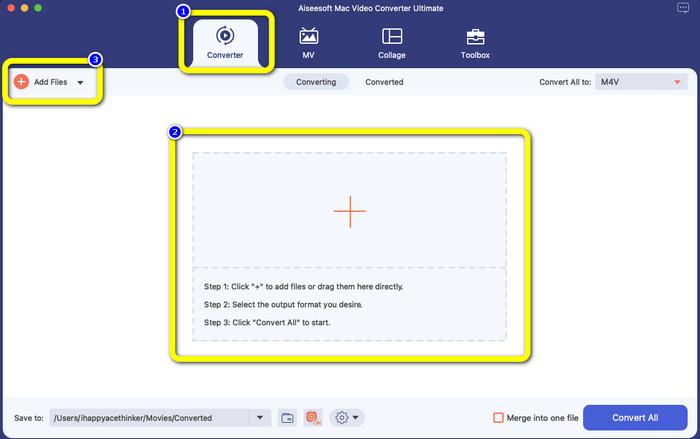
Trinn 2: Velg fanen Converter når grensesnittet dukker opp. Klikk på ikonet Plus eller knappen Add Files for å legge til VOB-filen din. Du kan også dra videofilen direkte inn i boksen.
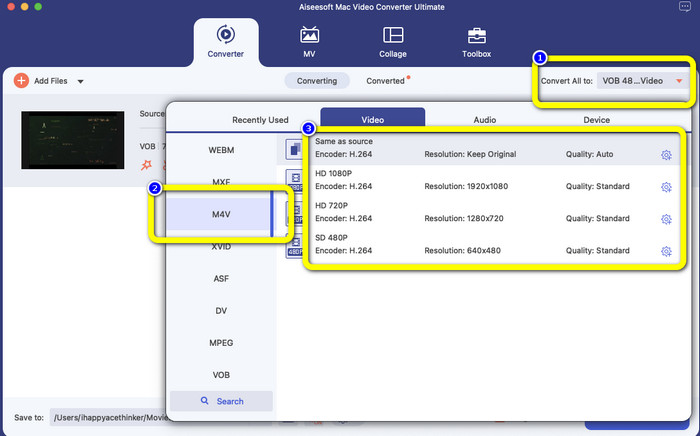
Trinn 3: Klikk på knappen Convert All to for å se formatvalgene. Velg deretter M4V-filformatet. Du kan også velge oppløsning for videoen fra 480p til 1080p, eller beholde original kvalitet.
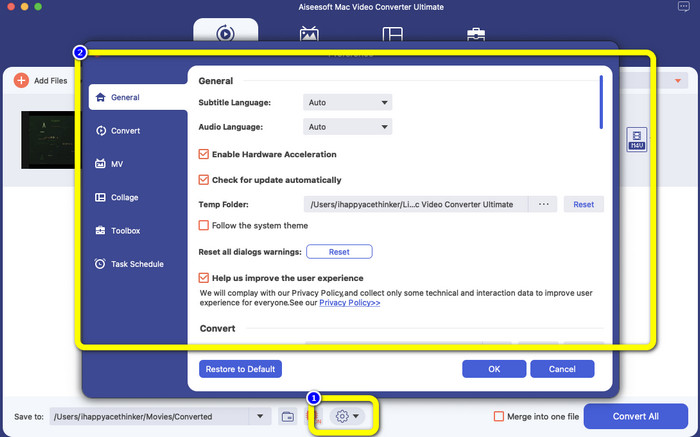
Trinn 4: Før du konverterer, kan du redigere videoen din, for eksempel legge til undertekst eller lydspråk og mer, ved å klikke på ikonet Preference nederst i grensesnittet.
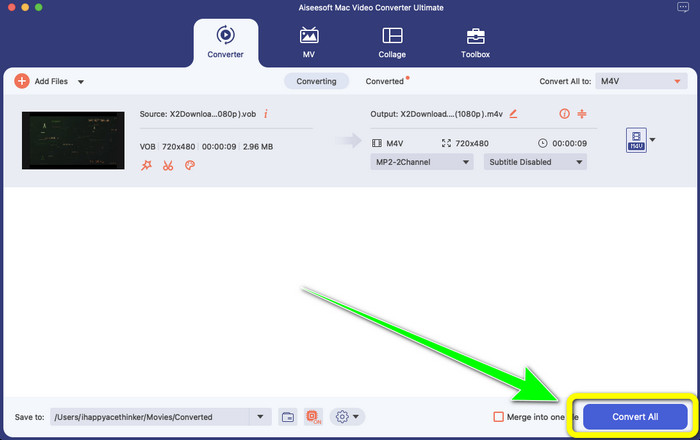
Trinn 5: Når du er ferdig med å gjøre endringer i VOB-videoen din, klikker du på knappen Convert for å konvertere VOB-filen til M4V-format. Lagre deretter videoen på Mac-en din.
Del 4: Enkle måter å konvertere VOB til M4V online gratis
Hvis du vil konvertere VOB til M4V gratis på nettet, kan du prøve FreeFileConvert. Denne nettbaserte omformeren kan enkelt konvertere ulike filer. Den har bare tre trinn for å konvertere VOB-videofilen din til M4V-format, noe som gjør den perfekt for ikke-profesjonelle brukere. Dessuten blir alle konverterte filer slettet fra serveren etter 24 timer og er ikke lenger tilgjengelige. Du kan også slette filen din ved å bruke knappen Delete etter at en fil er konvertert. FreeFileConvert er dessuten ikke bare bra for videokonvertering. Den lar deg også konvertere bilder, dokumenter, vektorgrafikk, lyd, arkiver, e-bøker og presentasjoner, noe som gjør den praktisk for brukere. Denne nettjenesten har imidlertid en treg konverteringsprosess, så du må beregne mer tid. Den krever også internettilkobling for å fungere.
Trinn 1: Gå til nettstedet til FreeFileConvert.
Trinn 2: Klikk på knappen Choose File for å legge til VOB-videofilen din.
Trinn 3: Klikk på knappen Convert File to for å se formatvalgene, og velg M4V-filformat.
Trinn 4: Til slutt klikker du på knappen Convert. Last ned den ferdige videoen etter at konverteringsprosessen er fullført.
Del 5: Vanlige spørsmål om konvertering av VOB til M4V
1. Hva er det vanlige filformatet å konvertere en VOB-fil til?
Siden MP4 er en vanlig multimediefiltype og et beholderformat for lagring av video-, lyd- og undertekstdata, ville det være det beste videoformatet for å konvertere ikke-støttede VOB-videofiler til det. Mange bærbare enheter, inkludert Apple-produkter, støtter MP4-formatet.
2. Hvordan konverterer jeg et VOB-filformat uten å miste kvalitet?
Du kan bruke FVC Video Converter Ultimate. Dette offline-verktøyet kan konvertere flere filer uten å endre videokvaliteten.
3. Kan VOB-filer spilles av på Androider?
Nei. Videoer lagres på DVD-er med beholderformatet VOB (Video Object). VOB-filer støttes vanligvis ikke av Android. Du må konvertere VOB-filen din til MP4 eller andre videoformater som støttes av Android-enheter hvis du vil spille dem av på Android-smarttelefoner eller nettbrett.
Konklusjon
Nå har du lært forskjellene mellom VOB og M4V. Denne artikkelen viser deg også den enkleste fremgangsmåten for å konvertere VOB til M4V. Hvis du foretrekker et program med rask konverteringsprosess, kan du bruke FVC Video Converter Ultimate. Denne omformeren kan konvertere ulike filer 30 ganger raskere enn andre omformere.
-
 Hvordan komprimere VOB-filer online og gratis [Ingen nedlasting]
 Leter du etter metoder for å komprimere VOB-filer? Lær den beste måten å gjøre VOB-filer mindre på i denne artikkelen
-
 Konkret guide for å bli med M4V-filer på Windows og Mac gratis
 Hvis du leter etter en løsning for å kombinere M4V-videofiler til én, må du aldri gå glipp av denne passasjen. Her vil vi snakke om de to beste metodene for å kombinere M4V-videofiler
-
 Konverter VOB til 3PG på Windows og Mac gratis [Tapløst]
 Hvordan konvertere VOB til 3GP på Windows og Mac? Denne artikkelen gir de beste løsningene for deg for å konvertere VOB til 3GP
