


 Video Converter Ultimate
 Skjermopptaker
 Videoreparasjon
 Sikker nedlasting
Hvordan konvertere SVG til JPG raskt [Superenkle måter]
Du kan ha behov for å konvertere et SVG‑bilde til et JPG‑bilde av flere grunner. En mulighet er å gjøre redigeringen enklere. SVG‑filer krever et vektorbasert bilderedigeringsprogram, mens rasterbaserte bildeeditorer er langt vanligere blant brukere. Microsoft Paint og Adobe Lightroom er eksempler på slike. Det kan være mulig å bruke Lightroom til å redigere en SVG hvis du først konverterer den til JPG. Deling på nett er en annen grunn til å konvertere SVG til JPG. JPG aksepteres nesten alltid av nettsteder og apper som lar deg laste opp bilder. Derimot er det lite sannsynlig at de tar imot SVG. For eksempel godtar Instagram JPG, men ikke SVG. Denne artikkelen gir deg praktiske metoder for å endre SVG til JPG. Du vil også få vite hvilke bildekonverterere som er best å bruke både på nett og uten nett.

Del 1. Sammenlign SVG og JPG
| Filformat | SVG | JPG |
| Filnavnutvidelse | .svg | .jng |
| Utviklet av | World Wide Web Consortium | JPEG-komiteen |
| Utviklet av | SVG er et vektorbildefilformat for 2D-grafikk basert på XML. Animasjon og interaktivitet støttes. I XML-tekstfiler er SVG-bilder og deres oppførsel definert. Siden SVG-filer bare er XML-filer, kan de redigeres med et hvilket som helst tekstredigeringsprogram. | JPG er brukt til nettsteder og e-post fordi de har reduserte filstørrelser. Men siden JPG har tap, vil det påvirke bildekvaliteten etter komprimering. Den resulterende "tapsede" filen betyr at kvaliteten er tapt. Minnekortene for digitale kameraer bruker JPG-formatet. |
| Tekniske detaljer | SVG er et format som brukes til å definere XML-basert vektorbasert grafikk for nettet. Denne filen vil ikke miste bildekvaliteten selv når den zoomes inn eller endres størrelse. SVG-filens elementer og attributter kan alle animeres. | JPG er et bildefilformat for redigering av stillbilder. Det gir en symmetrisk komprimeringsteknikk som er prosessorintensiv. Det er også tidkrevende både i kompresjon og dekompresjon. JPEG er en vanlig standard for International Telecommunications Union. Det inkluderer også International Organization for Standardization. |
| Tilknyttede programmer | Adobe Photoshop Adobe forhåndsvisning Corel Paint Shop Pro Corel SVG Viewer | Microsoft Windows Photo Gallery Viewer Adobe Photoshop Adobe forhåndsvisning Corel Paint Shop Pro |
Del 2. Beste måten å konvertere SVG til JPG Online
Det beste verktøyet du kan bruke er FVC Free Image Converter. Det kan konvertere SVG til JPG uten problemer. I tillegg er det mulig å konvertere flere SVG‑filer til JPG samtidig. Det har et brukervennlig grensesnitt og enkle instruksjoner, noe som passer godt for de fleste brukere. Denne bildekonvertereren støtter batch‑konvertering. Du kan dessuten laste ned mange konverterte filer med ett klikk. Et av de positive aspektene ved dette verktøyet er fraværet av irriterende annonser. Du kan konsentrere deg om å konvertere filer uten å bli forstyrret av reklame. I tillegg aksepterer det inndatafiler i ulike formater, som PNG, BMP, TIFF, GIF osv. Du trenger heller ikke å installere denne konvertereren. Den styres via nettleseren din. Dessuten vil bildekvaliteten etter konvertering være den samme som originalen. På den måten kan du være trygg på at bildet fortsatt ser utmerket ut. Informasjonen din er også trygg på dette nettstedet. Etter at du har konvertert og lagret bildene, blir alle dataene dine slettet automatisk.
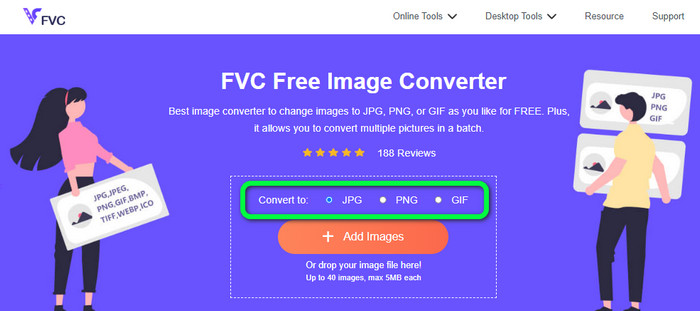
Trinn 1: Gå til hovedsiden til FVC Free Image Converter. Velg ønsket utdataformat før du legger til SVG‑bildefilen. Klikk på formatet JPG i formatvalgene.
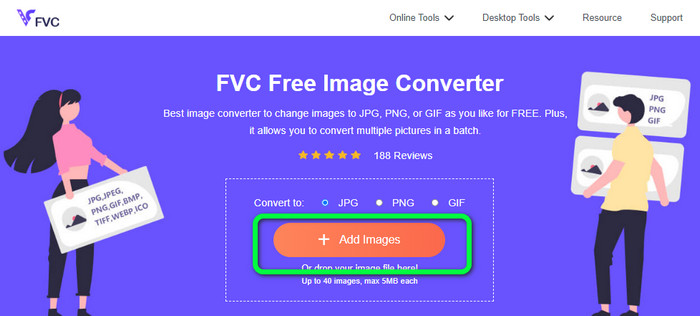
Trinn 2: Klikk på knappen Add Images midt på skjermbildet. Deretter vises filutforskeren på skjermen. Velg SVG-bildet du vil konvertere, og åpne det. Du kan også slippe SVG‑filen direkte inn i boksen. Klikk på Add Images-knappen igjen for å utføre en batch‑konvertering.
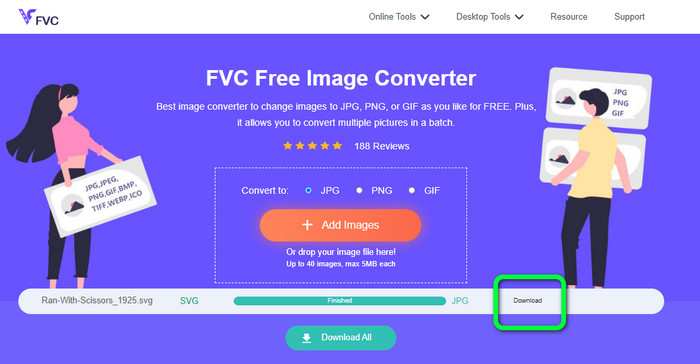
Trinn 3: Mens filen lastes opp, vil bildet bli konvertert automatisk. Til slutt klikker du på knappen Download på høyre side av grensesnittet. Etter at lagringsprosessen er ferdig, åpner du det konverterte bildet på datamaskinen.
Del 3. Enkel metode for å konvertere SVG til JPG på Windows
I denne delen får du den beste metoden for å konvertere SVG til JPG uten nett på Windows‑maskiner. Bruken av HitPaw Video Converter er en av de effektive metodene. Image Convert‑funksjonen i HitPaw Video Converter gjør batch‑bildekonvertering enkel. Du kan importere bilder og grafikk i ulike formater og konvertere dem til ønsket format. For masse‑ eller enkeltvise justeringer av bildeformat er dette et godt valg. Programmet støtter også alle vanlige bildeformater, blant annet PNG, JPG, HEIC, RAW, BMP og flere. Dermed kan du også bruke dette verktøyet til å konvertere BMP til JPG eller PNG. I tillegg tilbyr dette nedlastbare programmet andre funksjoner enn konvertering. Du kan laste ned musikk‑ og videofiler med denne programvaren. Du kan også redigere videoene dine ved å rotere, beskjære og bruke filtre. Likevel er HitPaw Video Converter vanskelig å bruke, spesielt for nybegynnere. Det har et forvirrende grensesnitt som gjør det vanskelig å forstå. Installasjonsprosessen tar dessuten mye tid.
Trinn 1: Installer HitPaw Video Converter på Windows‑maskinen din. Kjør programmet etter at installasjonen er fullført.
Trinn 2: Gå til panelet Toolbox, og velg verktøyet Image Converter. Velg SVG‑bildefilen du vil konvertere, fra datamaskinens mappe.
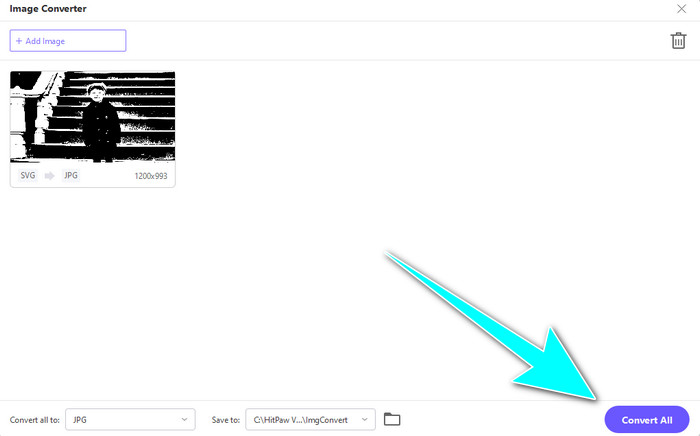
Trinn 3: Klikk på alternativet Convert All to nederst til venstre i grensesnittet. Velg deretter JPG som utdataformat.
Trinn 4: Klikk til slutt på knappen Convert All nederst til høyre i grensesnittet. Vent på at konverteringsprosessen blir ferdig. Deretter kan du åpne bildet ditt i PNG‑filformat.
Del 4. Hvordan konvertere SVG til JPG på Mac
Hvis du ønsker å konvertere SVG til JPG på Mac, kan du bruke BatchPhoto Pro. Det støtter en rekke bildeformater, blant annet JPG, PNG, ICO, SVG, EPS og over 170 til. Du kan til og med lagre bilder som PDF. Programmet tilbyr også batch‑konvertering, slik at du kan konvertere flere filer samtidig. I tillegg har det andre funksjoner enn ren konvertering. Du kan redigere bildet ved å endre størrelse, rotere og justere fargeinnstillinger. Men du må kjøpe programmet hvis du vil bruke det over tid. Det tilbyr bare en prøveversjon i noen få dager. Konverteringsprosessen er også vanskelig å forstå. Ikke‑profesjonelle brukere vil oppleve det som komplisert å konvertere bilder.
Trinn 1: Last ned og installer BatchPhoto Pro. Du kan hente en gratis prøveversjon. Etter at du har installert programmet, åpner du det.
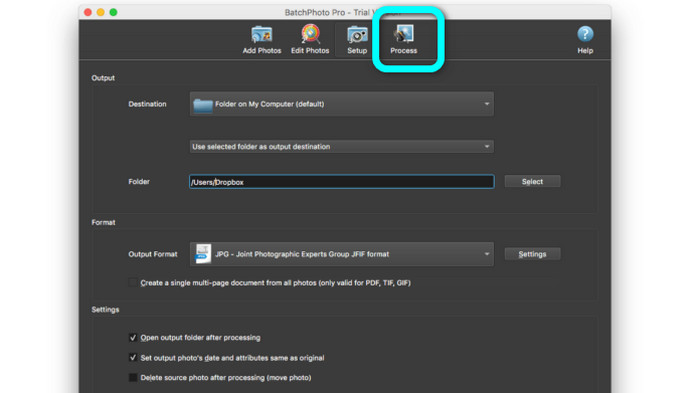
Trinn 2: Øverst i grensesnittet velger du alternativet Add Photos. Etter å ha klikket, legger du til SVG‑bildene du vil konvertere til JPG‑format. Du kan legge til flere filer samtidig.
Trinn 3: Gå til alternativet Set Up øverst i grensesnittet. Gå videre til alternativene for Output Format, og velg JPG‑formatet.
Trinn 4: Klikk på alternativet Process for å starte konverteringsprosessen. Når den er ferdig, går du til utdatamappen din og sjekker det konverterte bildet.
Del 5. Vanlige spørsmål om konvertering av SVG til JPG
1. Hvorfor bør du konvertere SVG til JPG?
Sammenlignet med SVG er JPG mer egnet for sosiale medier og andre enheter. Det er et av de populære bildeformatene du kan bruke i dag. I SVG kan du bare åpne denne filen i nettlesere. Så konvertering av SVG til JPG er nødvendig for mer kompatibilitetsbruk.
2. Hva er fordelene og ulempene med SVG-filer?
Du kan utvide eller krympe en SVG-fil til hvilken som helst størrelse uten å miste kvalitet. SVG-er bryr seg ikke om visningstypen eller bildestørrelsen. Måten de ser ut på er konstant. SVG-er gir også designere og utviklere mye kontroll over hvordan de ser ut. Det er bedre enn å redigere dem i et tekstredigeringsprogram. Selv andre visuelle elementer som skygger og fargegraderinger er justerbare. Det finnes imidlertid bedre formater enn SVG for et detaljert bilde av høy kvalitet. Brukere konstruerer vektorgrafikk ved å bruke punkter og baner i stedet for piksler. Kode er også nødvendig.
3. Hvordan åpner jeg en SVG-fil?
Den beste måten å åpne en SVG‑fil på er å bruke nettleseren din. Trykk ctrl+o på tastaturet. Velg deretter SVG‑filen du vil vise, og klikk Open.
Konklusjon
Da var vi i mål! Informasjonen ovenfor viser hvordan du konverterer SVG til JPG på Windows, Mac og på nett. Å laste ned en egen bildekonverterer kan imidlertid være tungvint. Hvis du vil ha en enklere måte å konvertere bilder på, kan du bruke FVC Free Image Converter. Denne nettbaserte bildekonvertereren lar deg konvertere bilder direkte i nettleseren.
-
 Nyttige metoder for å konvertere TIFF til JPG/PNG enkelt
 Ikke gå glipp av disse utmerkede måtene å gjøre TIF til JPG/PNG-formater på. Dette innlegget vil gi den nødvendige informasjonen du trenger å vite. Det inkluderer deres forskjeller.
-
 Konverter JPEG til JPG effektivt [Fem metoder oppført]
 Kom og få de enkleste veiledningene for å konvertere JPEG til JPG bildefilformat. Klikk på denne guideposten og begynn å lære dine foretrukne metoder
-
 Topp 5 ledende veiledninger for å konvertere PNG til JPG raskt
 Hvis du trenger å konvertere PNG-filen til JPG-format, kan du lære de beste måtene her. Du vil også lære forskjellen mellom PNG- og JPG-filformater
