


 Video Converter Ultimate
 Skjermopptaker
 Videoreparasjon
 Sikker nedlasting
Hvordan konvertere JFIF til JPG: Få de effektive metodene du kan prøve
I dag er JFIF-filformatet sjeldent. Noen programmer støtter ikke denne filtypen. Enkelte brukere vet ikke hvordan de skal åpne JFIF‑bildene sine i en slik situasjon. Hvis du vil se JFIF‑bildet ditt, må du imidlertid endre filendelsen. Hvis du ønsker en mer kjent og universell filendelse, kan du gjøre bildene dine om til JPG. For øvrig er JPG et av de mest populære bildeformatene du kan bruke. Nesten alle nettlesere og programmer støtter dette formatet. Hvis du vil konvertere JFIF til JPG, er det derfor lurt å lese denne veiledningen. Vi kan tilby ulike måter å konvertere JFIF‑filen din til JPG på. Uten videre om og men – les artikkelen for å finne ut mer.

Del 1. Enkleste måter å konvertere JFIF til JPG Online
Bonus: Hvordan konvertere JFIF til JPG med FVC Free Image Converter
Å bruke FVC Free Image Converter er den mest effektive metoden for å konvertere JFIF til JPG. Det er et fornuftig valg å konvertere bildefiler. Verktøyet støtter bildeformater som JPG, JPEG, PNG, SVG, BMP, TIFF og GIF. På denne måten slipper du å bekymre deg for om enkelte verktøy eller enheter ikke kan åpne bildefilene dine. I tillegg bevarer det den gode kvaliteten på originalbildene. Etter konverteringsprosessen vil du knapt kunne se forskjell fra originalen. Dessuten støtter bildekonvertereren batch‑konvertering. Det betyr at du kan konvertere opptil 40 bildefiler samtidig. Sammenlignet med andre konverterere er dette langt mer praktisk og effektivt. Det koster heller ingenting å bruke programmet. Her får du en gratis bildekconverter.
Dessuten trenger du ikke opprette en konto for å bruke den. Du trenger bare å gå til nettstedet og begynne å konvertere. Annonser er irriterende, som vi alle vet. Likevel har dette verktøyet ingen reklame, slik at du kan konvertere i fred. Nettlesere som Chrome, Mozilla, Edge, Explorer og mer gir deg tilgang til denne konverteren.
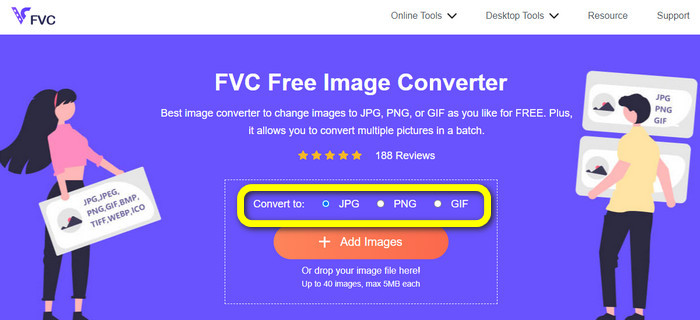
Trinn 1. Start nettleseren på datamaskinen. Gå deretter til den offisielle nettsiden til FVC Free Image Converter. Velg JPG som filformat i menyen Convert to. Du ser dette midt på skjermen på den oransje linjen med plussikonet.
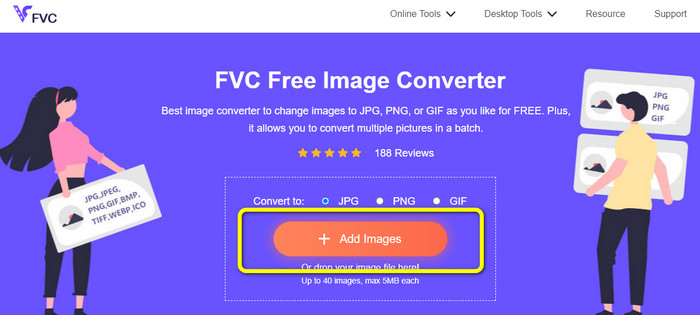
Trinn 2. Klikk på knappen Add Images for å laste opp JFIF‑bildet du vil konvertere. Du kan legge til mer enn én bildefil. Etter opplastingen blir bildefilen din konvertert automatisk.
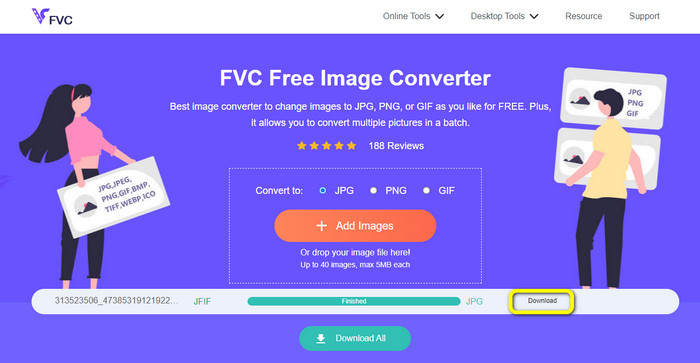
Trinn 3. Det siste trinnet er å lagre den konverterte filen ved å klikke på Download-knappen.
Hvordan konvertere JFIF til JPG ved hjelp av Convertio
Convertio er en av de effektive nettbaserte konvertererne du kan bruke for å endre JFIF‑filer til JPG. Med denne bildekonvertererens enkle arbeidsflyt kan du konvertere JFIF‑filene dine til JPG‑filer. Den har også et brukervennlig grensesnitt og oppsett som er lett å forstå. Dermed kan både erfarne brukere og nybegynnere bruke denne nettjenesten. I tillegg har programmet en funksjon for batch‑konvertering. Dermed kan du konvertere flere bildefiler samtidig. Konverteringen går dessuten raskt. Bilder kan konverteres på få sekunder. Convertio støttes av populære nettlesere som Google Chrome, Firefox, Internet Explorer og andre. Convertio tilbyr også flere funksjoner. Du kan konvertere video, lyd, dokumenter og mer – ikke bare bilder.
Convertio har imidlertid noen begrensninger, spesielt når du bruker gratisversjonen. Kun 100 MB med bilder kan lastes opp. Etter det er bildekonvertering ikke lenger mulig. Så hvis du vil bruke alle funksjonene, invester i en medlemskapsplan. I tillegg lar gratisversjonen deg bare laste opp to filer mens du utfører en batchkonverteringsprosess. Til slutt kreves en rask internettforbindelse for å oppleve ytelse på høyt nivå.
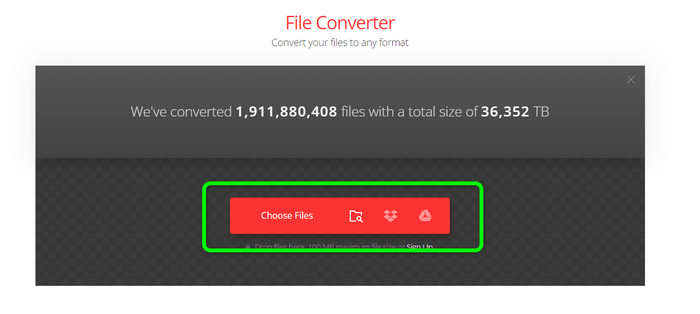
Trinn 1. Bruk en hvilken som helst nettleser på datamaskinen og gå til nettsiden til Convertio. Klikk på knappen Choose Files. Denne knappen ligger på den røde linjen. Etter at du klikker, vises datamaskinmappen på skjermen. Åpne JFIF‑filen og last den opp til verktøyet.
Trinn 2. Etter at du har lastet opp JFIF‑bildet, går du til formatvalget. Velg deretter JPG som ønsket utdataformat.
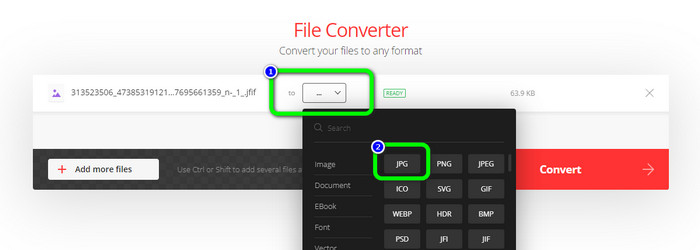
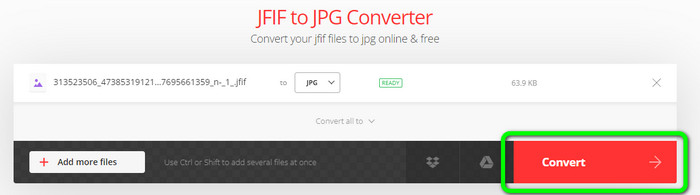
Trinn 3. Når du er ferdig med å velge JPG‑formatet, klikker du på Convert-knappen. Vent noen sekunder på at konverteringsprosessen skal bli ferdig.
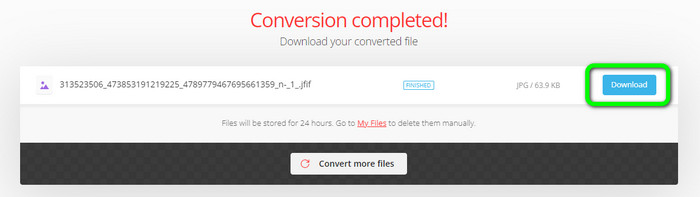
Trinn 4. Klikk på Download-knappen når konverteringsprosessen er fullført. På denne måten kan du enkelt åpne JFIF‑bildet ditt på enheten din.
Del 2. Hvordan konvertere JFIF til JPG på Windows 11/10
Hvis du vil lagre JFIF‑filen i JPG‑format, kan du bruke Bitrecover JFIF Converter Wizard. Du kan laste ned dette skrivebordsprogrammet gratis til Windows. I tillegg støtter det ulike bildeformater. Det inkluderer BMP, PNG, TIFF, PDF og flere, noe som gjør det mer praktisk til konverteringsbruk. Det har også en rask konverteringsprosess, slik at det ikke blir tidkrevende for brukerne. Det finnes imidlertid noen ulemper ved å bruke denne konvertereren. I gratisversjonen kan verktøyet bare konvertere opptil 5 bildefiler. Hvis du vil konvertere mer enn fem bilder, må du derfor kjøpe et abonnement.
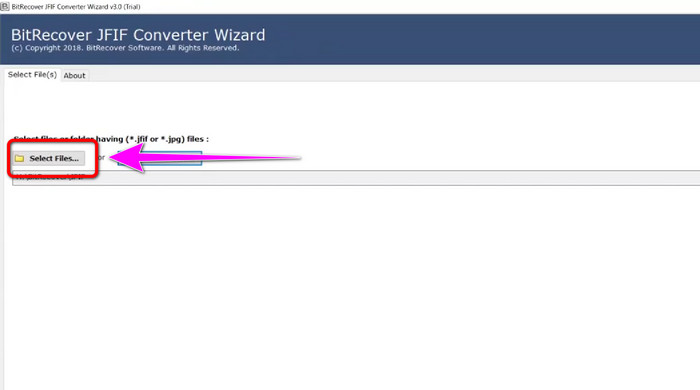
Trinn 1. Last ned Bitrecover JFIF Converter Wizard på datamaskinen din. Start det deretter etter at installasjonen er fullført.
Trinn 2. Når grensesnittet vises på skjermen, klikker du på alternativet Select file for å legge til JFIF‑filene du vil konvertere. Klikk deretter på Next-knappen nederst til venstre i grensesnittet.
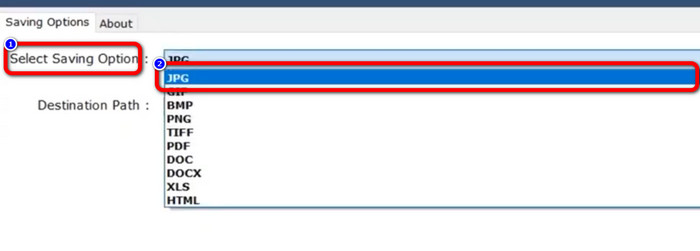
Trinn 3. Gå deretter til Select Saving Option. Klikk på JPG som utdataformat.
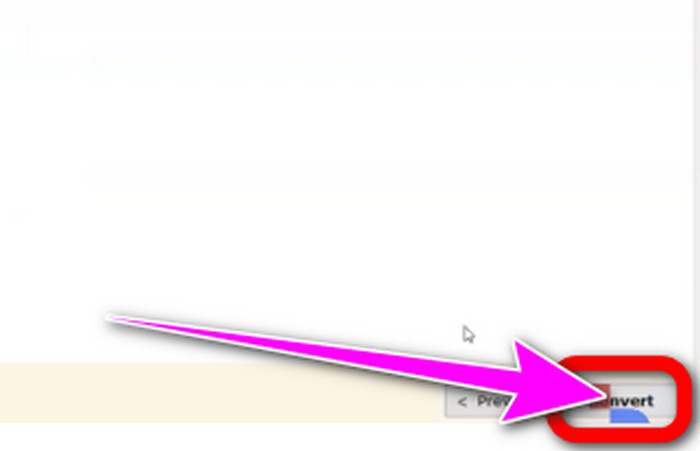
Trinn 4. Til slutt klikker du på Convert-knappen nederst til høyre i grensesnittet.
Del 3. Beste måten å konvertere JFIF til JPG på Mac
Du kan konvertere JFIF til JPG ved å bruke det innebygde Mac‑programmet Forhåndsvisning (Preview). Med hjelp av dette programmet kan du gjøre JFIF‑filen om til JPG. Hvis du derimot ikke er Mac‑bruker eller er uvant med enheten, må du kanskje bruke litt ekstra tid. Men hvis du er villig til å lære, kan du følge trinnene nedenfor.
Trinn 1. Høyreklikk på filen, velg Open With fra menyen som dukker opp, og velg deretter Preview. Dobbeltklikk på filen hvis du ikke ser Preview som et alternativ for denne filtypen.
Trinn 2. En dialogboks som sier at ingen applikasjon er tilgjengelig for å åpne dokumentet, vil vises. Klikk på alternativet Choose Application.
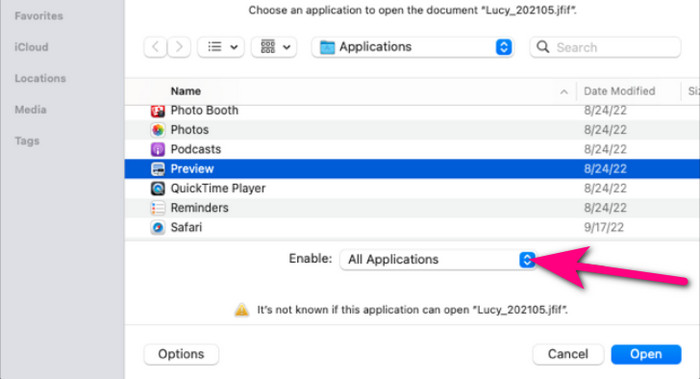
Trinn 3. Når programmappen åpnes, velger du All Applications fra rullegardinmenyen Enable nederst. Velg deretter Preview i listen, og klikk på Open.
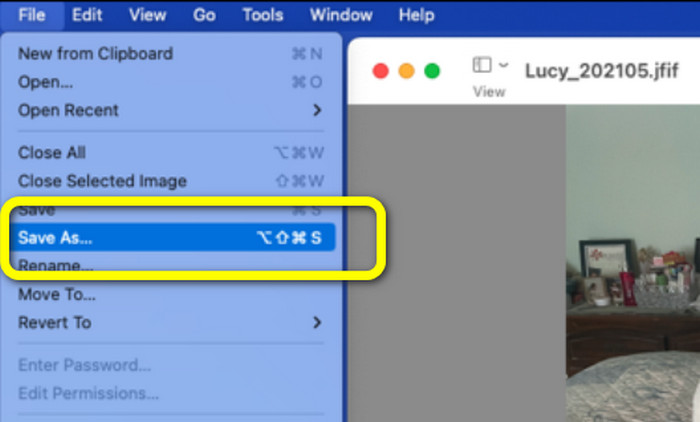
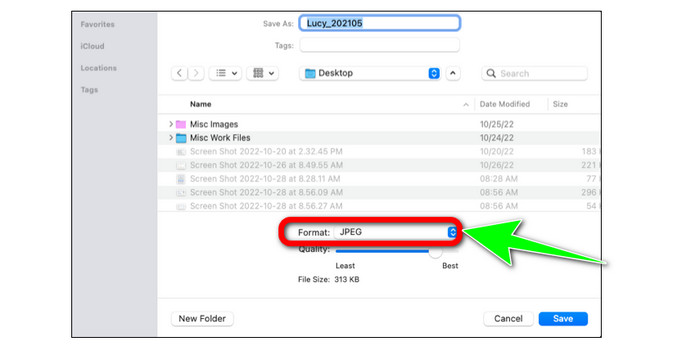
Trinn 4. JFIF‑bildet ditt skal nå vises i Preview. Hold nede Option‑tasten, klikk på File i menylinjen og velg deretter Save as.
Trinn 5. Velg JPEG fra rullegardinmenyen Format i Save As-dialogen. Du kan eventuelt justere kvaliteten med glidebryteren.
Del 4. Vanlige spørsmål om konvertering av JFIF til JPG
1. Hva er forskjellen mellom en .jfif-fil og en .jpeg-fil?
JFIF-filer er vanligvis rå datakode. Det er ikke en bilde- eller videofil, som noen ganger ikke engang er tilgjengelig. Mer teknisk sett er JFIF-filene JPG-filens kildekoder. JFIF er virtuelle JPG-fildata som har blitt bitmappet for lagring.
2. Hva er fordelene med å bruke en JFIF-fil?
JFIF-formatet definerer flere egenskaper som det originale JPEG-formatet hadde utelatt. Brukere kunne lagre og distribuere filer ved hjelp av JPEG-komprimering etter at nøkkelspesifikasjoner, for eksempel en standard overskrift, spesifikasjoner for oppløsning og sideforhold, og fargemodell, ble etablert. Mange digitale kameraer har historisk lagret bilder i JFIF-format.
3. Hvordan vet jeg om et bilde er JFIF?
Når du har funnet bildefilen, må du gå videre til utvidelseslinjen til høyre, hvor mange alternativer er tilgjengelige. En JFIF-utvidelse vil bli valgt som standard når du kommer til utvidelsesmenyen. Dette innebærer at JFIF er valgt som standard bildeutvidelse eller format når du lagrer et bilde.
Konklusjon
All informasjonen ovenfor beskriver de beste metodene for å konvertere JFIF til JPG. Hvis du foretrekker nettbaserte metoder for å konvertere bilder, er det lurt å bruke FVC Free Image Converter. Den har en enklere arbeidsflyt enn mange andre nettbaserte konverterere.
-
 Lær de enkleste tilnærmingene for å konvertere WebP til JPG raskt
 La oss alle lære effektive måter å konvertere nettbilder til JPG enkelt. Denne artikkelen vil gi deg utmerkede bildekonverterere du kan bruke til å konvertere bildefiler.
-
 Topp 5 ledende veiledninger for å konvertere PNG til JPG raskt
 Hvis du trenger å konvertere PNG-filen til JPG-format, kan du lære de beste måtene her. Du vil også lære forskjellen mellom PNG- og JPG-filformater.
-
 Uanstrengte metoder for hvordan du konverterer SVG til JPG-format
 Finner du den beste måten å konvertere SVG til JPG? Dette innlegget vil gi noen surefire veiledninger du kan prøve. Du vil også finne SVG til JPG-konverteren for deg.
