


 Video Converter Ultimate
 Skjermopptaker
 Videoreparasjon
 Sikker nedlasting
Facebook-videoer ingen lyd: hvorfor det skjer og hvordan du fikser det
Facebook er en av de mest brukte multimediaplattformene i dag. Du kan bruke denne plattformen ikke bare til sosiale interaksjoner, men også som en kilde til underholdning ved å inkludere musikk og videoer for å gi arbeidshverdagen et ekstra løft. Selv om det er viktig med en sømløs opplevelse, kan avbrudd som ingen lyd på Facebook være en betydelig utfordring.
Fraværet av lyd i Facebook-videoer kan gjøre opplevelsen din ikke så bra. Dette er sant, spesielt når du prøver å holde fokus mens du jobber. Heldigvis, hvis dette skjer med deg, kan det være noen årsaker til at lyden ikke fungerer på Facebook-videoer. Derfor, la oss lære årsakene til og de beste løsningene for å fikse et slikt hovedproblem på FB nå!

Del 1. Hvorfor har videoene på Facebook ingen lyd?
Ulike årsaker kan bidra til problemet med ingen lyd på Facebook-videoer på iPhone, Android og PC mens du ser, laster opp eller laster ned. En mulig årsak er feil systemlydinnstillinger eller en utdatert lyddriver på enheten.
Når vi snakker om lyden, kan det også være lyden til videoen som har problemet. I tillegg kan problemer med nettleseren din, spesielt angående Flash Player, også påvirke lyden. I tillegg er problemer med Facebook-appens innstillinger, konflikter i systemet ditt og potensielle lydrelaterte problemer med kildevideoen blant faktorene som kan føre til mangel på lyd. Derfor er det avgjørende å identifisere den spesifikke årsaken til problemet for en rask løsning, siden det lar deg fikse problemet effektivt og gjenopprette lydfunksjonaliteten til Facebook-videoene dine.
Del 2. Slik løser du når videoer ikke har lyd på FB
Sjekk om lyddriveren er oppdatert
Siden en av de vanlige årsakene til at Facebook-videoene dine ikke har lyd skyldes en utdatert lyddriver, må du rydde opp rotet direkte. Det anbefales på det sterkeste at driverne dine oppdateres jevnlig. Disse oppdateringene fungerer ikke bare som viktige sikkerhetsoppdateringer, men introduserer også funksjonsforbedringer som effektivt kan løse ulike uvanlige og vedvarende problemer. For å oppdatere lyddriveren manuelt, kan du gå til nettsiden til hovedkortprodusenten. Ved å være årvåken med driveroppdateringer, forbedrer du ikke bare sikkerheten til systemet ditt, men låser også opp forbedringer som bidrar til en mer stabil og effektiv lydopplevelse, spesielt når du bruker plattformer som Facebook.
Rett opp den mulige video- eller lydkorrupsjonen
Hvis du opplever at FB‑videoer ikke har lyd, kan det skyldes korrupte video- og lydfiler. Dette fører til manglende lyd på Facebook, og en mulig løsning er å bruke et videoreparasjonsverktøy som Video Repair. Dette toppmoderne, AI-drevne videoreparasjonsverktøyet er dyktig til å identifisere og rette ulike former for videokorrupsjon, inkludert tilfeller der lyden mangler. I tillegg gjør de avanserte funksjonene det mulig å gjenopprette lyddelen i videoen din på en sømløs måte. Til slutt vil det gjøre at videoen kan spilles av på Facebook med tilhørende lyd i løpet av kort tid. Her er hva du må gjøre med Facebook-videoen din ved hjelp av FVC Video Repair.
Gratis nedlastingFor Windows 7 eller nyereSikker nedlasting
Gratis nedlastingFor MacOS 10.7 eller nyereSikker nedlasting
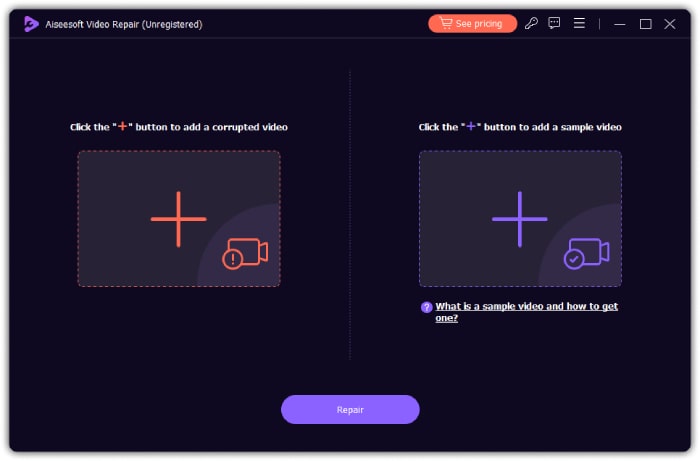
Trinn 1. Kjør verktøyet etter at du har installert det på datamaskinen. Klikk deretter på plussknappen til venstre for å laste opp Facebook-videoen du trenger å reparere. Klikk så på den andre plussknappen for å laste opp en hvilken som helst eksempelvideo fra enheten din.
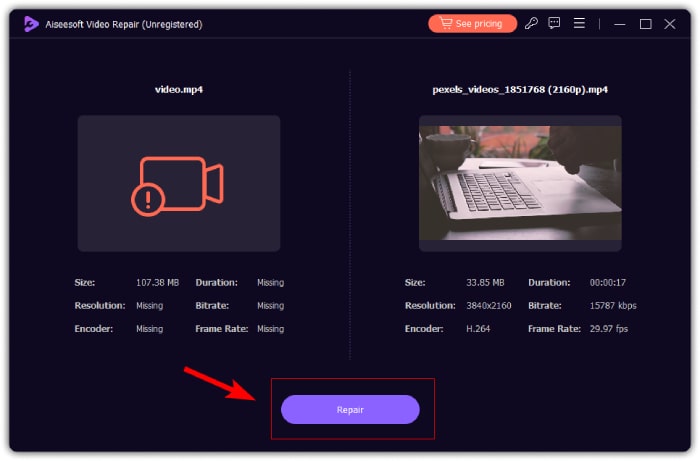
Trinn 2. Klikk deretter på Repair-knappen for å starte reparasjonsprosessen.
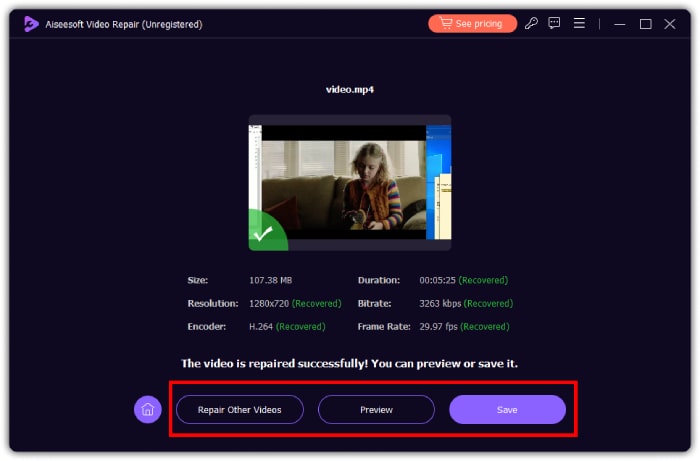
Trinn 3. I løpet av et øyeblikk er FB-videoen din uten lyd reparert. Du kan nå klikke på forhåndsvisningsfanen for å sjekke videoen, eller på Lagre-knappen for å eksportere den til en lokal mappe. Alternativt kan du fortsette å reparere andre videoer ved å klikke på knappen Repair Other Videos.
Få en oppdatert Flash Player
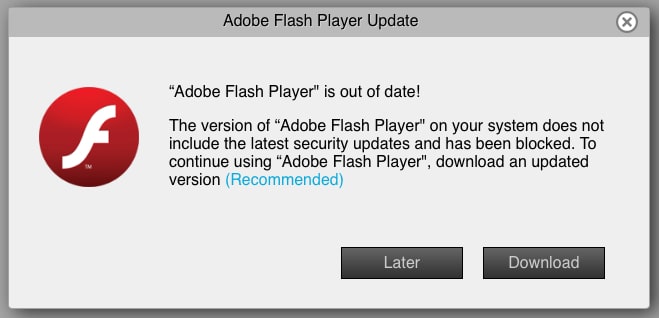
Sørg for at du har den nyeste versjonen av Flash Player installert på datamaskinen eller mobilenhetene dine. Etter at du har oppdatert til siste versjon, tester du funksjonaliteten for å se om Facebook-videoer fortsatt ikke spiller av og mangler lyd. Dersom problemet vedvarer og du fremdeles ikke får lyd, bruker du funksjonen Rapporter et problem i Facebook-kontoen din for å varsle plattformens utviklere om lydproblemet som spesifikt påvirker Facebook-videoer.
Synkroniser lyden til videofilen
Til slutt, hvis du skulle oppleve utfordringer med synkroniseringen av lyd og video, noe som ofte fører til lydproblemer, kan en nyttig løsning være å bruke programvare som Video Converter Ultimate. Denne programvaren er utstyrt med en rekke kraftige verktøy. Ett av dem er den bemerkelsesverdige funksjonen Audio Sync, som lar deg manuelt finjustere tidsinnstillingen til lyden slik at den harmonerer med videonavspillingen. Gjennom presise justeringer av synkroniseringen kan du sikre at lyden stemmer nøyaktig overens med den tilhørende videoen. Dette kan forbedre den samlede sammenhengen i seeropplevelsen. Nedenfor er trinnene du må følge.
Gratis nedlastingFor Windows 7 eller nyereSikker nedlasting
Gratis nedlastingFor MacOS 10.7 eller nyereSikker nedlasting
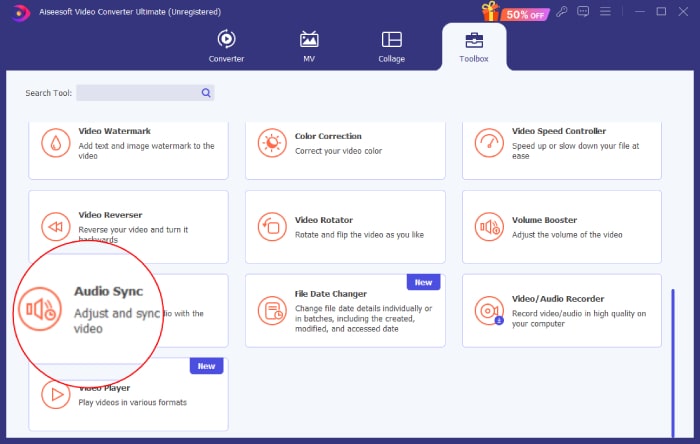
Trinn 1. Start programvaren og gå til menyen Verktøykasse. Klikk deretter på verktøyet Audio Sync.
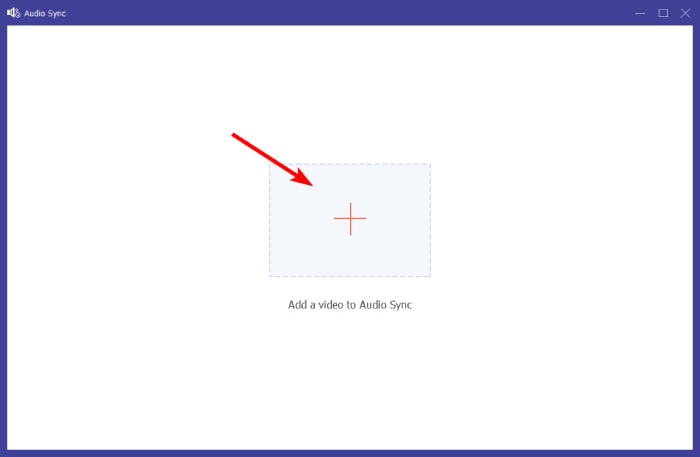
Trinn 2. I det neste vinduet klikker du på pluss-knappen for å laste opp Facebook Reel eller video uten lyd.
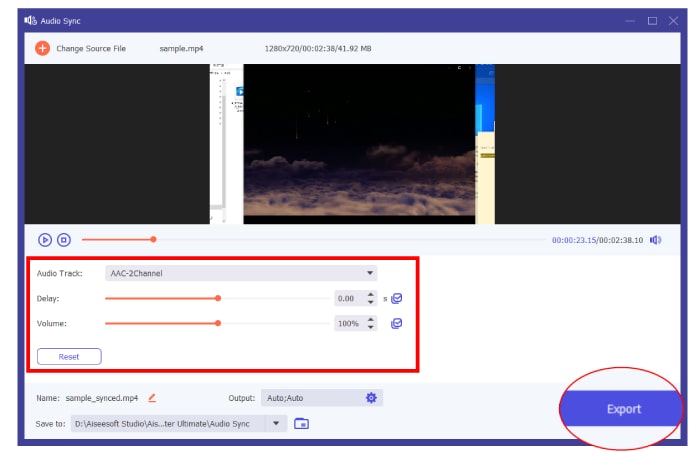
Trinn 3. Begynn å synkronisere lyden i videoen ved å bruke seksjonene Lydspor, Forsinkelse og Volum. Merk at du fritt kan justere dem etter egne preferanser. Du kan klikke på avspillingsknappen for å forhåndsvise resultatet hver gang du gjør en endring. Klikk deretter på Export-knappen når du er klar.
Del 3. Hvordan få lyden tilbake på Facebook-siden min
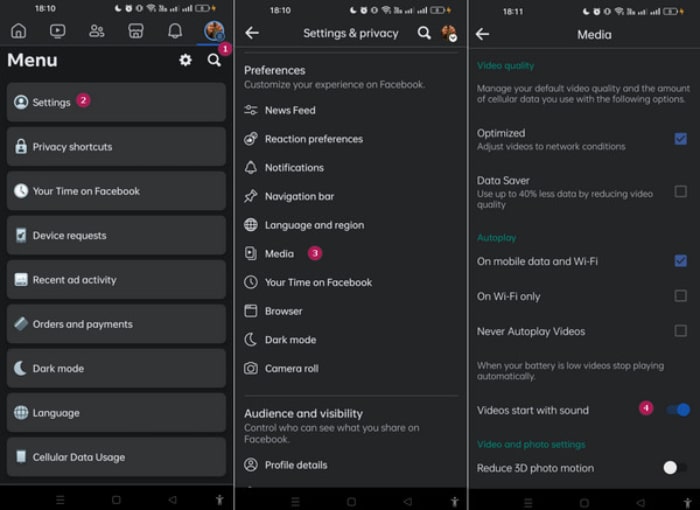
Det er også en måte å slå på lyden automatisk for Facebook-feedvideoene dine. Følg trinnene nedenfor for å gjøre det.
Trinn 1. Gå til profilmenyen din og trykk på Innstillinger.
Trinn 2. Rull ned på skjermen og trykk på Media.
Trinn 3. Slå deretter på alternativet Videoer starter med lyd.
Del 4. Vanlige spørsmål om Facebook
Hvordan slår jeg på lyden på Facebook?
For å slå på lyden for Facebook-videoen, klikk på videoen, etterfulgt av høyttalerikonet for å aktivere lyd.
Hva er demp-modusen på Facebook?
Det er en funksjon på Facebook som lar deg dempe lyd i videoer. Det vises vanligvis med et høyttalerikon med kryss over.
Hvorfor dempet Facebook videoen min?
Det er på grunn av brudd på fellesskapets standarder. Dette kan innebære bruk av opphavsrettsbeskyttet musikk som er i strid med Facebooks retningslinjer.
Konklusjon
Når du opplever problemet med ingen lyd i Facebook-videoer, må du være tålmodig. Som nevnt ovenfor kan dette problemet stamme fra ulike faktorer, slik som korrupte videofiler eller problemer med lydsynkronisering. Derfor kan bruk av verktøy som FVC Video Repair og Video Converter Ultimate, som omtalt tidligere, effektivt løse de underliggende årsakene og gjenopprette uavbrutt lyd i Facebook-videoene dine.
-
 5 metoder for å reparere ødelagte MOV-filer
 Oppdag effektive løsninger for MOV-reparasjon. Lær hvordan du enkelt reparerer korrupte MOV-filer for å sikre uavbrutt og sikker videostrømming.
-
 [Løst] Hvordan fikse MP4 Ingen lyd i mediespillere
 Har du problemer med MP4-lyd? Her er en trinn-for-trinn-guide for hvordan du fikser MP4-lyd uten lyd på Windows Media Player, Adobe Premiere og OBS Recording.
-
 Hvorfor er ingen lyd på Instagram og hvordan fikser det
 Har du problemer uten lyd på Instagram? Ikke bekymre deg mer og bare følg disse enkle og raske løsningene for å fikse problemet og få lyden tilbake.
