


 Video Converter Ultimate
 Skjermopptaker
 Videoreparasjon
 Sikker nedlasting
Komprimere TS-videofiler - Hvordan komprimere TS-filer til mindre størrelser
Når du har noen video_ts-filer fra DVDer, er filene store og spiser harddiskplass. Hvis du trenger å lagre TS-filene i NAS eller mediebiblioteket, er det nødvendig å komprimere TS-videoer. Selvfølgelig bør den elektroniske TS-videokompressoren være det første valget. Men de fleste nettbaserte tjenester har begrensninger for videostørrelse. Du kan sjekke ut den gratis online TS-kompressoren og det profesjonelle verktøyet fra artikkelen.

Del 1: Hvordan komprimere TS-filer online gratis
Is it possible to compress TS video files online? Since the TS files are large in size, it is difficult to find the online TS compressor without size limitations. Free Video Compressor is a versatile online TS compressor that supports large TS files without limitation. It only reduces the video size of the TS videos, but preserves the original video quality.
- 1. Komprimer TS-videoer i 4K-oppløsning med fantastisk kvalitet.
- 2. Legg til ikke noe vannmerke i de komprimerte TS-videofilene.
- 3. Batchkomprimere TS-filer med 30 ganger raskere hastighet enn andre verktøy.
- 4. Gi personvernsikkerhetsfunksjoner for å beskytte informasjonen din.
Step 1: Go to the online video compressor with any web browser, you can click the Add Files to Compress button to download the installer. Click the button again to import the TS file into the online video compressor without size limitation.

Step 2: Once you have uploaded the TS files online, you can tweak different parameters, such as Size, Format, Resolution, and Bitrate to the desired video size. After that, you can click the Compress button to compress your TS video for free.

Del 2: Hvordan komprimere TS-filer uten å miste kvalitet
When you need to combine the different movie clips from different TS files, compress the TS files for Android phones, or even convert TS to MP4 or MKV files, Video Converter Ultimate is a multi-featured TS compressor that shrinks the size of a video with advanced algorithms. It also enables you to remove the unwanted part and merge the video clips into one movie.
Gratis nedlastingFor Windows 7 eller nyereSikker nedlasting
Gratis nedlastingFor MacOS 10.7 eller nyereSikker nedlasting
Step 1: Download and install Video Converter Ultimate on your computer, you can launch the program on your computer. Click the Converter menu and choose the Add Files button to import the TS files.
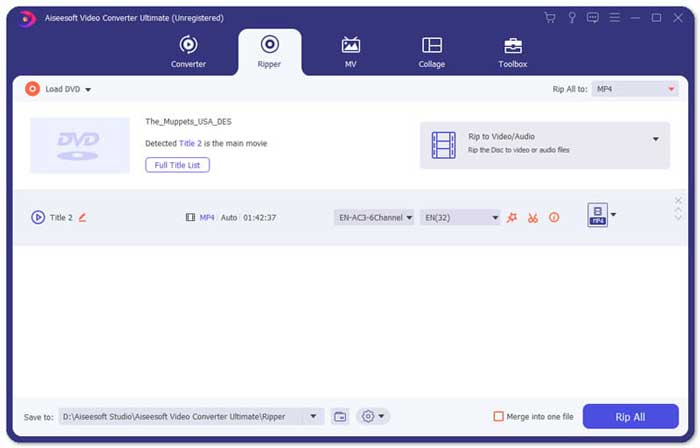
Step 2: Once you have imported the TS files, you can go to the Tool menu and click the Video Compressor option. Just change the size, name, format, resolution, and bitrate of the target file. When you get the desired video size, you can click the Compress button to compress TS files.

Step 3: You can also choose the MKV or MP4 as the output format. It will compress TS to MKV or MP4 with a relatively small size. Click the Scissors icon to cut out the desired TS parts. You can also combine the different TS clips into one with the Merge into one option.
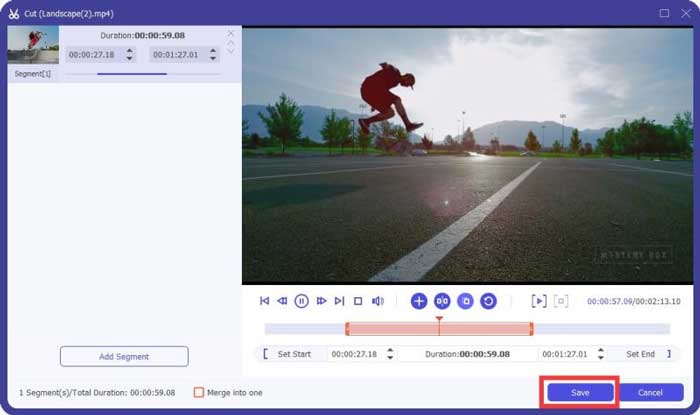
Step 4: When you are satisfied with the compressed video, you can choose a destination folder for the compressed TS videos. Then click the Convert All button to start compressing the TS files from your DVD without losing the original quality.

Del 3: Vanlige spørsmål om hvordan du komprimerer TS-videofiler
1. Hva er TS File Format?
TS, kort av Transport Stream som er et pakkeformat. Det fulle navnet på TS er MPEG2-TS, som er et standard databeholderformat for å overføre og lagre lyd, video, program osv. Det brukes hovedsakelig i digitale kringkastingssystemer, som DVB, ATSC og IPTV.
2. Skal jeg komprimere TS til MP4 eller MKV?
Ja. Når du trenger å bevare den originale videokvaliteten, kan du bare komprimere TS til MKV med den originale videokodeken. Men hvis du vil komprimere TS for en Android-telefon eller iPhone, bør MP4 være et av de beste valgene.
3. Hvor lang tid tar det å komprimere .TS-filer ved hjelp av H.264?
Det avhenger av filstørrelsen på .TS-filen. Når det gjelder H.264 med 15 MBPS komprimeringsbitrate, som tar litt under 2 minutter å komprimere. Det vil opprette en komprimert fil på 484 MB. Hvis du trenger å komprimere TS fra en 9 GB DVD, kan det ta omtrent en time.
Konklusjon
Artikkelen deler to brukbare måter å komprimere TS-videofilene dine på. Du kan bruke Free Video Compressor til å komprimere store TS-filer uten begrensning. Når du trenger å komprimere TS-filene dine uten kvalitetstap, bør Video Converter Ultimate alltid være det beste valget.
-
 Hvordan konvertere TS til AVI / MKV / MOV / WMV online og gratis på Win / Mac
 Vil du raskt konvertere TS-filer til AVI / MKV / MOV / WMV? Denne artikkelen viser online og offline videokonvertere med komplett guide. Kanskje du kan få den beste gratis TS-omformeren her.
-
 MTS VS M2TS - Forskjellen mellom MTS og M2TS
 Hva er MTS- eller M2TS-fil? Hva er forskjellen mellom M2TS og MTS? Hvordan kan jeg se videokameraets innspilte MTS- eller M2TS-fil? Finn alle svarene i dette innlegget.
-
 10 gratis måter å konvertere TS-fil til MP3, AIFF, ALAC, FLAC og mer
 Hvordan konvertere TS-fil til MP3 gratis? I denne guiden finner du 11 enkle måter å trekke ut lyd fra TS-fil med TS til lydfreeware og online konverteringsverktøy.
