


 Video Converter Ultimate
 Skjermopptaker
 Videoreparasjon
 Sikker nedlasting
Cut WMA Files: Ultimate Guide for Windows- og Mac-brukere
Å redigere lydfiler er gøy – helt til du må håndtere lange WMA-spor som virker umulige å klippe. Enten du er podkaster, musiker eller bare en som liker å leke med lyd, kan klipping av WMA-filer være en krevende oppgave uten de riktige verktøyene og kunnskapen. Denne artikkelen har som mål å forenkle prosessen for både Windows- og Mac-brukere, og gir deg trinnvise instruksjoner og de beste tilgjengelige verktøyene for å gjøre lydredigeringen din enklere og mer effektiv. Les videre for mer informasjon.

Del 1: Beste måten å kutte WMA-fil på Windows/Mac
Den beste og mest komplette måten å klippe WMA-filer på både Windows og Mac er med den anbefalte Video Converter Ultimate. Dette alt-i-ett-verktøyet for video- og lydkonvertering fungerer spesielt godt med WMA-formater, særlig når det gjelder å klippe dem. Verktøyet har en egen funksjon som enkelt trimmer lydfiler. Dette er nyttig spesielt for dem som må klippe WMA-filer som er upraktisk lange, eller som inneholder uønskede deler eller segmenter. Dessuten kan du med dette verktøyet manuelt velge den delen av WMA-filen du vil klippe, eller trimme den automatisk ved hjelp av den raske «Fast Slip»-funksjonen.
Trinn 1. Last først ned og installer Video Converter Ultimate på Mac- eller Windows-datamaskinen din.
Gratis nedlastingFor Windows 7 eller nyereSikker nedlasting
Gratis nedlastingFor MacOS 10.7 eller nyereSikker nedlasting
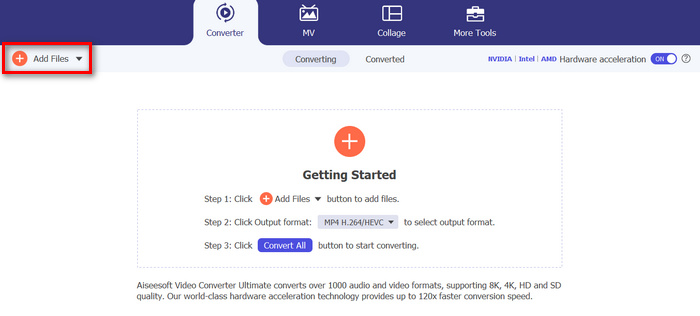
Trinn 2. For å importere WMA-filene du vil klippe, klikker du på knappen Add Files.
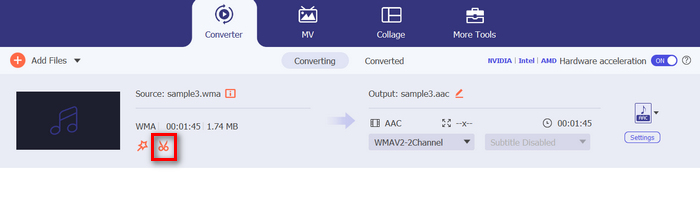
Trinn 3. Klikk deretter på knappen Cut.
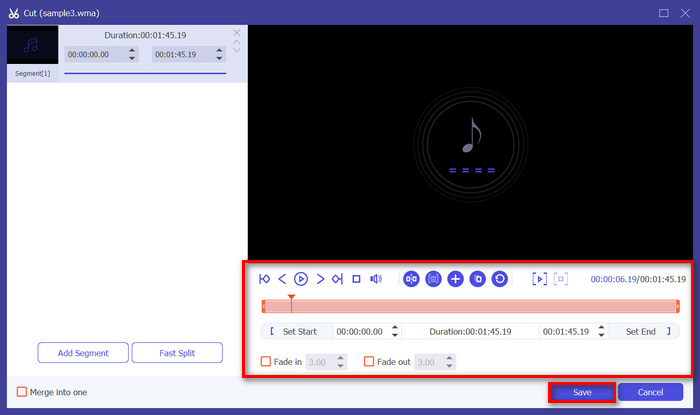
Trinn 4. For å trimme WMA-filene dine kan du gjøre det manuelt ved enkelt å justere eller flytte start- og sluttstolpen på klippet ved å dra den fra venstre til høyre, eller ved å skrive inn start- og sluttid for den delen av WMA-filen du vil trimme.
Den prosessen kutter automatisk delen av lyden basert på tidspunktet når du vil starte og avslutte trimmen.
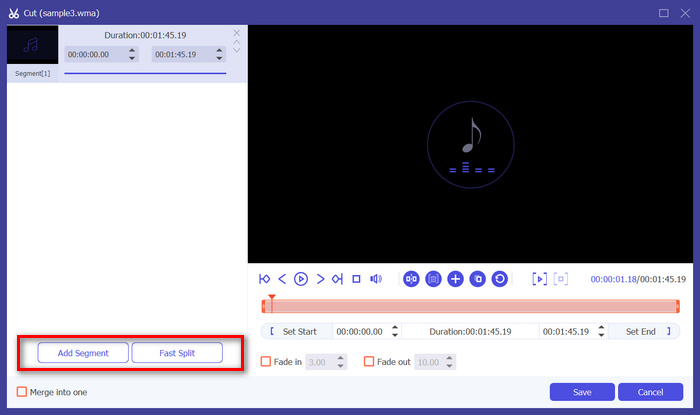
Trinn 5. Hvis du i stedet vil klippe ved hjelp av «Fast Slip»-trimmeren, klikker du bare på Fast Slip-knappen ved siden av Add Segment-knappen. Velg deretter hvilken modus du vil bruke til å dele opp segmentet. Hvis du velger å dele opp etter gjennomsnitt, angir du bare antallet, men hvis du vil dele opp etter tid, angir du tidsintervallet. Deretter klikker du på Save-knappen.
Trinn 6. Til slutt, for å eksportere den trimmede WMA-filen, klikker du på knappen Convert All.
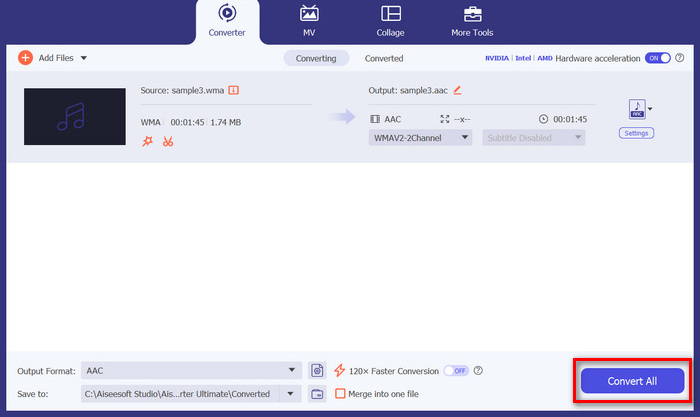
Når det gjelder å kutte WMA-filer, er denne FVC-plukkede Video Converter Ultimate virkelig en må-ha-løsning. Det enkle og brukervennlige grensesnittet sikrer at du enkelt og presist kan trimme WMA-filene dine, og dets ulike trimmealternativer gir deg fleksibilitet med hensyn til hvordan du enkelt vil kutte lydfilene dine.
Del 2: Klipp ut WMA-fil online gratis
Audio Trimmer er et gratis verktøy som lar brukere trimme lydfiler på farten. Dette støtter et bredt spekter av populære lydformater, inkludert WMA, noe som gjør dette verktøyet til et av de beste alternativene hvis du foretrekker å kutte WMA-filer online.
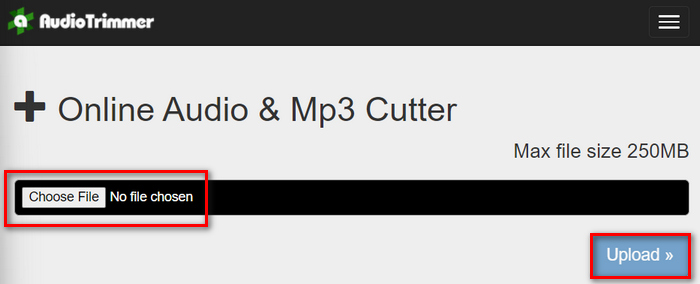
Trinn 1. For å importere WMA-filene du vil klippe, klikker du på knappen Choose File og deretter på Upload-knappen.
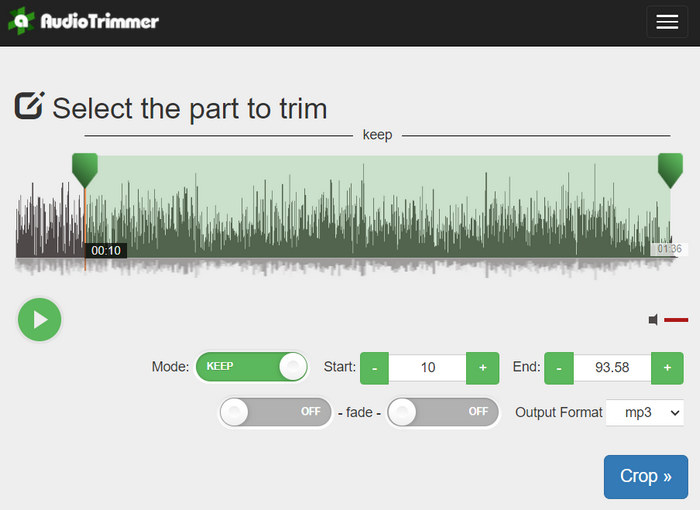
Trinn 2. Nå drar du bare ned linjen og velger den delen av lydsporet du vil trimme. Når du er ferdig, klikker du på knappen Crop.
Trinn 3. Til slutt, for å lagre den trimmede WMA-filen, klikker du bare på knappen Download.
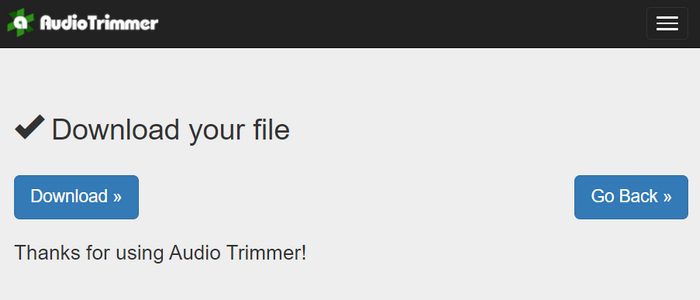
Der har du det, og du kan se på klippene dine med WMA-spilleren for å sjekke om du har klippet dem riktig. Med sitt enkle og svært intuitive grensesnitt tar det bare tre trinn å klippe WMA-filer. Selv om det er lett å trimme lydfiler med dette verktøyet, kan ikke alle brukere dra full nytte av dette gratisverktøyet på nett, siden det er begrenset til filer på under 250 MB.
Del 3: Kutt WMA med VLC Media Player
VLC Media Player er en mye brukt åpen kildekode mediespiller på grunn av sin allsidighet. Dette verktøyet støtter et bredt utvalg av lyd- og videoformater, inkludert WMA-filer. I tillegg til funksjonene for avspilling, streaming og opptak av media, kan dette verktøyet også brukes til å kutte WMA-filer. Med dette kan brukere enkelt trimme seksjoner ved å ta opp i sanntid uten å måtte endre avspillingstiden manuelt.
Trinn 1. Åpne VLC Media Player. Dra og slipp ganske enkelt WMA-filen du vil trimme.
Trinn 2. Lyden begynner å spille av automatisk. Sett avspillingen på pause et øyeblikk, klikk deretter på View-knappen og huk av for Advanced Controls-alternativet. Nå vil du se fire nye knapper over avspillingsikonet.
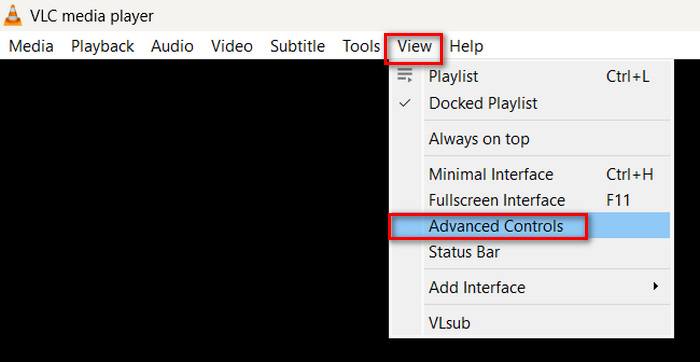
Trinn 3. Dra tidslinjen til punktet der du vil starte klippet. Juster deretter linjen til stedet der du vil begynne å trimme WMA-filen. Når det er gjort, spiller du av og klikker på Record-knappen.
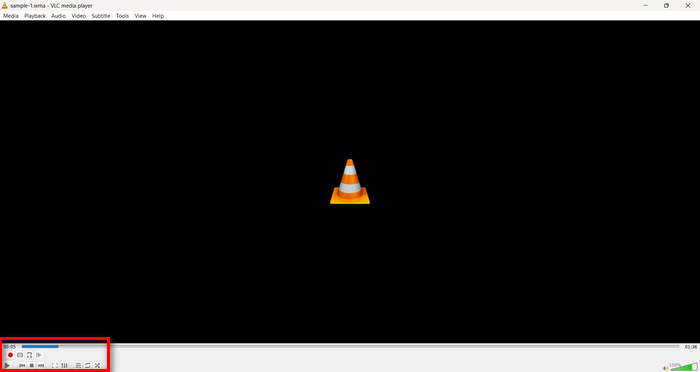
Trinn 4. Når du kommer til slutten av delen du vil lagre, klikker du på Record-knappen igjen for å stoppe opptaket.
Unngå å dra tidslinjen for å endre avspillingstiden mens du tar opp, siden VLC må spille inn segmentet i sanntid. Hvis du liker dette verktøyet, bør du ikke gå glipp av VLC-alternativene her.
Del 4: Vanlige spørsmål om kutting av WMA
Hvordan kutter jeg en del fra en lydfil?
For å kutte en del fra en lydfil, kan du bruke verktøy som Video Converter Ultimate. For å gjøre det trenger du bare å importere WMA-filen, klikke på Klipp-knappen og justere start- og sluttid.
Er WMA bedre enn MP3?
WMA har ofte bedre lydkvalitet ved lavere bithastigheter sammenlignet med MP3, noe som gir mindre filer med god lydkvalitet. MP3 støttes imidlertid bredere på ulike enheter og plattformer. Valget mellom WMA og MP3 avhenger av behovene dine for kvalitet og kompatibilitet. Du kan dessuten endre WMA til MP3 med WMA til MP3-konverteringsverktøy for å gjøre det raskt.
Hvordan trimme lydfiler i Windows Media Player?
For å trimme lydfiler i Windows Media Player, må du bruke en plugin kalt SolveigMM WMP Trimmer Plugin Home Edition. Denne plugin-en lar brukere enkelt trimme lydfiler direkte i Windows Media Players grensesnitt, og gir en praktisk løsning for lydredigeringsoppgaver.
Konklusjon
Klipping av WMA-filer trenger ikke å være stressende. Enten du foretrekker programvare som Video Converter Ultimate, et nettbasert verktøy som Audio Trimmer, eller den allsidige VLC Media Player, finnes det effektive metoder for både Windows- og Mac-brukere. Velg metoden som passer deg best, og begynn å redigere lydfilene dine med letthet. Klar til å gjøre lydredigeringen enklere? Prøv en av disse metodene i dag!
-
 2 metoder for å konvertere FLV til WMA-lyd [gratis og online]
 Vil du hente ut WMA-lyd fra FLV-video? Her er to gratis WMA-lyduttrekkere for å konvertere FLV (Flash Video) til WMA (Windows Media Audio) med rask konverteringshastighet på Mac OS X og Windows 10/8/7.
-
 Toppvalg WMA-metadataredigerere du ikke bør gå glipp av [2024]
 Hvorfor kan jeg ikke redigere WMA-tagger? Dette problemet er vanlig hos brukere' forespørsler. Men i dag vil vi gi deg WMA-metaredigeringene du kan bruke i 2024.
-
 8 måter å konvertere MP4 til MP3-lyd (batchkonvertering og stor størrelse)
 Hvis du vil trekke ut MP3-lyd fra MP4-video, kan du sjekke denne artikkelen og få 8 løsninger. Det er måter online og offline for å konvertere MP4 til MP3 på telefonen eller datamaskinen din uten problemer.
