


 Video Converter Ultimate
 Skjermopptaker
 Videoreparasjon
 Sikker nedlasting
Gjøre YouTube til ringetone: Konvertering på en enkel måte
Er du lei av å bli varslet av kjedelige og repetitive ringetoner på mobilen? Hva med å begynne å bruke den trendy, fengende og livlige tonen du fant på YouTube? Vet du ikke hvordan? Vi hjelper deg – løsningen er å konvertere dem, og flaksen din har bare så vidt begynt, for vi har listet opp programvare og nettbaserte verktøy som er laget for å konvertere YouTube til ringetoner. Begynn å konvertere YouTube‑videoer i dag og gjør den daglige ringetonen din om fra kjedelig til behagelig.

Del 1. Konverter YouTube Link til MP3-ringetone
Lurer du på hvordan du kan gjøre en YouTube-video til ringetonen din? Vel, for denne delen vil vi vise deg hvordan du konverterer en YouTube-video til en MP3-ringetone ved å kopiere og lime inn lenken og bruke et nettbasert konverteringsverktøy som Y2Mate. Prosessen tar omtrent tre trinn, og sikrer en enkel konvertering for å spare tid og angi den nylig konverterte ringetonen.
Trinn 1. Kopier lenken til YouTube‑videoen du vil gjøre om til en ringetone. Dette kan gjøres via en nettleser på datamaskinen eller i YouTube‑appen på mobilen.
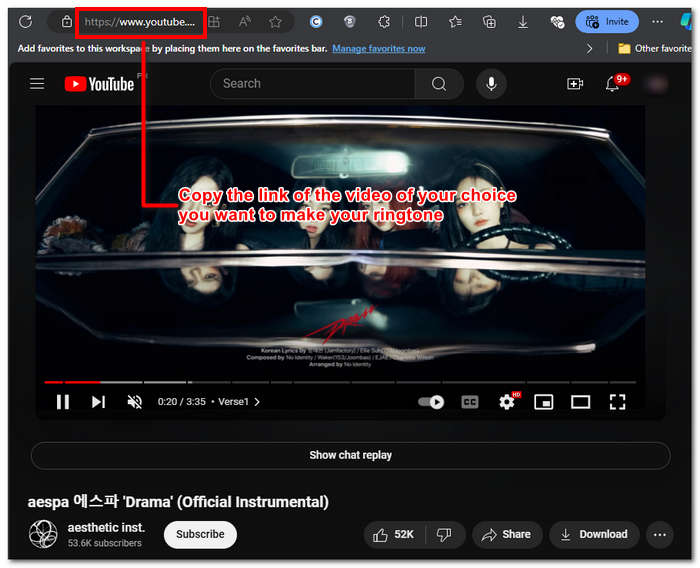
Trinn 2. Gå til Y2Mate.com og lim inn lenken til YouTube‑videoen i det angitte feltet.
Trinn 3. Deretter klikker du på Audio‑knappen og så på Download-knappen for å konvertere filen og lagre den på enheten din.
Dette trinnet fungerer også på mobiltelefoner, da du kan bruke mobiltelefonens nettleser.
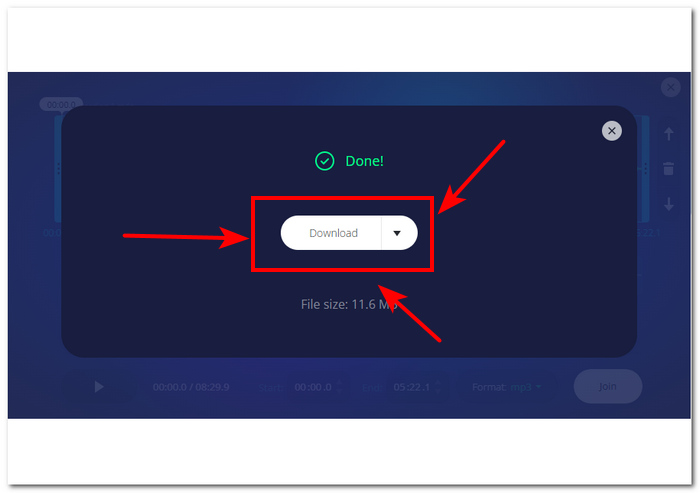
Del 2. Tilpass YouTube-video til MP3-ringetone for Android/iPhone
Hvis du vil laste ned en YouTube‑video, gjøre den om til ringetonen din og tilpasse den for et mer personlig preg, er et programvarebasert verktøy den beste løsningen. FVC-picked Video Converter Ultimate er et alt‑i‑ett‑verktøy som kan konvertere, forbedre, komprimere og til og med redigere video og lyd, med støtte for opptil 1000 filformater. Det er dessuten integrert med høyhastighets prosesseringsteknologi for å sikre rask konvertering uten kvalitetstap.
Angivelig er oppgaven å tilpasse en YouTube-videofil før den konverteres til en M4R- eller MP3-ringetone. Dermed kan programvaren hjelpe deg med å forkorte varighetstiden, legge til fade-effekter og fjerne deler du synes er unødvendige, noe som gjør fullstendig tilpasning som perfekt møter dine preferanser i en ringetone.
Før du tilpasser ringetonen din, bør du ha lastet ned YouTube-videoen din. Hvis du ikke har lastet ned videoen til enheten din, kan du bruke Y2Mate til å gjøre det.
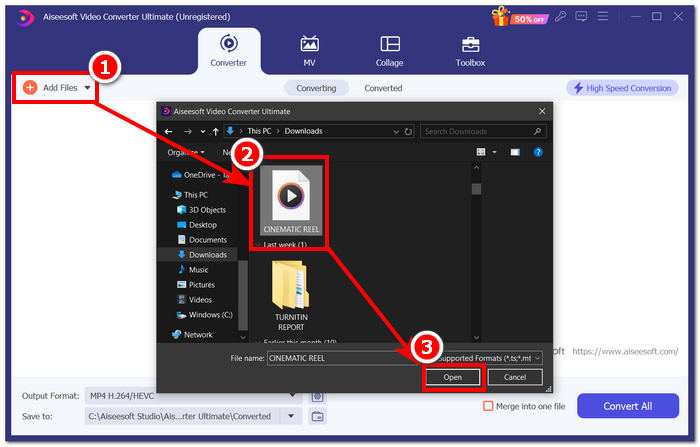
Trinn 1. Last ned og installer FVC-picked Video Converter Ultimate på datamaskinen din. Åpne programmet på enheten din, og last inn den nedlastede YouTube‑videoen ved å klikke på lenken Add Files øverst til venstre i grensesnittet.
Gratis nedlastingFor Windows 7 eller nyereSikker nedlasting
Gratis nedlastingFor MacOS 10.7 eller nyereSikker nedlasting
Trinn 2. Når videoen er importert i programmet, klikker du på saks-ikonet ved siden av videoen for å begynne å tilpasse ringetonen. Når et nytt vindu vises på skjermen, kan du legge til fade‑effekter på ringetonen og gjøre den kortere ved å dra markørlinjen fra venstre mot høyre. Når du er ferdig med tilpasningen, klikker du bare på Save‑knappen.
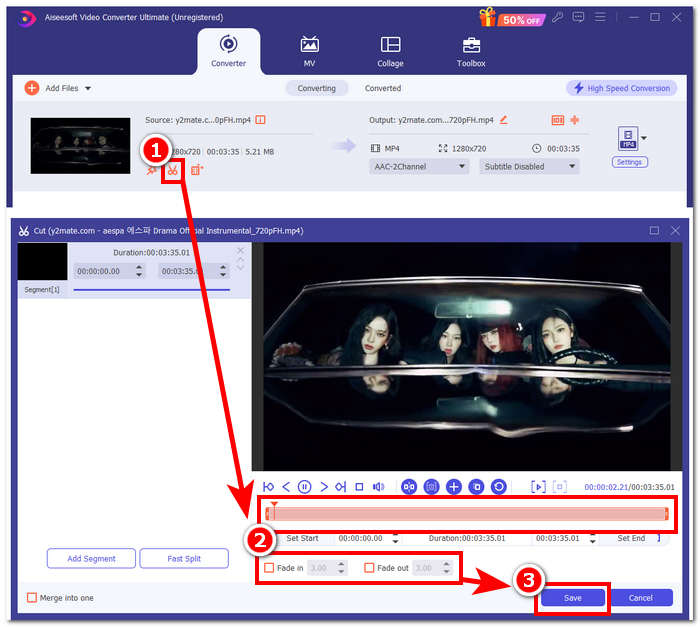
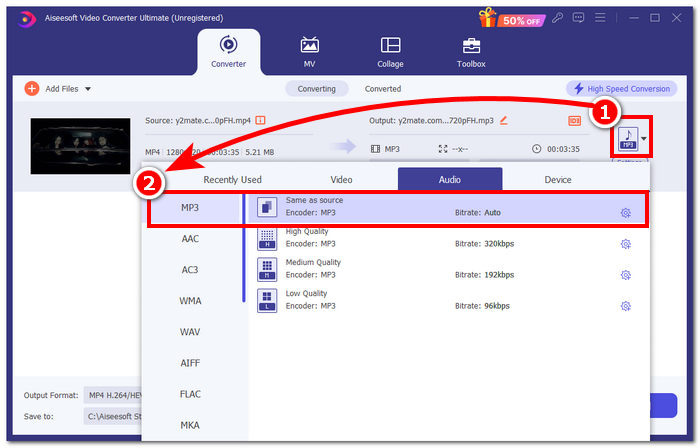
Trinn 3. Når du har tilpasset ringetonen, endrer du filformatet fra MP4, som er et videoformat, til et ekte MP3‑format slik at det vises som en lydfil på enheten din.
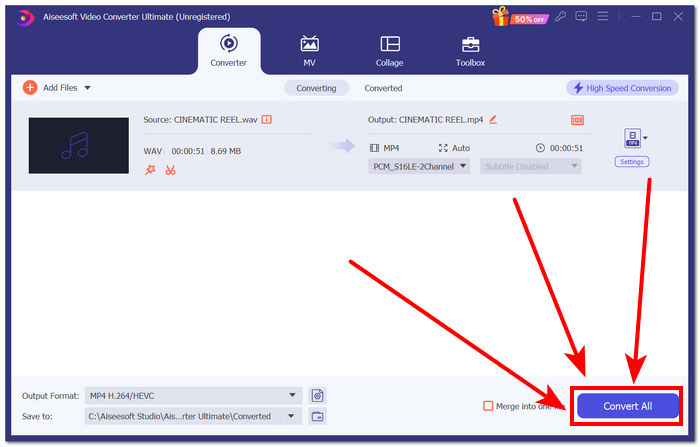
Trinn 4. Klikk på Convert All-knappen for å starte konverteringsprosessen og automatisk lagre ringetonen på enheten din. Når du er ferdig med konverteringen, ligger ringetonen i nedlastingsmappen din.
Del 3. Sett YouTube Video til MP3-ringetone
iPhone
Etter å ha laget ringetoner til iPhone er det å sette en ringetone på en iPhone en ganske tungvint prosess sammenlignet med Android. iPhone har ikke innebygd støtte som forenkler det å legge inn en ny ringetone fra en ekstern kilde. Det hindrer oss likevel ikke i å finne måter å lage en konvertert YouTube‑til‑MP3‑ringetone på iPhone på.
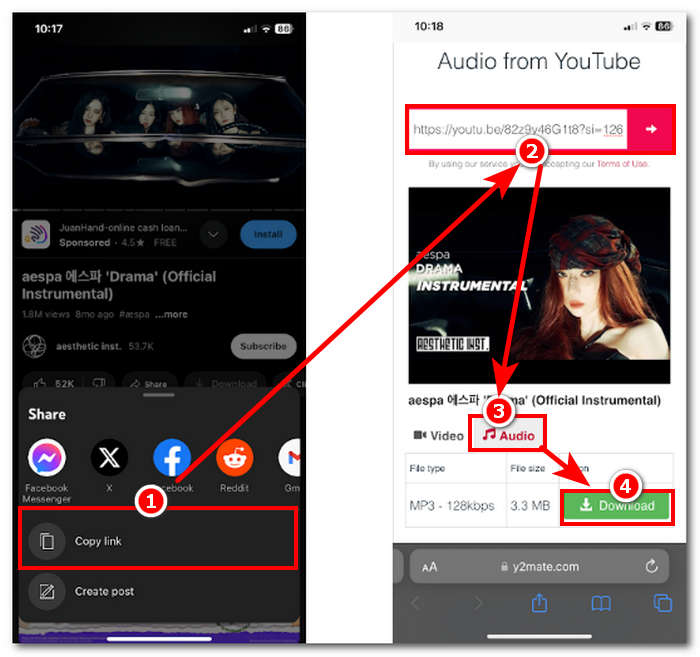
Trinn 1. Kopier videolenken i YouTube‑appen på iPhone‑en din.
Trinn 2. Lim inn URL‑en i det foretrukne konverteringsverktøyet i Safari. Husk å velge Audio‑alternativet først, slik at videoen blir konvertert til MP3 før du trykker på Download-knappen.
Merk: Sørg for at du har installert appene GarageBand og RingtoneMaker før du går videre til neste trinn.
Trinn 3. Åpne RingtoneMaker-appen og last inn den nedlastede YouTube‑ringetonen i appen. Når den er lastet inn, trykker du på Make Ringtone-knappen og velger GarageBand‑appen for å fortsette.
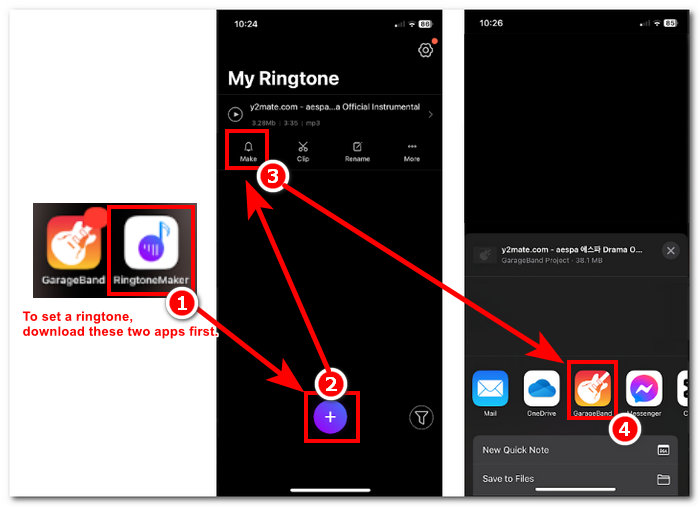
Trinn 4. Når du har blitt videresendt til GarageBand‑appen, trykker du på ringetonen du importerte i appen, og følger deretter denne navigasjonen: Share > Ringtone > Export.
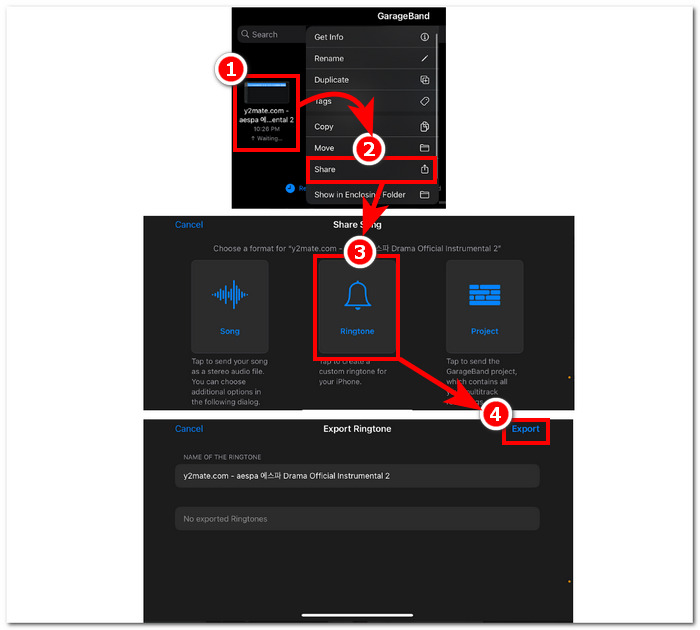
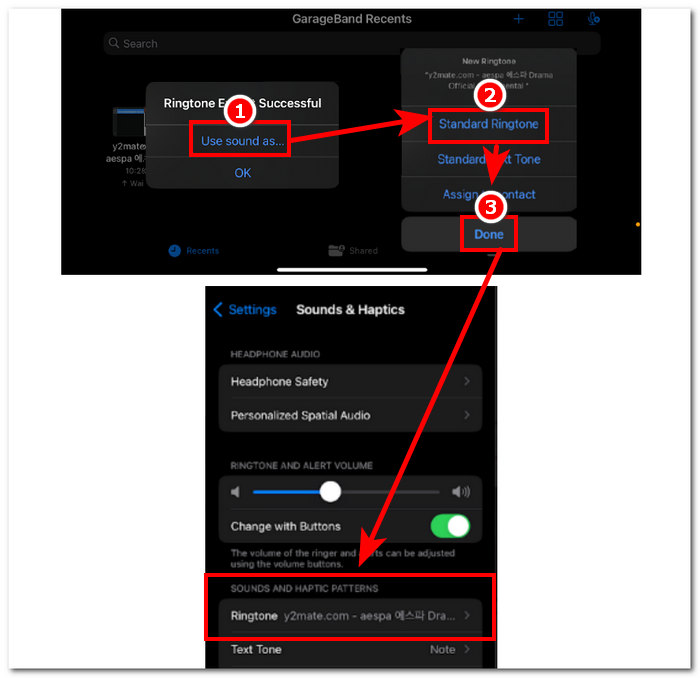
Trinn 5. Når du er ferdig med eksporteringen, bruker du lyden som standard ringetone og trykker på Done-knappen. For å sjekke om du har satt den nye ringetonen riktig, går du til Settings > Sound & Haptics. Navnet på filen din skal ligge under seksjonen Ringtone.
Android
Konvertering av YouTube til MP3-ringetone på Android er like enkelt som å sette det opp. Takket være de innebygde funksjonene tillater Android brukerne å angi en ringetone, noe som gjør prosessen mye enklere og mer praktisk. Dermed må brukere fortsatt laste ned og konvertere YouTube-videoen ved å bruke Y2mate online-verktøyet.
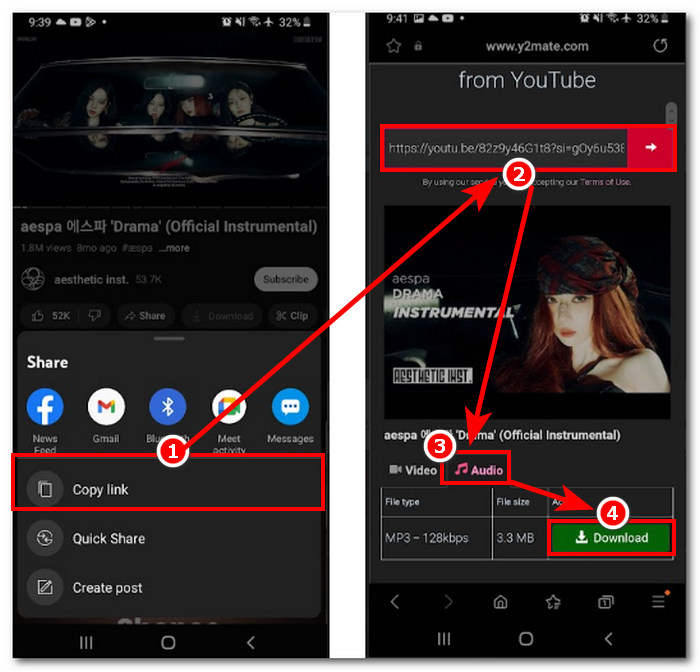
Trinn 1. Bruk YouTube‑appen til å kopiere lenken til videoen du vil lage en ringetone av.
Trinn 2. Bruk nettleseren din til å lime inn lenken i konverteringsverktøyet du ønsker. Før du klikker på Download-knappen, husk å velge Audio‑delen først, slik at videoen blir konvertert til MP3.
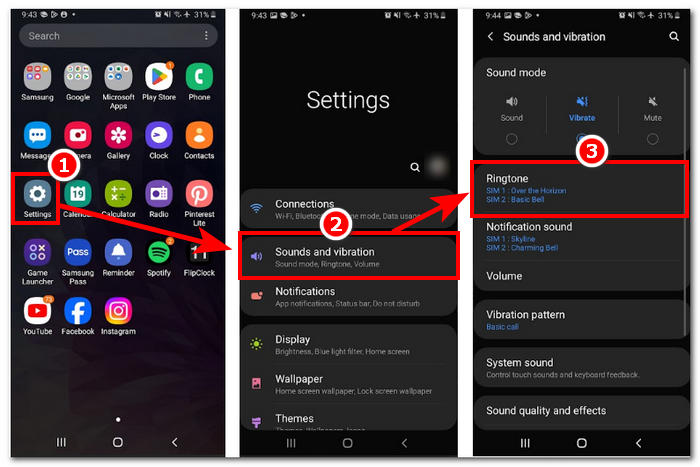
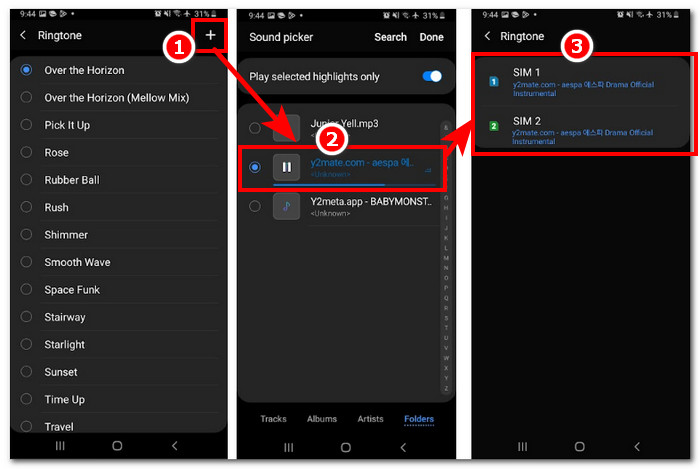
Trinn 3. Gå inn i telefonens ringetoneinnstilling for å angi den nylig konverterte lyden som ringetone. Følg bare denne navigasjonen: Settings > Sound and Vibration > Ringtone.
Trinn 4. Når du er inne i ringetoneinnstillingen, legger du til den nye ringetonen ved å trykke på +-knappen øverst til høyre på skjermen. Og slik, har du nå satt en ny ringetone som kommer fra en YouTube‑video.
Del 4. Vanlige spørsmål om YouTube til MP3-ringetone
Hvilket AI-verktøy konverterer YouTube til MP3?
Mange A-liste AI-verktøy kan effektivt konvertere YouTube-videoer til MP3. Noen populære valg er YTMP3.cc og ClipGrab.
Hva er YouTube til MP3-konverteringsappen?
En YouTube til MP3-applikasjon er et verktøy som kan lastes ned til en brukers mobile enhet. Slike konverteringsapper er TubeMAte, VideMate og Snaptube.
Hvordan lagrer du lyd fra YouTube-shorts?
YouTube forbyr ulovlig nedlasting av lyd, derav innholdet på plattformen. For å ulovlig lagre lyd fra YouTube-shorts, er brukere avhengige av online konverteringsverktøy og telefonskjermopptak.
Konklusjon
Å konvertere YouTube til en MP3‑fil for bruk som ringetone kan være en ganske omfattende prosess, særlig for nybegynnere eller dem som ikke er teknisk anlagt. Ved å følge trinnene ovenfor nøye kan brukere likevel lage sine egne ringetoner uten problemer. Her får du alternativer for hvordan du kan konvertere en YouTube‑video og lage en ringetone ved å bruke det nettbaserte verktøyet Y2Mate for Android‑ og iPhone‑enheter, samt et programvarebasert verktøy, FVC-picked Video Converter Ultimate, for mer avanserte tilpasningsmuligheter.
-
 MOV VS MP4 - Hvilken velger du?
 MOV VS MP4, hvilken er bedre? Dette innlegget forteller forskjellen mellom MP4 og MOV, slik at du kan få det bedre valget å bruke til videofilene dine.
-
 FLAC vs. MP3: Hvilket lydfilformat regjerer
 Dette innlegget vil sammenligne de viktigste forskjellene mellom FLAC vs. MP3. Det inkluderer lydkvalitet, filstørrelse, kompatibilitet og mer.
-
 Hvordan konvertere MP3 til M4A for forbedret lydkvalitet
 Forbedre kvaliteten på musikkfilene dine ved å konvertere MP3 til M4A med våre eksperttips og triks. Vår guide tilbyr trinnvise instruksjoner og anbefalt programvare.
