


 Video Converter Ultimate
 Skjermopptaker
 Videoreparasjon
 Sikker nedlasting
Hvordan konvertere FLV-videofiler til AVI-format på PC / Mac
Denne veiledningen fokuserer på hvordan du kan konvertere FLV til AVI med skrivebordsprogrammer og nettbaserte apper. Det finnes mange grunner til at du kan trenge å konvertere FLV‑videoene dine. FLV ble utviklet for distribusjon av videoinnhold på nettet, men ikke for avspilling på digitale enheter. Når du vil se FLV på datamaskinen, må du endre det til et annet videoformat. Dessuten er det en god idé å redigere videofilene dine ved å konvertere FLV til et ukomprimert videoformat.

Del 1: Topp 2 gratis måter å konvertere FLV til AVI
Metode 1: Konverter FLV til AVI med Free FLV Converter
Når du konverterer FLV til AVI, kan du være bekymret for flere faktorer, som utgangskvalitet, brukervennlighet og mer. FVC Free FLV Converter er det beste valget. Selv om det er gratis, får du en rekke funksjoner på proffnivå uten å trenge særlig teknisk kunnskap. I tillegg tilbyr det mange ekstra verktøy, som videoredigering.
Hovedtrekkene til den beste FLV-omformeren
- 1. Konverter FLV-videoer til andre multimediaformater enkelt.
- 2. Støtt nesten alle videoformater, som AVI, MP4, MKV, etc.
- 3. Batch prosess hundrevis av FLV filer per konvertering.
Gratis nedlastingFor Windows 7 eller nyereSikker nedlasting
Gratis nedlastingFor macOS 10.7 eller nyereSikker nedlasting
Hvordan konvertere FLV til AVI på skrivebordet gratis
Trinn 1: Legg til FLV-filer
Så snart du har installert den beste gratis FLV‑omformeren på datamaskinen din, starter du den. Den er kompatibel med både PC og Mac. Klikk på menyen Add File(s) øverst til venstre for å åpne dialogboksen for filvalg. Finn og velg deretter FLV‑videoene på datamaskinen din, og klikk på knappen Open for å legge dem til.

Trinn 2: Rediger video og angi format
Hvis du vil endre videofilene dine, velger du FLV‑filen og klikker på menyen Edit. Da kommer du til vinduet for videoredigering. Følg instruksjonene på skjermen for å redigere filen, og gå deretter tilbake til hovedgrensesnittet.
Klikk på rullegardinmenyen Utdataformat nederst i hovedgrensesnittet for å åpne profildialogen. Søk deretter etter AVI og velg den i kategorien Generell video.

Trinn 3: Konverter FLV til AVI
Klikk på trepunktsikonet ved siden av feltet Output folder og velg en bestemt mappe for å lagre AVI‑filene. Til slutt klikker du på knappen Convert for å begynne å konvertere FLV til AVI umiddelbart.

Metode 2: Hvordan konvertere FLV til AVI med VLC
VLC er langt mer enn en enkel mediaspiller. Du kan finne mange nyttige funksjoner, inkludert videokonvertering. Som et open source-prosjekt lar VLC deg konvertere FLV til AVI gratis. Videre er VLC i stand til å reparere ødelagte AVI-videoer.
Trinn 1: Åpne den gratis FLV‑omformeren. Hvis du ikke har VLC, laster du det ned gratis fra det offisielle nettstedet.
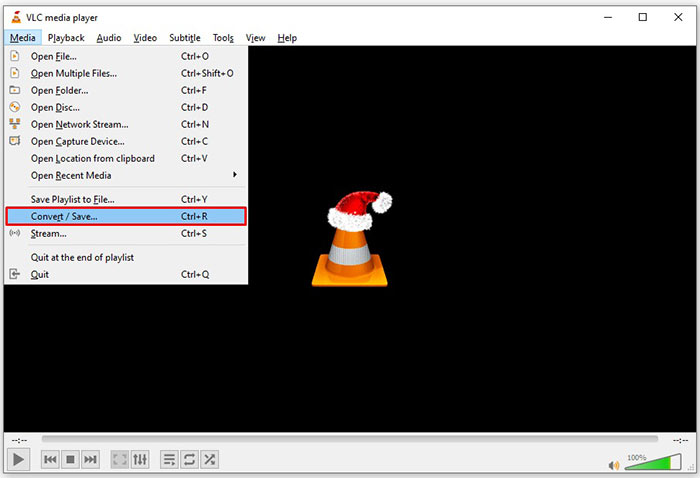
Trinn 2: Gå til menyen Media fra båndmenyen øverst og velg Convert/Save. Velg Convert/Stream fra menyen File på Mac.
Trinn 3: Klikk på knappen Add i dialogboksen for åpen media og legg til FLV‑filen du vil konvertere.
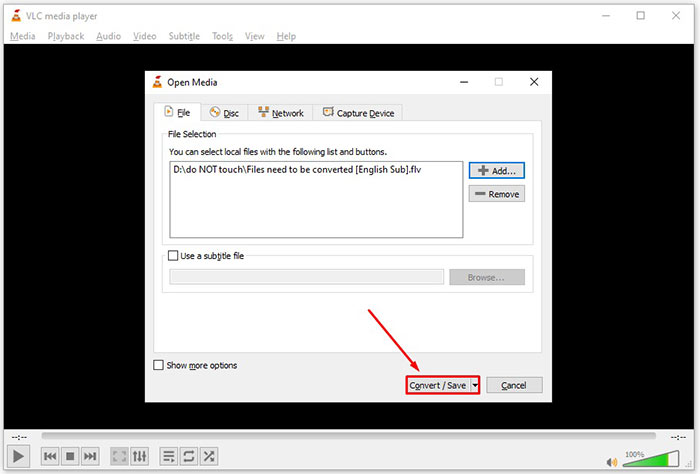
Trinn 4: Klikk deretter på knappen Convert/Save for å gå videre til neste dialog.
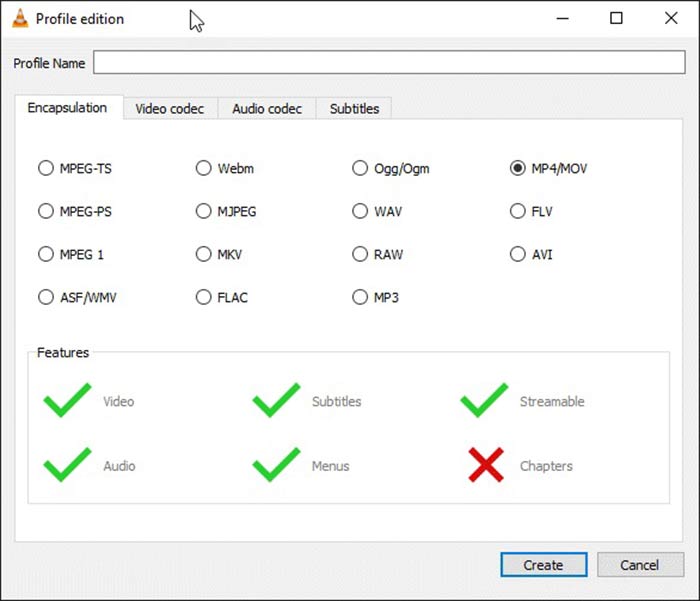
Trinn 5: Åpne rullegardinlisten Profile og velg AVI. Hvis du ikke finner det, klikker du på den tredje knappen ved siden av Profile. Det vil åpne dialogen Profile edition. Velg AVI og skriv inn et Profile Name. Klikk Create for å bekrefte. Velg deretter det nye elementet fra Profile.
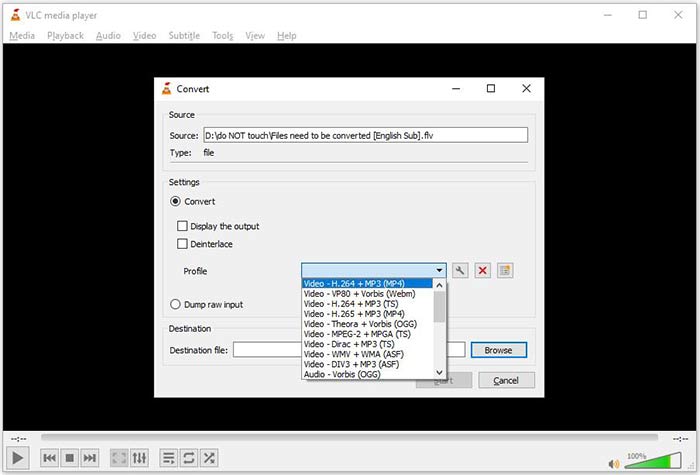
Trinn 6: Angi utdatamappen ved å klikke på knappen Browse. Klikk på knappen Start, så vil VLC konvertere FLV til AVI.
Ikke gå glipp av:
- • Topp 3 måter å konvertere FLV til MOV
- • Slik konverterer du FLV-videoene dine til MP3-lydfiler på skrivebordet og online
Del 2: Hvordan konvertere FLV til AVI Online
Noen ganger trenger du bare å konvertere FLV til AVI på nettet en gang iblant. I tillegg liker noen ikke å installere programvare. FVC Free Online Video Converter kan dekke behovet ditt. Den fungerer på nettet, men er kraftig nok til å konvertere flere FLV‑filer til AVI. I motsetning til andre nettapper har den ingen begrensninger på filstørrelse, vannmerker og mer.
Trinn 1: Gå til https://www.free-videoconverter.net/free-online-video-converter/ i en nettleser når du trenger å konvertere videoer. Klikk på knappen Add Files to Convert og last ned programstarteren.
Last ned skrivebordsversjonen for å konvertere filer i batch.
Trinn 2: Etter nedlasting vil programstarteren dukke opp automatisk. Klikk på knappen Add File øverst til venstre og last opp FLV‑filene du vil konvertere. Velg deretter AVI nederst.
For å endre oppløsning, bildefrekvens og andre parametere, klikk på Gear-ikonet for å åpne profildialogen.
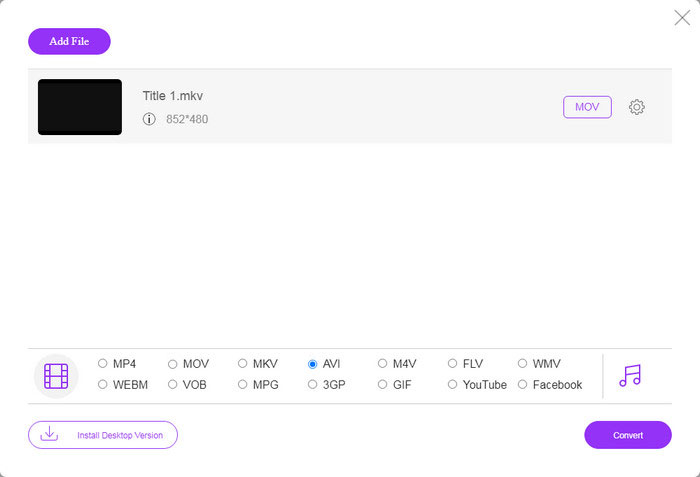
Trinn 3: Når du klikker på knappen Convert, vil nettappen gjøre jobben som ønsket. Når du blir bedt om det, laster du ned AVI‑videofilene til harddisken din.
Sammenlignet med andre nettvideoomformere fungerer Free Online Video Converter raskt, men du trenger også en god internettforbindelse.
FLV kontra AVI
Adobe Flash Player brukte FLV til å levere videoinnhold som filmer og TV-serier. Nå for tiden utvikler ikke Adobe spilleren lenger og anbefaler brukere å avinstallere den av sikkerhetsgrunner. Du kan imidlertid fortsatt bruke FLV-formatet på mange ikke-Adobe/Macromedia-programmer.
Basert på Resource Interchange File Format (RIFF), ble AVI-formatet introdusert av Microsoft i 1992. Det kan lagre video/lyd av høy kvalitet siden det bruker mindre komprimering. Men det forårsaker også den store filstørrelsen til en AVI-fil, som kan være et problem når det er begrenset plass.
Del 3: Vanlige spørsmål om FLV til AVI
Hvor lenge skal jeg vente på å konvertere FLV til AVI?
Det avhenger av situasjonen din. Generelt sett er det veldig raskt å konvertere videoer på skrivebordet. For elektroniske verktøy vil internettforbindelsen din bestemme effektiviteten.
Er det sikkert å konvertere FLV til AVI online?
De fleste online FLV-konverteringsapper lover å slette videoene dine etter konvertering. Du bør imidlertid ikke laste opp private videoer på nettet med mindre du er sikker på at webappen er 100% trygg å bruke.
Er AVI bedre enn FLV?
FLV er et tapsfritt videoformat mens AVI er ukomprimert videoformat. Det betyr at FLV-filen er mindre enn AVI i samme tilstand. AVI gir imidlertid bedre videokvalitet. FLV brukes til å dele videoer online, mens AVI er et godt valg for å redigere videoer.
Konklusjon
Denne guiden har delt tre måter å konvertere FLV-videofiler til AVI-format med stasjonær programvare og webapp. VLC er både en gratis mediespiller og videoomformer, selv om den er vanskelig å bruke. Videre kan du gjøre jobben online uten å installere programvare. Vi foreslår imidlertid at du prøver FVC Free FLV Converter siden utgangskvaliteten er fantastisk. I tillegg er det ganske enkelt å bruke og navigere. Hvis du har andre spørsmål relatert til FLV til AVI-konvertering, kan du legge igjen en melding under dette innlegget.
-
 3 gratis måter å konvertere FLV til WAV
 Hvordan konverterer jeg en FLV-fil? Kan VLC konvertere FLV til WAV? Dette innlegget forteller 3 gratis måter å konvertere FLV til WAV uten kvalitetstap.
-
 3 gratis måter å konvertere FLV til MPG
 Hvordan konvertere FLV til MPEG? Kan jeg konvertere FLV til MPG gratis? Dette innlegget deler 3 gratis videokonvertere for å hjelpe deg med å konvertere FLV til MPG uten tap av kvalitet.
-
 3 gratis måter å konvertere FLV for å spille på Xbox
 Kan du ikke spille FLV-filer på Xbox One eller Xbox 360? Trenger du å konvertere FLV til Xbox-format som MP4, AVI, MOV eller WMV? Dette innlegget viser 3 gratis FLV til Xbox-omformere som du kan spille FLV på Xbox.

