


 Video Converter Ultimate
 Skjermopptaker
 Videoreparasjon
 Sikker nedlasting
Hvordan konvertere FLV-videofiler til 3GP-format gratis
This article will show you the best ways to convert FLV to 3GP. According to the survey, there are tons of video file formats on market. Developers released them for different purposes. FLV, for example, standing for Flash Video, is used to store visual contents for playing in Adobe Flash Player over the internet.
3GP, derimot, er multimediaformatet opprettet av Third Generation Partnership Project for å spare båndbredde og databruk på mobile enheter. Med et annet ord, bør du konvertere FLV til 3GP og se videoer på håndsettet.

Del 1: Beste måten å konvertere FLV til 3GP på skrivebordet
FVC Free FLV Converter is a powerful video converter. As its name indicated, it enables you to convert FLV to 3GP without paying a penny. Moreover, it offers you a lot of useful functionalities, such as video and audio editing. More importantly, the user-friendly interface makes you find what you want quickly.
Nøkkelfunksjoner i den beste gratis FLV-omformeren
- 1. Konverter FLV-videoer til alle multimediaformater, som 3GP.
- 2. Batchhåndterer flere videofiler samtidig.
- 3. Kode FLV-filer for å spille på mobile enheter.
Gratis nedlastingFor Windows 7 eller nyereSikker nedlasting
Gratis nedlastingFor macOS 10.7 eller nyereSikker nedlasting
Hvordan konvertere FLV til 3GP gratis
Start the best free FLV converter after you install it on your machine. It is compatible with Windows 10/8/7 and Mac OS X. Click the Add File(s) button to trigger the open-file dialog. Select the FLV files that you want to convert and click Open. Then the videos will appear in the library area.

Step 2: Set output format
Click and expand the Profile format dropdown menu at the bottom and you will be presented the profile box. Enter 3GP in the Search Profile box and press the Enter key on your keyboard. Then select the output format. If you want to play the videos on your mobile device, select the manufacturer and pick the right model directly.

Step 3: Convert FLV to 3GP
Set a specific directory to store the output by hitting the Open Folder button at the bottom. Finally, click on the Convert button to initiate FLV to 3GP converting. A few minutes later, you will find the 3GP files on your hard drive.

Del 2: Hvordan konvertere FLV til 3GP Online
Web video converter apps are another popular way to convert FLV to 3GP for free. However, most of them have various downsides, like file size limit, watermark, security issue and more. Fortunately, FVC Free Online Video Converter can help you resolve the problem. It is free of charge without any restrictions. The output quality is great.
Step 1: Visit https://www.free-videoconverter.net/free-online-video-converter/ in a web browser and click the Add Files to Convert button to get the launcher. It won't take up local space of your computer.
Last ned skrivebordsversjonen for å konvertere filer i batch.
Step 2: Click the Add File menu and upload the FLV files that you wish to convert. The web app enables you to batch convert videos at one time.
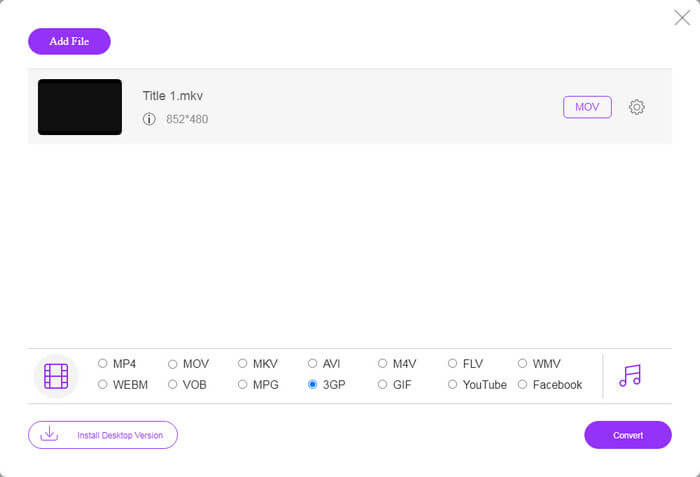
Step 3: Go to the bottom and select 3GP at the profile section. Click on the Convert button to initiate converting FLV to 3GP online. If your network works fast, it will finish in a few seconds. Then download the 3GP files to your hard drive.
Ikke gå glipp av:
Del 3: Hvordan konvertere FLV til 3GP med VLC
Noen ganger er freeware like kraftig som profesjonell programvare. VLC er for eksempel en populær mediespiller med åpen kildekode. Den er i stand til å konvertere FLV til 3GP på Windows, Mac og Linux gratis. Selvfølgelig er utgiften åpenbar, for eksempel vanskelig å bruke. Derfor deler vi trinnene nedenfor:
Step 1: Run the free FLV to 3GP converter on your computer. You need to install it first. The official website provides the safe installer.
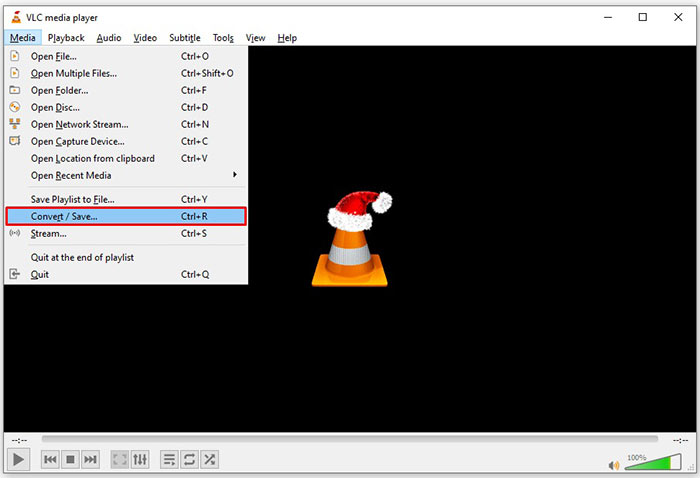
Step 2: Go to the Media menu on the top ribbon and choose Convert/Save. Then the open media dialog will pop up.
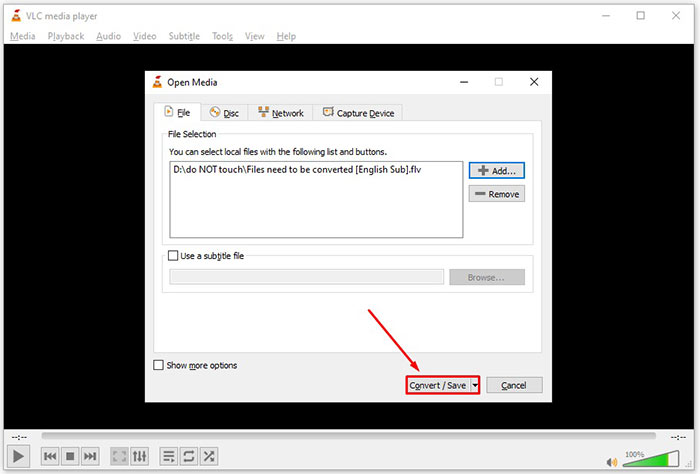
Step 3: Click the Add button, find the FLV file that you need to convert and select it, and click Open. Hit the Convert/Save button to move to the next window.
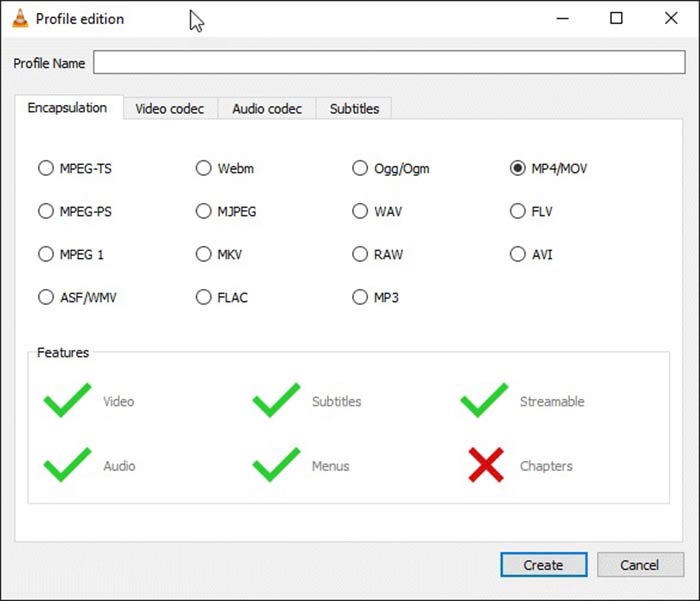
Step 4: Unfold the dropdown list next to Profile and choose 3GP or relative video format. If you want to change the video codec or other parameters, click the Profile Edit button next to the dropdown list and add 3GP.
Step 5: Click the Browse button and choose a specific folder to save the output 3GP file in the Destination section.
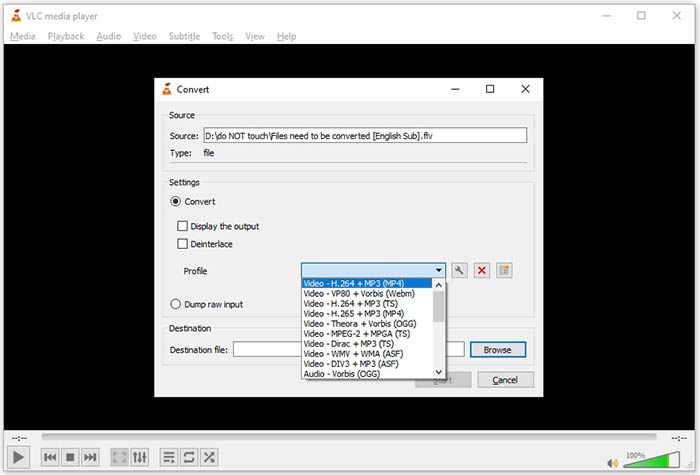
Step 6: As long as you click on the Start button, VLC will begin converting FLV to 3GP.
Det tar et øyeblikk å fullføre konverteringen siden VLC gjør jobben ved å spille inn originalvideoen. Det betyr at prosessen tilbringer så lenge lengden på FLV-videoen din.
FLV vs. 3GP
Adobe Flash Player brukte FLV til å levere videoinnhold som filmer og TV-serier. Nå for tiden utvikler ikke Adobe spilleren lenger og anbefaler brukere å avinstallere den av sikkerhetsgrunner. Du kan imidlertid fortsatt bruke FLV-formatet på mange ikke-Adobe/Macromedia-programmer.
3rd Generation Partnership Project (3GPP) produserte 3GP/3GPP-formatet som et multimediebeholderformat. Det er faktisk basert på ISO-mediefilformatet. Vi bruker den ofte til å lagre video-/lydstrømmer som overføres mellom 3G-mobiltelefoner og online.
Del 4: Vanlige spørsmål om konvertering av FLV til 3GP
Vil konvertering av FLV til 3GP skade videokvaliteten?
Generelt vil videokonvertering miste kvalitet. Imidlertid er et kraftig videokonverteringsprogram i stand til å løse dette problemet og optimalisere videokvaliteten ved hjelp av avansert teknologi.
Hvor lang tid tar det å konvertere en FLV-video?
Det bestemmes av flere faktorer, som videolengden, videokonverteringsprogramvaren du bruker, maskinvarens ytelse og mer. Hvis du bruker en webvideoomformer, er internettforbindelsen et viktig element.
Hvorfor spiller ikke FLV på iPhone?
iPhone støtter MOV, en del av MP4, ASF og AVI. Derfor kan du ikke åpne FLV på iPhone direkte. Imidlertid er det måter å se FLV på mobile enheter. Hvis FLV-filen din er vert for internettjenester, som Google Drive, er den innebygde mediespilleren tilgjengelig. I tillegg kan du bruke en annen mediespiller, som VLC.
Konklusjon
Denne guiden har fortalt deg tre gratis måter å konvertere FLV-videofiler til 3GP-format på datamaskin eller online. Hvis du forbereder deg på å se FLV-videoer på mobile enheter, bør du konvertere den til 3GP eller andre mobilvennlige videoformater med FVC Free FLV Converter. Det er ikke bare enkelt å bruke, men også i stand til å beskytte videokvaliteten din. Flere spørsmål? Legg igjen en melding nedenfor.
-
 Hvordan konvertere FLV-videofiler til MP4 uten å betale en krone
 Denne guiden deler fire gratis metoder for å konvertere FLV-videofiler til MP4-format på Windows 10/8/7 / XP og Mac OS X, slik at du kan nyte videoene på alle enheter.
-
 Slik konverterer du FLV-videoene dine til MP3-lydfiler på skrivebordet og online
 Hvordan konvertere en FLV til en MP3-fil? Alt du trenger å gjøre er å lese denne artikkelen nøye, finne din favorittmetode og følge vår trinnvise guide for å få det du vil ha.
-
 Topp 3 måter å konvertere FLV til MOV
 Hvordan konvertere FLV til MOV? Hvordan konverterer jeg FLV til MOV på Mac? Er det noen gratis måte å konvertere FLV til MOV på nettet? Dette innlegget deler 3 FLV til MOV-konverterere for å endre FLV-filer til MOV.

