


 Video Converter Ultimate
 Skjermopptaker
 Videoreparasjon
 Sikker nedlasting
3 beste Facebook-opptakere - Slik tar du opp Facebook-videosamtaler
Hvordan ta opp videosamtaler på Facebook for å bevare de dyrebare øyeblikkene mellom deg og venner og familie? Etter at Facebook fikk funksjonen for videosamtaler, foretrekker stadig flere brukere å kontakte andre via Facebook-samtaler i stedet for vanlige telefonsamtaler. Men som en ekstra kommunikasjonsfunksjon i et sosialt medienettverk har den ikke en opptaksfunksjon slik som en telefonsamtale. Den tilhørende frittstående appen – Facebook Messenger – har heller ikke en innebygd opptaker. I denne situasjonen kan du lære om 3 brukervennlige Facebook-opptakere for datamaskiner, iOS-enheter og Android-mobiler med detaljerte veiledninger i denne artikkelen.

Del 1: Den beste online Facebook Call Recorder for Windows / Mac
Uten å laste ned tredjepartsprogramvare kan du bruke FVC Free Screen Recorder til å ta opp videosamtaler på Facebook gratis på nett. Dette er en brukervennlig Facebook-opptaker med et oversiktlig grensesnitt og flere funksjoner du trenger.
- 1. Ta opp Facebook-samtaler og videoer online gratis med enkle trinn.
- 2. Tapsfri innspilling av lyd og videoer for å holde videoer av høy kvalitet.
- 3. Ingen vannmerker for å beskytte ditt eierskap.
- 4. Opptakene lagres automatisk i mediebiblioteket, og du kan velge å slette, laste ned og dele på SNS fritt.
Trinn 1: Gå til nettsiden til FVC Free Screen Recorder i en hvilken som helst nettleser. Klikk på Start Recording-knappen for å installere starteren på noen sekunder, og klikk deretter på Start Recording-knappen igjen for å starte opptakeren.

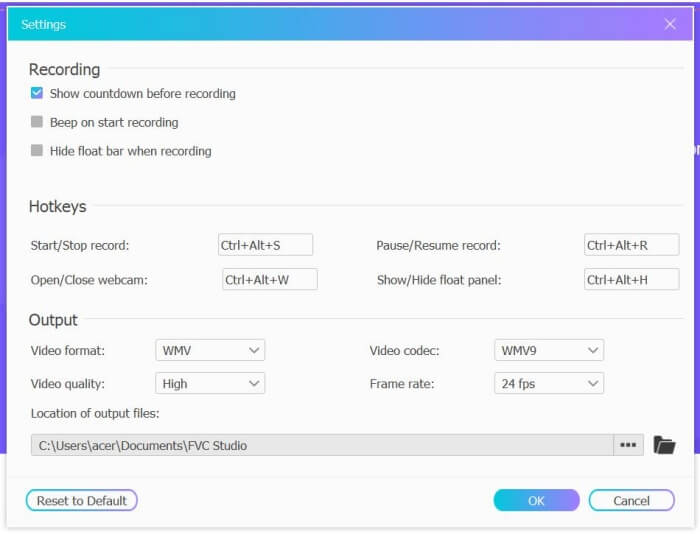
Trinn 2: Klikk på menyen Recording Area for å velge fullskjerm eller fritt velge et område. Slå deretter på Microphone og Speaker-lyd. For å justere videoinnstillingene kan du klikke på ikonet Setting. Du kan velge MP4-format, høy kvalitet og 24 fps for å beholde høy bildekvalitet på opptakene. Klikk deretter på REC-knappen for å begynne å ta opp Facebook-samtaler.
Trinn 3: Det vil dukke opp en verktøykasse med flere redigeringsverktøy. Du kan legge til figurer, tekst og linjer etter behov. Klikk deretter på Stop-ikonet for å lagre opptaket ditt i skyen. Du kan høyreklikke for å laste det ned til datamaskinen din.
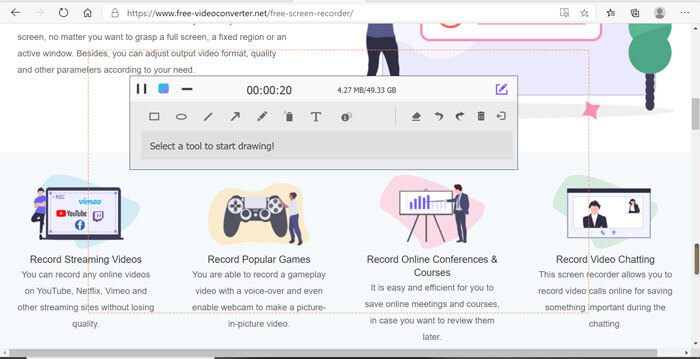
Å bruke denne gratis online videoopptakeren på Facebook er den beste måten for databrukere å ta opp Facebook-videosamtaler online. Ved å justere opptaksinnstillingene på forhånd, kan den lagre Facebook-samtalene i MP4-format med liten størrelse og høy kvalitet. Hvis du er vant til å ha Facebook-samtaler på mobilen, kan du lese denne artikkelen.
Del 2: Slik tar du opp Facebook-samtale for iOS gjennom standardopptakeren
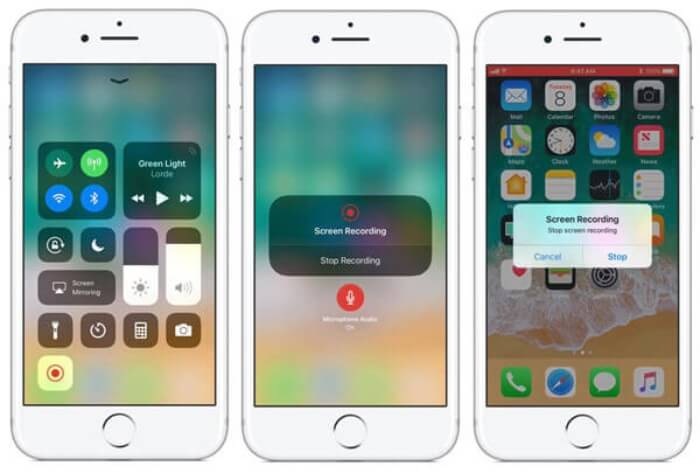
Den oppdaterte versjonen av iOS 11 eller nyere har en ny standardopptaker på iPhone og iPad som er det beste valget for å fange Facebook-videosamtaler uten å laste ned noen apper. Her kan du lære hvordan du legger til Facebook-opptakeren til snarveiene i kontrollsenteret og måten å bruke den på.
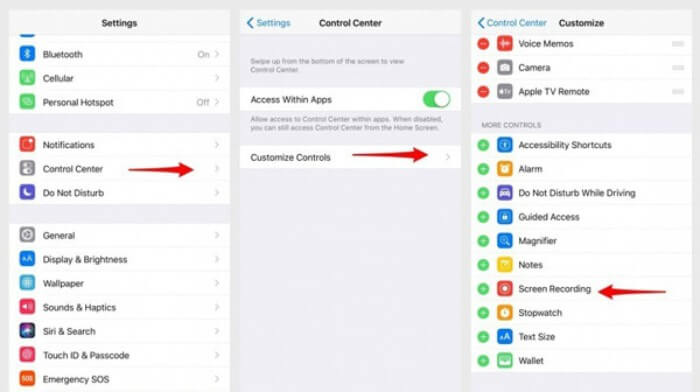
Trinn 1: Åpne appen Settings på iPhone/iPad og bla ned for å velge Control Center. Trykk deretter på fanen Customize Controls og finn funksjonen Screen Recording. Trykk på Plus-ikonet for å legge denne funksjonen til i kontrollsenteret.
Trinn 2: Dra ned fra toppen av skjermen for å åpne kontrollsenteret, så vil du finne opptaksfunksjonen nederst. Trykk på ikonet Screen Recording for å starte opptaket, og du kan velge å fange video eller bare ta opp lydsporet. Hvis du vil avslutte, trykker du på den røde Status Bar øverst og deretter på Stop i vinduet som dukker opp.
Del 3: En enkel Facebook Messenger-opptaker for Android
Noen Android-telefoner har ikke innebygde opptakere, og det er for mange Facebook-videoopptakere som Android kan velge mellom. Dermed kan du lære en av de beste opptakere for Android-mobiler med de detaljerte trinnene i den følgende delen.
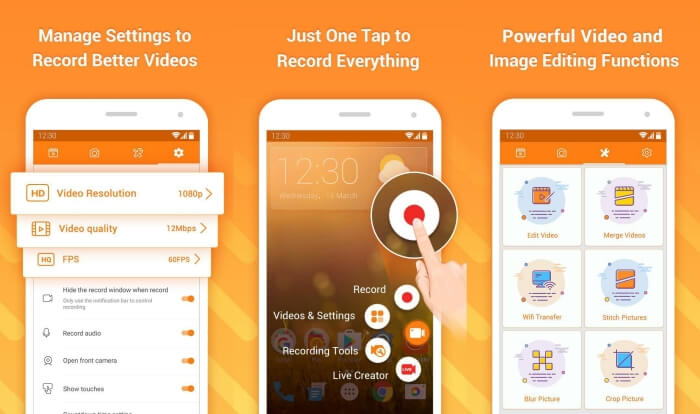
DU Recorder er en brukervennlig Facebook-opptaker for Android og er kjent for jevn opptakskvalitet. Uten root-tilgang kan alle bruke den til å ta opp samtaler i Facebook Messenger med ett trykk.
Trinn 1: Start opptakeren; du vil se fire menyer: opptak, skjermbilder, redigeringsverktøy og innstillinger. Trykk først på menyen Settings for å justere videoparametrene. For å beholde høy kvalitet kan du velge 1080p-oppløsning og 30 fps bildefrekvens.
Trinn 2: Lukk ikke opptakeren, men åpne Facebook Messenger. Da vil du se opptakerikonet. Trykk på ikonet og velg Recording-ikonet for å begynne å ta opp skjerm og lyd. Du kan trykke på det igjen for å stoppe opptaket. Deretter kan du trykke på Editing-ikonet for å klippe opptaket og legge til musikk.
Her er noe du kanskje liker:
Action Screen Recorder-anmeldelse
Del 4: Vanlige spørsmål om Facebook Call Recorder
1. Dose Facebook har standard opptaker for å ta opp videosamtaler på PC?
Nei, det gjør det ikke. Dermed må du stole på andre profesjonelle Facebook-opptakere. Hvis du ikke vil laste ned annen programvare som vil oppta lagringsplassen på datamaskinen din, er FVC Free Screen Recorder det beste valget.
2. Hvordan starte en prat med en venn på Facebook Messager App?
Først åpner du Facebook Messenger på mobilen din, og velger deretter chatboks til vennen du vil ha en Facebook-samtale. Og nå kan du se videoikonet, slik at du kan klikke på det for å starte en videosamtale.
3. Hvilket format skal jeg velge å lagre opptakene når jeg bruker Facebook Messenger-opptakere?
Enten du bruker en Facebook-samtaleopptaker på en datamaskin eller mobil, er det beste formatet for å lagre Facebook-videosamtaler MP4. Det kan spare mer lagringsplass og det er kompatibelt med alle enhetene.
Konklusjon
Artikkelen ovenfor har presentert 3 opptakere for Facebook-videosamtaler. For iPhone, iPad og noen Android-telefoner kan du enkelt bruke den innebygde opptakeren på telefonen. Ellers kan du velge en hvilken som helst opptaker, inkludert DU Recorder, i Google Play. For PC er FVC Free Screen Recorder ditt beste valg for å ta opp Facebook-samtaler. Hvis du møter andre problemer når du bruker Facebook-opptakere, kan du legge igjen en kommentar nedenfor.
-
 Snagit 2021 Review - Fordeler, ulemper og det beste alternativet
 Hva er det beste alternativet til Snagit? Er det et skjermopptaksverktøy som Snagit? Dette innlegget vil vurdere Snagit og dele det beste alternativet til Snagit for å fange skjermen.
-
 6 beste WAV -opptakere du ikke bør gå glipp av på skrivebord og online
 Den beste WAV -innspillingsprogramvaren vi deler i denne artikkelen, har en rekke nyttige funksjoner som hjelper deg med å fange lyd og stemme som profesjonelle.
-
 Topp 4 gratis AIFF -lydopptakere som produserer lyd av høy kvalitet
 Denne artikkelen snakker om AIFF og noen av de mest populære verktøyene du kan bruke til å produsere AIFF-format av høy kvalitet.
