


 Video Converter Ultimate
 Skjermopptaker
 Videoreparasjon
 Sikker nedlasting
Hva er en MTS-fil og hvordan konvertere / spille av MTS-filer
Du får en videoopptak i MTS-format hvis du bruker et videokamera fra Sony eller Panasonic. Egentlig vil du ikke legge merke til det før du oppdager at du ikke kan spille av MTS-filen med mediespilleren eller enheten din. Da melder spørsmålet seg: Hva er en MTS-fil?

Nå i mange felt og elektroniske produkter er det høyere og høyere krav til bildekvalitet for videoprosessen. MTS er et HD-videoformat for transportstrøm, som kan tilby visuell opplevelse av høy kvalitet.
MTS er imidlertid ikke et populært filformat. Mange ofte brukte mediespillere og bærbare iOS/Android-enheter kan ikke spille av MTS-filen direkte. Med det i tankene ønsker vi i dette innlegget å gi deg en detaljert introduksjon til MTS-formatet. Dessuten vil vi vise deg 3 enkle måter å konvertere og spille av MTS-filer på.
Del 1. Hva er en MTS-fil - MTS vs MP4
MTS er filendelsen for AVCHD (Advanced Video Coding High Definition), som hovedsakelig brukes av HD-videokameraer fra Sony og Panasonic. Det er utviklet i fellesskap av Sony og Panasonic og er spesielt designet for høyoppløselige digitale videoer. MTS er et høyoppløselig MPEG- og H.264-transportstrøm-videoformat, og det støtter i stor grad 720p og 1080i HD. Sammenlignet med andre formater kan derfor en MTS-fil tilby høyere videokvalitet.
MTS er filtypen til AVCHD-video på digitalt videokamera. Når du importerer en MTS-fil til datamaskinen, blir filtypen automatisk M2TS. MTS er også mye brukt til Blu-ray Disc Audio-Video (BDAV). Den har muligheten til å bære forskjellige video-, lyd- og andre strømmer.
En MTS-fil kan gi video av høy kvalitet med relativt liten filstørrelse. Men som nevnt ovenfor, støttes ikke MTS av mange mediespillere, videoredigeringsprogrammer, datamaskiner og mobile enheter. Det er lett å få en feil ved avspilling av MTS på grunn av manglende kompatibilitet. På grunn av dette er det mange som søker på internett etter MTS-spiller, hvordan spille av en MTS-fil og hvordan konvertere MTS til MP4, og så videre.
MTS vs MP4
Sammenlignet med MTS kan MP4 enkelt spilles av nesten alle mediespillere, videoredigeringsverktøy og enheter. MP4 er det mest populære digitale multimedia-containerformatet for lagring av video. MP4 er også i stand til å bære lyd og tekst.
MP4 er kompatibel med Windows 10/8/7 / XP / Vista PC, Mac, redigeringsprogramvare, mediaspillere, iOS / Android-enheter som iPhone, iPad, iPod touch, Android-telefon, Windows-telefon og mer. MP4 kan tilby høy videokvalitet og samtidig ha en passende filstørrelse. Så når du får et format som ikke støttes som MTS, kan du velge å konvertere det til MP4 for bedre avspilling.
Del 2. Hvordan gratis konvertere MTS til MP4 online
Når du vil dele den innspilte MTS-videoen til YouTube, Facebook eller andre plattformer, eller hvis du vil redigere og se den på enheten din, må du kanskje konvertere MTS til MP4. Heldigvis er det mange MTS-videokonvertere, inkludert noen gratis online som kan hjelpe deg med å gjøre MTS-filkonvertering. Her på denne delen vil vi introdusere deg med en populær gratis online videokonverterer, FVC Free Online Video Converter for å konvertere MTS-filen.
Trinn 1. Først åpner du nettleseren din og går til den offisielle nettsiden til FVC Free Online Video Converter. Du kan gå direkte til https://www.free-videoconverter.net/free-online-video-converter/. Deretter klikker du på knappen Add Files to Convert for å laste ned og installere startprogrammet.
Trinn 2. Når startprogrammet er aktivert, laster du opp MTS-filen du vil konvertere til MP4. Klikk deretter på knappen Convert for å starte videokonverteringen fra MTS til MP4.

Del 3. Gratis måte å konvertere MTS til MP4 uten kvalitetstap (anbefalt)
Med den gratis nettbaserte videokonverteren over kan du enkelt utføre videokonvertering fra MTS til MP4. Hvis du er mer opptatt av kvaliteten på den ferdige MP4-filen, bør du prøve Free MTS Converter. Den lar deg konvertere MTS til MP4 uten tap av bilde- eller lydkvalitet.
Gratis nedlastingFor Windows 7 eller nyereSikker nedlasting
Gratis nedlastingFor MacOS 10.7 eller nyereSikker nedlasting
Trinn 1. Dobbeltklikk på nedlastingsknappen ovenfor, og følg deretter instruksjonene på skjermen for raskt å installere og kjøre denne gratis MTS-til-MP4-konverteren på datamaskinen din.
Trinn 2. Når du kommer inn i første vindu i denne MTS-videokonverteren, klikker du på Add File(s) for å laste inn MTS-filen du vil konvertere. I dette trinnet kan du legge til én eller flere filer etter behov.
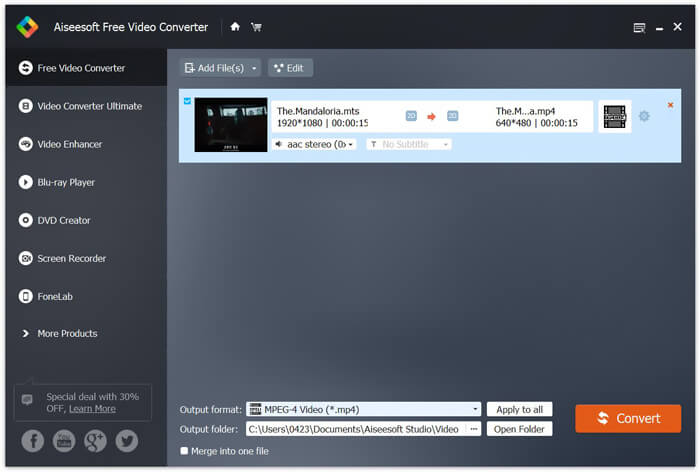
Trinn 3. Klikk på Output format, og velg deretter MP4 som målformat. Her kan du også velge en passende målmappe for den konverterte videoen ved å klikke på Output folder-alternativet. Etter det klikker du på knappen Convert for å starte den gratis videokonverteringen fra MTS til MP4.

Free Video Converter er designet med den nyeste akselerere teknologien som garanterer deg en veldig rask MTS / M2TS til MP4 konverteringshastighet. Videre tilbyr den også noen grunnleggende redigeringsfunksjoner for deg til tilpasset video før den endelige konverteringen. Du bør laste den ned gratis og prøve.
Del 4. Hvordan gratis konvertere og spille av en MTS-fil med VLC Player
Hvis du har VLC Media Player installert på datamaskinen din, kan du stole på at den gratis konverterer en MTS-fil til MP4, MOV, FLV og mer for bedre opplasting eller avspilling. Faktisk, som en åpen kildekode mediespiller, lar VLC Player deg direkte nyte MTS-fil med god visuell opplevelse. Her i denne delen vil vi gjerne vise deg hvordan du spiller og konverterer en MTS-fil på VLC-spiller.
Spill av en MTS-fil med VLC Player
Trinn 1. Først må du sørge for at du har en VLC Player på datamaskinen. Åpne deretter denne mediaspilleren for avspilling av MTS-fil.
Trinn 2. Klikk på Media > Open File for å laste inn MTS-filen du vil spille av. Etter innlasting vil VLC Player automatisk spille av MTS-filen for deg.
Her bør du vite at ikke alle MTS-filer kan vises med gode effekter på VLC Player.
I noen tilfeller er det mer sannsynlig at du får en MTS-spillfeil. Du må legge til noen utvidelser for å få VLC Player til å støtte din MTS-fil. For eksempel trenger du et bibliotek for AACS-dekoding for å spille en MTS-fil.
Konverter en MTS-fil med VLC Player
Når du får MTS-filavspillingsfeil, kan du faktisk velge å konvertere MTS til et populært videoformat som MP4, MOV, FLV og AVI og så videre. Etter det kan du enkelt se MTS-filen på alle enheter uten problemer.
Trinn 1. Åpne VLC Player på datamaskinen din. Klikk på Media > Convert/Save for å få opp popup-vinduet Open Media. Her kan du klikke Add for å importere MTS-filen du vil konvertere.
Trinn 2. Etter import klikker du på Convert Save for å åpne konverteringsvinduet. Klikk på Profile, og velg deretter MP4 som målformat. I dette trinnet kan du velge en passende målmappe for videoen som skal eksporteres, ved å klikke på alternativet Browse.
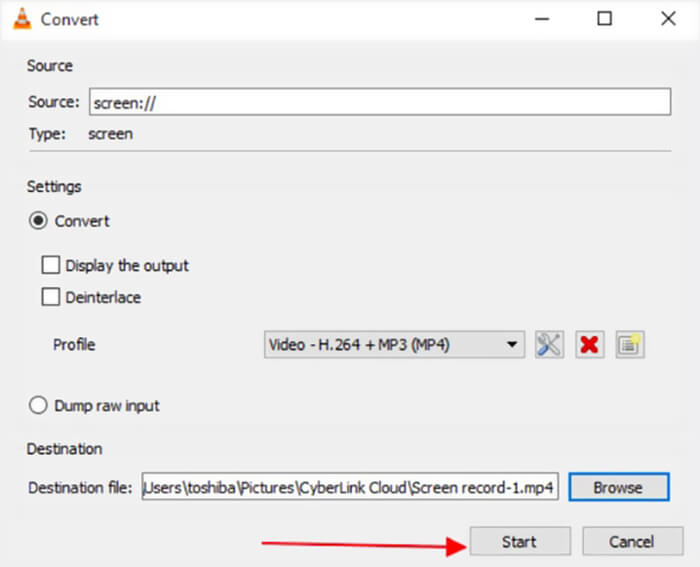
Trinn 3. VLC Player gir deg noen grunnleggende redigeringsfunksjoner. Før den endelige MTS-filkonverteringen kan du tilpasse videoeffektene etter behov. Deretter kan du klikke på Start for å begynne den gratis konverteringen av MTS-filen.
Etter å ha lest denne siden kan du få en klar forståelse av MTS-filen. I tillegg kan du lære hvordan du konverterer og spiller av en MTS-fil. Legg igjen en melding til oss hvis du fortsatt har spørsmål om MTS-formatet.
-
 2 enkle måter å gratis konvertere MTS til MP3
 Har du behov for å trekke ut MP3-lyd fra MTS-fil, men vet ikke hvordan? Hva er den beste MTS til MP3-omformeren? Dette innlegget deler to enkle måter å hjelpe deg med å konvertere MTS / M2TS til MP3 med høy lydkvalitet.
-
 Topp 4 gratis måter å konvertere MTS til MOV
 Kan du ikke spille MTS-filen på datamaskinen eller iPhone / Android-telefonen? Hva er en MTS-fil og hvordan spiller du den? Hva er den beste MTS Video Converter? Dette innlegget deler 4 enkle og gratis måter å hjelpe deg med å konvertere MTS til MOV for bedre avspilling.
-
 Hva er forskjellen mellom MTS og M2TS
 Hva er MTS- eller M2TS-fil? Hva er forskjellen mellom M2TS og MTS? Hvordan kan jeg se videokameraets innspilte MTS- eller M2TS-fil? Finn alle svarene i dette innlegget.
