


 Video Converter Ultimate
 Skjermopptaker
 Videoreparasjon
[Gratis og betalt] Mestre kunsten å konvertere for MKV til AVI-format
Matroska utviklet MKV‑formatet for å bevare filer slik at de kan brukes i fremtiden. I praksis blir filer i dette formatet pakket hver for seg med ulike kodeker inni. Men i noen tilfeller kan de ikke spilles av i den innebygde mediespilleren på PC-en eller Mac-en din. Derfor er det ofte best å konvertere dem til AVI-filformatet eller et annet egnet format. Vil du vite hvordan du endrer en MKV-fil til AVI-format? Da bør du lese nøye gjennom informasjonen nedenfor – vi forteller bare sannheten og ingenting annet enn sannheten.

Del 1. Hvordan konvertere MKV til AVI gratis online og offline
1. FVC gratis online videokonverterer
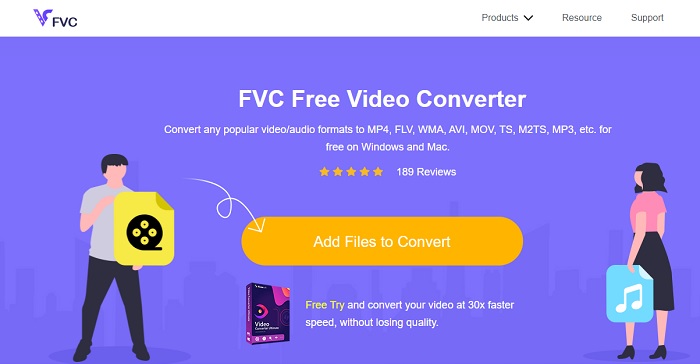
Du kan bruke dette til å konvertere MKV til AVI på nettet ved hjelp av det beste verktøyet. FVC Free Video Converter er laget for å være brukervennlig og gratis, i tråd med brukernes ønsker. I motsetning til andre verktøy som nevnes her, gir dette verktøyet en svært god komprimering av hver fil. Du kan også justere bitrate, fps, kodek og mer i filen du vil konvertere. På den andre siden er ikke alle hovedfunksjonene som finnes i premiumversjonen av dette verktøyet tilgjengelige her. Det lar bare brukeren velge færre formater, kjent som basisformater. La oss nå fortsette og se hvor bølgene fører oss i videokonverteringen. Følg trinnene, så kan vi starte seilasen på konverteringens hav.
Trinn 1. Gå til denne lenken som er gjort tilgjengelig for deg for å komme i gang.
Trinn 2. For å starte verktøyet må du klikke på Add Files to Convert.
Last ned skrivebordsversjonen for å konvertere filer i batch.
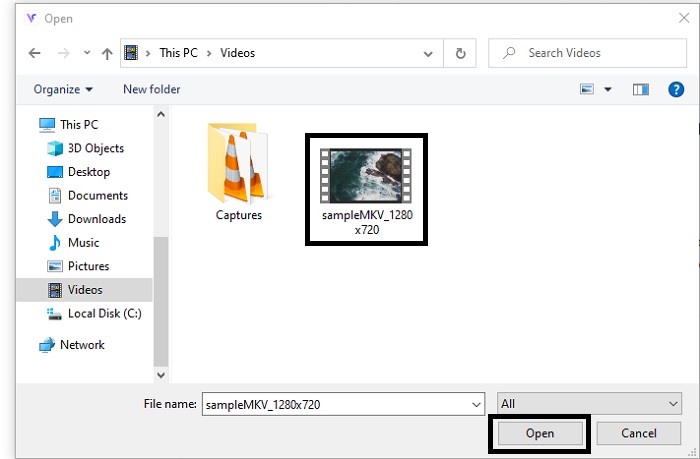
Trinn 3. Velg MKV-filen du vil konvertere, og klikk open for å fortsette.
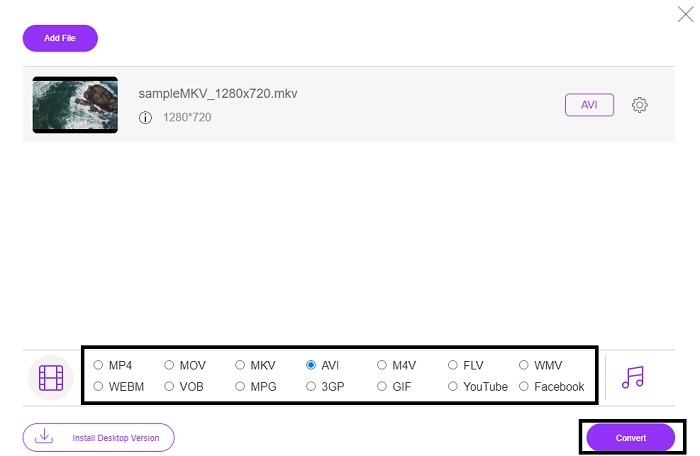
Trinn 4. Velg AVI-formatet nederst i grensesnittet, og klikk Convert for å starte prosessen.
Stepp 5. Vent til den er ferdig. Etter et minutt vil et ikon med en folder vises på skjermen; klikk på det for å åpne filutforskeren der den konverterte filen ligger.

Fordeler
- Ingen nedlasting nødvendig fordi du kan få tilgang til den til søkemotoren din.
- Det gir mer format enn de to andre gratisverktøyene nedenfor.
- Flott i kompresjon også.
Ulemper
- Tilbyr ikke redigeringsfunksjoner og formatet som er tilgjengelig er begrenset.
- Hvis tilkoblingen ikke er tilgjengelig, kan du ikke bruke dette verktøyet.
2. VLC Media Player
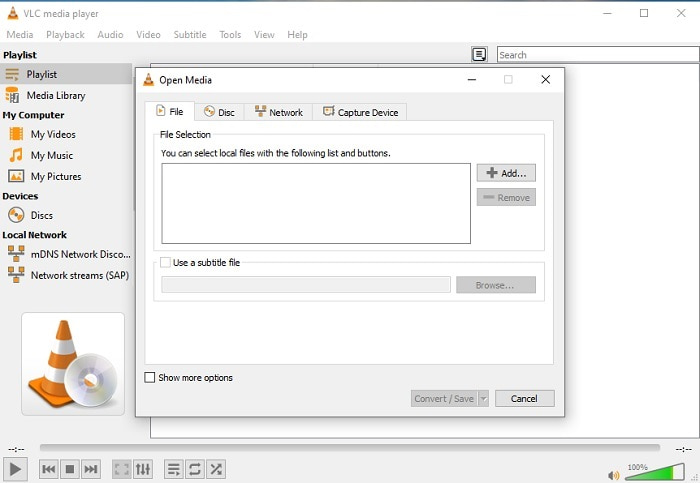
Hvis du har VLC, hvorfor ikke prøve å bruke det til å konvertere? Som nevnt kan du konvertere MKV til AVI på Mac med VLC. Men det er ikke laget for å være best på selve konverteringsjobben, på grunn av begrenset formatstøtte og andre årsaker. Likevel er dette verktøyet kjent for å være en av de beste mediespillerne du kan bruke til å se og lytte. Hvis du vil prøve å bruke VLC som konverter, følger du disse trinnene nedenfor.
Trinn 1. Åpne VLC på datamaskinen din.
Trinn 2. Klikk på File (Fil) og finn konverteringsfunksjonen i verktøyet.
Trinn 3. Legg til filen du vil konvertere, og start prosessen.
Fordeler
- En av de beste mediespillerne som tilbyr konverteringsfunksjoner.
- Gratis å laste ned.
- Støtter de fleste kodeker.
Ulemper
- Det er ikke nybegynnervalget for nye som skal konvertere
- Vanskelig å lese og forstå instruksjonene.
3. Freemake

Freemake er et av skrivebordsverktøyene du kan bruke til å konvertere MKV til AVI på Mac og PC. Dette verktøyet kan lastes ned, så du trenger ikke internettforbindelse for å bruke det. Formatene det støtter er svært begrensede sammenlignet med den nettbaserte FVC‑konverteren ovenfor. I tillegg er grensesnittet gammeldags, selv om det er lett å forstå, men kjedelig å se på. Likevel kan du stole på dette verktøyet når det gjelder selve konverteringsjobben. Lær hvordan du bruker Freemake ved å følge trinnene nedenfor.
Trinn 1. Last ned Freemake til datamaskinen din og start programmet.
Trinn 2. Velg filformatet du vil konvertere til.
Trinn 3. Vent i mer enn ett minutt til konverteringen er ferdig.
Fordeler
- Ingen internett nødvendig for å bruke den.
- Brukervennlig.
- Enkelt å forstå grensesnitt.
Ulemper
- Fargekombinasjonen av grensesnittet er litt kjedelig, og den har også en barnslig stemning.
- Begrenset til å tilby format og funksjoner.
Del 2. Beste måten å endre MKV-fil til AVI-format med detaljerte trinn
Hvis du vil ta filkonvertering til neste nivå, er det et must å lære deg å bruke dette verktøyet. Dessuten gir FVC Video Converter Ultimate den beste konverteringen du ønsker å utføre. Det lar også brukeren gjøre flere konverteringer samtidig. Så konverter i vei til du blir lei – men du blir ikke lei, takket være de spesielle funksjonene det tilbyr. For eksempel: vil du konvertere MKV til AVI og deretter forbedre kvaliteten etterpå? Med FVC Video Converter Ultimate kan du gjøre mer. For å se hvor imponerende verktøyet er, finner du her trinnene for hvordan du bruker den unike konverteringsfunksjonen det tilbyr.
Trinn 1. Installer verktøyet på harddisken og følg installasjonsveiviseren for å starte programmet.
Gratis nedlastingFor Windows 7 eller nyereSikker nedlasting
Gratis nedlastingFor MacOS 10.7 eller nyereSikker nedlasting
Trinn 2. Start verktøyet etter installasjonen. Dette er et eksempel på grensesnittet til programmet.
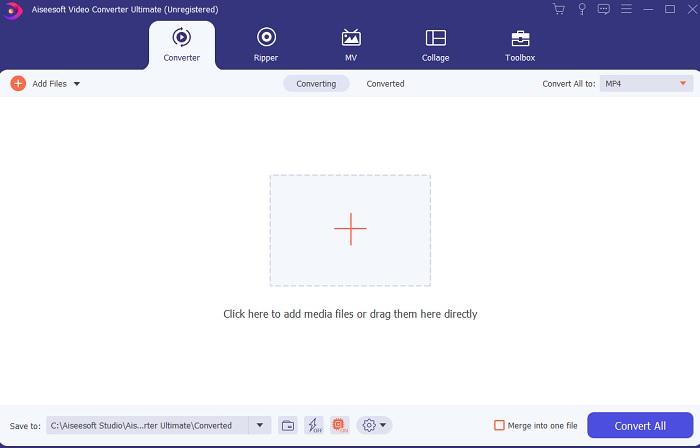
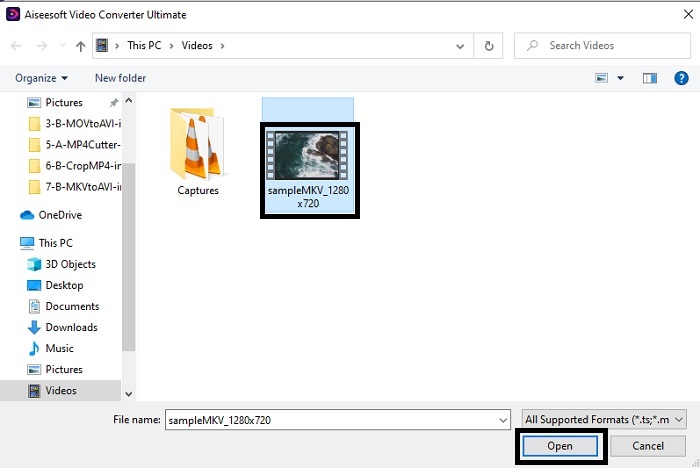
Trinn 3. Klikk på plus-knappen for å sette inn MKV-filen du vil konvertere. Hvis du for eksempel har mer enn to eller tre filer, er det enklest å dra og slippe dem inn i grensesnittet.
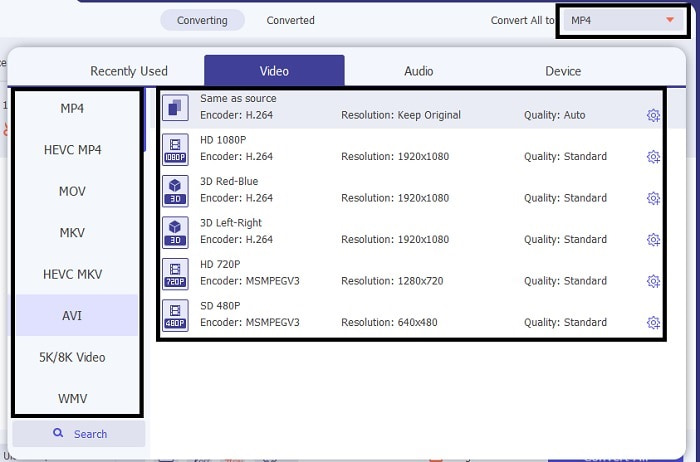
Trinn 4. Velg hvilket format du vil ha i drop-down-menyen. Klikk deretter på Convert All og vent til konverteringen er fullført.
Trinn 5. Konverteringen tar mindre enn ett sekund, så du trenger knapt å vente. Når den er ferdig, åpnes filutforskeren automatisk på skjermen med den konverterte filen. Klikk på den og nyt den nylig konverterte filen du nettopp har laget.
Fordeler
- Gir viktige redigeringsfunksjoner for å gjøre mediefilen din bedre.
- 30 ganger raskere i konvertering enn nettverktøyet. Og det er 100 ganger bedre i komprimering enn det andre verktøyet.
- Enkel som 1-2-3 å bruke. Du trenger ikke å bli proff for å bruke dette verktøyet.
Ulemper
- Det må betales, men det er ikke veldig dyrt.
- Du må laste ned verktøyet til skrivebordet.
MKV vs. AVI
Matroska multimediebeholderformatet, utgitt i 2002, er et åpen kildekode-format som kan inkludere en rekke video-, lyd-, bilde- og undertekstspor. Så du kan bruke den til å lagre korte videoklipp, TV-serier og filmer enkelt. Det er ganske populært for anime-fansubing.
Basert på Resource Interchange File Format (RIFF), ble AVI-formatet introdusert av Microsoft i 1992. Det kan lagre video/lyd av høy kvalitet siden det bruker mindre komprimering. Men det forårsaker også den store filstørrelsen til en AVI-fil, som kan være et problem når det er begrenset plass.
Del 3. Vanlige spørsmål om MKV til AVI
Kan Handbrake konvertere MKV til AVI?
Ja, du kan bruke Handbrake til å konvertere alle formater. Men dette verktøyet er bare begrenset til Windows 10 og nyere.
Er MKV tapsfri eller tapsfri?
MKV er en type tapsfri komprimering.
Hva er ulempene med MKV?
Etter hvert som MKV skaper en ny fremtid for videoformat verden over, er dette formatet fortsatt under utvikling. Som nevnt tidligere kan det inneholde ulike kodeker. Det betyr at filene ofte er mye større enn AVI-filer og også mer kompliserte. Du kan imidlertid velge å konvertere MKV til MP4 for å få en mindre fil.
Konklusjon
Per nå er det viktig å lære seg å konvertere, spesielt for dem som elsker å se på film og video. Noen ganger kan filformatet vårt ikke spilles av i standardmediespilleren fordi formatet eller kodeken ikke støttes. Den beste løsningen på dette problemet er å konvertere filen til et nytt format. FVC Video Converter Ultimate er det ultimate verktøyet som gir deg kvaliteten du ønsker. I stedet for å velge et verktøy med lav kvalitet, hvorfor ikke bruke dette ultimate verktøyet som løser alle problemer du har med konvertering, forbedring, sammenføying og oppretting av filer.
-
 MKV til MOV - Hvordan konvertere MKV til MOV
 Hvordan konverterer jeg MKV til MOV på Mac? Kan iMovie lese MKV? Hva betyr MOV-format? Dette innlegget forteller to enkle måter å hjelpe deg med å konvertere MKV til MOV med gratis online og profesjonelle videokonverterere.
-
 Hvordan konvertere MKV-filer for å spille på PS3 jevnt [løst]
 Vil du spille av MKV-videoer på PS3-en din? PS3 kan imidlertid ikke spille av MKV-filer direkte. Denne artikkelen vil vise deg måter å konvertere MKV-videoer til PS3-støttede videoformater for å spille på PS3 uten problemer.
-
 Hvordan konvertere MKV -videoer til animerte GIF -er uten Photoshop/FFmpeg
 Etter at du har lastet ned og sett MKV -filmer på datamaskinen din, vil du kanskje dele noen fantastiske øyeblikk med venner eller på Internett som GIF -er. I denne artikkelen kan du lære om de 2 enkleste måtene å konvertere MKV til GIF.

