


 Video Converter Ultimate
 Skjermopptaker
 Videoreparasjon
 Sikker nedlasting
Hvordan tone lyd i iMovie: Opplæring for Mac og iPhone
Fade er en effekt som brukes for å skape en gradvis økende eller avtagende effekt i et bestemt medium. I lydredigering er det avgjørende å lære hvordan du legger til fade-effekter; de brukes til overganger eller ganske enkelt for å la lytterne vite at lyden vil tones ut eller avta, noe som bidrar til det samlede resultatet av lyden. Brukere kan enkelt legge til fade-effekter med iMovie-programvaren, et Apple-utviklet program for medieredigering. Les videre for å finne måter å bruke Mac og iPhone til å legge inn fade-effekter, og oppdag et alt‑i‑ett‑alternativt verktøy for å legge fade i lyden din.

Del 1. Tone musikk i iMovie på Mac
Fade håndtak
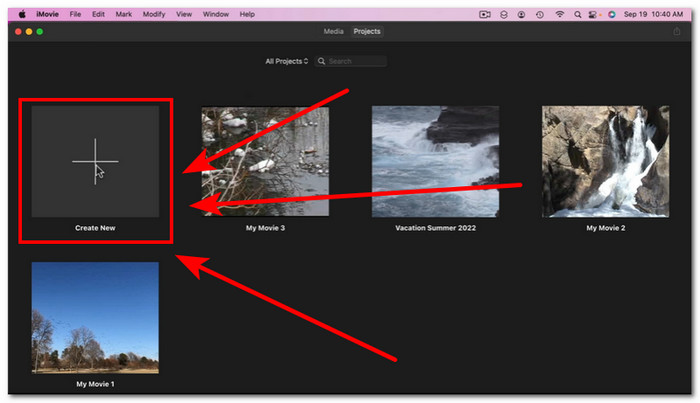
Den første metoden for å legge til fade-effekter i lyd ved å bruke en Mac-versjon av iMovie, er å bruke fade-håndtaket. Dette er den enkleste måten å gjøre det på, da det bare krever at brukere laster inn lydfilen og deretter fortsetter å dra hvert av fade-styret som vises på begynnelsen og slutten av klippet.
Trinn 1. Start iMovie-appen på Mac-en din, og importer lydfilen du ønsker ved å dra og slippe den inn i tidslinjevisningen i programvaren.
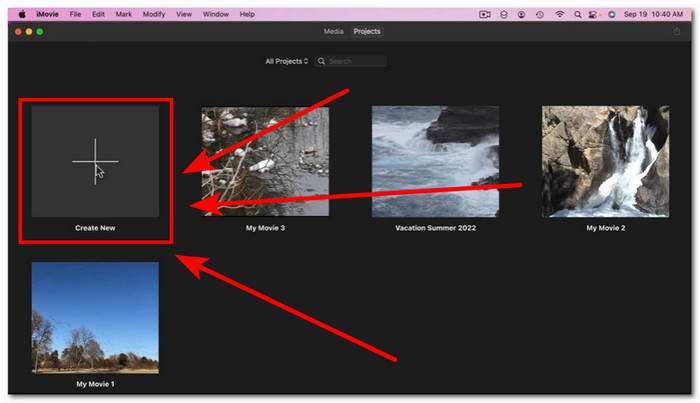
Trinn 2. Når lydfilen er i iMovie-tidslinjen, vises en liten sirkel i begynnelsen og slutten av hvert spor, noe som indikerer at du kan bruke fade-hendlene til å lage fade-effekter.
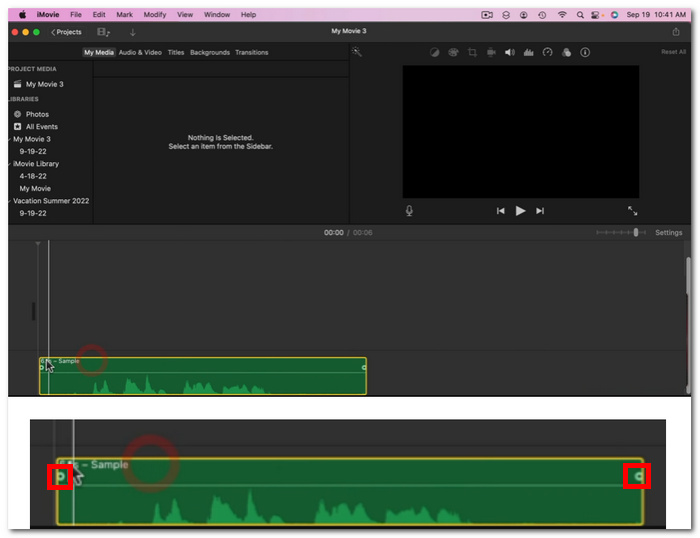
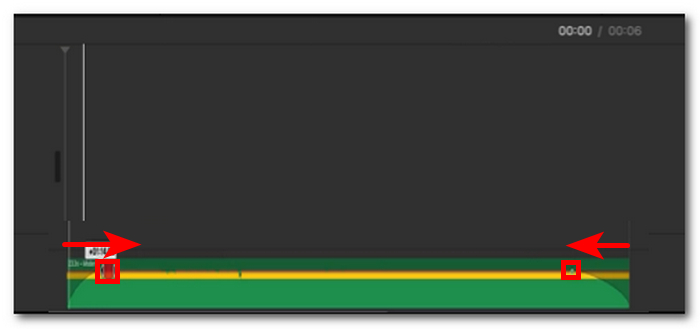
Trinn 3. Dra ganske enkelt fade-hendlene innover på lydsporet for å lage en fade-effekt.
Merk: Som du kan se, skaper det en skråningsvisuelt i sporet, noe som indikerer at lyden din nå har en fade-effekt.
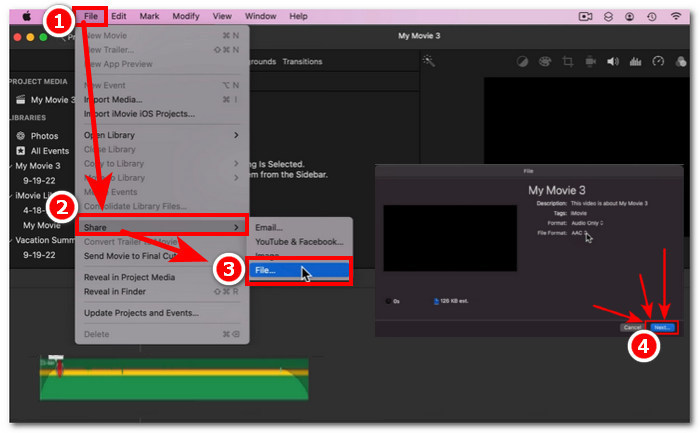
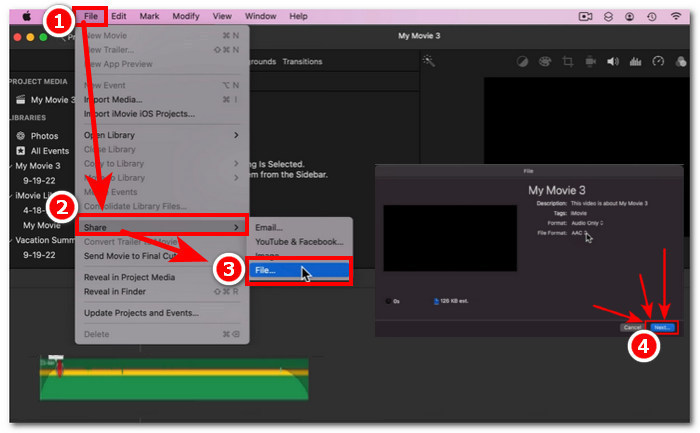
Trinn 4. Lagre til slutt filen ved å klikke på Arkiv > Del > Fil … og Neste for å laste den ned til nedlastingsmappen på Mac-en.
Når du har lastet ned videoen med lydfilen som er tonet inn/ut, og du oppdager at lyden ikke er synkronisert med videoen i iMovie, kan du følge denne artikkelen for å løse det.
Audio Inspector
En annen måte å tone ut lyd i iMovie ved å bruke en Mac er gjennom Audio Inspector. Dette er mye mer komplekst sammenlignet med Fade Handles. Det lar brukere være presise når det gjelder å sette inn fade-effekter, da det gir en mer beregnet og spesifikk visning av varighet i det sekundet du vil at fade-in og fade-out skal ha i lyden.
Trinn 1. På Mac-en din åpner eller laster du inn lydfilen du vil legge fade-effekter på, ved å bruke iMovie-programmet.
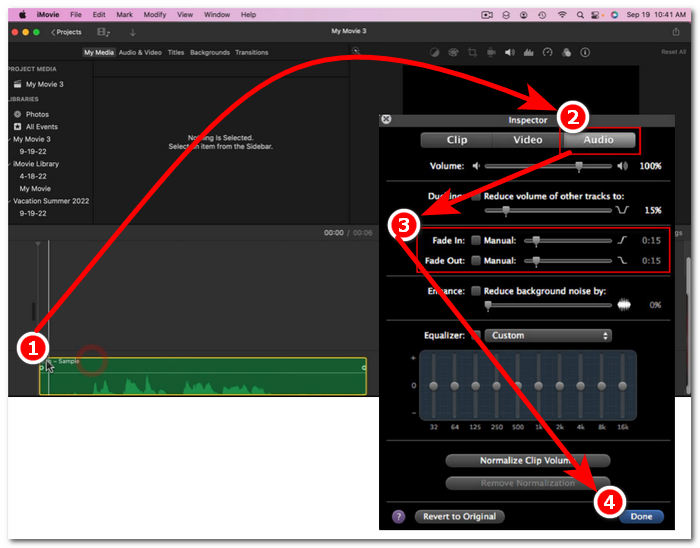
Trinn 2. Når lydfilen er i programgrensesnittet, dobbeltklikker du på lydfilen din i tidslinjen og velger Clip Adjustments (Klippjusteringer) for å åpne Inspektør-panelet.
Trinn 3. Når Inspektør-panelet er åpnet, går du til delen Lyd. Der kan du justere Fade inn og Fade ut på sporet ditt. Dra ganske enkelt lengden på fade-effektene manuelt slik du ønsker, og når du er ferdig, klikker du på knappen Ferdig for å lagre endringene i lydfilen.
Trinn 4. Når alt er klart, kan du laste ned lydfilen ved å klikke på Arkiv-knappen øverst på skjermen og deretter klikke Del > Fil > Neste.
Del 2. Tone musikk i iMovie på iPhone
Det er relativt enkelt å falme lyd i iMovie med en iPhone, siden mobilversjonen av iMovie for iPhone-brukere er ganske enkel. Brukere, selv ikke-teknologikyndige, kan gjøre det uten å svette.
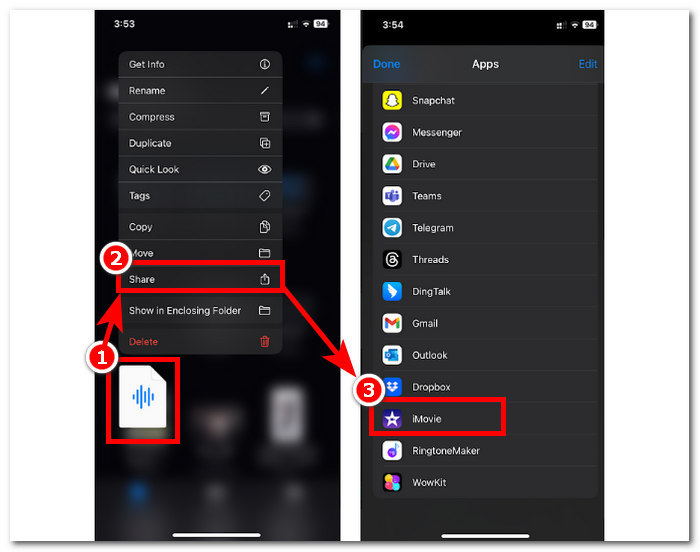
Trinn 1. For å kunne legge fade-effekter til en lydfil må du laste lydfilen inn i iMovie-appen på iPhone-en din,
Trinn 2. Når du er i appens grensesnitt, trykker du på Lyd > Fade-knappen for å få fram fade-linjene. Når fade-linjene vises, drar du dem innover i lydfilen og justerer etter behov; når du er fornøyd, trykker du på Ferdig-knappen for å lagre endringene.
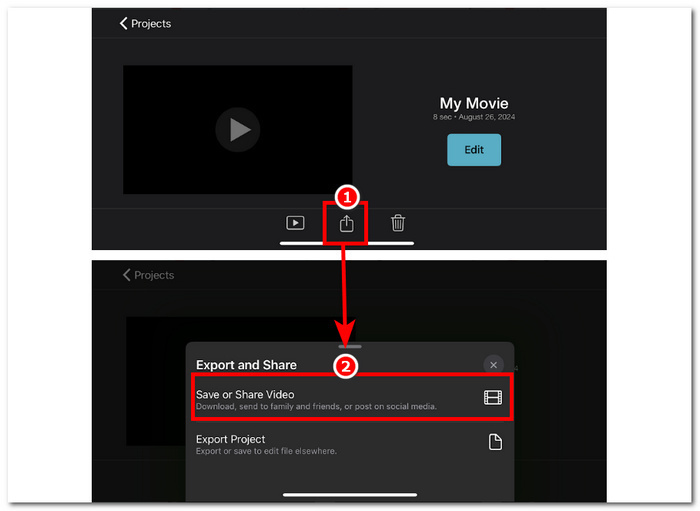
Trinn 3. For å lagre filen trykker du på ikonet Del, og velger deretter alternativet for å Lagre eller Dele video.
Del 3. Beste iMovie-alternativ til fade-musikk
Når iMovie, et mye brukt videoredigeringsverktøy på Mac og iPhone, får tekniske problemer, trer FVC-picked Video Converter Ultimate fram som det ideelle alternativet. Denne programvaren er spesielt utviklet for sømløst å legge fade-effekter til videoer, takket være den dedikerte Fade inn og ut-funksjonen. Med presis tidsangivelse kan brukerne oppnå nøyaktig de fade-effektene de ønsker. FVC-picked Video Converter Ultimate går lenger enn enkel trimming eller klipping av lyd, og tilbyr en allsidig redigeringsverktøykasse. I tillegg sørger den enestående prosesseringshastigheten for effektiv redigering samtidig som lydkvaliteten forblir tapsfri, noe som skiller den fra andre programvarer.
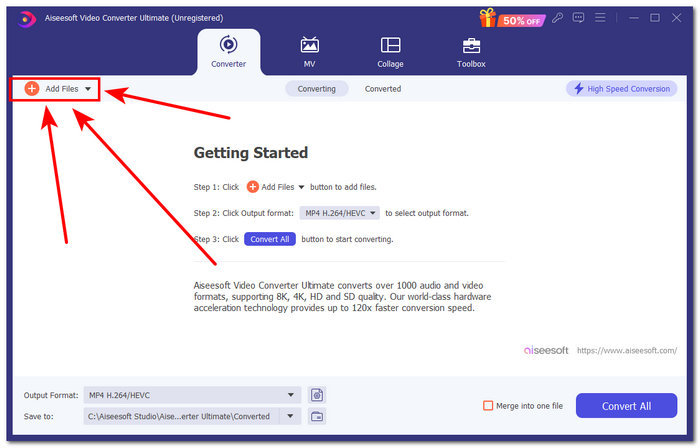
Trinn 1. Last ned og start FVC-picked Video Converter Ultimate på datamaskinen din. Finn knappen Legg til filer i programgrensesnittet og klikk på den for å laste inn lydfilen. Dette trinnet er avgjørende hvis du vil trimme eller klippe bestemte deler av lydfilen.
Gratis nedlastingFor Windows 7 eller nyereSikker nedlasting
Gratis nedlastingFor MacOS 10.7 eller nyereSikker nedlasting
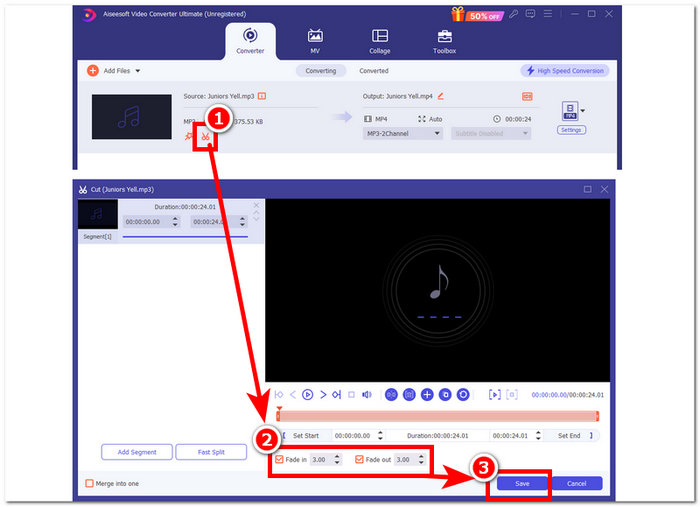
Trinn 2. Klikk på saks-knappen for å få tilgang til programmets klippe- og trimmefunksjoner. I klippevinduet vil du se boksen Fade In & Out. For å legge fade-effekter til lydfilen din, setter du ganske enkelt en hake i denne boksen.
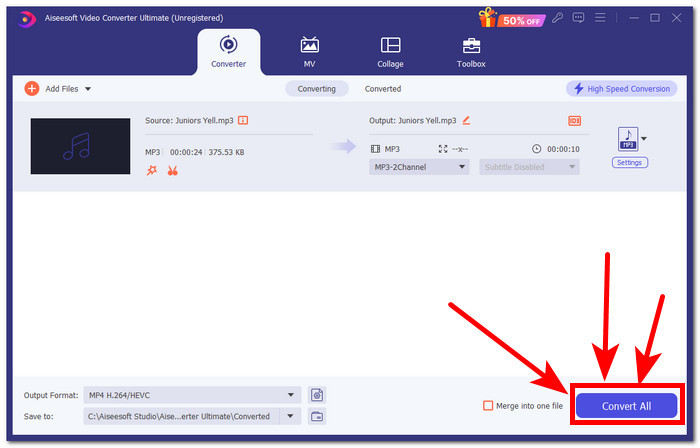
Trinn 3. Klikk på knappen Konverter alle. Denne handlingen lagrer endringene og lagrer filen i en angitt mappe på datamaskinen din, slik at du er sikker på at endringene dine blir trygt lagret.
Del 4. Vanlige spørsmål om hvordan tone musikk i iMovie
Hva er forskjellen mellom fade-out og fade-in?
Fade gjelder den gradvise økningen av lyd fra fullstendig stillhet, mens uttoning refererer til den gradvise reduksjonen av volumet på en lyd til en fullstendig stillhet.
Har iMovie fade-in?
Ja, iMovie har fade-in og out-effekter, som lar Apple-brukere jevnt bruke en gradvis økning og reduksjon av volum i prosjektet. Dermed kan den ikke bare brukes i lyd, men iMovie tilbyr også fade-effekter til videoredigereren.
Hvorfor bruker du fade-out?
En uttoningseffekt kan bidra til å legge til et ekstra lag med smak til et prosjekt. Det skaper en jevn overgang eller slutt, og forhindrer en bråstopp, som er mer ubehagelig å høre, spesielt i musikk.
Konklusjon
Apple-brukere trenger ikke lenger å bry seg om hvordan man får musikk til å fade ut i iMovie, ettersom iMovie for Mac og iPhone enkelt kan utføre slike oppgaver. I tillegg til den sømløse prosessen med å legge fade-effekter til en lydfil, ble det nevnt et alternativt program som fungerer som reserve hvis iMovie skulle svikte. FVC-picked Video Converter Ultimate er til stor hjelp med sin raske behandlingshastighet, lette programvarestørrelse, brukervennlighet og enkle fade inn- og ut-funksjon.
-
 Enkle måter å legge til tekst i en video ved hjelp av iMovie på Mac og iPhone
 Trenger du å legge til tekst i en video ved hjelp av iMovie? Les hele blogginnlegget for å lære hvordan du legger til teksttitler på iMovie med detaljerte trinn.
-
 iMovie Tutorial - Hvordan ta opp skjermvideo og lyd med iMovie
 Les og få detaljerte trinn for å spille inn en video med iMovie. Hvis du støter på problemer med iMovie-opptak, kan du få et iMovie-gratis alternativ til skjermopptak på Windows og Mac uten vannmerke også.
-
 Hvordan legge til vannmerke til en video i iMovie på Mac [All Embracing]
 Vil du vite hemmelighetene ved å legge til et vannmerke i en video i iMovie? Ikke søl te på noen, og lær det ved å lese denne artikkelen.
