


 Video Converter Ultimate
 Skjermopptaker
 Videoreparasjon
 Sikker nedlasting
Hvordan konvertere M2TS til iPad-kompatible formater på Windows / Mac / Online
Kan du spille M2TS direkte på iPad? Dessverre er svaret nei. M2TS er ikke kompatibelt med iPad. Hvis du vil spille av M2TS på iPad, må du installere en M2TS‑avspillerapp på iPad, eller du kan konvertere M2TS til iPad‑format. Denne artikkelen velger åpenbart den sistnevnte løsningen. Les videre og lær hvordan du endrer videoformat til iPad fra M2TS.

Del 1: Slik konverterer du M2TS til iPad på Windows og Mac
Hvilke formater støtter iPad? Egentlig godtar iPad vanlige H.264-, MP4-, M4V-, MOV-, MPEG-4- og M-JPEG-videoformater. For å sette M2TS på iPad, må du først konvertere M2TS til iPad-videoformat.
Slik konverterer du M2TS til iPad på Windows gratis
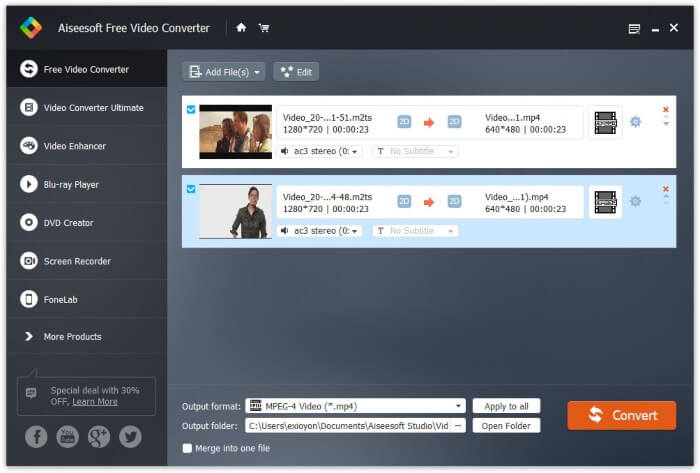
FVC Free M2TS Converter er en M2TS‑til‑iPad batch‑konverter som er helt gratis å bruke. Du kan batchkonvertere M2TS‑filer til iPad med opptil 50x høyere hastighet enn vanlige M2TS‑konverterere. Dermed spiller det ingen rolle om du trenger å konvertere store M2TS‑videofiler til iPad i bulk. Den gratis M2TS‑til‑iPad‑konverteren kan håndtere det perfekt.
I tillegg kan du slå sammen M2TS‑filer og legge til temaer før M2TS‑til‑iPad‑konverteringen. Forhåndsvisningsvinduet i sanntid kan vise deg videoeffekter umiddelbart. Kort sagt kan du redigere og konvertere AVCHD M2TS til iPad på Windows gratis i én og samme prosess.

Gratis M2TS Converter
113456+ nedlastinger- Konverter M2TS til iPad H.264, MP4, MOV, MPEG-4 og andre kompatible formater.
- 50 ganger raskere hastighet med støtte for batchkonvertering.
- Oppretthold det høye kvalitetsnivået mens du konverterer til iPad fra alle HD-videokameraer.
- M2TS til iPad-omformeren fungerer med Windows 10/8/7 datamaskin.
Gratis nedlastingFor Windows 7 eller nyereSikker nedlasting
Gratis nedlastingFor MacOS 10.7 eller nyereSikker nedlasting
Trinn 1: Last ned, installer og start FVC Free M2TS Converter gratis. Dra og slipp M2TS‑filer inn i hovedgrensesnittet.

Trinn 2: Åpne listen Output format nær bunnen. For å konvertere M2TS til iPad på Windows kan du angi utdataformat direkte fra kategorien Apple iPad.

Trinn 3: Klikk på tannhjulikonet Settings for å justere videokoder, bildefrekvens og mer. Til slutt klikker du Convert for å konvertere video fra M2TS til iPad‑format.
Hvordan konvertere M2TS til iPad på Mac gratis
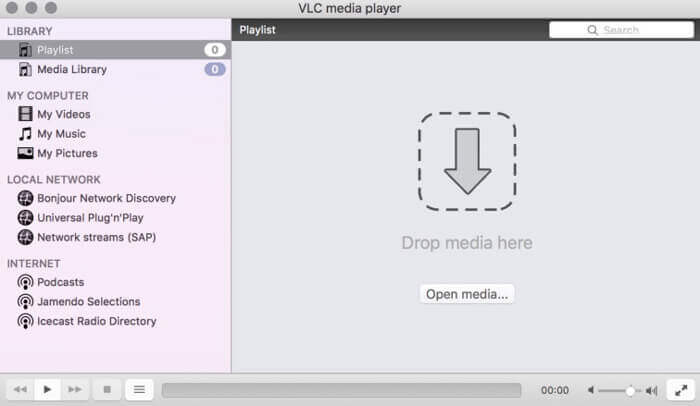
Hvis du vil konvertere M2TS-video til iPad gratis på Mac, kan VLC Media Player være ditt gode valg. Det er en gratis og åpen kildekode M2TS-spiller og omformer for multiplatform.
Trinn 1: Åpne VLC Media Player på Mac. Velg Convert/Save fra rullegardinlisten Media.
Trinn 2: Klikk Add for å importere en M2TS‑fil. Velg deretter filen og klikk Open nedenfor for å fortsette prosessen.
Trinn 3: Klikk Convert/Save nederst for å gå videre til neste vindu.
Trinn 4: Velg iPad‑format fra rullegardinlisten Profile. Du kan klikke på Tools-ikonet ved siden av for å justere videoinnstillinger.
Trinn 5: Klikk Start for å begynne å konvertere M2TS‑fil til iPad på Mac via VLC.
Del 2: Hvordan konvertere M2TS til iPad Online
For mobilbrukere er det også et fint valg å bruke en online M2TS til iPad-omformer. Du kan konvertere en M2TS-fil til iPad gratis uten krav om nedlasting, installasjon eller registrering.
Trinn 1: Åpne en nettbasert M2TS‑til‑iPad‑konverter, for eksempel FVC Free Online Video Converter.

Trinn 2: Last ned FVC launcher ved å klikke Add Files to Convert og installer den.

Trinn 3: Finn M2TS‑filen på datamaskinen din som skal konverteres. Og ikke glem å velge formatet.

Trinn 4: Klikk Start Converting for å konvertere M2TS til iPad gratis på nettet.
Del 3: Vanlige spørsmål om konvertering av M2TS til iPad
Hva skjer som plutselig ingen lyd i M2TS-filer i iMovie?
M2TS støttes ikke av Apple-enheter. Du må konvertere M2TS til Mac-format for å løse problemet.
Hvordan åpner jeg M2TS-filer på iPhone og iPad?
AVCHD M2TS er ikke kompatibel med iOS-enheter. Hvis du insisterer på å spille M2TS-videoer på iPad, kan du bruke VLC Media Player-appen for å få videoavspilling.
Er det noen god videospiller-app for iPad?
Du kan få en større skjerm på iPad enn iPhone. Så videoopplevelsen blir også bedre. De anbefalte videospillerne inkluderer PlayerXtreme Media Player, KMPlayer, VLC, AirPlayer og mer. Du kan velge hvilken som helst for å få videokontroller fleksibelt.
Det var alt om hvordan du konverterer M2TS til iPad med nettbaserte og lokale verktøy. Disse M2TS‑videokonvertererne er gratis og trygge å bruke. Uansett hvor mange M2TS‑filer du vil konvertere til iPad‑kompatible formater, kan du få den raskeste hastigheten her.
-
 Hvordan konvertere M2TS til MP4 uten å redusere kvaliteten
 Vil du konvertere videoen fra HD-videokamera til vanlig MP4? Her er 4 enkle og gratis måter å endre M2TS-fil til MP4 på Windows og Mac.
-
 Hvordan konvertere M2TS til MKV uten å miste kvalitet
 Vil du konvertere M2TS til MKV mens du holder den originale kvaliteten? Dette innlegget viser deg gratis og online metoder for å endre M2TS til MKV tapsfritt.
-
 Hva er forskjellen mellom MTS og M2TS
 Hva er MTS- eller M2TS-fil? Hva er forskjellen mellom M2TS og MTS? Hvordan kan jeg se videokameraets innspilte MTS- eller M2TS-fil? Finn alle svarene i dette innlegget.
