


 Video Converter Ultimate
 Skjermopptaker
 Videoreparasjon
 Sikker nedlasting
Topp 4 gratis måter å konvertere MTS til MOV
Jeg har tatt noen videoer med Sony-videokameraet mitt som eksporterte MTS-filer. Jeg merker at MTS ikke kan støttes av mediaspilleren min og iMovie. Jeg bruker en Mac og vil redigere disse fangede MTS-videoene. Noe hjelp? Er det noen enkel måte, spesielt gratis måte å konvertere MTS til MOV?
MTS er et høyoppløselig videoformat som er mye brukt av videokameraer fra Sony og Panasonic, som filendelsen for AVCHD (Advanced Video Coding High Definition). Etter at du har tatt opp video med det digitale kameraet ditt, vil du som oftest få en MTS‑fil. Den støtter 720p/1080i HD og kan gi en høyere videokvalitet. MTS er imidlertid ikke et populært format som støttes av de fleste mediespillere eller redigeringsprogrammer.

Når du trenger å redigere MTS i iMovie eller spille det av med en mediespiller, bør du konvertere MTS til MOV eller MP4 for bedre kompatibilitet. I dette innlegget viser vi deg 4 gratis MTS‑omformere som hjelper deg å konvertere MTS til MOV på en enkel måte.
Del 1. Beste gratis måte å konvertere MTS til MOV uten tap av kvalitet
Det finnes et stort antall MTS‑konverteringsverktøy på internett som kan hjelpe deg å konvertere MTS til MOV med høy kvalitet. Her i den første delen vil vi anbefale den beste gratis programvaren for konvertering fra MTS til MOV, Free MTS Converter, til deg.
Den er spesielt designet for å håndtere alle slags konverteringer. Den er kompatibel med nesten alle video- og lydformater som MP4, MOV, MKV, MTS, AVI, FLV, WMV, MP3, AAC, FLAC og mer. Du kan laste den ned gratis og ta følgende guide for å konvertere MTS til MOV gratis.
Gratis nedlastingFor Windows 7 eller nyereSikker nedlasting
Gratis nedlastingFor MacOS 10.7 eller nyereSikker nedlasting
Trinn 1. Først må du installere og kjøre denne gratis MTS til MOV-omformeren på datamaskinen din. Den tilbyr både Windows- og Mac-versjoner du kan laste ned.
Trinn 2. Klikk på Add File(s) for å importere MTS‑filen(e) du vil konvertere. Du kan konvertere én eller flere MTS‑filer om gangen.
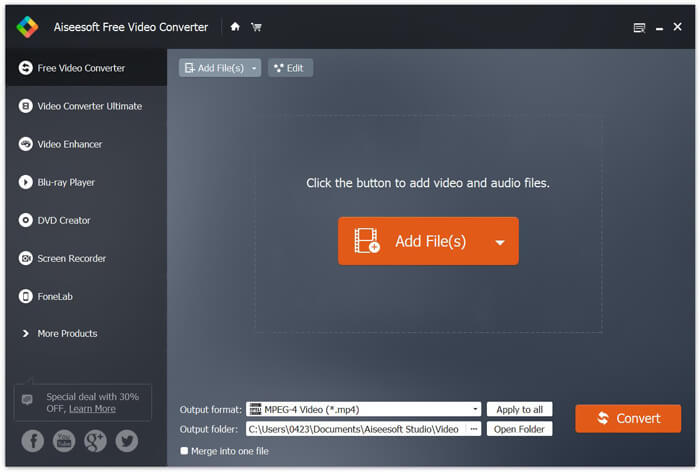
Trinn 3. Velg MOV som målformat fra listen over Output format. Klikk deretter på Convert -knappen for å starte konverteringen fra MTS til MOV.
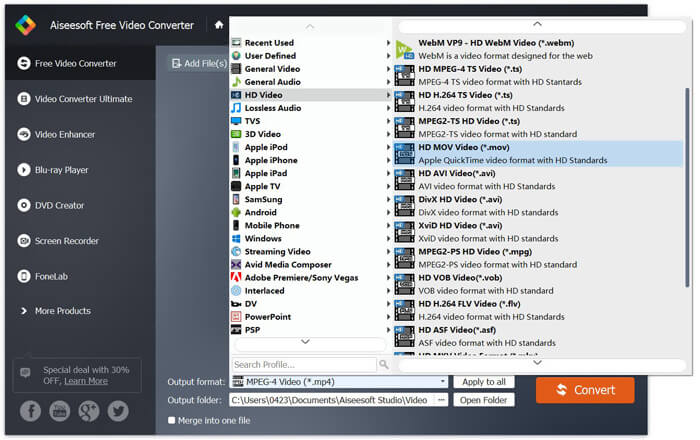
Som du kan se ovenfra, har denne gratis MTS til MOV-omformeren også noen grunnleggende redigeringsfunksjoner. Før den endelige konverteringen kan du bruke dem til å tilpasse MTS-filen. Sammenlignet med online-omformere, kan denne gratis videokonvertereren gi deg raskere konverteringshastighet og høyere videokvalitet. Derfor gjør vi det til vår første anbefaling.
Del 2. Gratis online omformer hjelper deg med å konvertere videoer enkelt
Når du søker på Google etter hvordan du konverterer MTS til MOV, får du mange gratis nettbaserte konverteringsresultater. Her introduserer vi en brukervennlig gratis MTS‑til‑MOV‑omformer på nett, FVC Free Online Video Converter. Uten å installere noe programvare kan du konvertere alle populære videoformater til MP4, AVI, MOV osv. gratis. Og du trenger ikke bekymre deg for noe, fordi konverteringen er sikker og stabil. Ingen data går tapt under konverteringsprosessen.
Trinn 1. Åpne lenken ovenfor og klikk på knappen Add Files to Convert. Før du konverterer, må du laste ned og installere FVC launcher. Det tar bare noen sekunder.

Trinn 2. Etter at du har installert og oppdatert startprogrammet, velger du bare videoen du vil konvertere. Deretter velger du formatet du trenger og trykker på Convert.

Trinn 3. Åpne lenken ovenfor og klikk på knappen Add Files to Convert. Før du konverterer, må du laste ned og installere FVC launcher. Det tar bare noen sekunder.
Del 3. Hvordan konvertere MTS til MOV gratis online med ZAMZAR
ZAMZAR er en av de mest populære programvarene for online videokonvertering som kan hjelpe deg med å konvertere MTS til MOV gratis. Den er designet med kortfattet grensesnitt og enkel konverteringsfunksjon. Du kan ta følgende guide for å gjøre MTS-videokonvertering.
Trinn 1. Åpne nettleseren din og naviger til det offisielle nettstedet til ZAMZAR. Her kan du gå direkte til https://www.zamzar.com/convert/mts-to-mov/ siden. Her har du lov til å konvertere MTS direkte til MOV uten å gjøre andre innstillinger.
Trinn 2. Klikk på knappen Legg til filer for å laste inn MTS-filen du vil konvertere. Du kan dra og slippe for opplasting av MTS-filen. En ting du bør vite er at denne gratis online MTS-omformeren bare lar deg konvertere en MTS-fil mindre enn 150 MB.
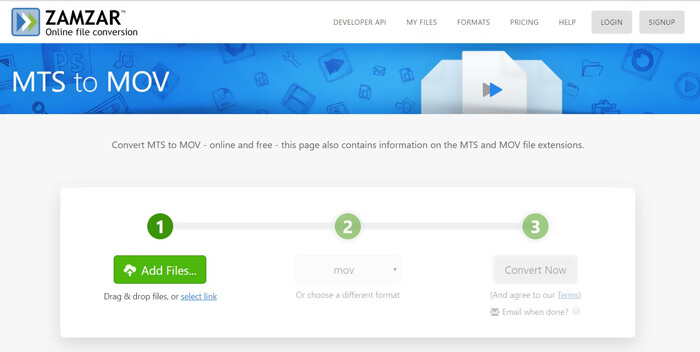
Trinn 3. Etter opplasting kan du klikke på knappen Convert Now for å starte gratis nettbasert konvertering av MTS til MOV.
Del 4. Online måte å konvertere MTS til MOV med FreeConvert
FreeConvert er en annen populær videokonverterer på nett som kan gjøre MTS‑til‑MOV‑videokonvertering gratis. Denne gratis MTS‑til‑MOV‑omformeren støtter MTS og M2TS svært godt. Den lar deg laste opp en MTS‑fil på opptil 1 GB. Dessuten kan du laste opp 20 MTS‑filer om gangen for konvertering. Nå kan du følge trinnene nedenfor for å konvertere MTS til MOV.
Trinn 1. Først må du gå til FreeConvert.com i nettleseren din. Her kan du gå direkte til https://www.freeconvert.com/mts-to-mov for konverteringen.
Trinn 2. Klikk på den store blå Choose MTS Files for å laste opp MTS‑filen du vil konvertere til MOV. Som nevnt ovenfor kan du her laste opp én eller flere MTS‑filer for konverteringen.
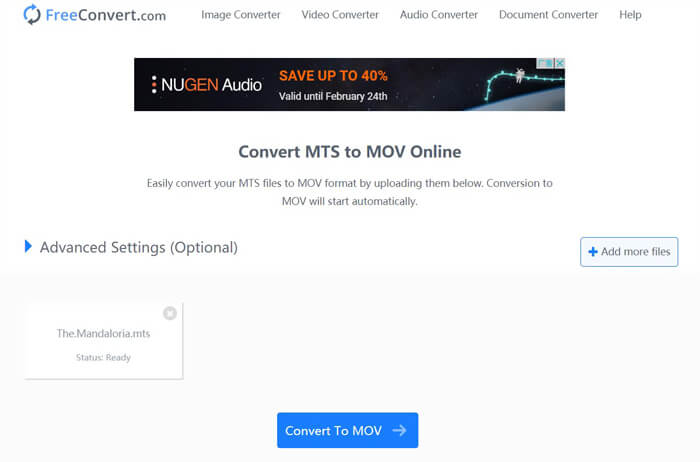
Trinn 3. Klikk på knappen Convert To MOV for å starte opplastings- og konverteringsprosessen. Deretter må du klikke på Download‑knappen for å lagre den konverterte filen på datamaskinen din.
Når du velger gratis nettbaserte omformere for å konvertere MTS til MOV, må du beregne relativt lang tid til opplasting og konvertering. Derfor er det bedre å konvertere en MTS‑fil med liten filstørrelse med nettbasert programvare. Hvis du vil konvertere en stor MTS‑ eller M2TS‑video, bør du stole på den sterkt anbefalte Free Video Converter.
-
 6 enkle måter å konvertere TS til AVI / MKV / MOV / WMV på Windows / Mac
 Vil du raskt konvertere TS-filer til AVI / MKV / MOV / WMV? Denne artikkelen viser online og offline videokonvertere med komplett guide. Kanskje du kan få den beste gratis TS-omformeren her.
-
 MOV VS MP4 - Hvilken er bedre
 MOV VS MP4, hvilken er bedre? Dette innlegget forteller forskjellen mellom MP4 og MOV, slik at du kan få det bedre valget å bruke til videofilene dine.
-
 Hvordan bli med MOV (QuickTime) -filer gratis
 Det kan være vanskelig for nybegynnere å bli med i flere MOV-videoklipp. Så er det en enkel og rask måte å kombinere MOV-filer på? Hvis det er, hvordan bruker du det? Dette innlegget vil hjelpe deg med å få disse svarene.
