


 Video Converter Ultimate
 Skjermopptaker
 Videoreparasjon
Lær å konvertere MTS til WMV på forskjellige måter

Del 1. Beste verktøyet som konverterer MTS til WMV Online
De fleste av oss foretrekker å slippe å håndtere ulemper, og derfor vil vi ikke installere en programvarekonverter. De er på jakt etter en nettbasert konverter som kan konvertere filtypene deres. FVC Free Video Converter Online er en nettbasert videokonverter som er helt gratis. Selv om dette programmet er gratis å bruke, trenger du ikke bekymre deg for kvaliteten, fordi FVC Free Video Converter ikke går på kompromiss med kvaliteten under konverteringen.
Trinn 1: For å begynne klikker du på denne lenken, og du blir omdirigert til nettstedet. Derfra klikker du på knappen Add Files to Convert for å laste ned startprogrammet; deretter må du laste opp filene du vil konvertere.
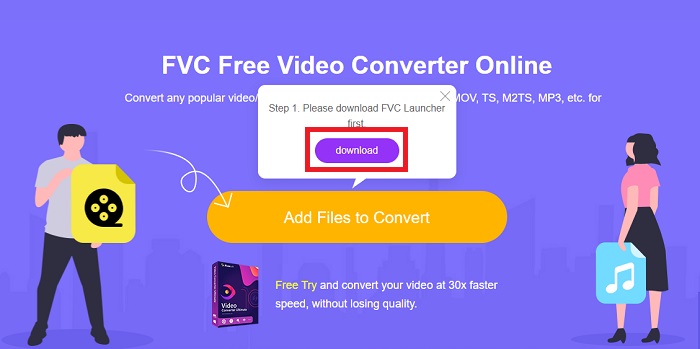
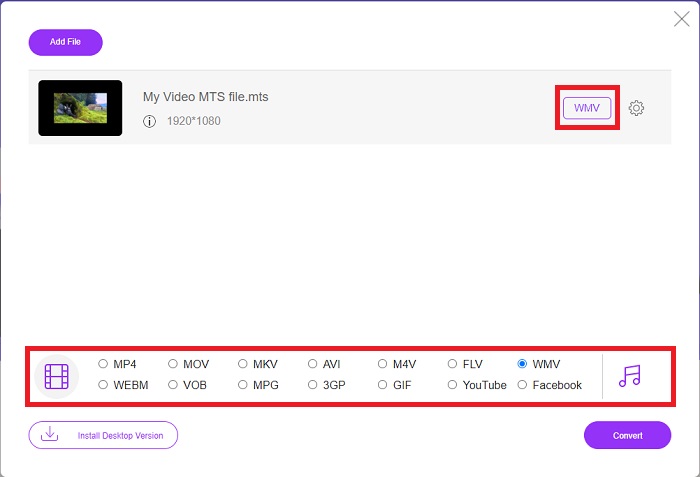
Trinn 2: Etter det kan du klikke på knappen igjen for å laste opp videofilen. Du vil se alle formatene som tilbys nederst, og velg WMV blant de andre.
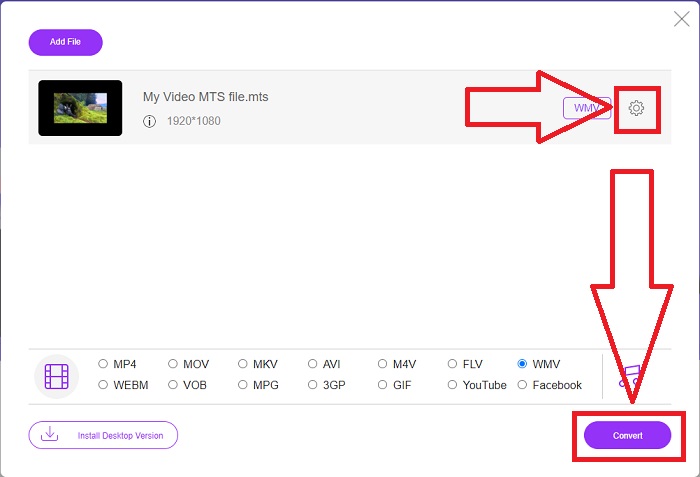
Trinn 3: De ekstra valgmulighetene er fortsatt der. Klikk på tannhjulikonet, så vil du se alle justeringene du kan gjøre med videoen. Klikk bare på OK når du allerede har valgt et format for å lagre endringene, og klikk deretter på Convert for endelig å starte konverteringen.
Del 2. Hvordan konvertere MTS til WMV med Best Converter Offline
Når vi velger en konverter, må vi ta hensyn til hvor enkel den er, siden vi ikke ønsker en dyr konverter som er vanskelig å bruke. Vi er glade for å kunne presentere Video Converter Ultimate og brukergrensesnittet dens. Denne konverteren har det mest rett‑frem grensesnittet, og siden det er enkelt, er det også lettest å bruke. I tillegg kan du raskt legge til filene dine og se hvilke filtyper som støttes. Det finnes flere funksjoner her du kan stole på som vil gjøre redigeringsopplevelsen din mer praktisk. Hvis du vil prøve dette selv, følger du disse enkle trinnene:
Trinn 1: Først må du installere selve programvaren. For å gjøre dette, laster du ned .exe-filen ved å klikke på Free Download-knappen nedenfor for Windows eller Mac. Vent til nedlastingen er ferdig, og åpne den for å starte installasjonsprosessen. Klikk på Start Now og start deretter programvaren.
Gratis nedlastingFor Windows 7 eller nyereSikker nedlasting
Gratis nedlastingFor MacOS 10.7 eller nyereSikker nedlasting
Trinn 2: Et grensesnitt med en +-knapp i midten vil vises når programmet åpnes. Klikk på den for å laste opp MTS-videofilen du ønsker å konvertere, eller du kan ganske enkelt dra og slippe for rask bruk.
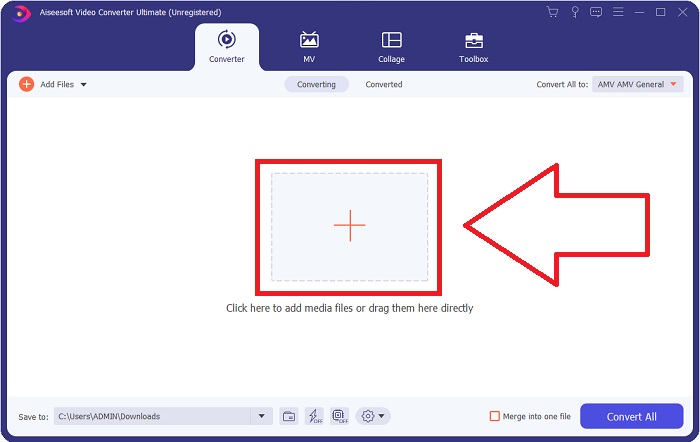
Trinn 3: Hvis prosessen lykkes, og filen vises i grensesnittet, kan du på høyre side se hvilket format videoen din for øyeblikket er i. Klikk på nedtrekkspilen, så vises alle tilgjengelige formater. Bla ned og velg WMV, eller bare skriv det inn i søkefeltet. I tillegg kan du velge hvilken kvalitet du vil ha i panelet til høyre i fanen.
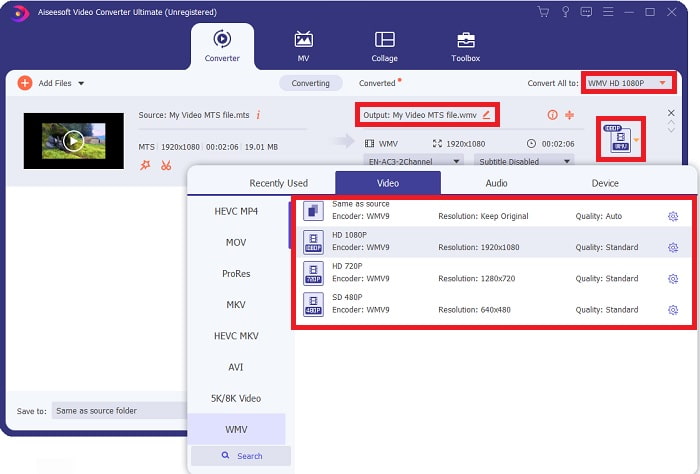
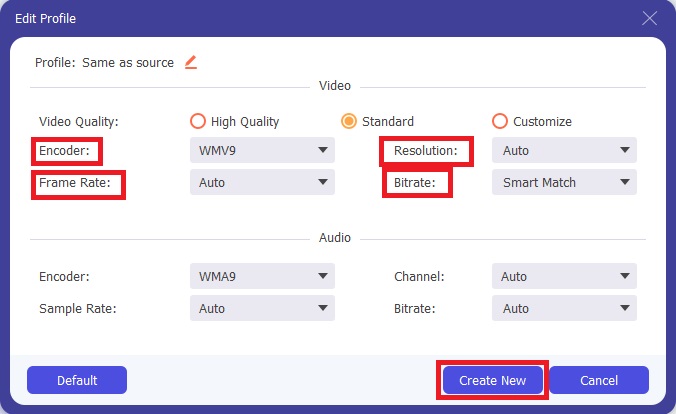
Trinn 4: For flere alternativer klikker du på tannhjulikonet til høyre for videokvaliteten du har valgt. Derfra kan du redigere videoen videre, for eksempel oppløsning, bildefrekvens, bithastighet og mye mer. Klikk bare på knappen Create New når du er ferdig med å justere.
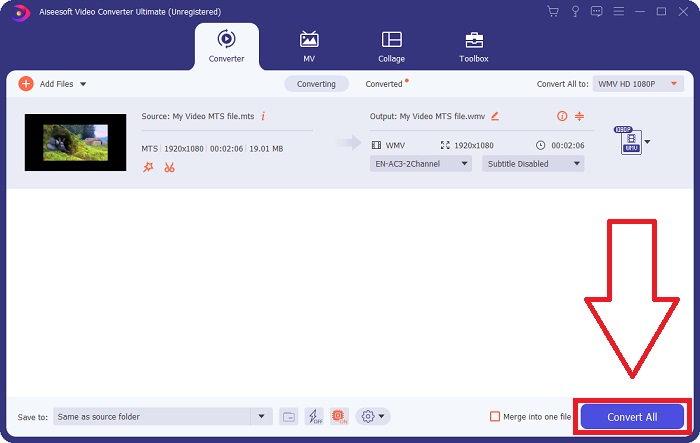
Trinn 5: Når alle nødvendige justeringer er gjort, klikker du på knappen Convert All nederst i høyre hjørne for å starte konverteringen på riktig måte og venter til den er ferdig.
Del 3. Utvidet kunnskap om MTS VS. WMV
| Filutvidelse | .mts | .wmv |
| Beskrivelse | Advanced Video Coding High Definition (AVCHD) er et videoformat som bruker filtypen MTS som filnavn. Noen videokameramerker, som JVC, Sony, Canon og Sanyo, bruker HD MPEG-videoformatet og lagrer filene med filtypen .mts. | Som en del av Microsofts Windows Media-rammeverk inkluderer WMV (Windows Media Video) ulike videokodeker og kodingsformater. I begynnelsen er formålet å konkurrere med RM-format på streaming-apper på nettet. Ved hjelp av WMV-teknologi kan videoer lagres, komprimeres og leveres på Blu-ray/DVD-er. |
| Tilknyttede programmer | ◆ Roxio Creator NXT Pro 7 ◆ Blender ◆ VLC Media Player ◆ Apple Final Cut Pro X | ◆ VLC Media Player ◆ MPlayer ◆ Klassisk mediespiller ◆ Windows Media Player |
| Utviklet av | Sony/Panasonic | Microsoft |
| Filtype | Video/mp2t | Video/x-ms-asf |
Del 4. Vanlige spørsmål om konvertering av MTS til WMV
Hvilken spiller kan spille av MTS-filen?
Hvis du har en MTS-video, kan du redigere den med programvaren som følger med HD-videokameraene fra Sony og Panasonic, eller du kan bruke ett av programmene listet opp nedenfor: Blender for å kombinere to eller flere elementer (flermiljø) MAGIX Vegas er en programpakke som lar deg lage ulike typer visuelle effekter (Windows) CyberLink PowerDirector er et videoredigeringsprogram (Windows, Mac, Android).
Har MTS-filer lyd?
Flere faktorer kan forårsake tap av lyd i MTS-filer. Det vanligste er at samsvarsprosessen ikke fikk fullføres, noe som resulterte i ingen lyd eller kuttet lyd og en feil med å kopiere hele mappestrukturen (i motsetning til bare mediefilene) fra minnekortet.
Hva er bruken av WMV?
Microsoft introduserte WMV-filformatet som en serie videokodeker i Windows Media Player. WMV er en forkortelse for 'Windows Media Video', et komprimert videokontainerformat utviklet for bruk med Windows Media-rammeverket. For å selge videoinnhold på nettet eller via HD DVD og Blu‑ray-plater er WMV-videofiler det mest passende formatet å bruke. For å spille av WMV-filer kan du klikke her for å lære mer om noen nyttige WMV-spillere.
Konklusjon
Alle omformerne nevnt ovenfor er pålitelige og anbefalte verktøy for å konvertere MTS til WMV. Video Converter Ultimate og Free Video Converter Ultimate er de to beste omformerne som er uforlignelige med andre online verktøy og programvare. Den har forskjellige typer verktøy den tilbyr og de mange videoformatene den støtter.
-
 [Gratis og online] 5 metoder for å konvertere M2TS til MP4
 Vil du konvertere videoen fra HD-videokamera til vanlig MP4? Her er 5 enkle og gratis måter å endre M2TS-fil til MP4 på Windows og Mac.
-
 Hvordan konvertere M2TS til MKV gratis og online
 Vil du konvertere M2TS til MKV mens du holder den originale kvaliteten? Dette innlegget viser deg gratis og online metoder for å endre M2TS til MKV tapsfritt.
-
 [2021] Topp 6 gratis og online måter å konvertere M2TS til MP3
 Kan en M2TS fil konverteres til MP3? I dette innlegget har vi listet topp 6 gratis og online måter å hjelpe deg med å konvertere M2TS til MP3, AAC, AIFF og mer lydformat.
