


 Video Converter Ultimate
 Skjermopptaker
 Videoreparasjon
 Sikker nedlasting
Topp 4 effektive metoder for å konvertere TS til 3GP
Artikkelen fokuserer på hvordan du kan konvertere TS til 3GP. I dag er mobiltelefoner svært populære. De er en av måtene å se favorittvideoene dine på. Men dessverre hender det at TS-filer ikke støttes av mobiltelefoner. Det populære formatet du kan bruke for å se videoer på telefonen, er 3GP-filformatet. Dermed er den eneste løsningen å konvertere TS-filen din til 3GP-format. Hvis det er tilfellet, kan denne artikkelen gi deg det du trenger. Les denne artikkelen for å lære hvordan du konverterer TS til 3GP.

Del 1: Gratis nedlastbare programmer for å konvertere TS til 3GP
Video Converter Ultimate
Hvis du vil ha et gratis nedlastbart program du kan bruke på Windows og Mac for enkelt å konvertere TS til 3GP, er Video Converter Ultimate noe for deg. Denne programvaren lar deg konvertere TS til 3GP enkelt og raskt. Den gjør det også mulig å konvertere mange filer med ett enkelt klikk. I tillegg kan du konvertere filene dine raskt fordi Video Converter Ultimate har en svært rask konverteringsprosess, som er 30 ganger raskere enn mange andre konvertere. Alle brukere kan også benytte dette programmet, siden det har et brukervennlig grensesnitt og enkle metoder. Dessuten har denne konverteren flere funksjoner enn du kanskje forestiller deg. Den kan også konvertere bildefilformater som JPG, PNG, BMP, TIFF og mer. Hvis du vil rotere videoen din, kan du også stole på dette programmet. Du kan vende videoen horisontalt og vertikalt. Se detaljene nedenfor for å oppdage flere funksjoner.
Funksjoner
◆ Konverter videoformater, for eksempel MP4, M4V, 3GP, FLV, AVI, MOV, MKV og mer.
◆ Pålitelig i å lage en fantastisk collage.
◆ Tilbyr batchkonverteringsprosess.
◆ Musikkvideoskaper er tilgjengelig.
◆ Den kan justere videohastigheten fra 0,125x til 8x raskere.
◆ Tilbyr redigeringsverktøy, som videoforsterker, kompressor, fusjon, trimmer, etc.
Fordeler
- Også god til å konvertere bildefiler.
- Ikke behov for en internettforbindelse.
- Perfekt for nybegynnere og har et enkelt grensesnitt.
- Den har muligheten til å tilpasse 3D-videoer fra 2D.
Ulemper
- Kjøp pro-versjonen for å oppleve flotte funksjoner.
For å konvertere TS til 3GP-filformat, skal vi bruke Video Converter Ultimate med de detaljerte veiledningene nedenfor.
Trinn 1: Klikk på nedlastingsknappen nedenfor for å laste ned Video Converter Ultimate gratis på Windows eller Mac. Installer det deretter og start konverteringsprogrammet.
Gratis nedlastingFor Windows 7 eller nyereSikker nedlasting
Gratis nedlastingFor MacOS 10.7 eller nyereSikker nedlasting
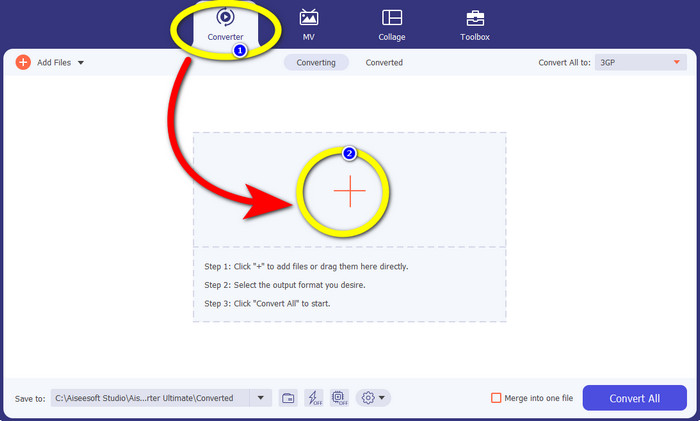
Trinn 2: Velg Converter-panelet og klikk på +-symbolet for å importere TS-filen du vil konvertere til 3GP-format.
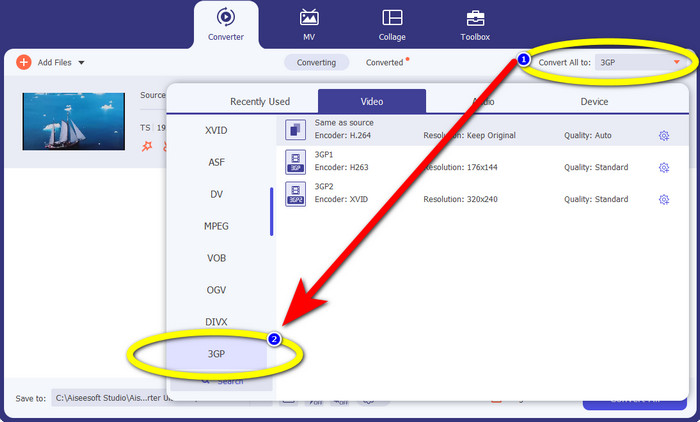
Trinn 3: Etter at du har importert TS-filen, klikker du på knappen Convert all to. Formatvalgene vises, og deretter klikker du på 3GP-filformatet.
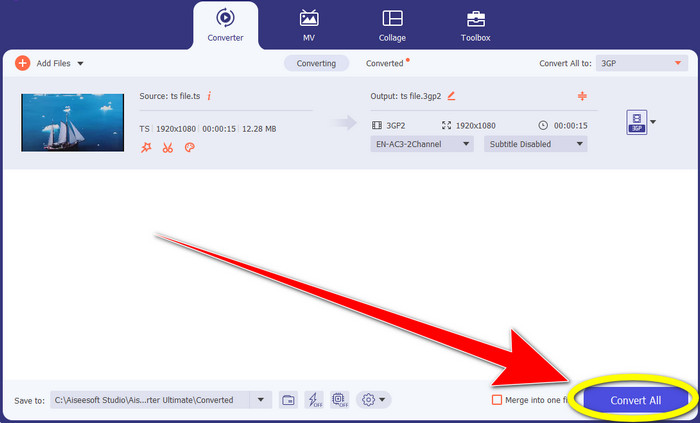
Trinn 4: Til slutt klikker du på knappen Convert All. Konverteringsprosessen tar bare noen sekunder, og du kan allerede lagre den endelige videoen på Windows eller Mac.
HitPaw Video Converter
Et annet gratis nedlastbart verktøy for å konvertere TS til 3GP er HitPaw Video Converter. Denne konverteren er også utmerket til å konvertere ulike filer, som MKV, M4V, VOB, WEBM, FLV, XVID, M2TS, TS, 3GP og mer. Du kan også enkelt konvertere lydformater med dette verktøyet. I tillegg har det mange redigeringsverktøy, som klipp, slå sammen, beskjær og roter, vannmerke, hastighet, filter osv. Dessuten lar HitPaw Video Converter deg laste ned videoer fra over 1000 nettsteder, som YouTube, Bili Bili, Facebook osv. Men selv om det er et gratis nedlastbart program, er funksjonene begrenset, så du må fortsatt kjøpe programmet for full tilgang. Dessuten er prosessen med å laste det ned og installere det på Windows og Mac komplisert, og det er mange trinn du må gjennom. Følg trinnene nedenfor hvis du vil bruke HitPaw Video Converter til å konvertere TS til 3GP.
Trinn 1: Last ned HitPaw Video Converter på Windows eller Mac. Følg installasjonsprosessen og åpne programmet.
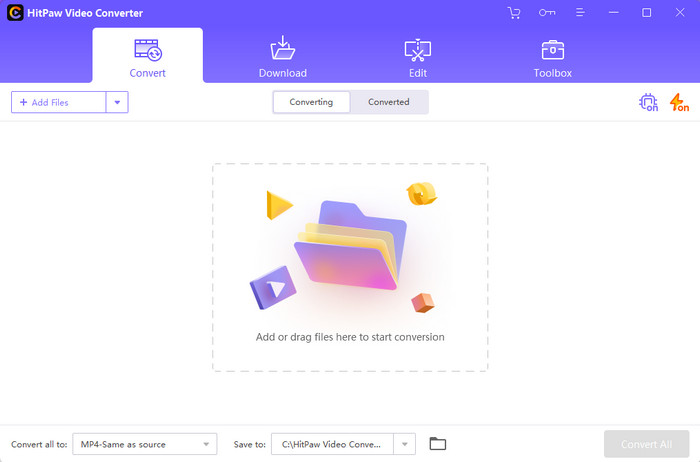
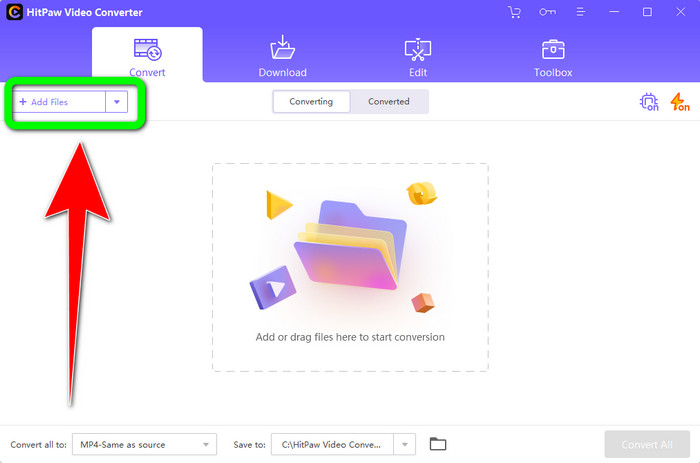
Trinn 2: Klikk på knappen Add Files for å laste opp TS-filen.
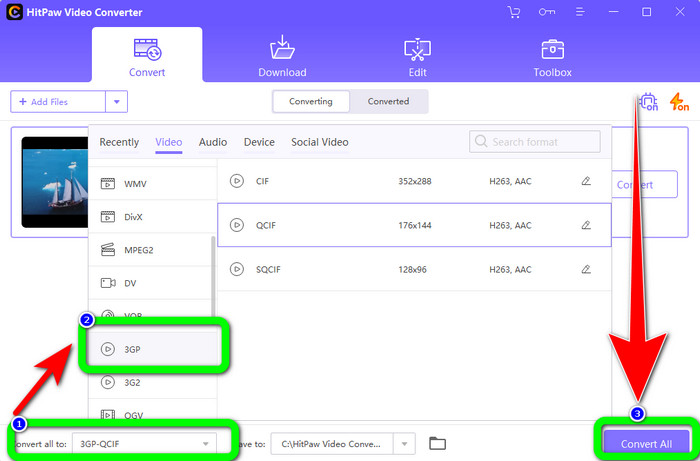
Trinn 3: Klikk på knappen Convert All to. Deretter vises formatvalgene på skjermen. Velg filformatet 3GP og klikk på knappen Convert All for endelig å konvertere og lagre den ferdige videoen.
Del 2: Fantastiske TS til 3GP-konverterere online
FVC Free Video Converter Online
Når det gjelder nettbaserte konvertere, finnes FVC Free Video Converter Online. Dette programmet kan konvertere TS til 3GP enkelt og problemfritt. Det kan også hjelpe deg med å konvertere flere andre filer, som MP4, AVI, WMA, TS, M2TS, XVID, FLV og mer. I tillegg er denne konverteren enkel å bruke og egner seg for alle brukere. Du kan dessuten bruke denne gratis nettprogramvaren både på Windows og Mac. Den er også tilgjengelig i nesten alle nettlesere, som Google, Mozilla Firefox, Microsoft Edge og flere. Følg disse enkle trinnene for å konvertere TS til 3GP-filformat ved hjelp av FVC Free Video Converter Online.
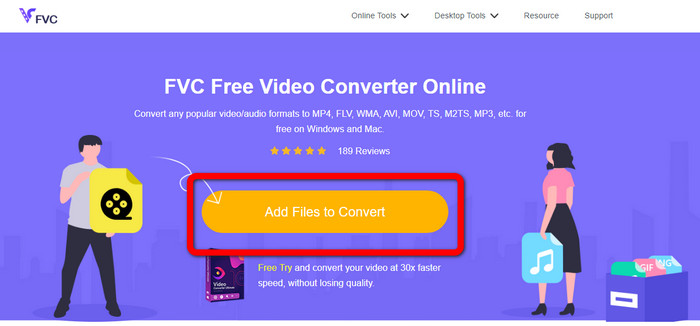
Trinn 1: Gå til nettstedet til FVC Free Video Converter Online. Klikk på den oransje boksen i midten for å laste opp TS-filen.
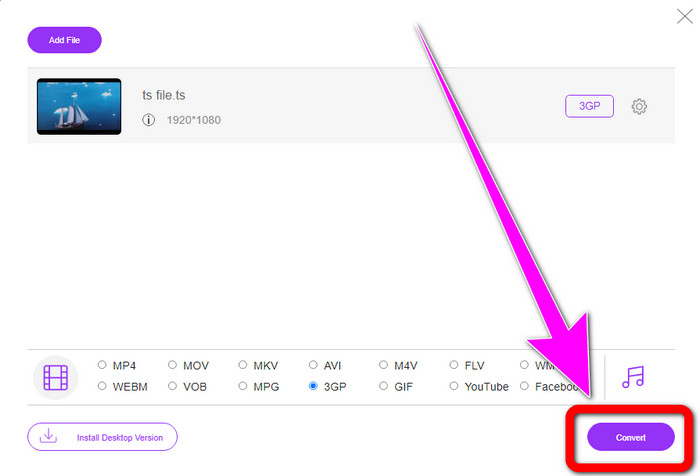
Trinn 2: Etter at du har lastet opp TS-filen, vil du se mange formatvalg i den nedre delen av grensesnittet. Velg deretter ønsket filformat, som er 3GP-formatet.
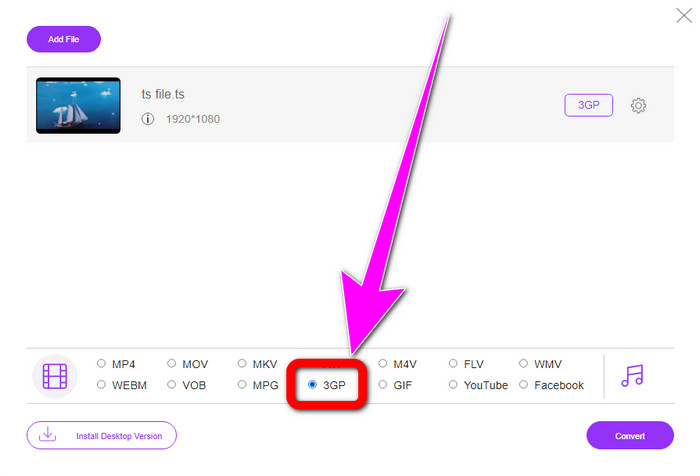
Trinn 3: Når du er ferdig med å velge 3GP-formatet, klikker du på knappen Convert. Last deretter ned og lagre den ferdige videoen.
Convertio
Convertio er et annet nettbasert verktøy for å konvertere TS til 3GP. Akkurat som programmene ovenfor, er denne konverteren enkel å bruke fordi den bare krever tre klikk for å konvertere ulike filer, som MOV, AVI, FLV, MKV, MPG, MP4 og flere. I tillegg til videokonvertering er Convertio også en konverter for lyd, dokumenter og presentasjoner. Men den har en ulempe, spesielt når du bruker gratisversjonen av dette verktøyet. Den har bare en maksimal filstørrelse på 100 MB, så du kan ikke konvertere ubegrensede filer. Du må bruke betalingsversjonen for å oppleve best ytelse fra dette programmet. Gå videre til trinnene nedenfor for å konvertere TS til 3GP-format.
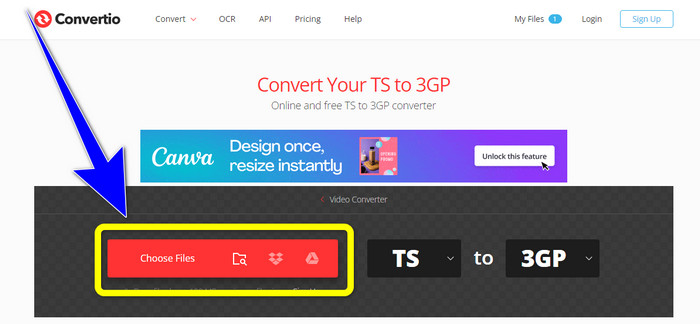
Trinn 1: Besøk nettstedet til Convertio. Klikk deretter på knappen Choose Files for å sette inn TS-filen din.
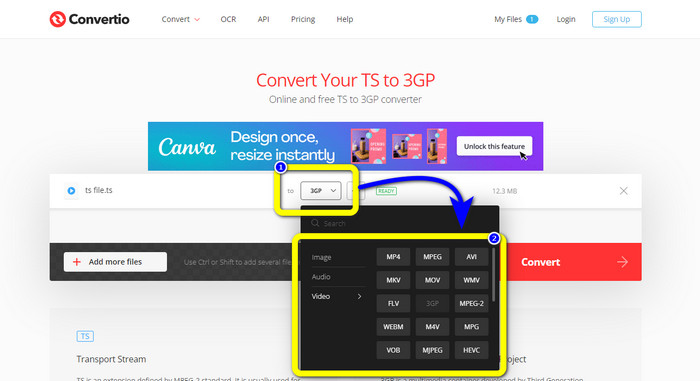
Trinn 2: Klikk på formatvalgene og velg 3GP-filformatet.
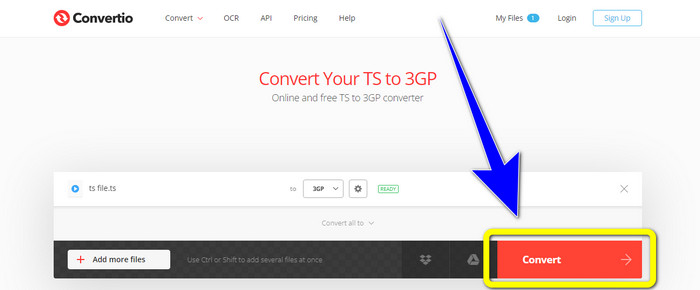
Trinn 3: For siste trinn, trykk på konverter-knappen. Vent på prosessen, og lagre deretter resultatet. Du kan også bruke dette verktøyet til å konvertere TS til FLV.
Del 3: TS vs. 3GP
| Fil | TS | 3GP |
| Filutvidelse | .ts | .3gp |
| Beskrivelse | MPEG-2-spesifikasjonen definerer TS som en utvidelse. Vanligvis brukes den til kringkasting, streaming av internettmedier og lagring av musikk og video på DVDer. Når en dataoverføringsfeil oppstår, lagres denne mediebeholderens elementære strømmer i en form som muliggjør rask avspilling og lyd/video-synkronisering. | For GSM-baserte (Global System for Mobile Communications) telefoner opprettet Third Generation Partnership Project 3GP multimediebeholderen i 1998. Beholderen er perfekt for mobiltelefoner fordi den bruker mindre data, båndbredde og lagring. Det er en vanlig beholder for MMS-filer (Multimedia Messaging Service). |
| Utviklet av | Ekspertgruppen for bevegelige bilder | Tredje generasjons partnerskapsprosjekt |
| Tilknyttede programmer | QuickTime Player, Windows Movies og TV VLC Media Player | Windows Meda Player, VLC Media Player |
Del 4: Vanlige spørsmål om konvertering av TS til 3GP
Er TS bedre enn MP4?
Både MP4- og TS-filer har samme videokvalitet. Hovedforskjellen mellom TS- og MP4-filer er at TS-filer er flate, men MP4-filer starter med en indeks. På den annen side er videobitene i filene identiske. Derfor har alle TS-, M2TS- og MP4-filer samme videokvalitet.
Kan jeg laste opp TS-filer til YouTube?
Dessverre, nei. Du kan laste opp TS-filer til Facebook, men ikke til YouTube. Det beste programmet for å åpne TS filer er VLC Media Player.
Hva er MPEG TS og PS?
TS er Transport Stream, som brukes til kommunikasjons- og kringkastingsapplikasjoner. PS er Program Stream, som kan brukes til lagringsapplikasjoner som DVD-plater.
Konklusjon
Dette er de fire mest effektive metodene for å konvertere TS til 3GP. Men noen programmer kan bare brukes fullt ut når du kjøper betalingsversjonen. Hvis du vil ha en gratis konverter uten begrensninger, bruk FVC Free Video Converter Online.
-
 TS til GIF: Slik gjør du TS -filen til animerte GIF -er
 Lær hvordan du endrer TS-filene til et GIF-format ved hjelp av denne oppskriften. Listen nedenfor viser forskjellige ideer om TS og GIF og hvordan du konverterer TS til GIF.
-
 Hvordan konvertere DIVX til 3GP på Windows, Mac og Online
 Hvordan konvertere DIVX til 3GP? Hvis du leter etter et svar, les denne artikkelen. Vi vil vise deg flotte prosedyrer ved hjelp av forskjellige omformere.
-
 4 beste måter å konvertere SWF til 3GP på Windows, Mac & Online
 Her er de mest nyttige metodene for å konvertere SWF til 3GP umiddelbart. Dette innlegget vil også vise deg noen effektive Windows- og Online-verktøy du kan bruke.
