


 Video Converter Ultimate
 Skjermopptaker
 Videoreparasjon
 Sikker nedlasting
3 gratis måter å konvertere FLV for å spille på Xbox
FLV brukes mye på nyhets- og videotjenester. Når du laster ned nettvideoer fra YouTube, Hulu eller Facebook, får du som regel FLV-filer. FLV-formatet støttes av mange spillere, enheter, plattformer og nettlesere. Men det kan ikke spilles av på Xbox.
Xbox er mer enn bare en spillkonsoll – den lar deg også spille av video og musikk fra en USB-minnepinne eller ekstern harddisk. Xbox er kompatibel med mange populære mediefiler. Men som nevnt over, kan du ikke spille av FLV direkte på Xbox. Når du vil se FLV-filer på Xbox, må du konvertere FLV til et Xbox-støttet format.

Dette innlegget deler 3 gratis måter å konvertere FLV til Xbox på. Når du vil se FLV-filer på Xbox One, Xbox 360, den nye Xbox Series X eller Xbox Series S, kan du bruke disse metodene til å konvertere FLV til et format som støttes av Xbox.
Del 1. Slik konverterer du FLV gratis til Xbox Online
Mange videokonvertere kan hjelpe deg med å konvertere FLV til Xbox-støttet format som AVI eller MP4. Hvis du har å gjøre med noen små FLV-videoklipp, bør du først prøve den gratis online FLV til Xbox-omformeren.
Free Online Video Converter er en brukervennlig videokonverter som lar deg konvertere FLV til MP4, AVI, WMV, MOV eller et annet format som støttes av Xbox-konsollen. Sammenlignet med andre nettkonvertere krever den ingen konto eller innlogging. Dessuten er det ingen filstørrelsesbegrensning for FLV-konverteringen din. Følgende veiledning viser deg hvordan du bruker den.
Trinn 1. Denne nettbaserte FLV til Xbox-konverteren er kompatibel med alle nettlesere som Chrome, Safari, IE og Firefox. Åpne nettleseren din og gå til nettstedet for Online FLV til Xbox-konverter.
Trinn 2. Når du kommer dit, klikker du på Add Files to Convert og deretter på Download-knappen for å installere et startprogram for FLV-konverteringen. Når startprogrammet er klart, vises et popup-vindu der du kan legge til FLV-filen din.

Trinn 3. Du ser noen populære videoformater, inkludert MP4, AVI, MOV, FLV, WMV, MKV og flere, listet opp under den innlastede FLV-filen. Du kan velge et Xbox-støttet format som MP4 eller AVI.
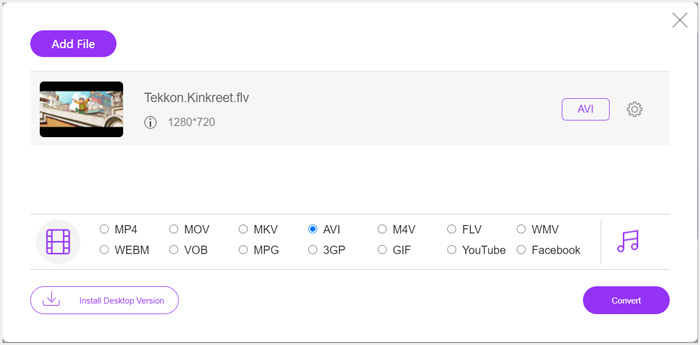
Trinn 4. Hvis du vil tilpasse flere utgående video- og lydinnstillinger, kan du klikke på Settings-ikonet ved siden av utdataformatet. Deretter kan du klikke på Convert-knappen for å starte konverteringen fra FLV til Xbox. Videoen som konverteres, blir automatisk lagret på datamaskinen din så snart konverteringen er fullført.
Del 2. Hvordan konvertere FLV til Xbox Online med FreeConvert
FreeConvert er en annen populær video- og lydkonverter som kan hjelpe deg å konvertere FLV til Xbox-støttet MP4, AVI eller WMV. Den har en egen FLV to Xbox Video Converter som lar deg konvertere FLV-filene dine direkte til Xbox.
Trinn 1. Åpne nettleseren din og gå til denne siden for FLV to Xbox Video Converter.
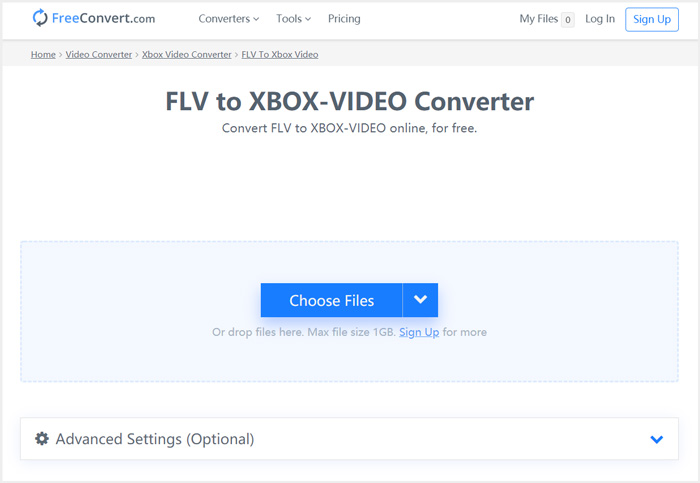
Trinn 2. Klikk på Choose Files-knappen for å finne og laste opp FLV-filen din. Du kan også legge til fil via URL, Google Drive og Dropbox.
Trinn 3. Du kan klikke på Add More Files for å laste opp andre FLV-filer du vil konvertere. Målformatet blir satt til XBOX som standard. Du kan ganske enkelt klikke på Convert to Xbox Video-knappen for å starte FLV til Xbox-konverteringen.
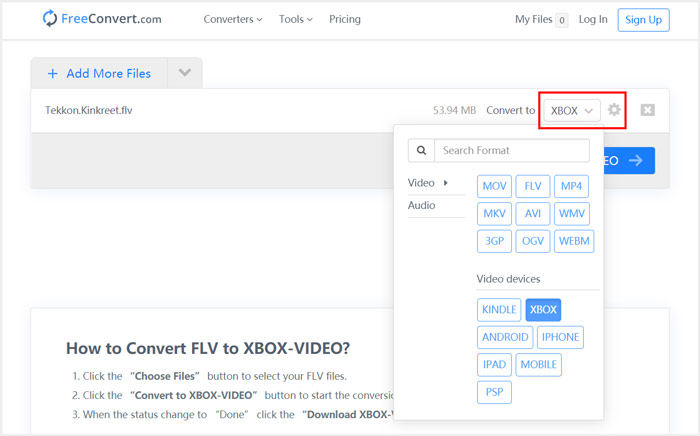
Følg lignende trinn, og du kan spille av hvilken som helst musikk på Xbox etter at du har konvertert den til formater som er kompatible med Xbox.
Denne FLV to Xbox Video Converter begynner å laste opp og konvertere videoen din. Etter konverteringen kan du klikke på Download-knappen for å lagre den på Mac- eller Windows-PC-en din. Eller du kan velge å lagre den på Google Drive og Dropbox. Du vil se noen annonser når du bruker denne gratis FLV til Xbox-konverteren.
Del 3. Bedre måte å gratis konvertere FLV til Xbox på Mac og Windows PC
I tillegg til nettbaserte FLV-konvertere kan du også bruke andre gratis videokonvertere for å konvertere og spille av FLV-filene dine på Xbox-spillkonsollen. Her introduserer vi den kraftige Free FLV Converter for deg. Den er spesielt utviklet for å gjøre ulike FLV-konverteringer.

- Konverter hvilket som helst FLV til Xbox-format som MP4, AVI, WMV, MOV og mer.
- Tilbyr en serie temaer for å redigere og tilpasse FLV-filen.
- Avanserte flerkjerners CPUer og GPU-akselerasjoner for å konvertere FLV til Xbox i rask hastighet.
- Konverter en eller flere FLV-filer til Xbox uten tap av bilde- eller lydkvalitet.
Gratis nedlastingFor Windows 7 eller nyereSikker nedlasting
Gratis nedlastingFor macOS 10.7 eller nyereSikker nedlasting
Trinn 1. Først kan du dobbeltklikke på nedlastingsknappen for å installere den gratis på datamaskinen din. Åpne programmet og klikk på Add Files for å importere FLV-fil(ene) dine.

Trinn 2. Velg MP4 eller AVI som målformat fra rullegardinlisten Output format. For flere innstillinger kan du klikke på Settings-ikonet ved siden av utdataformatet for å gå inn i vinduet Profile Settings.
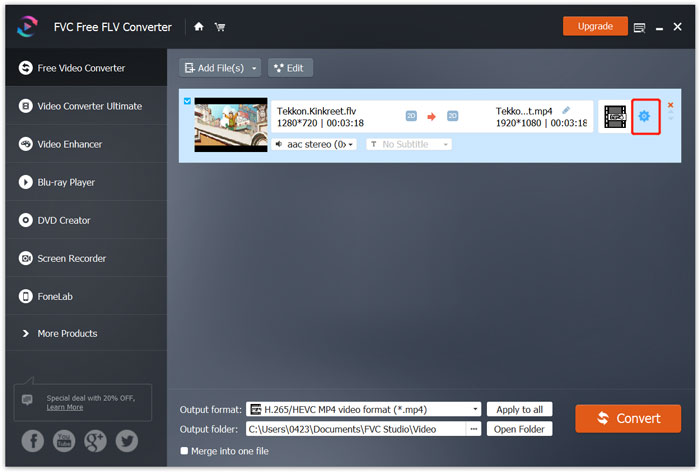
Den har også en egen Xbox-kategori i Output format, slik at du kan konvertere FLV direkte til et format som støttes av Xbox One eller Xbox 360. Men da må du oppgradere til en betalt versjon.
Trinn 3. Klikk på Convert-knappen for å starte videokonverteringen fra FLV til MP4 eller et annet Xbox-støttet videoformat.
Del 4. Vanlige spørsmål om å spille FLV på Xbox
Spørsmål 1. Hvilke formater kan støttes av Xbox One?
Som en av de mest populære spillkonsollene er XBox kompatibel med mange video- og lydformater som ofte brukes, inkludert MP4, AVI, M4V, MOV, WMV, MKV, H.264 AVCHD, WAV, WMA, 3GP-video, 3GP-lyd, AAC , MP3 og mer.
Spørsmål 2. Hvordan spiller jeg videoer på Xbox?
Hvis du har Movies & TV-appen på Xbox One eller Xbox 360, når du kaster video til Xbox, eller kobler den eksterne stasjonen til Xbox, kan du bruke den til å se på videoer uten problemer.
Spørsmål 3. Hvilken spiller kan spille FLV-filer?
Når du vil spille FLV-filer på Mac, Windows PC eller bærbar iOS / Android-enhet, er VLC Media Player alltid et godt alternativ å gjøre det. Den tilbyr stasjonære og mobile apper der du kan spille FLV-filer på datamaskinen eller telefonen.
Konklusjon
Kan du ikke spille FLV-filer på Xbox-spillkonsollen din? For å gjøre det, bør du først konvertere FLV til Xbox-støttet fil. Du kan finne 3 gratis metoder for å konvertere og spille FLV på Xbox fra dette innlegget.
-
 Topp 10 FLV-spillere for Windows, Mac, iOS og Android i 2021
 FLV-spiller hjelper deg med enkel tilgang til FLV-filene dine på Windows, Mac, Android, iOS-enheten. Sjekk ut de beste FLV-filspillerne du kan laste ned akkurat nå.
-
 Veiledning for å komprimere GIF og redusere filstørrelsen med høy kvalitet
 Her er to enkle måter å komprimere GIF på datamaskinen eller mobiltelefonen din. Du kan bruke FVC Free Online Video Compressor og Photoshop redusere GIF-filstørrelse i forskjellige aspekter.
-
 Topp 4 gratis måter å konvertere FLV-videoer til MP4 på skrivebordet og online
 Denne guiden deler fire gratis metoder for å konvertere FLV-videofiler til MP4-format på Windows 10/8/7 / XP og Mac OS X, slik at du kan nyte videoene på alle enheter.
