


 Video Converter Ultimate
 Skjermopptaker
 Videoreparasjon
 Sikker nedlasting
Hvordan konvertere BMP til PNG og JPGU ved å bruke online og offline konverterere
Bitmap- eller BMP-formatet er ikke optimalt for fargebilder med overtoninger eller gradienter. Du ser heller ikke like mange bilder i dette formatet lenger. Teknisk sett er BMP et foreldet format med nesten ingen komprimering. Derfor, hvis du vil åpne BMP-bilder uten begrensninger, må du konvertere BMP til mer vanlige bildeformater. Du kan konvertere mellom flere bildeformater på mange måter. Vi skal skissere de enkleste og mest rett‑frem metodene i dette innlegget. Så hvis du vil vite hvordan du kan konvertere BMP til JPG eller PNG-bildeformat, les dette innlegget. Vi vil introdusere utmerkede bildekonvertere som kan hjelpe deg.

Del 1. BMP vs. JPG vs. PNG
| Filformat | BMP | JPG | PNG |
| Filnavnutvidelse | .bmp | .jpg | .png |
| Utviklet av | Microsoft | Fellesgruppe for Foto-eksperter | PNG Development Group |
| Beskrivelse | EN BMP fil er forkortelse for bitmap og uttales bump. Microsoft opprettet BMP-filformatet for sitt Windows-operativsystem. Det er for å beholde oppløsningen til digitale bilder på ulike skjermer og dingser. Både farge- og svart-hvitt todimensjonale fotografier kan lagres. BMP-filer er ikke lenger bare kompatible med Windows-baserte enheter i moderne tid. De er nå kompatible med et stort antall Mac- og Android-enheter. | De JPG bildefilformatet er det mest effektive for bildekomprimering. Brukere bruker mye JPG-filer. Det er også referert til som JPEG- eller JPG-filer. Joint Experts Group er det fulle navnet på JPEG. I tillegg har de fleste punktgrafikkbilder filtypen.jpg. Hovedmålet er å gjøre filene mindre i størrelse. Siden JPG er et tapsformat, har overdreven komprimering en innvirkning på kvaliteten på bildene. | Bærbar nettverksgrafikk, en PNG utvidelse for rasterfamilien, som utfører tapsfri kompresjon. Den ble utviklet for å erstatte GIF, Graphics Interchange Format, og er ikke patentert. De kan være basert på en palett, og typisk gråtonebilder som tilbyr gjennomsiktighet. PNG er tapsfri komprimering. Det innebærer at det holder informasjon, detaljer og kvalitet. |
Del 2. Online metoder for å konvertere BMP til JPG/PNG
Konverter BMP til JPG/PNG med FVC Free Image Converter
For å konvertere BMP til JPG gratis på nettet, kan du bruke FVC Free Image Converter. Dette nettverktøyet har den aller enkleste prosessen for å konvertere BMP til PNG eller JPG. På grunn av det intuitive grensesnittet kan både avanserte og uerfarne brukere bruke denne konverteren. Du kan konvertere bilder på bare tre trinn. I tillegg kan du laste opp bilder i ulike filformater. Det støtter inndataformater som PNG, JPG, BMP, GIF, TIFF og flere. I tillegg støtter FVC-bildefilkonverteren batchkonvertering. Det gjør at du kan konvertere en rekke bilder samtidig. Dette er langt mer effektivt og praktisk enn andre bildekovertere på markedet. Det er praktisk for alle brukere, fordi du kan konvertere 40 bildefiler om gangen.
FVC Free Image Converter garanterer et bilde av høy kvalitet. Etter konverteringen vil bildet fortsatt se det samme ut som originalt. Dessuten vil du ikke se forstyrrende annonser på skjermen din, selv om det er en online bildekonvertering. På denne måten kan du fokusere mer på å konvertere bildene dine. Denne omformeren er tilgjengelig i nesten alle nettlesere. Den inkluderer Chrome, Safari, Edge, Firefox og mer. Du kan følge de enkle trinnene nedenfor for å konvertere BMP til JPG- og PNG-format.
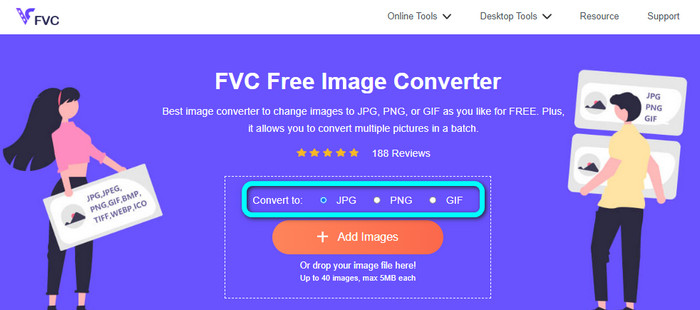
Trinn 1: Gå til nettleseren din og besøk nettstedet til FVC Free Image Converter. Finn alternativet Konverter til og velg ønsket format. Du kan klikke på JPG eller PNG.
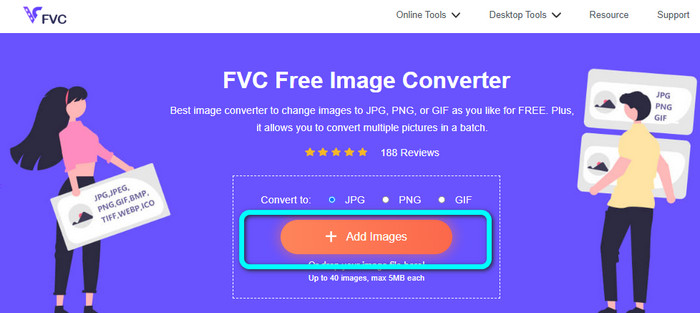
Trinn 2: Legg til BMP-bildet ved å klikke på knappen Add Images. Filene på datamaskinen din vises på skjermen. Velg BMP‑bildefilen du vil konvertere.
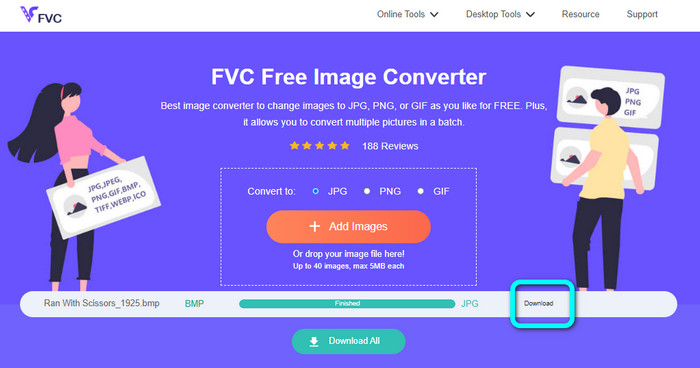
Trinn 3: Etter opplasting vil bildet bli konvertert automatisk. Så, som siste trinn, klikker du på knappen Download for å lagre bildet på datamaskinen.
Konverter BMP til JPG/PNG ved hjelp av Convertio
Convertio er et annet nettverktøy for å konvertere BMP til JPG eller PNG. Det er en filkonverterer som lar deg konvertere ulike formater. Det inkluderer BMP, JPG, PNG, GIF, SVG og flere. Med hjelp av dette verktøyet er det enkelt å konvertere mange bilder. Det tilbyr også batchkonvertering. På denne måten kan du konvertere BMP til JPG i batch for å spare mer tid. I tillegg garanterer Convertio personvernet ditt. Etter at du har konvertert bildene dine, vil det automatisk slette dataene dine etter 24 timer. Du kan også få tilgang til denne konverteren i ulike nettlesere. Du kan bruke den i Google, Mozilla, Edge osv.
Convertio har imidlertid ulemper. Du kan bare laste opp et bilde på opptil 100 MB. Hvis du vil ha en ubegrenset filstørrelse å laste opp, kjøp et abonnement. Du trenger også en internettforbindelse for å betjene denne omformeren.
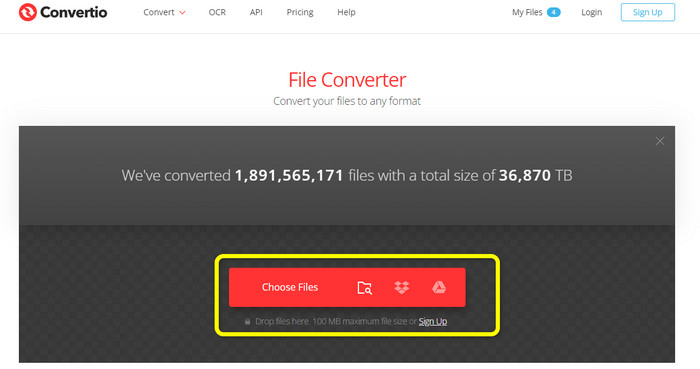
Trinn 1: Besøk nettstedet til Convertio. Klikk på knappen Choose Files for å legge til BMP‑bildefilen.
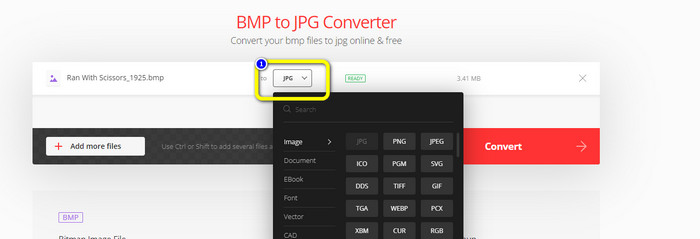
Trinn 2: Velg JPG- eller PNG‑filformat fra formatvalgene. Hvis du vil legge til flere bilder, klikker du på knappen Add more files.
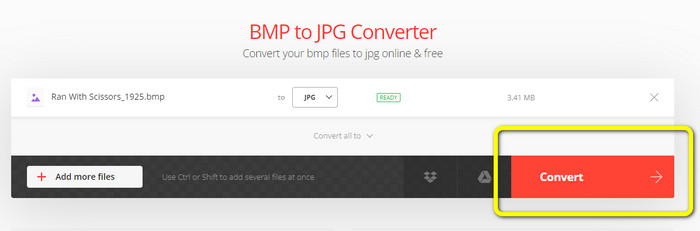
Trinn 3: Etter å ha valgt ønsket filformat, klikker du på knappen Convert. Vent på konverteringsprosessen og last deretter ned bildene til datamaskinen din.
Del 3. Offline metoder for å konvertere BMP til JPG/PNG
Du kan også bruke Video Converter Ultimate til å konvertere BMP til JPG. Denne offline‑konverteren har en lettfattelig fremgangsmåte. Den har også et intuitivt grensesnitt, noe som gjør den egnet for alle brukere, spesielt nybegynnere. Video Converter Ultimate tilbyr batchkonvertering. Det betyr at du kan konvertere flere bilder samtidig. Den tilbyr også rask konvertering. Med denne funksjonen kan du konvertere mange filer umiddelbart. Dessuten støtter den ulike bildeformater. Det inkluderer JPG, BMP, PNG, GIF, TIFF og flere. I tillegg til å konvertere kan du også endre bildekvaliteten i innstillingene for utdata. På denne måten kan du justere bildekvaliteten etter egne preferanser. Utover dette kan du bruke denne nedlastbare konverteren både på Mac og Windows. Følg instruksjonene nedenfor for å konvertere BMP‑filen din til JPG- eller PNG‑format.
Trinn 1: Last ned Video Converter Ultimate på Mac eller Windows. Start programmet etter installasjonen. Vi har også gjort konverteren tilgjengelig ved å klikke på Download-knappen nedenfor.
Gratis nedlastingFor Windows 7 eller nyereSikker nedlasting
Gratis nedlastingFor MacOS 10.7 eller nyereSikker nedlasting
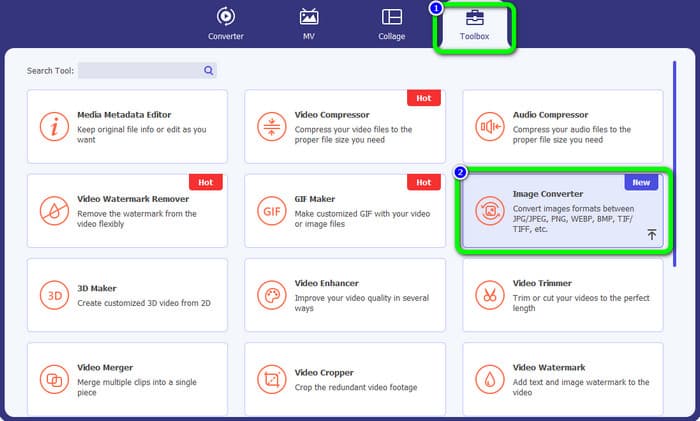
Trinn 2: Gå til panelet Toolbox og velg verktøyet Image Converter. Et nytt grensesnitt vil vises.
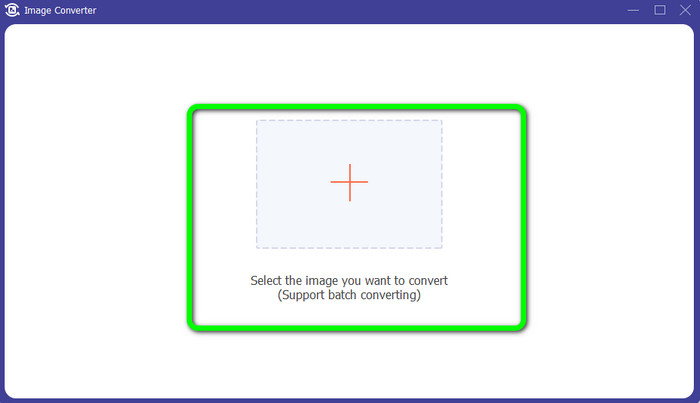
Trinn 3: Klikk på Plus-symbolet. Velg deretter BMP‑bildet du vil konvertere, fra filmappen din.
Trinn 4: Klikk på knappen Add Source File for å legge til flere filer. Gå deretter til formatvalget for å velge ønsket utdataformat. Du kan velge PNG- og JPG‑formatene.
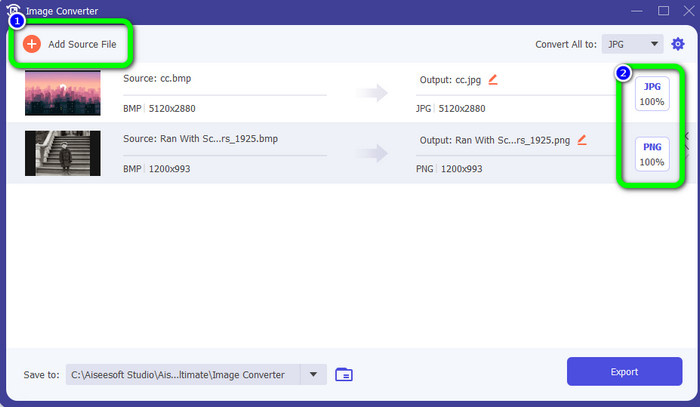
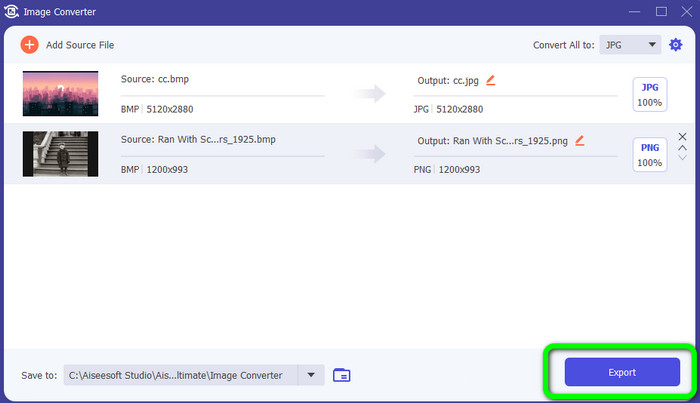
Trinn 5: For det siste trinnet klikker du på knappen Export. Vent på konverteringsprosessen. Åpne deretter de konverterte bildene i mappen din.
Del 4. Vanlige spørsmål om konvertering av BMP til JPG/PNG
1. Hvordan batchkonvertere BMP til PNG?
Hvis du vil utføre en batchkonvertering, kan du bruke FVC Free Image Converter. Først velger du PNG‑formatet i alternativet Convert to. Etter det klikker du ganske enkelt på knappen Add Images. Du kan legge til flere bildefiler. Verktøyet lar deg laste opp opptil 40 bilder om gangen. Etter opplastingen vil verktøyet automatisk konvertere bildefilene dine. For å fullføre prosessen klikker du deretter på knappen Download All for å lagre dem på datamaskinen.
2. Kan en BMP-fil animeres?
Dessverre ikke. Animasjon er ofte ikke kompatibel med BMP-filer. I stedet for å bruke Flash, tenk på å bruke GIF-filformatet. Den kan lage korte, enkle animasjoner som kan deles og lagres.
3. Hvilken er større, en BMP-fil eller JPEG-fil?
En BMP vil være større gitt sammenlignbare bilder. Men en BMP kan bare være så stor som 4 GB på grunn av størrelsesbegrensninger. Størrelsen på en JPEG er ubegrenset. For eksempel er visse satellittbilder tilgjengelige i JPEG-format.
Konklusjon
Siden en BMP‑fil har en større filstørrelse, er det nødvendig å konvertere den til andre formater som JPG og PNG. Heldigvis har denne artikkelen gitt deg utmerkede metoder for å konvertere BMP til JPG og PNG-formater. Men hvis du foretrekker en enkel og gratis måte å konvertere bilder på, kan du bruke FVC Free Image Converter.
-
 Fullskala måter å konvertere JPG til PNG online og offline
 Leter du etter nyttige metoder for å konvertere JPG til PNG filformat? Denne guideposten har svaret du trenger. For å oppdage disse metodene, les artikkelen
-
 Konverter JPEG til JPG effektivt [Fem metoder oppført]
 Kom og få de enkleste veiledningene for å konvertere JPEG til JPG bildefilformat. Klikk på denne guideposten og begynn å lære dine foretrukne metoder
-
 Topp 5 ledende veiledninger for å konvertere PNG til JPG raskt
 Hvis du trenger å konvertere PNG-filen til JPG-format, kan du lære de beste måtene her. Du vil også lære forskjellen mellom PNG- og JPG-filformater
