


 Video Converter Ultimate
 Skjermopptaker
 Videoreparasjon
 Sikker nedlasting
Konverter TGA til PNG: Lær de 3 beste eksepsjonelle TGA til PNG-konvertererne
Truevision Inc. utviklet TGA‑formatet for redigering og animasjon. Dette filformatet ble imidlertid ikke like populært som andre formater (som PNG og JPG). Noen brukere klarer ikke engang å åpne denne filtypen i andre plattformer eller programmer. Dermed er det noen som ikke vet hva de skal gjøre for å bruke og åpne denne bildefilen. Vil du i så fall lære hvordan du kan transkode TGA‑filen din til PNG‑format? Heldigvis gir denne veiledningen deg det beste svaret. Vi tilbyr deg utmerkede måter å konvertere TGA til PNG ved hjelp av bildekonvertere. Så hvis du ikke kan vente med å finne disse gode løsningene, bør du lese artikkelen fra begynnelse til slutt.

Del 1.Hvordan konvertere TGA til PNG på FVC Free Image Converter
Siden TGA‑filformatet ikke er populært, er det vanskelig å åpne det i andre programmer. Men hvis du vil bruke bildet, er det beste du kan gjøre å transkode det til et annet bildeformat. Hvis du vil ha svar på hvordan du kan transkode det, kan du bruke FVC Free Image Converter. Med hjelp av denne nettbaserte bildekonverteren kan du gjøre TGA‑filen din om til et annet standardformat som PNG. I tillegg kan du konvertere flere TGA‑filer til PNG i én og samme prosess. Det er fordi bildekonverteren tilbyr batch‑konvertering. På denne måten kan du konvertere flere filer på kort tid. Dessuten støtter den ulike inngangsformater. Dette inkluderer BMP, JPG, PNG, BMP, TIFF, SVG og flere. Dermed kan du laste opp alle typer bilder til dette nettverktøyet. Når du dessuten har lastet opp bildene, vil verktøyet automatisk konvertere dem til ønsket utdataformat.
Men vent, det er mer. FVC Free Image Converter krever ikke installasjon. Det betyr at du kan begynne å konvertere bilder direkte til nettleserne. Du kan få tilgang til verktøyet i alle nettlesere, noe som gjør det mer praktisk for brukerne. Videre vil du ikke få noen uønskede objekter fra bildene dine etter nedlasting. Verktøyet vil ikke sette vannmerker, logoer, klistremerker og mer. Det vil også garantere ditt personvern. Verktøyet vil automatisk slette bildene dine etter å ha lagret de konverterte bildene. Bruk denne online-konverterens enkle instruksjoner nedenfor for å konvertere TGA til PNG.
Trinn 1. Åpne en vilkårlig nettleser på datamaskinen og gå til den offisielle nettsiden til FVC Free Image Converter. Velg deretter filformatet PNG i alternativet «Convert to» midt på grensesnittet.
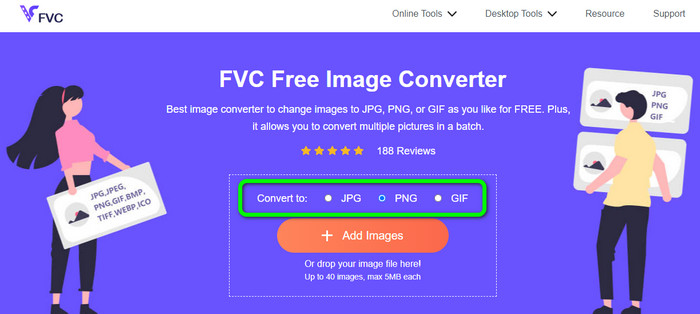
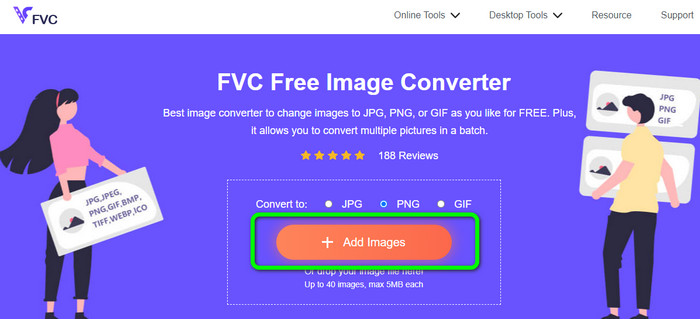
Trinn 2. Etter at du har valgt ønsket utdataformat, klikker du på knappen Add Images. Når datamaskinens mappevindu vises, velger du TGA‑filen du vil konvertere og åpner den. Merk at du kan legge inn mer enn én bildefil. Du kan også dra og slippe filen direkte inn i boksen.
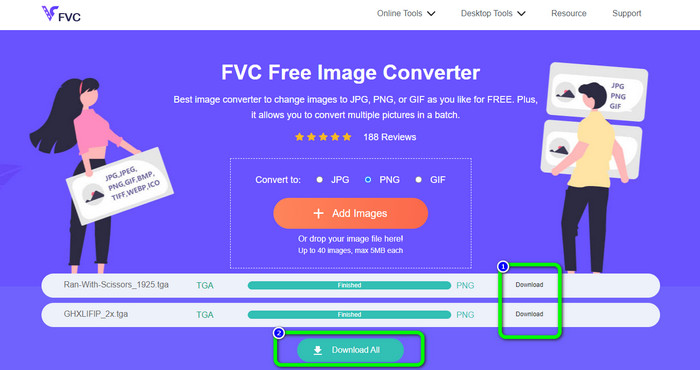
Trinn 3. Når opplastingen er fullført, vil du se at verktøyet automatisk konverterer bildene. Etter konverteringsprosessen klikker du på Download-knappen for å lagre bildene én etter én. Hvis du vil laste dem ned med ett klikk, trykker du på knappen Download All.
Del 2. Hvordan konvertere TGA til PNG på Zamzar
Zamzar er en annen nettbasert TGA‑til‑PNG‑konverter du kan bruke. Alle brukere, spesielt nybegynnere, vil oppleve denne nettbaserte konverteren som svært tilgjengelig. Det skyldes det brukervennlige grensesnittet. Med dette verktøyet kan du laste opp bilder i CR2, ARW, PNG, 3FR, JPG, GIF, ERF, TIFF og andre inngangsformater. Du kan også konvertere bildefilen til mange formater, som BMP, EPS, PDF, PNG, JPG og WBMP, for å gjøre det enklere for alle brukere. Du kan enten vente til lenkene på nedlastingssiden vises, eller åpne den konverterte filen via e‑post. Muligheten til å laste opp bilder på opptil 50 MB er flott. Du kan laste opp filen fra datamaskinen, Dropbox, Google Disk eller et annet nettsted ved å skrive inn nettadressen. Zamzar er tilgjengelig i nesten alle nettlesere, som Google, Firefox, Edge og flere. Dette verktøyet kan også hjelpe deg med å gjøre om SVG til PNG.
Det har imidlertid noen ulemper. Konverteringsprosessen er veldig lang. Prosessen tar lang tid i denne situasjonen. I tillegg er hver økt begrenset til to bildekonverteringer. Følg trinnene nedenfor for å konvertere TGA til PNG ved hjelp av Zamzar.
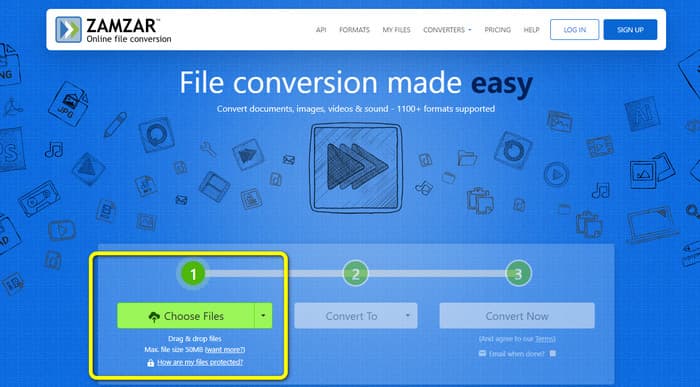
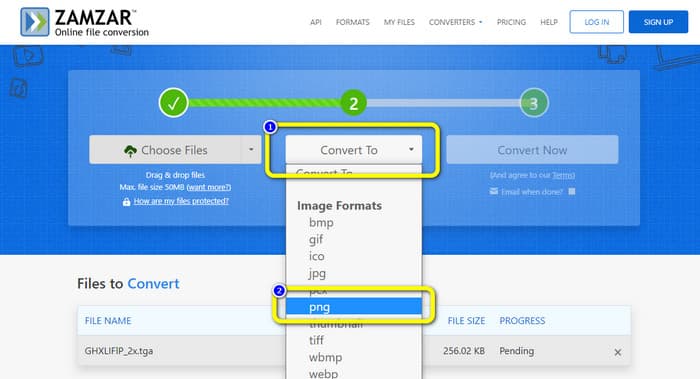
Trinn 1. Gå til nettleseren din og gå til hovedsiden til Zamzar. Klikk på knappen «Choose Files» på nettsiden for å laste opp TGA‑bildefilen. En annen måte å laste opp bildet på er å dra og slippe filen direkte inn i verktøyet.
Trinn 2. Etter at du har lastet opp TGA‑bildefilen, går du til alternativene Convert to. Velg formatet PNG som utdataformat når formatvalgene vises.
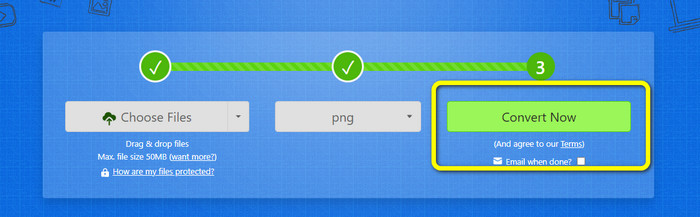
Trinn 3. Klikk deretter på knappen Convert Now for å gå videre med konverteringsprosessen. Til slutt trykker du på Download-knappen for å lagre det konverterte bildet på datamaskinen etter konverteringen.
Del 3. Hvordan konvertere TGA til PNG ved hjelp av Convertio
Hvis du er på jakt etter en annen effektiv TGA‑til‑PNG‑konverter, kan du bruke Convertio. Denne nettbaserte bildekonverteren kan konvertere TGA‑filen din til PNG. Nybegynnere vil ha lett for å forstå den, takket være det enkle oppsettet. Du kan konvertere bilder enkelt med Convertio. I tillegg støtter den mange bildeformater, blant annet PNG, GIF, BMP og SVG. Denne bildekonverteren støtter også batch‑konvertering. Du kan umiddelbart konvertere mange bilder samtidig med dette flotte verktøyet. I tillegg til bilder kan du konvertere video‑, musikk‑ og dokumentfiler. Dermed trenger du ikke lete etter et annet nettverktøy. Du kan også bruke dette verktøyet til å konvertere WebP til PNG.
Gratisversjonen har imidlertid en opplastingsgrense på 100 MB. For å legge til den største filstørrelsen, må du kjøpe en medlemskapsplan. På gratisversjonen kan du bare konvertere to filer samtidig ved å bruke en batchkonverteringsmetode. En kostbar pakke er også et alternativ hvis du ønsker tilgang til alle tjenester. Du kan bruke de enkle trinnene nedenfor for å konvertere TGA-filen til PNG-format ved hjelp av Convertio.
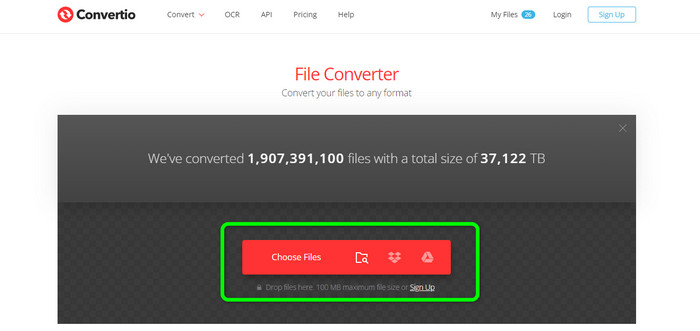
Trinn 1. I nettleseren din søker du opp og åpner den offisielle nettsiden til Convertio. Når du er på nettsiden, klikker du på knappen Choose Files. Åpne deretter TGA‑bildefilen fra datamaskinens filer. Du kan laste opp opptil to bilder når du bruker gratisversjonen.
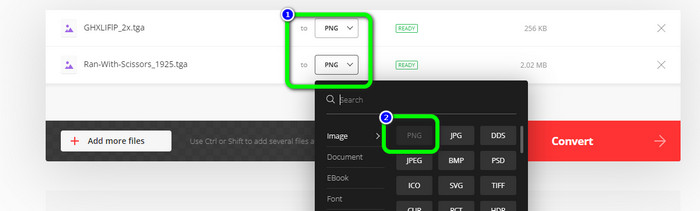
Trinn 2. Når du er ferdig med å laste opp TGA‑bildene, går du til formatvalgene. Etter å ha klikket, velger du ønsket utdataformat, som er PNG.
Trinn 3. Etter at du har endret utdataformat i formatvalgene, klikker du på knappen Convert. Vent på konverteringsprosessen. Det tar bare noen sekunder.
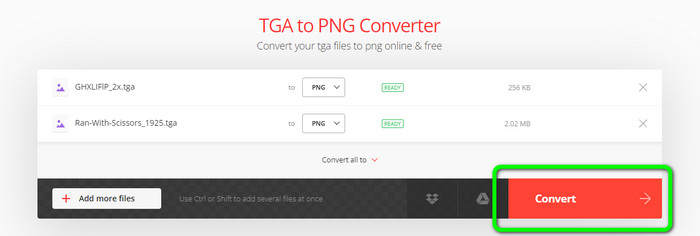
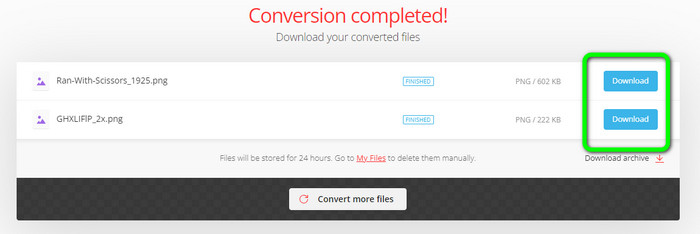
Trinn 4. For å lagre de konverterte bildene klikker du til slutt på knappen Download. Deretter kan du åpne de konverterte bildene i Download-mappen din.
Del 4. Vanlige spørsmål om konvertering av TGA til PNG
1. Hva er en TGA-fil?
En Truevision Graphics Adapter-bildefil har filtypen TGA. Akronymet TARGA står for Truevision Advanced Raster Graphics Adapter. Targa Graphic-formatet tillater lagring av komprimerte og ukomprimerte bilder. Det kan velges for ikoner, strektegninger og annen enkel grafikk. Bildefilene som brukes i videospill antas å være relatert til dette formatet.
2. Hvorfor er TGA-bilder så store?
TGA-bilder består vanligvis av store filer på grunn av bruken av biter for pikselrepresentasjon. Størrelsen på filene i dette formatet avhenger av fargedybden.
3. Hvordan ser jeg på TGA-bilder?
Du kan se TGA-bilder på Adobe Photoshop, GIMP og TGA Viewer.
Konklusjon
Siden TGA‑filformatet er upopulært, støttes det ikke av enkelte programmer. Den beste løsningen for å åpne det er å transkode det til et mer utbredt format, som PNG. Derfor har artikkelen gitt deg de beste måtene å konvertere TGA til PNG på. Noen nettverktøy krever imidlertid et abonnement for at du fullt ut skal få tilgang til alle de gode funksjonene. I så fall kan du bruke FVC Free Image Converter. Denne nettbaserte bildekonverteren lar deg bruke alle funksjonene gratis.
-
 Enkelt å forstå måter å konvertere PSD til PNG eller JPG
 Dette innlegget vil gi deg håndterbare trinn for å konvertere PSD til JPG eller PNG. Det finnes ulike omformere du kan bruke til å konvertere filene dine. Les mer for å finne ut.
-
 Ledende metoder for hvordan du konverterer EPS til PNG og JPG
 De mest bemerkelsesverdige metodene for å konvertere EPS til PNG og JPG er her. La oss lese denne guideposten for å finne veiene ved hjelp av bildekonverterere.
-
 Enkleste metoder for å konvertere BMP til JPG- og PNG-formater
 Lær de beste metodene for å konvertere BMP til JPG eller PNG ved å bruke utmerkede omformere. Du vil også oppdage forskjellen mellom filformatene BMP, JPG og PNG.
