


 Video Converter Ultimate
 Skjermopptaker
 Videoreparasjon
 Sikker nedlasting
Effektive måter å konvertere TIFF til JPG og PNG
TIFF er et bildefilformat som er vanlig blant fotografer og grafiske designere. Det har høy kvalitet, fleksibilitet og nesten universell kompatibilitet. Men filstørrelsen er større, noe som gjør det vanskelig å dele med andre eller på nettet. I så fall er en av de beste løsningene å konvertere denne filen til andre formater. JPG- og PNG‑filformater har mindre filstørrelser enn TIFF. Derfor er det bedre å konvertere TIFF til JPG og PNG. Denne artikkelen kan gi deg de beste metodene for å konvertere TIFF til JPG/PNG-formater. I tillegg vil du lære all informasjonen du trenger om disse bildefilformatene. Så, uten videre, la oss lese dette innlegget mens vi gir deg løsningen du leter etter.

Del 1. TIFF vs. JPG vs. PNG
| Filformat | TIF/TIFF | JPG | PNG |
| Filnavnutvidelse | .tif / .tiff | .jpg | .png |
| Utviklet av | Aldus (kjøpt av Adobe) | Fellesgruppe for Foto-eksperter | PNG Development Group |
| Beskrivelse | I 1992, Tag Image File Format (TIFF) var utviklet. Utviklere kan utvide denne fleksible filtypen for å imøtekomme mange behov. TIF- og TIFF-filer er begge bildefilformater som brukes til å lagre bilder. Men det er noen forskjeller mellom disse formatene. TIFF-bildefiler er i stand til å lagre mer enn ett bilde i en fil. På den annen side kan TIF-filer bare lagre ett bilde. Dessuten kan TIFF-filene lagre metadata angående bildet, men TIF-filene kan ikke. | JPG og JPEG er like utvidelser som refererer til det samme digitale bildeformatet. Det er ingen forskjeller mellom JPEG- og JPG-formatene. Den eneste forskjellen er antall tegn som brukes. JPG-filer lagres med filtypen .jpg, og JPEG-filer lagres med filtypen .jpeg. JPEG er et akronym for Joint Photographics Experts Group. | Akronymet PNG står for Portable Network Graphic. Du kan lagre bilder av høy kvalitet og dele dem i PNG-format. PNG-er kan håndtere svimlende 16 millioner farger. Den støtter også gjennomsiktige og semi-transparente bakgrunner. PNG-bildefil er et åpent format, noe som betyr at du kan lagre og åpne en PNG-fil fra hvilken som helst bilderedigeringsprogramvare. |
Del 2. Utmerkede metoder for å konvertere TIF/TIFF til JPG/PNG Online
FVC Free Image Converter er den ultimate omformeren du kan bruke til å gjøre TIFF om til JPG/PNG på nettet. Konverteringsprosessen er også enkel. Bilder kan konverteres i tre enkle trinn. En batchkonvertering tilbys i tillegg. Flere bilder kan konverteres samtidig. Det betyr at du kan konvertere bildene dine på kortere tid. Den er lett å forstå og tilbyr et intuitivt grensesnitt med oversiktlige innstillinger. I tillegg støtter FVC Free Image Converter en rekke inndataformater. Den støtter ulike formater, inkludert JPG, PNG, BMP, TIFF, WEBP og GIF. Dessuten er denne omformeren helt gratis. Den beskytter også brukerens personvern. Den vil umiddelbart slette dataene dine når bildene dine er konvertert og lagret. Det at du kan bruke dette nettbaserte verktøyet i alle typer nettlesere øker tilgjengeligheten for brukerne. For å bruke denne TIFF til JPG‑omformeren, følger du de enkle instruksjonene nedenfor.
Konverter TIF/TIFF til JPG
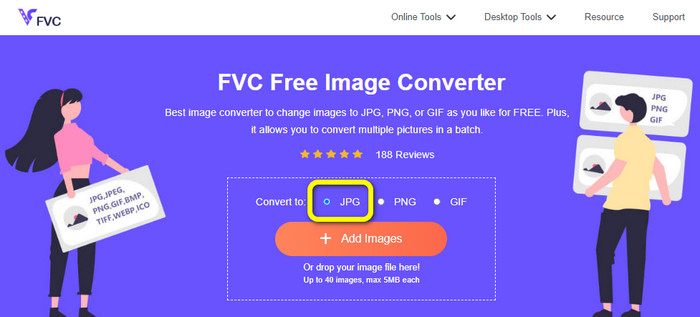
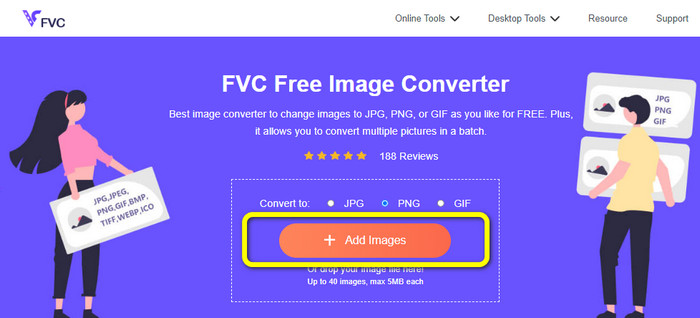
Trinn 1: Gå til nettstedet til FVC Free Image Converter i nettleseren din. Velg deretter JPG-filformatet fra valget Konverter til.
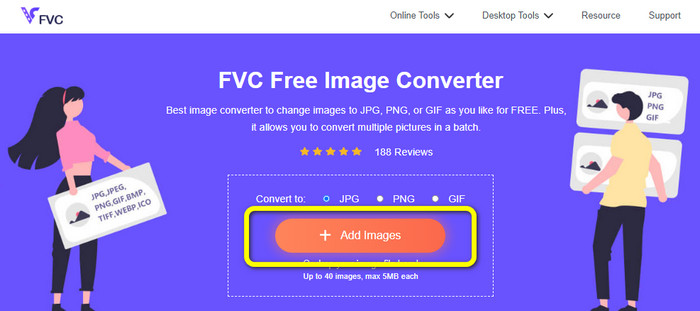
Trinn 2: Det neste trinnet er å klikke på knappen Add Images. Etter å ha klikket, vises filmappen på dataskjermen din. Velg bildefilen og klikk Open.
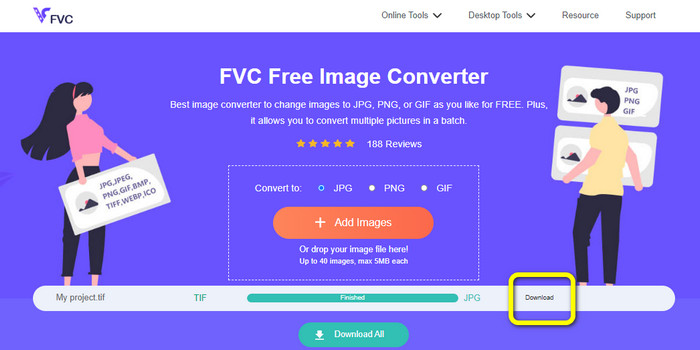
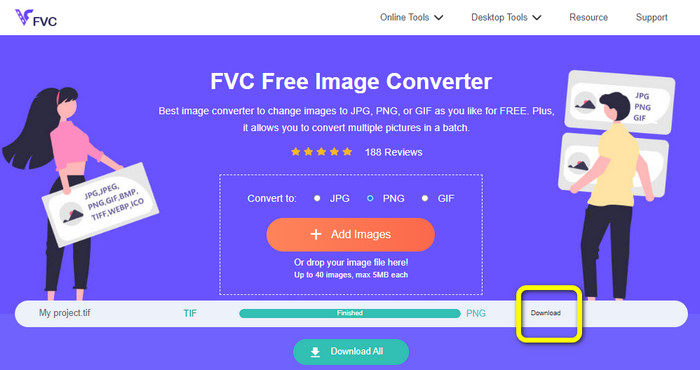
Trinn 3: Bildekonverteren vil automatisk konvertere bildet ditt etter opplasting. Klikk på knappen Download for å lagre og laste ned det konverterte bildet til datamaskinen.
Konverter TIFF/TIF til PNG
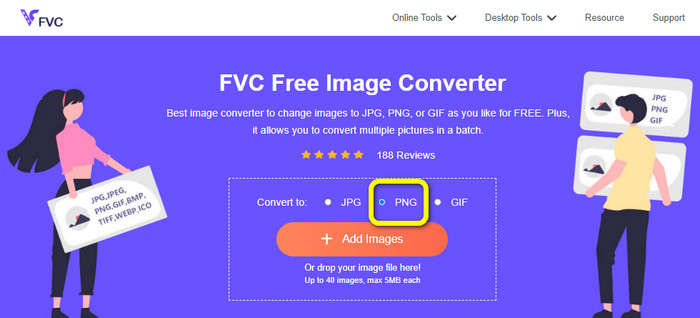
Trinn 1: Velg PNG-filformatet fra formatvalget på nettsiden.
Trinn 2: Klikk på knappen Add Images. Når filmappen deretter vises på skjermen, velger du PNG-filen du vil konvertere. Åpne den deretter.
Trinn 3: Etter konverteringsprosessen klikker du på knappen Download. Vent til lagringsprosessen er ferdig, og åpne bildet ditt fra mappen. Klikk her for å lære hvordan du konverterer BMP til JPG eller PNG.
Del 3. Beste måter å konvertere TIF/TIFF til JPG/PNG offline
Video Converter Ultimate er en av de beste frakoblede metodene for å konvertere en TIF-fil til JPG og PNG. Du kan laste ned dette programmet på både Mac- og Windows-operativsystemer. Denne frakoblede bildekonverteren lar deg konvertere TIF-filen din til JPG og PNG. Den støtter også andre formater som WEBP, BMP, GIF, TIFF, JPG, PNG og flere. Konverteren tilbyr et brukervennlig grensesnitt, noe som gjør den perfekt for både profesjonelle og nybegynnere. I tillegg, hvis du ønsker å konvertere flere filer samtidig, kan du gjøre det. En av de bemerkelsesverdige funksjonene er å utføre en batchkonverteringsprosess. På grunn av dette blir det praktisk for alle brukere som liker å konvertere bildefiler. Dessuten er det mer du kan gjøre mens du konverterer bilder. I innstillingsikonet kan du zoome inn og ut på bildene dine. Du kan også endre bildekvaliteten etter egen preferanse. På denne måten kan du få resultatet du ønsker. Følg de grunnleggende prosedyrene nedenfor for å konvertere TIF til JPG- og PNG-format.
Konverter TIFF til JPG
Trinn 1: Last ned Video Converter Ultimate på datamaskinen din. Etter det kjører du programmet etter installasjonsprosessen. Se Download-knappen nedenfor og klikk på den for å få enkel tilgang til konverteren.
Gratis nedlastingFor Windows 7 eller nyereSikker nedlasting
Gratis nedlastingFor MacOS 10.7 eller nyereSikker nedlasting
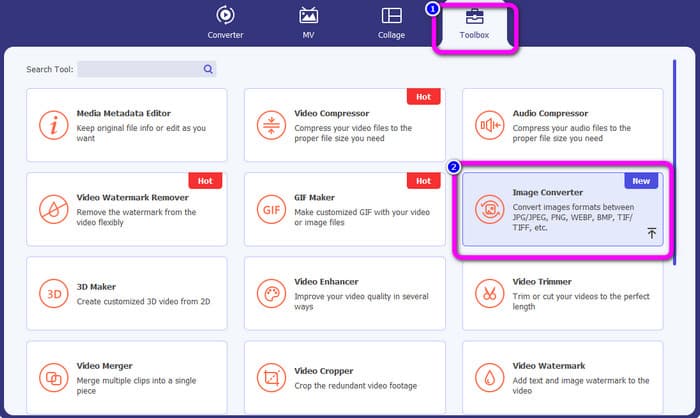
Trinn 2: Klikk på panelet Toolbox øverst i grensesnittet. Velg funksjonen Image Converter.
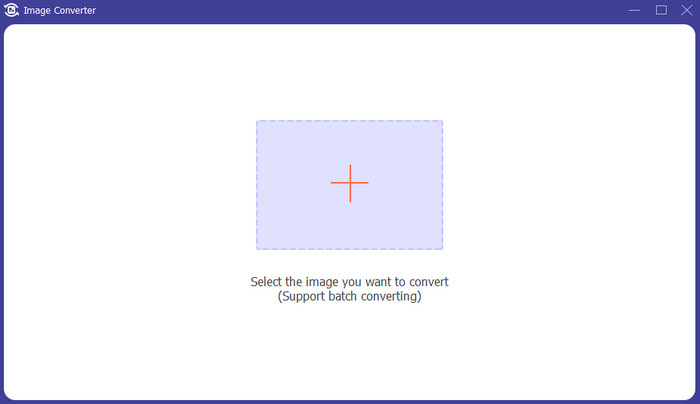
Trinn 3: Klikk deretter på Plus-knappen midt i grensesnittet. Velg TIFF-bildefilen fra filmappen din, og åpne den.
Trinn 4: Hvis du vil ha flere bilder, klikker du på knappen Add Source file. Gå deretter til alternativet Convert All to og velg filformatet JPG.
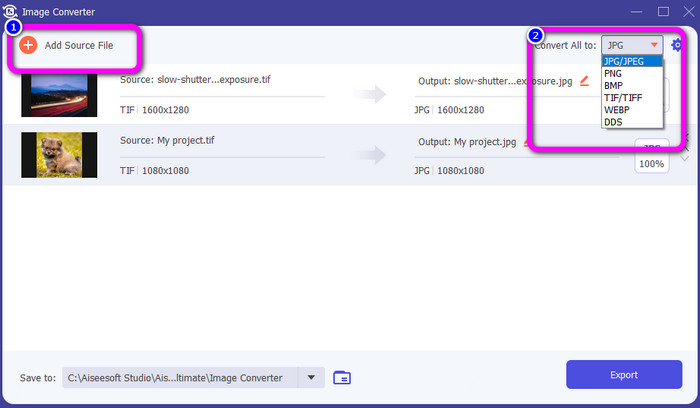
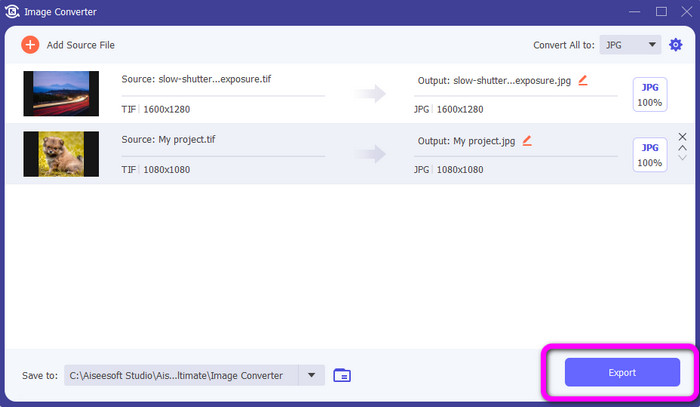
Trinn 5: Til slutt klikker du på knappen Export etter at du har valgt JPG-format som utdataformat. Etter konverteringsprosessen kan du åpne det konverterte bildet i filmappen din.
Konverter TIFF til PNG
Trinn 1: Du kan følge den samme prosessen som ovenfor. Gå til panelet Toolbox og velg funksjonen Image Converter.
Trinn 2: Klikk på Plus-ikonet for å sette inn TIFF-filen du vil konvertere.
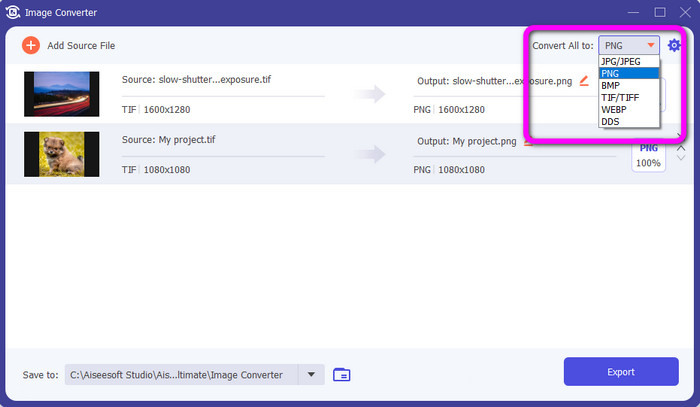
Trinn 3: Etter å ha lagt til TIFF-bildene dine, kan du gå til alternativet Convert All to. Velg filformatet PNG som utdataformat.
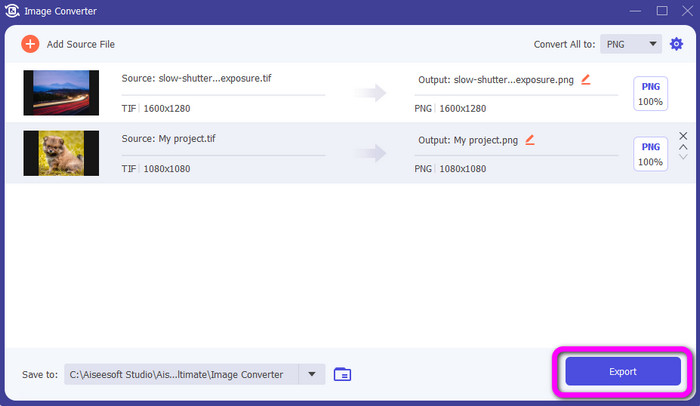
Trinn 4: Som siste trinn klikker du på knappen Export nederst i venstre hjørne av grensesnittet. Du kan også bruke denne programvaren til å konvertere JPG til PNG.
Del 4. Vanlige spørsmål om konvertering av TIF/TIFF til JPG/PNG
1. Hvordan konvertere TIFF til PNG på Mac?
En av de effektive måtene å konvertere TIFF til PNG på Mac er å bruke FVC Free Image Converter. Åpne Safari på Mac-en din og gå til denne nettbaserte bildekonverteren. På hovedsiden velger du PNG-formatet fra formatvalget. Klikk på knappen Add Images for å legge til TIFF-filen du vil konvertere. Under opplastingen vil den automatisk konvertere filen. Klikk deretter på nedlastingsknappen for å lagre det konverterte bildet på Mac-en din.
2. Hva er fordelene med å konvertere TIF til PNG?
Hvis du vil gjøre filen mindre, er det nødvendig å endre TIF-filen til andre formater. Konvertering av TIF til en PNG-fil er best siden PNG har en mindre filstørrelse. Det vil gi deg en håndterbar filstørrelse for nettlesere og enheter.
3. Hvilken fil er lettere å sende, JPG eller TIFF?
JPG-filformatet har mindre filstørrelse. Det gjør det enklere å sende et bilde online eller via e-post. TIFF har en større filstørrelse, noe som gjør det tregt å sende et bilde.
Konklusjon
Nå vet du at TIFF-bildefilen har en større filstørrelse. Så hvis du vil sende et bilde raskere på nettet, er det bedre å konvertere det til andre formater med mindre filstørrelser. Derfor ga denne artikkelen deg den beste løsningen for å konvertere TIFF til JPG og PNG. Hvis du vil ha en enklere måte å konvertere bildefiler på, kan du bruke FVC Free Image Converter. Den tilbyr et forståelig grensesnitt med enkle metoder for å konvertere bildefiler.
-
 Konverter JPEG til JPG effektivt [Fem metoder oppført]
 Kom og få de enkleste veiledningene for å konvertere JPEG til JPG bildefilformat. Klikk på denne guideposten og begynn å lære dine foretrukne metoder
-
 Topp 5 ledende veiledninger for å konvertere PNG til JPG raskt
 Hvis du trenger å konvertere PNG-filen til JPG-format, kan du lære de beste måtene her. Du vil også lære forskjellen mellom PNG- og JPG-filformater
-
 Fullstendige detaljer om forskjellene mellom JPEG vs. JPG vs. PNG
 Dette innlegget vil gi deg nok informasjon om forskjellene mellom JPEG vs. JPG vs. PNG. I tillegg vil du lære hvordan du konverterer bilder til disse filene
