


 Video Converter Ultimate
 Skjermopptaker
 Videoreparasjon
 Sikker nedlasting
Slik gjenoppretter du gamle vintagebilder på datamaskinen din
Leter du etter en løsning for restaurering av gamle bilder? Mange verktøy kan hjelpe deg med å restaurere de gamle bildene du har. Restaurering av gamle bilder er kjent blant mange som ønsker å forbedre de gamle bildene sine. I tillegg brukes denne prosessen også til å restaurere skadede bilder og få dem til å se nye ut. Så hvis du også har et gammelt bilde du vil restaurere, kan du bruke metodene vi lærer deg nedenfor. Les dette blogginnlegget for å lære de beste måtene å restaurere et gammelt bilde eller reparere et skadet foto ved hjelp av oppskaleringsverktøy.

Del 1. Restaurering av gamle bilder på nett gratis
Har du et gammelt vintagebilde du vil lage nytt? Oppskalering av bildet gjør det mulig å gjenopprette et gammelt bilde og gjøre det nytt og vakkert. Og hvis du tror at det er umulig å gjøre, så tar du feil. Fordi ved å bruke denne fantastiske nettapplikasjonen kan du enkelt gjenopprette det gamle vintagebildet du har.
FVC Free Image Upscaler
FVC Free Image Upscaler er en nettbasert bildeoppskaler som er gratis og enkel å bruke. Dette verktøyet kan skalere opp bildet ditt til 2x, 4x, 6x og 8x forstørrelse. I tillegg kan nybegynnere enkelt bruke denne bildeforbedreren fordi den har et enkelt og ryddig brukergrensesnitt. Dessuten kan du bruke den i alle nettlesere, inkludert Google, Firefox og Safari. I tillegg støtter den de mest vanlige bildeformatene, som JPG, JPEG, PNG og BMP. Det som er enda bedre med denne applikasjonen, er at den bruker AI-teknologi (kunstig intelligens) som automatisk oppdager de lavkvalitetsdelene av bildene dine og forbedrer dem. Og i motsetning til andre nettapplikasjoner har FVC Free Image Upscaler en rask forbedringsprosess, noe som gjør den praktisk.
Slik forbedrer du gamle bilder med FVC Free Image Upscaler:
Trinn 1. Gå til nettleseren din og søk etter FVC Free Image Upscaler i søkefeltet. Du kan også klikke på lenken for å gå direkte til hovedsiden deres.
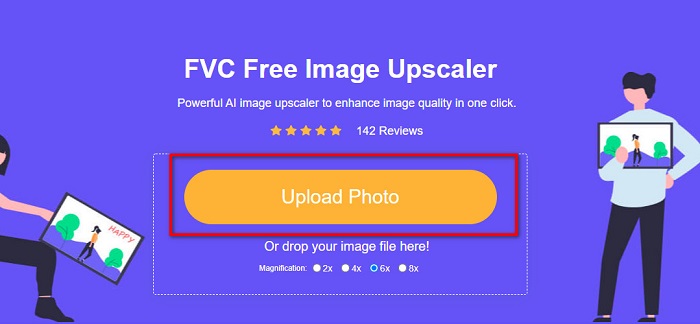
Trinn 2. På hovedgrensesnittet klikker du på knappen Upload Photo for å importere det gamle bildet du vil forbedre eller skalere opp.
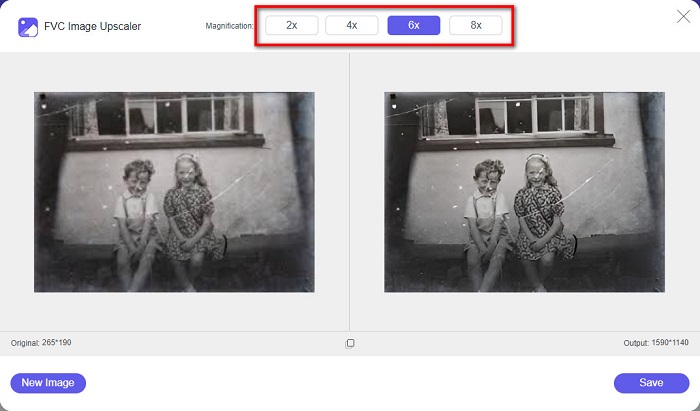
Trinn 3. Etter at du har lastet opp bildet ditt, velger du forhåndsinnstillingen for Magnification som du ønsker for bildet. Du kan velge mellom 2x, 4x, 6x og 8x. Jo høyere forstørrelse, desto bedre blir bildekvaliteten.
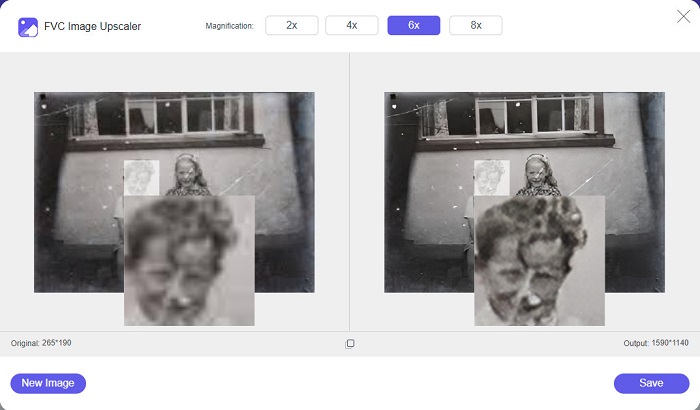
Trinn 4. Flytt deretter musen over bildet for å se forskjellen mellom det forbedrede bildet og originalen.
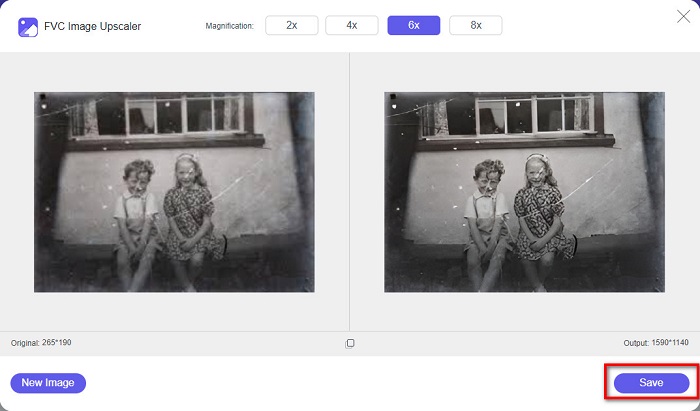
Trinn 5. Når du er ferdig med å forbedre bildet ditt, klikker du på knappen Save for å lagre bildet på enheten din.
Og det er det! Så enkelt som 1-2-3 kan du forbedre det gamle vintagebildet ditt for å få det til å se nytt og bedre ut.
Zyro
Zyro image upscaler er et av internettets mest kjente verktøy for oppskalering av bilder. Det har et brukervennlig programgrensesnitt, noe som gjør det enkelt å bruke. Videre benytter det en AI-basert bilde-retusjering som automatisk skalerer opp det gamle bildet du vil forbedre. Det er også tilgjengelig i alle nettlesere, som Google og Firefox. I tillegg støtter det noen av de vanligste bildeformatene, som JPG og PNG.
Dessuten øker dette verktøyet bildets oppløsning, noe som gjør det bedre i kvalitet. Du vil imidlertid se at det ikke oppskalerer bildet ditt for mye. Den har også annonser som kan være distraherende for deg. Likevel bruker mange nybegynnere fortsatt dette verktøyet fordi det har et enkelt brukergrensesnitt.
Online fotorestaurering online gratis ved å bruke Zyro:
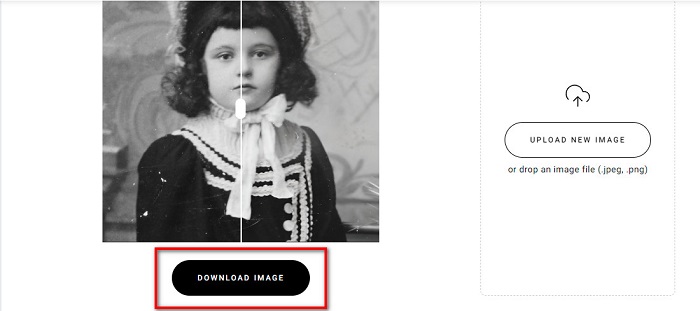
Trinn 1. Søk etter den nettbaserte bildeforbedreren Zyro i nettleseren din, og gå deretter direkte til hovedsiden deres. På det første grensesnittet klikker du på knappen Upload Image for å laste opp det gamle bildet du vil forbedre.
Trinn 2. Siden Zyro bruker en AI-forbedringsprosess, vil det automatisk forbedre bildet ditt. Deretter vil du se forskjellen mellom originalbildet ditt og det forbedrede gamle bildet.
Trinn 3. Til slutt klikker du på knappen Download for å laste ned det forbedrede bildet til enheten din.
Del 2. How to Enhance Old Photos Offline
Hvis du ikke vil bruke en internettavhengig applikasjon for å forbedre et gammelt bilde, vil vi presentere deg et offline-verktøy som er verdt å prøve. Når du bruker en offline-applikasjon, trenger du ikke lenger tilgang til internett for å forbedre et bilde. Les derfor denne delen grundig for å lære hvordan du kan forbedre et gammelt bilde offline.
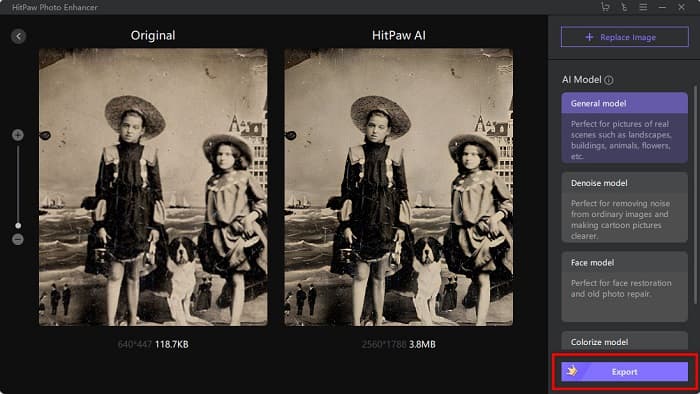
HitPaw Photo Enhancer er en offline bildeoppskaler du kan laste ned på nesten alle plattformer, inkludert Windows og Mac. Den bruker også en AI-basert oppskaleringsprosess som automatisk justerer bildets metning, kontrast og lysstyrke og forbedrer bildekvaliteten. I tillegg kan du bytte AI-modell etter behov. Du kan velge mellom modellene Denoise, Face og Colorize. Videre kan du zoome inn på bildet for å se den forbedrede delen av bildet ditt. Du kan også laste ned denne appen gratis, men med begrensninger. Ulempen med HitPaw Photo Enhancer er at du må kjøpe premiumversjonen for å kunne eksportere det forbedrede bildet ditt.
Slik forbedrer du gamle bilder ved hjelp av HitPaw Photo Enhancer:
Trinn 1. Last ned HitPaw Photo Enhancer på enheten din. Følg installasjonsprosessen, og start deretter appen.
Trinn 2. På hovedgrensesnittet til programmet klikker du på knappen Choose Images for å bla etter bildet du vil forbedre.
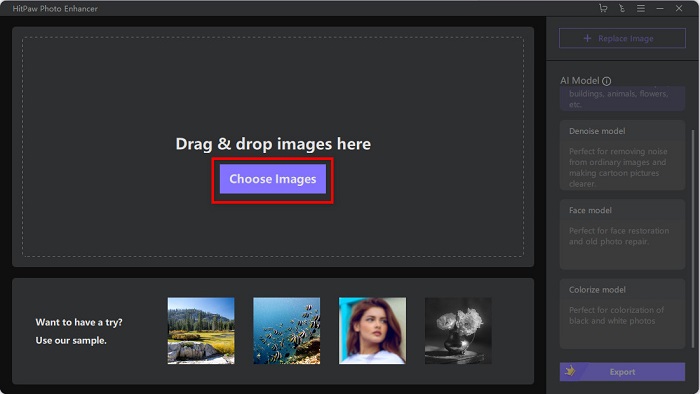
Trinn 3. Klikk deretter på AI-modellen General Model og knappen Preview for å se resultatet.
Trinn 4. Deretter vil du se at bildet ditt nå er forbedret. Klikk på knappen Export for å lagre bildet.
Del 3. Vanlige spørsmål om hvordan du forbedrer gamle bilder
Øker filstørrelsen når du forbedrer bildet ditt?
Ja. Når kvaliteten på et bilde økes, vil bildeoppløsningen mest sannsynlig også øke, noe som gjør filstørrelsen større enn originalen.
Forbedrer det å øke bildekvaliteten?
Høy oppløsning betyr flere piksler per tomme, noe som betyr mer pikselinformasjon, noe som gjør bildet ditt av høy kvalitet og størrelse. Hvis du derimot har et lavoppløselig bilde, har bildet ditt få piksler. Derfor, hvis du øker pikslene i bildet ditt, vil bildet ditt ha bedre kvalitet.
Hvor mange piksler er et bilde av god kvalitet?
Den beste oppløsningen for utskrift er 330 PPI (Pixels Per Inch). Ved 330 PPI vil bildet ditt virke skarpt og krypt. Og hvis du har en 330 PPI, vil du ha et høyoppløselig bilde, slik at det ser ut som et bilde av høy kvalitet.
Konklusjon
Restaurering av gamle bilder er ikke vanskelig hvis du følger metodene som er presentert ovenfor. Og siden alle verktøyene nevnt ovenfor vil hjelpe deg med å forbedre det gamle bildet ditt, vil det være enkelt for deg å skalere det opp. Men ikke alle bildeoppskalere gir resultater i høy kvalitet, så bruk FVC Free Image Upscaler for bildekomprimering med høy kvalitet.
-
 Hvordan konvertere lavoppløselig bilde til høyoppløsning online
 Hvis du vil lære hvordan du konverterer bilder med lav oppløsning til bilder med høy oppløsning på nettet, så er denne artikkelen for deg. Les fullstendig for å lære hvordan.
-
 Hvordan enkelt forbedre bildekvaliteten på Windows og Mac
 Ønsker du å forbedre kvaliteten på bildet ditt? Lær hvordan du øker bildekvaliteten online og offline på datamaskinen eller iPhone ved å lese den enkle veiledningen.
-
 Topp 6 lytefotofjernere du må ha nå [2022]
 Trenger du en fotoflekkfjerner for å få glatt hud? Ikke bekymre deg mer! Her vil vi introdusere forskjellige verktøy som kan hjelpe enheten din.
