


 Video Converter Ultimate
 Skjermopptaker
 Videoreparasjon
 Sikker nedlasting
Fjern vannmerke fra JPG Online: 3 Ultimate Methods
I dag er det å lagre bilder den beste måten å bevare minnene om menneskene som er spesielle for oss. Det hender imidlertid at bildene dine har vannmerker på seg. Heldigvis gir vi deg nyttig informasjon om hvordan du kan fjerne vannmerker fra JPG-filer på nett ved hjelp av flere programmer. JPG-filer er et av de mest populære bildeformatene som brukes i digitale kameraer, så noen av bildene dine kan være lagret i JPG-format. Hvis du er en av dem som vil fjerne unødvendige elementer fra bildene dine, spesielt i en JPG-fil, bør du lese de neste delene av denne artikkelen.

Del 1: Kan et vannmerke fra JPG fjernes
I denne moderne tid er det ukomplisert å fjerne forstyrrende objekter, som vannmerker, logoer og tekst fra JPG-filformatet hvis du vet hva du skal gjøre og hvilke verktøy du skal bruke. Ikke bare på en JPG-fil, men også i andre bildefilformater. Alt du trenger å gjøre er å se etter legitime vannmerkefjernere på nettet.
Del 2: Slik fjerner du vannmerke fra JPG Online
Fjern vannmerke fra JPG ved å bruke FVC Free Watermark Remover
Det er veldig nyttig å vite hvordan man fjerner vannmerker fra en JPG-fil, fordi de fleste ikke vil se distraherende objekter på bildene sine. Hvis du vil finne de beste metodene for å fjerne vannmerker fra JPG gratis, kan du bruke FVC Free Watermark Remover. Dette programmet har en rask opplastings- og fjerningsprosess, slik at brukere ikke trenger å vente lenge når de fjerner vannmerker fra bildene sine. Det støtter ulike filformater, som JPG/JPEG, PNG, BMP og flere. I tillegg finnes det to måter å fjerne vannmerker fra JPG-filen din på: beskjæringsverktøyet og verktøyet for fjerning av vannmerker. Etter at du har fjernet vannmerkene, kan dessuten bildet ditt lagres i samme format som originalen. Med detaljerte veiledninger, enkle knapper og et brukervennlig og oversiktlig grensesnitt er dette nettverktøyet også perfekt for ikke-profesjonelle brukere. Du trenger ikke en konto for å bruke dette verktøyet, i motsetning til annen programvare. Du trenger heller ikke å installere programmet, siden du kan bruke det direkte i nettleseren. Til slutt er det bare du som kan se filen din, så du kan være trygg på at filen din er sikker og beskyttet.
Funksjoner
◆ Den kan beskjære bildet før eller etter fjerning av vannmerkene.
◆ Den tilbyr tre fjerningsverktøy, Lasso, Brush og Polygonal, for å fjerne forstyrrende objekter.
Fordeler
- Den har detaljerte guider og et enkelt grensesnitt, som er bra for nybegynnere.
- Den elektroniske programvaren er gratis, så det er ikke nødvendig å kjøpe et abonnement.
- Gir en rask fjerningsprosess.
- Lagre bildet med samme kvalitet.
- Filen er trygg og sikret.
- Du trenger ikke å laste ned applikasjonen fordi den kan brukes direkte i nettleseren.
Ulemper
- For å betjene applikasjonen trenger du en internettforbindelse.
La oss fjerne vannmerkene fra JPG ved å bruke FVC Free Watermark Remover. Følg de enkle trinnene nedenfor. Vi vil bruke verktøyene for fjerning av vannmerker. Pass på at området av vannmerket ble plassert på den midtre delen av bildet.
Bruke polygonverktøyet
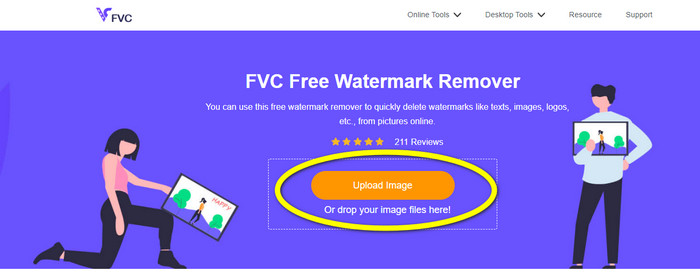
Trinn 1: Det første du må gjøre, er å gå til nettstedet til FVC Free Watermark Remover. Trykk på knappen Upload Image eller dra JPG-filen din inn i verktøyet for å laste den opp.
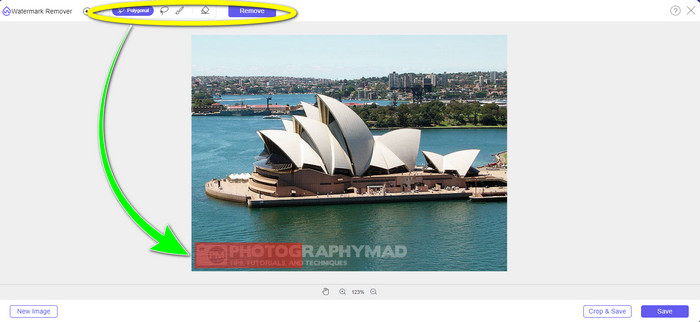
Trinn 2: Marker vannmerkene etter at du har lastet opp bildet. Du kan bruke verktøy som Lasso, Polygon og Brush for å markere.
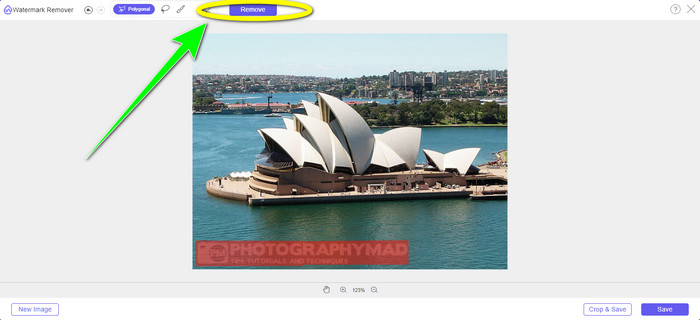
Trinn 3: Når du har markert alle vannmerkene i JPG-filen din, kan du fjerne dem ved å klikke på knappen Remove. Vent til fjerningsprosessen er ferdig, og gå deretter videre til neste trinn.
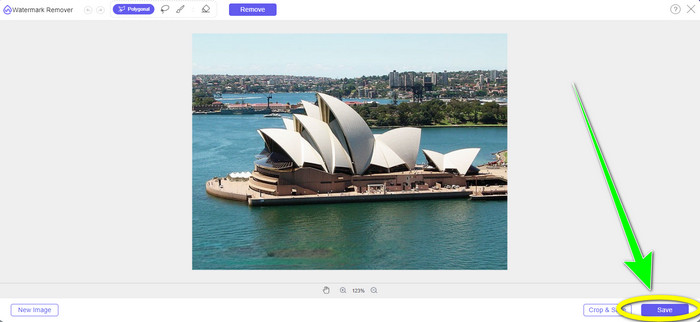
Trinn 4: Når du er fornøyd med det endelige resultatet, klikker du på knappen Save for å lagre JPG-filen uten vannmerke.
Bruke penselverktøyet
Trinn 1: Last opp JPG-bildefilen med vannmerket du vil fjerne.
Trinn 2: Velg Brush-verktøyet fra verktøyene for fjerning av vannmerker for å markere vannmerket på bildet ditt. Du kan også klikke på ikonene + og - nederst i grensesnittet for å zoome inn og ut på bildet ditt. Ved å bruke skyvebryteren under penselverktøyet kan du dessuten endre penselstørrelsen.
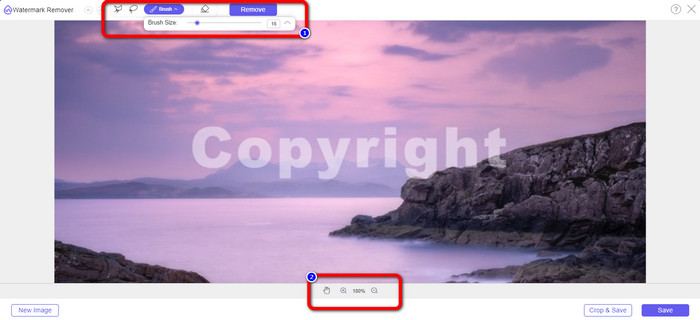
Trinn 3: Etter at du har valgt Brush-verktøyet, markerer du alle vannmerkene på bildet ditt.
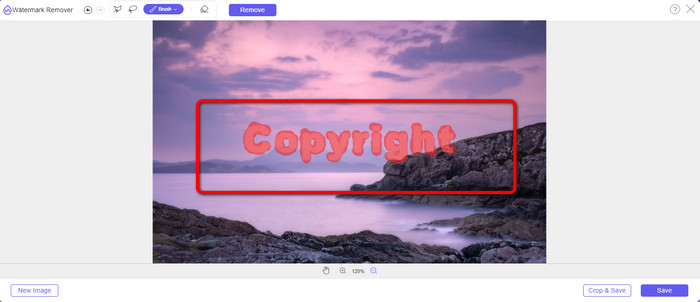
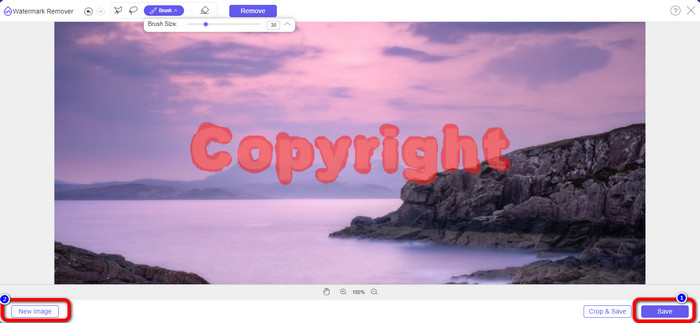
Trinn 4: Når du er ferdig med å markere vannmerkene, kan du fjerne dem ved å klikke på knappen Save, og bildet lagres automatisk. Åpne filen og se bildet ditt uten vannmerke. Hvis du vil fjerne vannmerket fra et annet bilde, klikker du på knappen New Image nederst til venstre i grensesnittet.
Bruke lasso-verktøyet
Trinn 1: Last opp JPG-bildefilen med et vannmerke.
Trinn 2: Velg Lasso som verktøyet for å fjerne vannmerket.
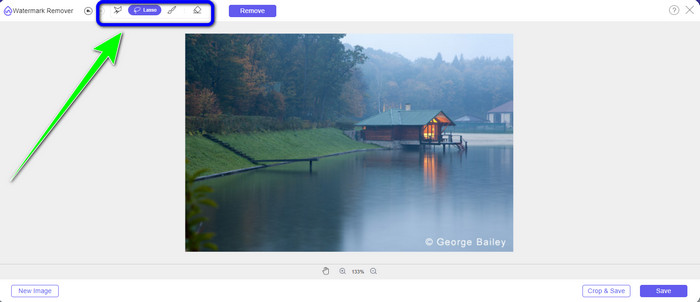
Trinn 3: Klikk på +-ikonet under bildet for å se vannmerket tydelig. Bruk deretter lasso-verktøyet til å markere vannmerkene. Prosessen er som å bruke en blyant mens du holder venstre museknapp inne. Du kan også klikke på knappen Eraser øverst i grensesnittet for å velge området på nytt.
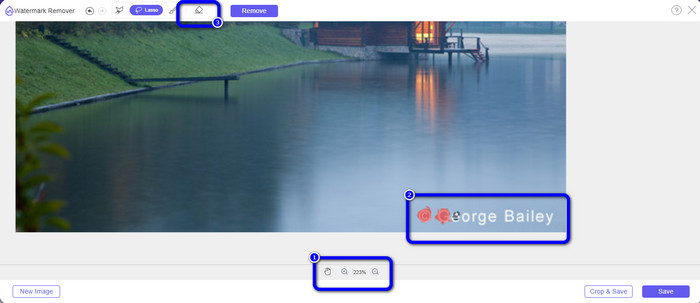
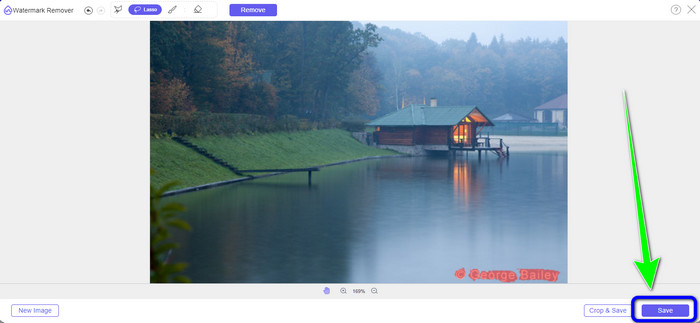
Trinn 4: Når du er ferdig med å markere vannmerket med lasso-verktøyet, klikker du på knappen Save for å lagre bildet. Se deretter JPG-bildefilen uten vannmerket.
Ved å bruke beskjæringsverktøyet
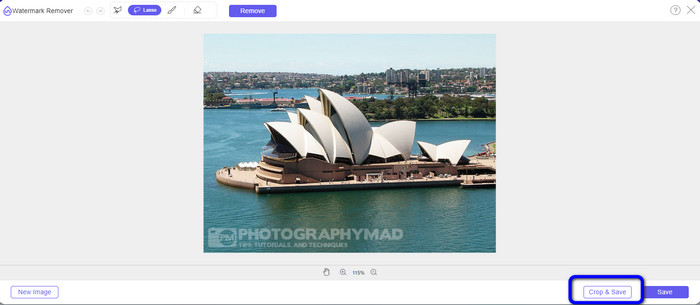
Når du bruker beskjæringsverktøyet, sørg for at området av vannmerket fra jpg-en din er i kanten eller hjørnedelen.
Trinn 1: Last opp JPG-bildefilen.
Trinn 2: Velg knappen Crop & Save for å gå videre til beskjæringsprosessen.
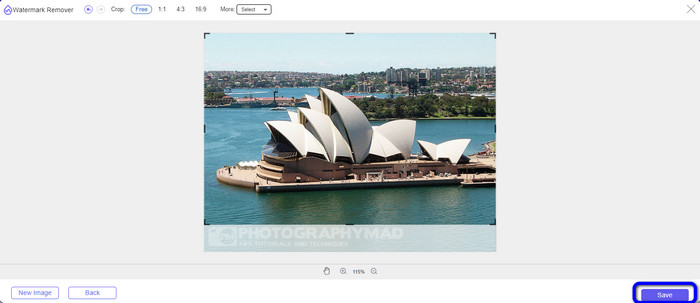
Trinn 3: I denne delen kan du beskjære bildet ditt. Du kan også bruke den øvre delen av grensesnittet til å beskjære bildet.
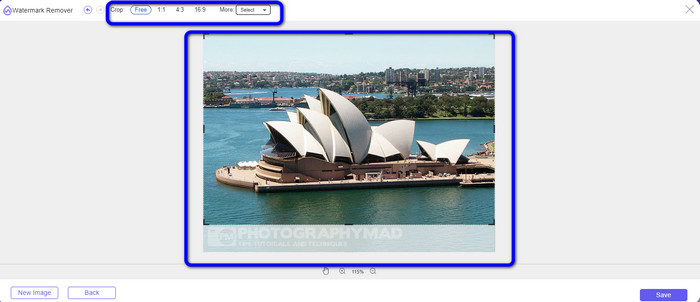
Trinn 4: Etter at du har beskjært bildet, kan du klikke på knappen Save for å lagre det.
Relatert til:
Hvordan fjerne personer fra bilder: enkel og rask prosess
Enkle måter å fjerne iSkysoft-logoen fra en video på
Del 3: Vanlige spørsmål om fjerning av vannmerke fra JPG
Hva skjer hvis du fjerner et vannmerke fra et bilde?
Etter å ha fjernet et vannmerke fra et bilde, vil det redigerte bildet bli slettet så snart som mulig. Det er på grunn av den intense endringen av originalbildet.
Er det et vannmerke som er vanskelig å fjerne?
Ja det er. Et vannmerke i full størrelse, for eksempel den typen som brukes av arkivfotograferingsbedrifter for å beskytte fotografier, er det eneste unntaket fra denne regelen. Det er umulig å utrydde disse fullt ut. Hvis du gjør det, vil du se den dårlige kvaliteten på bildet etter at du har fjernet vannmerket for hele bildet.
Kan jeg fjerne vannmerker fra JPG uten å miste kvaliteten?
Ja, det kan du. Bruk FVC Free Watermark Remover. Denne nettbaserte programvaren lar deg fjerne alle uønskede elementer fra JPG-bildefiler uten tap av kvalitet.
Konklusjon
Denne artikkelen viser deg den beste strategien du kan følge for å fjerne vannmerker fra JPG på nett. Du har også blitt kjent med de mest effektive verktøyene for fjerning av vannmerker, som Lasso, Polygon, Brush og beskjæringsverktøyet. Du finner disse verktøyene bare i en pålitelig nettapplikasjon, nemlig FVC Free Watermark Remover.
-
 Raskeste måten å fjerne logo fra video i Adobe Premiere Pro
 Prøv disse enkle og raskeste måtene å fjerne logoer fra en video i Adobe Premiere Pro. Denne artikkelen vil gi deg de beste måtene du kan prøve å bruke enheten på.
-
 Slik fjerner du logo fra video ved hjelp av Windows Movie Maker
 Hvis du vil lære om hvordan du fjerner logoer fra videoer med Windows Movie Maker og andre alternative måter, kan du lese denne artikkelen. Vi har enkle måter for deg.
-
 Hvordan fjerne VideoScribe-logoen fra videoen uten problemer
 Du trenger ikke å bekymre deg for å fjerne VideoScribe-logoen fra videoene dine lenger. Denne artikkelen vil gi problemfrie metoder. Les dette innlegget for å lære mer.
