


 Video Converter Ultimate
 Skjermopptaker
 Videoreparasjon
 Sikker nedlasting
Bemerkelsesverdige måter å fjerne vannmerker fra bilde
Ønsker du å lære hvordan du fjerner vannmerker fra bilder? Noen ganger har bildene du vil lagre vannmerker som irriterer øynene, og du får ikke sett hele skjønnheten i motivet. Heldigvis kan du bruke programvare til å fjerne disse unødvendige vannmerkene på datamaskinen, iPhone og Android. På denne måten kan du lagre bildene du ønsker ved å bruke disse programmene med funksjon for fjerning av vannmerker. Å lese denne artikkelen er det beste valget for å lære mer om enkle metoder for å fjerne vannmerker.

Del 1. Slik fjerner du vannmerke fra bildet på datamaskinen
1. FVC Free Watermark Remover
Hvis du vil fjerne et vannmerke fra et bilde gratis på nettet, kan du bruke FVC Free Watermark Remover. Dette verktøyet kan hjelpe deg med å fjerne alle typer vannmerker fra bildene dine, som logoer, tekst, bilder og mer. I tillegg støtter det forskjellige bildeformater, som JPG, PNG, JPEG, BMP og flere. Dessuten er denne programvaren enkel å bruke og forstå fordi den har et oversiktlig grensesnitt, detaljert veiledning og enkle knapper. Når det gjelder selve fjerningen av vannmerker, lar FVC Free Watermark Remover deg bruke musen til å tegne en polygonlinje eller lasso på bildet for å velge vannmerket du vil fjerne. Penselen er også et annet alternativ for å fjerne vannmerker fra bildene dine. Hvis du vil fjerne vannmerket fra bildet gratis, følger du de enkle trinnene nedenfor.
Trinn 1: Gå til nettstedet til FVC Free Watermark Remover og klikk Upload Image. Legg deretter til bildet med vannmerket du vil fjerne.

Trinn 2: Etter at du har åpnet bildet med vannmerker, kan du bruke verktøyene for å fjerne vannmerker, som Polygonal-verktøy, Lasso og Brush-verktøyet, for å fjerne vannmerkene.
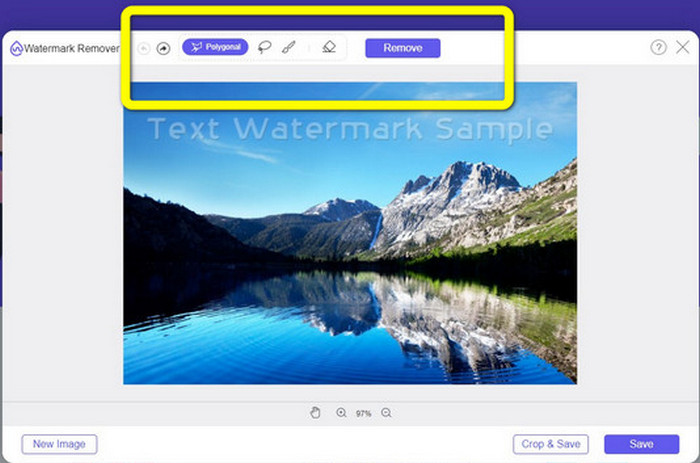
Trinn 3: Bruk Brush-verktøyet, Lasso eller Brush-verktøyet til å markere vannmerkene på bildet ditt.
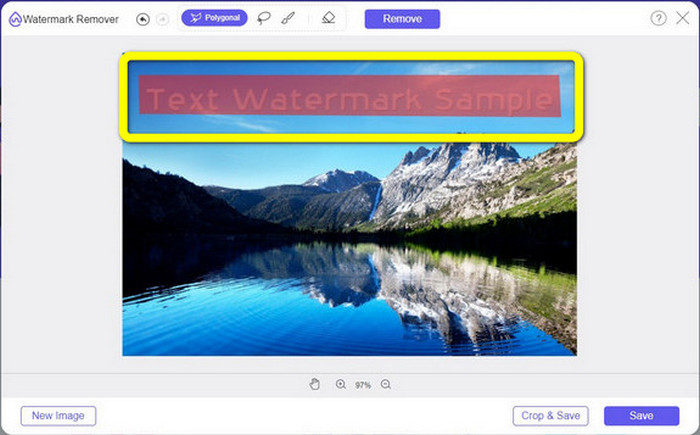
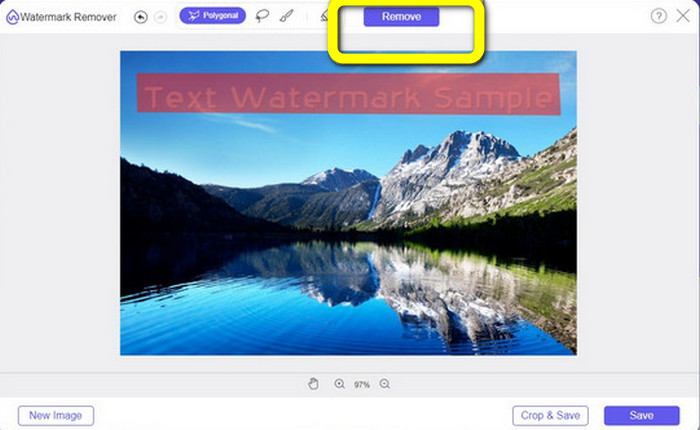
Trinn 4: Når du er ferdig med å markere vannmerkene på bildet, klikker du på knappen Remove.
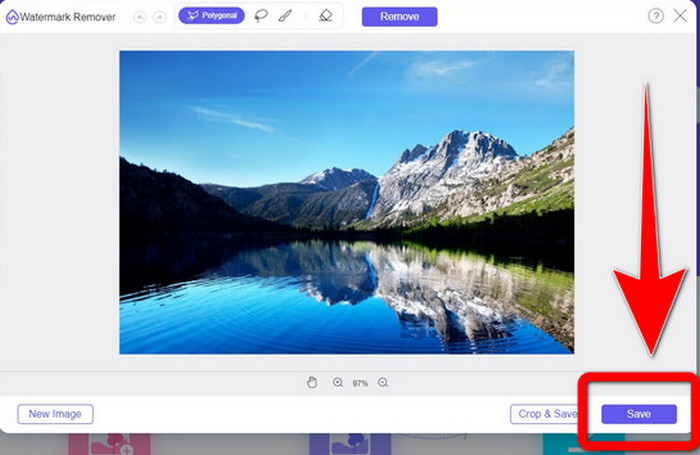
Trinn 5: Når vannmerket er fjernet fra bildet, klikker du på knappen Save for å laste ned bildet ditt, og du kan nå nyte å se på bildene uten å irritere deg over vannmerkene.
2. Photoshop
Hvis du også ser etter et godt og pålitelig program du kan laste ned på datamaskinen, er Adobe Photoshop et av de mest pålitelige programmene du kan bruke. Denne delen viser deg hvordan Photoshop fjerner vannmerker fra bilder. Dette programmet passer for fotografer, webdesignere, grafiske designere, memeskapere osv. Du må imidlertid kjøpe Adobe Photoshop, siden det kun har en gratis prøveperiode på 7 dager. I tillegg egner Photoshop seg ikke så godt til batcharbeid med bilder og har en komplisert læringskurve. Hvis du vil vite den enkleste måten å fjerne vannmerker på bildene dine, følger du disse enkle trinnene nedenfor.
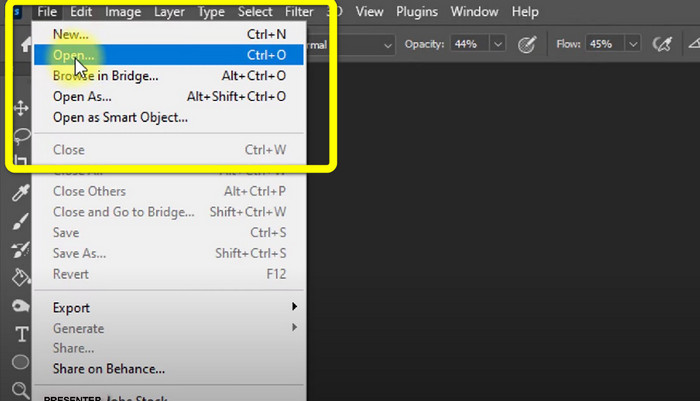
Trinn 1: Åpne Adobe Photoshop. Velg File > Open og legg til bildet ditt med vannmerker.
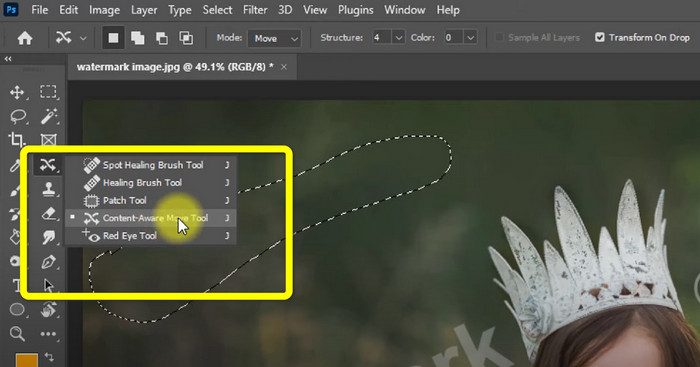
Trinn 2: Klikk på Content-Aware Move Tool i redigeringsverktøyene.
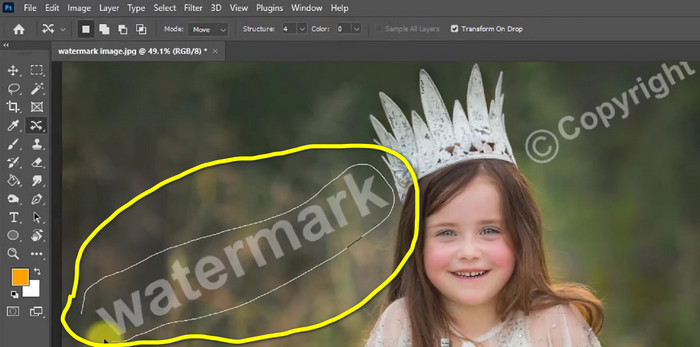
Trinn 3: Etter at du har klikket på Content-Aware Move Tool, velger du området med vannmerket på bildet og trykker Delete på tastaturet.
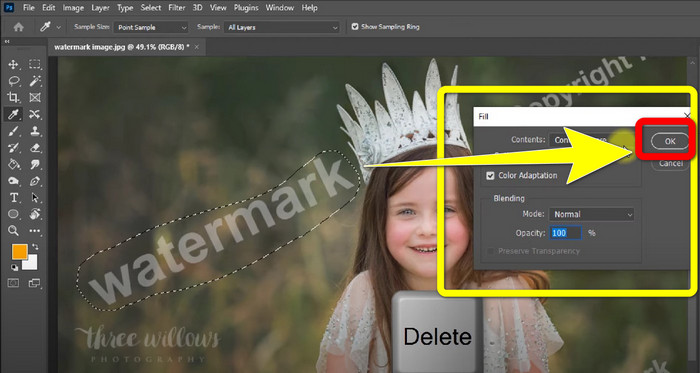
Trinn 4: Når du har trykket Delete, vises et nytt lite vindu, og du klikker på OK.
3. GIMP
Et annet godt program for å fjerne vannmerker fra bildene dine er GIMP. Det er en åpen kildekode-baserte rastergrafikk-editor som brukes til å manipulere og redigere bilder, noe som gjør det til et nyttig verktøy for bildebehandling. I tillegg støtter det mange filformater, som JPG, PNG, TIFF, GIF og flere. Det hender imidlertid at det krasjer brått, og det kan også være vanskelig å organisere lagene. Hvis du vil vite hvordan du fjerner vannmerker fra bildene dine ved hjelp av GIMP, følger du de enkle trinnene nedenfor.
Trinn 1: Når du er på nettstedet til GIMP, klikker du på Download Directly for å laste ned programmet og følger installasjonsprosessen.

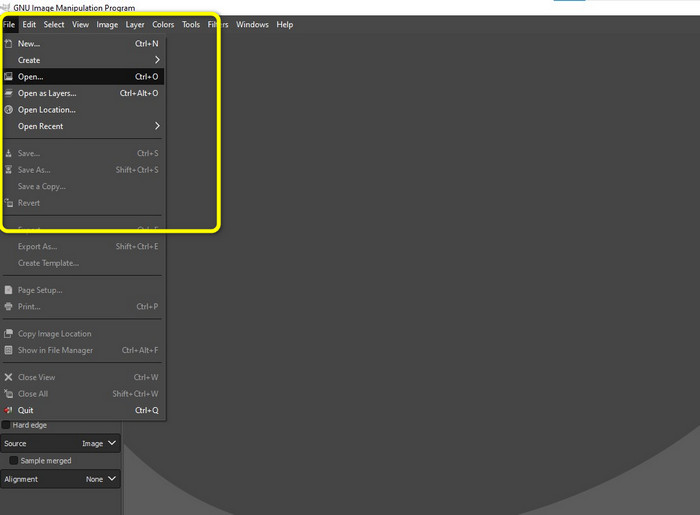
Trinn 2: Åpne programmet og klikk File > Open for å legge til bildet med vannmerker.
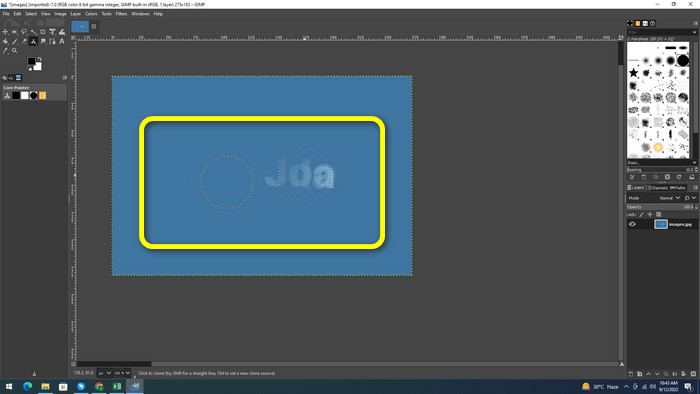
Trinn 3: Klikk på Clone tool og plasser markøren på et tomt område. Trykk Ctrl og klikk på det tomme området.

Trinn 4: Dra markøren over vannmerkene for å fjerne dem. Vannmerket er nå borte. Du kan nå lagre bildet ditt.
4. Aiseesoft Free Watermark Remover Online
Hvis du vil ha den beste nettbaserte fjerneren av vannmerker på bilder, er Aiseesoft Free Watermark Remover Online noe for deg. Dette verktøyet kan hjelpe deg med å fjerne flere vannmerker, tekst, datostempler, logoer og mer på bildene dine. Dessuten er det lett å bruke og derfor perfekt for nybegynnere. Det støtter også ulike bildeformater, som PNG, JPEG, BMP, JPG og flere. Denne tjenesten er imidlertid ikke 100% gratis; du må kjøpe en lisens for å få tilgang til avanserte funksjoner. Hvis du vil fjerne vannmerker på bildene dine, følger du disse trinnene.
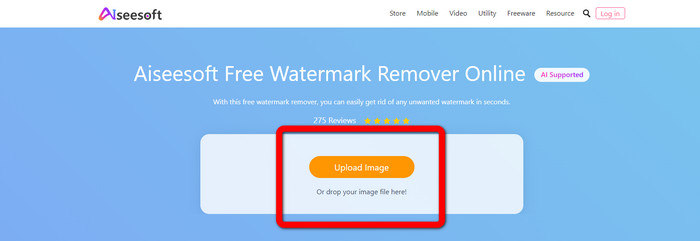
Trinn 1: Gå til nettstedet til Aiseesoft Free Watermark Remover Online. Klikk deretter på Upload Image for å legge til bildet ditt med vannmerker.
Trinn 2: Når du har lagt inn bildet ditt, går du videre til watermark remover tool. Der kan du se fjerningsverktøyene, som Brush, Polygonal og Lasso.
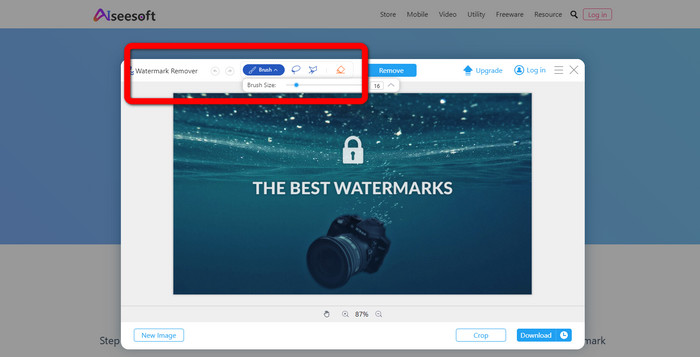
Trinn 3: Bruk disse verktøyene og marker vannmerkene på bildet ditt og klikk Remove.
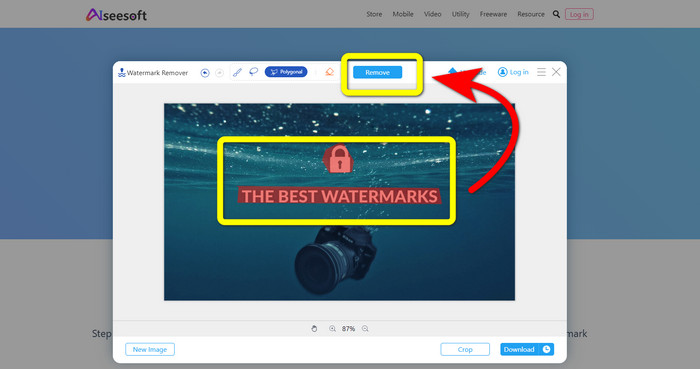
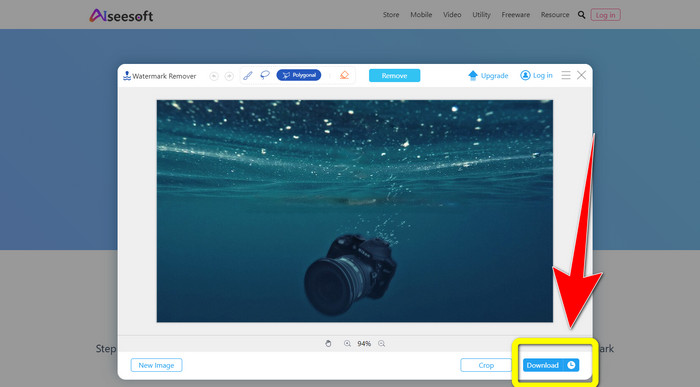
Trinn 4: Hvis du er fornøyd med resultatet, klikker du på Download for å lagre bildet.
5. Pixlr
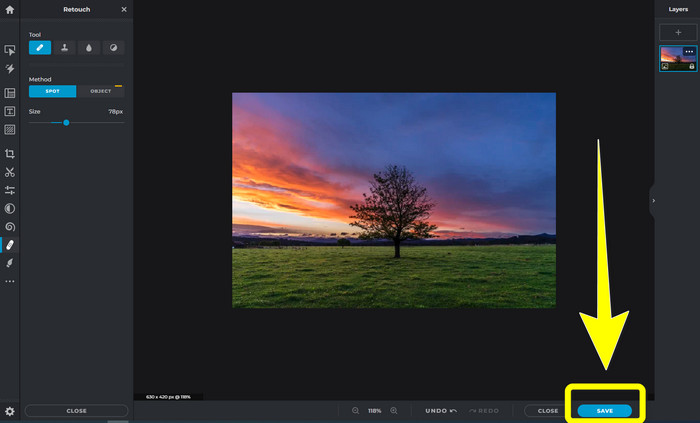
Pixlr er et annet nettbasert verktøy du kan bruke til å fjerne vannmerker fra bildene dine. Det er enkelt å bruke og passer for nybegynnere. Det støtter ulike bildeformater, som PSD, PNG, JPEG, WEBP og PXZ. Dessuten kan du bruke dette programmet på enheter som iPhone, Android, stasjonær PC og bærbar PC. Men det har ikke like mange funksjoner som andre programmer og har begrensede effekter. Hvis du vil lære hvordan du fjerner et vannmerke på et bilde, følger du trinnene nedenfor.
Trinn 1: Gå til nettstedet til Pixlr. Klikk Open Image for å legge til bildet med vannmerket.

Trinn 2: Etter at du har lagt til bildet, går du til verktøyet retouch > heal.
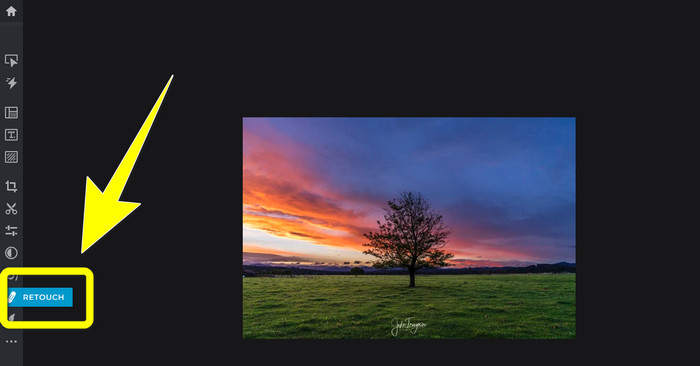
Trinn 3: Etter at du har klikket på verktøyet retouch > heal, klikker du på vannmerket på bildet ditt.
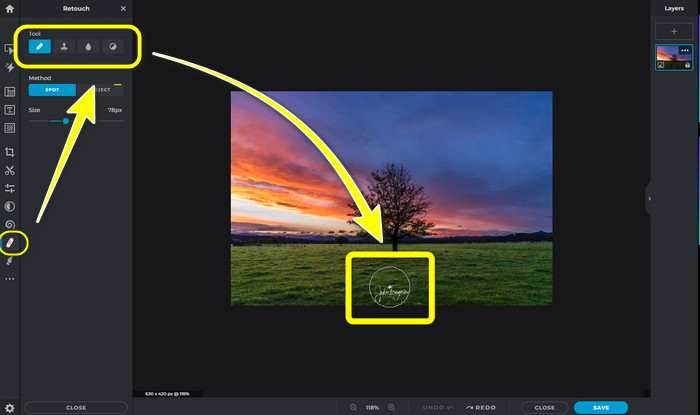
Trinn 4: Når vannmerket er borte, klikker du på knappen Save.
6. Maling
Inpaint er et annet nettbasert program du kan bruke hvis du vil fjerne vannmerker fra bildene dine. Det kan ikke bare fjerne vannmerker, men også logoer og tekst. Det støtter også bildeformater som JPG, PNG og WEBP. Hvis du vil ha bilder i høy kvalitet, må du imidlertid kjøpe programmet. Hvis du vil fjerne vannmerker fra bildene dine, følger du de enkle trinnene nedenfor.
Trinn 1: Gå til nettstedet til Inpaint. Klikk Upload Image og last opp bildet ditt med vannmerket.

Trinn 2: Når du har lastet opp bildet ditt, velger du watermark remover tools som Marker, Polygonal, Lasso og Eraser tool og markerer vannmerkene på bildet ditt.
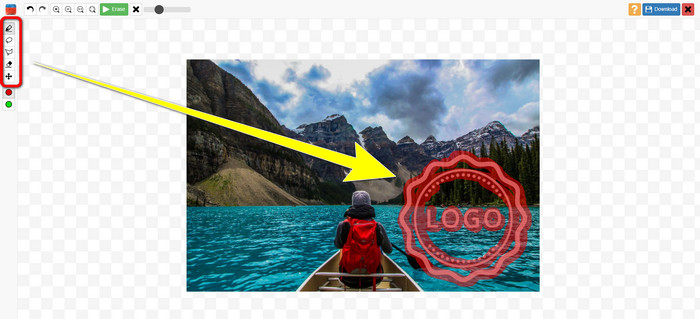
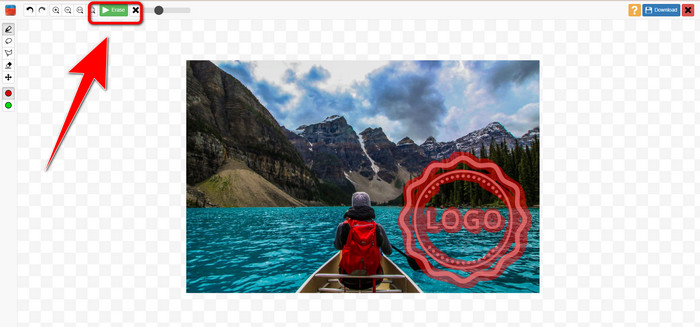
Trinn 3: Når du er ferdig med å markere vannmerkene, klikker du på Erase.
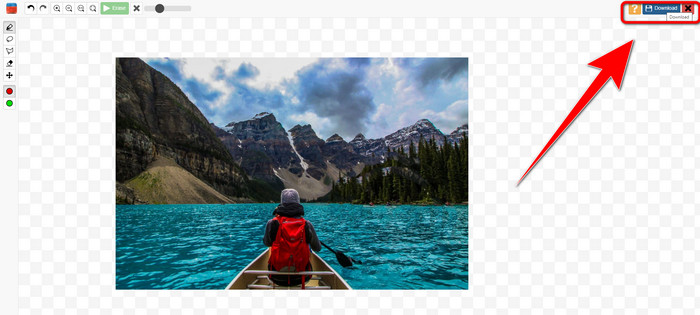
Trinn 4: Når vannmerket er borte, klikker du på knappen Download for å lagre bildet ditt.
7. Fotostempelfjerner
Photo Stamp Remover er et program du kan bruke med datamaskinen din. Du kan laste den ned gratis. Denne applikasjonen kan raskt fjerne unødvendige objekter på bildene dine, for eksempel logoer, tekst, vannmerker og datoer. Men det fungerer ikke bra på bilder med komplisert bakgrunn. Dessuten kan denne programvaren gjenopprette fargene og teksturen til det originale bildet for å dekke vannmerker slik at det ser autentisk ut. Følg disse trinnene for å fjerne vannmerker på bildene dine.
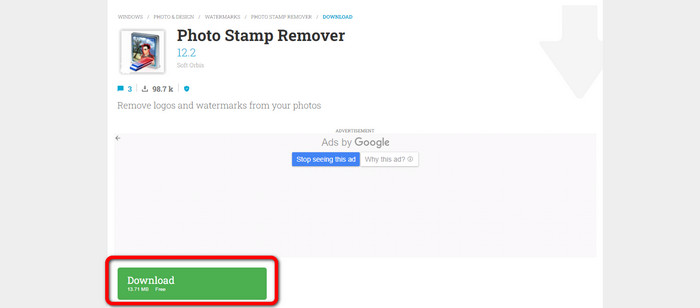
Trinn 1: Klikk på knappen Download for å laste ned Photo Stamp Remover på Windows-PC-en din og følg installasjonsprosessen.
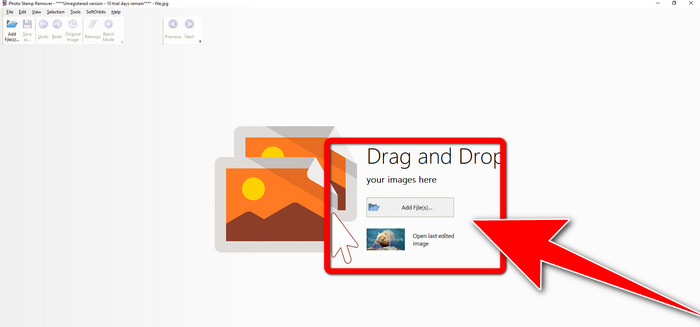
Trinn 2: Start programmet og klikk Add File for å legge til bildet ditt med vannmerker.
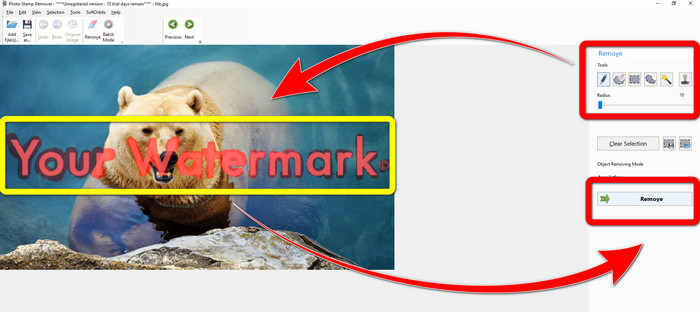
Trinn 3: Gå til Remover tools og klikk på Selection Marker. Marker vannmerkene og klikk Remove.
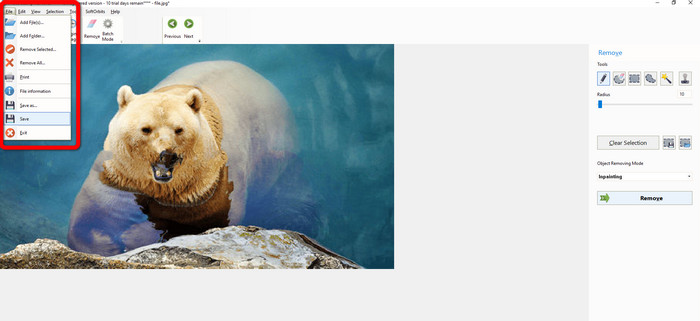
Trinn 4: Når du har fjernet vannmerkene på bildet ditt, klikker du File > Save. Da er du ferdig med å fjerne vannmerkene fra bildet.
Del 2. Slik fjerner du vannmerke fra bilde på iPhone og Android
1. Video Eraser
Hvis du vil vite hvilken app som kan hjelpe deg å lære hvordan du fjerner vannmerker fra et bilde på Android, er Video Eraser noe for deg. Dette programmet kan fjerne uønskede objekter på bildene dine, som tekst, vannmerker osv. I tillegg kan du med dette programmet også fjerne vannmerker fra videoene dine. Men området der vannmerket er fjernet, kan bli flekkete. Hvis du vil lære hvordan du bruker Video Eraser, følger du trinnene nedenfor.
Trinn 1: Installer Video Eraser på Android-enheten din. Åpne programmet når installasjonen er ferdig.

Trinn 2: Klikk Remove Image Watermark for å legge til bildet ditt med vannmerker.
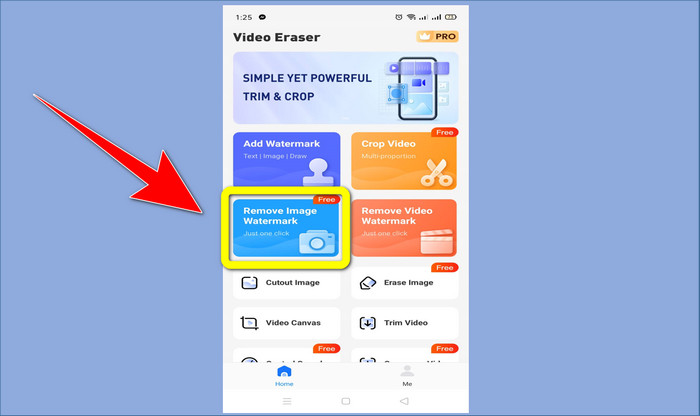
Trinn 3: Marker vannmerket på bildet ditt og klikk Done.
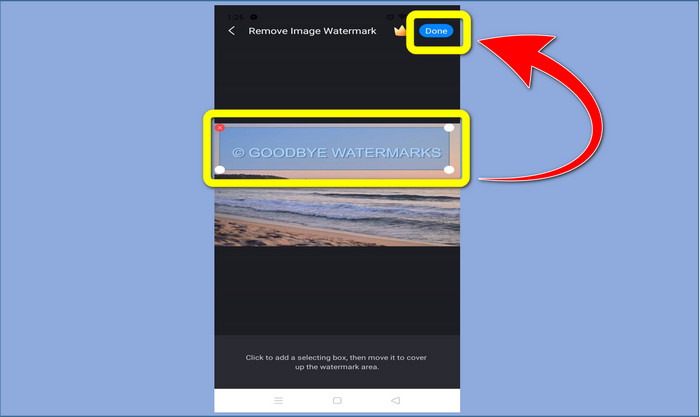
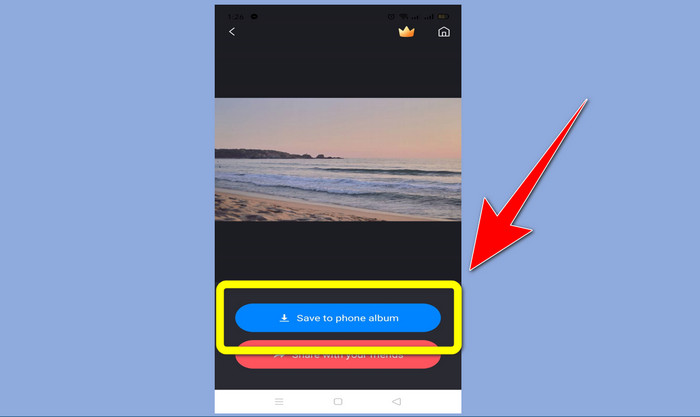
Trinn 4: Etter at du har klikket Done, vil vannmerket forsvinne. Klikk Save to Photo Album for å lagre bildet ditt.
2. Snapseed
Snapseed er en utmerket editor du kan bruke, spesielt hvis du vil lære hvordan du fjerner et vannmerke fra et bilde på iPhone. Denne appen er god hvis du vil fjerne vannmerker fra bildene dine. I tillegg har den ulike redigeringsverktøy du kan bruke, som beskjæring, rotering og mer. Appen er likevel ikke helt ideell for nybegynnere når det gjelder avansert redigering, og selv om den er brukervennlig, har den en liten læringskurve. Følg trinnene nedenfor for å fjerne vannmerker på bildet ditt med denne appen.
Trinn 1: Installer Snapseed på iPhone-en din. Når installasjonen er ferdig, åpner du programmet.
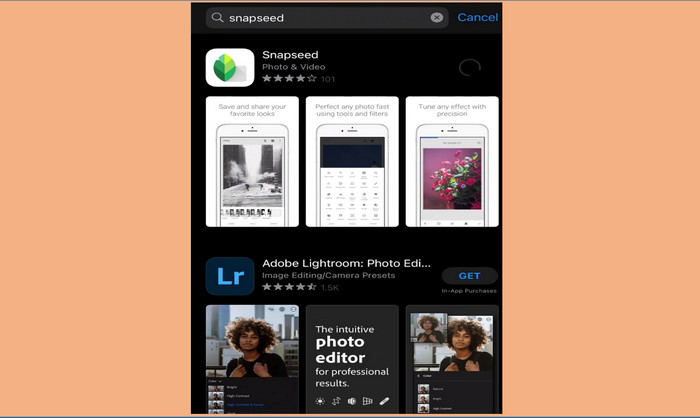
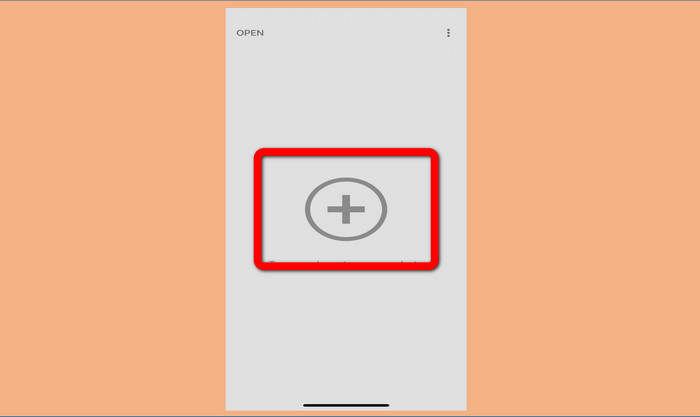
Trinn 2: Klikk på knappen med Plusstegnet for å legge til bildet ditt med vannmerker.
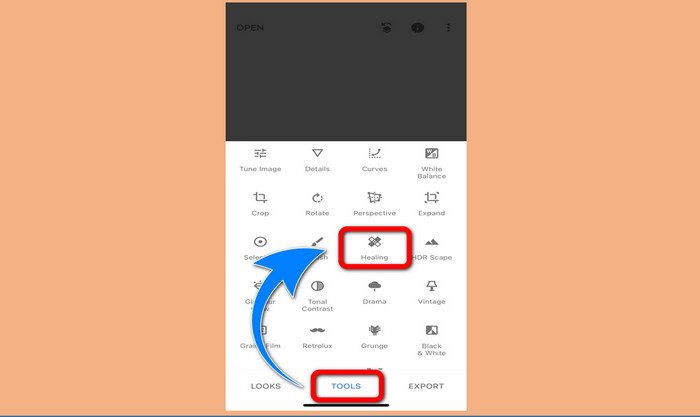
Trinn 3: Når du har lagt til bildet, velger du Tools > Healing og markerer vannmerkene på bildet. Etter at du har markert vannmerkene, vil de automatisk forsvinne.
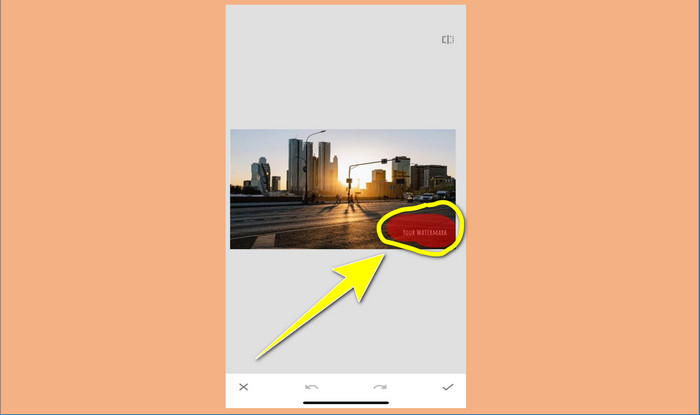
Trinn 4: Etter at du har markert vannmerkene, vil de automatisk forsvinne.
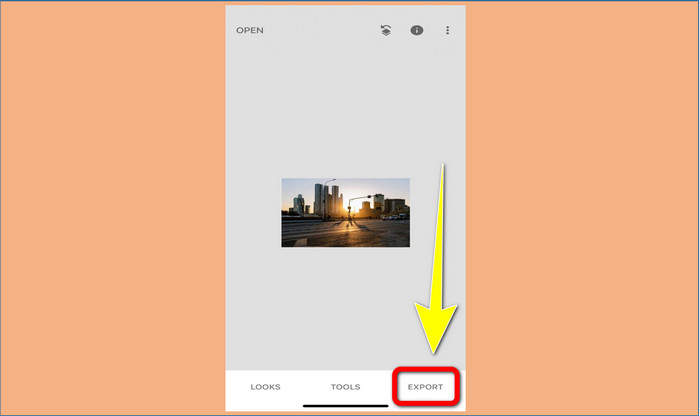
Trinn 5: Når du er ferdig med å fjerne vannmerker fra bildet ditt, klikker du på Check-tegnet og Export for å lagre bildet på iPhone-en din.
Relatert til:
Raskeste triks for å fjerne Adobe Stock-vannmerke fra en video [veiledning]
5 måter å fjerne et vannmerke fra en video på en profesjonell måte
Del 3. Vanlige spørsmål om fjerning av vannmerker fra bilder
Er det en vannmerkefjerner jeg kan bruke gratis, spesielt for Mac?
Ja, det finnes! Du kan bruke mange verktøy for å fjerne vannmerker på Mac, som for eksempel FVC Free Watermark Remover. Det er et nettbasert program for å fjerne vannmerker på Mac.
Er det en måte å fjerne vannmerker fra en video?
Helt sikkert! Det er en enkel ting å gjøre. Noen av vannmerkefjerningsapplikasjonene du kan bruke nå, kan fjerne vannmerker på bilder og videoer. Alt du trenger å gjøre er å søke etter vannmerkefjerneren i søkeboksen og se resultatsiden.
Er det lett å fjerne vannmerker?
Ja, selvfølgelig! Hvis du allerede har applikasjonen du skal bruke, må du se etter fjerningsverktøy, som pensel, markør, lasso og polygonalverktøy. Deretter markerer du vannmerkene og er ferdig.
Konklusjon
Som vist ovenfor gir denne artikkelen bemerkelsesverdige måter å fjerne vannmerker fra bilder på. Men hvis du vil ha et utmerket verktøy du kan bruke til å fjerne vannmerker, er FVC Free Watermark Remover det beste valget for deg.
-
 Hvordan bli kvitt Power Director-vannmerket gratis [Fullfør]
 Hvordan bli kvitt Power Director vannmerket gratis? De beste verktøyene for å eliminere vannmerket er her, så lær dem ved å lese dette.
-
 Beste teknikker for å fjerne Canvasjs prøveversjon vannmerke du må kjenne til
 Den beste måten å fjerne Canvasjs vannmerket på, må du bruke et verktøy. Hvis du ikke har valgt et verktøy, kan du velge det i denne artikkelen.
-
 Hvordan fjerne Animaker-vannmerket uten en kostnad [Prøvde måter]
 Hvordan fjerne Animaker vannmerket? Med de beste verktøyene vi bruker i denne bloggen kan du bruke dem til å bli kvitt vannmerket.
