


 Video Converter Ultimate
 Skjermopptaker
 Videoreparasjon
 Sikker nedlasting
Enkle trinn for hvordan du endrer størrelse på bilde for Facebook
Mange millennials og voksne bruker Facebook som den mest populære sosiale medieplattformen. Facebook er en app der du kan laste opp bilder og dele eller sende dem til vennene dine. Og mange ønsker å ha bilder av høy kvalitet å laste opp på Facebook. Hvis du også vil laste opp bilder i høy oppløsning og høy kvalitet, har vi verktøyet som kan hjelpe deg. Heldigvis har vi funnet apper for iPhone, Android og nett som kan endre bildestørrelse raskt og effektivt. Så spenn fast setebeltet, for i dette innlegget lærer du raskt hvordan du kan endre størrelse på bilder for Facebook.

Del 1. Hvordan endre størrelse på bilde på iPhone for Facebook
Hvis du bruker en iPhone-enhet, kan apper lastes ned på AppStore for å hjelpe deg med å endre størrelsen på bildet. I tillegg finnes det gratis apper som du kan bruke på iPhone-enheten din. Imidlertid produserer ikke alle apper utdata av høy kvalitet. Det er derfor vi søkte etter den beste appen for å endre størrelse på bilder umiddelbart.
Remini er den mest populære appen for å endre bildestørrelse som du kan laste ned på iPhone. Denne appen har et brukervennlig grensesnitt fordi funksjonene er intuitive. I tillegg kan Remini forbedre bildet ditt ved hjelp av sin AI‑ (kunstig intelligens‑)forbedrer, som automatisk endrer størrelsen på bildet og forbedrer det til best mulig kvalitet. Og ikke bare det – med denne appen kan du også forbedre videoene dine med videoforbedrer‑funksjonen. Dessuten støtter den alle vanlige bildeformater, som JPEG, JPG og PNG. Det som også er fantastisk med denne appen, er at du kan laste den ned gratis fra App Store. Så hvis du vil bruke denne appen til å endre størrelsen på et bilde til Facebook‑forsiden din, følger du trinnene nedenfor.
Slik endrer du størrelsen på et bilde ved hjelp av Remini-appen:
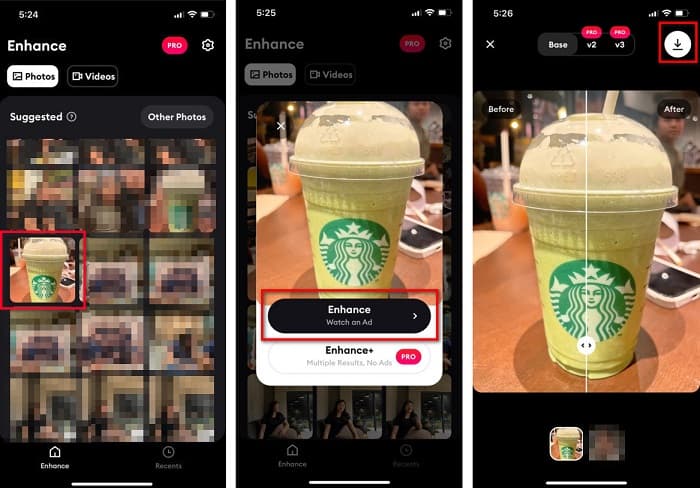
Trinn 1. Åpne App Store, søk etter Remini og last den ned til enheten din. Når appen er installert, åpner du den.
Trinn 2. Etter at du har åpnet appen, vil du se bildene dine og kan velge bildet du vil forbedre. Deretter trykker du på Enhance‑knappen for å gå videre til neste grensesnitt.
Trinn 3. Før du går videre til neste grensesnitt, må du først se en annonse. Deretter vil du se før‑ og etterversjonen av bildet ditt. Trykk på Nedlastingsikonet øverst til høyre på skjermen.
Del 2. Hvordan endre størrelse på bilde på Android for Facebook
Er du en Android-bruker? Ikke bekymre deg; vi vil også presentere et program du kan bruke til å endre størrelse på et bilde. Selv om det er mange apper du kan laste ned fra PlayStore, valgte vi de beste blant dem å presentere for deg. Les nedenfor for å lære hvordan du endrer størrelse på bilder for Facebook på Android.
AI Photo Enhancer & PixelLeap er en annen flott app som hjelper deg å endre størrelsen på bildet for bedre kvalitet. Denne bilde‑resizeren er gratis å laste ned fra Play Store‑appen din og er trygg å bruke. I tillegg, hvis du vil forbedre eller restaurere et gammelt bilde, kan du bruke AI Photo Enhancer & PixelLeap. Med sin AI‑teknologi er det bare å laste opp bildet du vil endre størrelsen på, så vil appen automatisk forbedre bildet ditt. Videre har den et enkelt brukergrensesnitt, noe som gjør den til en svært god app hvis du er nybegynner. Den har også andre redigeringsfunksjoner du kan bruke, som å rette opp, fargelegge, animere, gi uttrykk og lysne bildet ditt. Problemet med denne appen er imidlertid at den inneholder mange annonser som tar tid å se ferdig, og den legger en vannmerking på resultatet ditt. Likevel er denne appen en løsning hvis du vil endre størrelse på et bilde for Facebook uten å beskjære.
Slik endrer du størrelsen på et bilde ved hjelp av AI Photo Enhancer og PixelLeap:
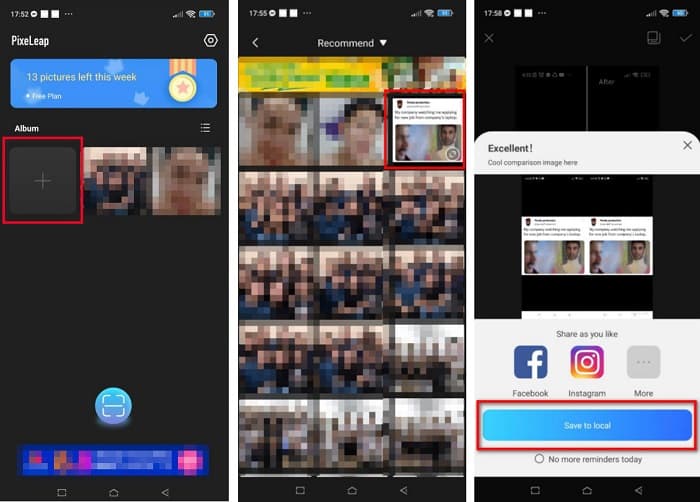
Trinn 1. Installer AI Photo Enhancer & PixelLeap på Android‑enheten din.
Trinn 2. Trykk deretter på +‑ruten i hovedgrensesnittet til appen for å laste opp bildet du vil endre størrelsen på. Deretter vil appen la deg se en annonse før du går videre til neste grensesnitt.
Trinn 3. Bla etter bildet du vil endre størrelsen på, og trykk på det. Etter at du har valgt bildet, trykker du på Enhance. Deretter vil appen automatisk forbedre bildet ditt. Trykk på Save to local for å laste ned resultatet ditt.
Del 3. Hvordan endre størrelse på bilde på nett for Facebook
Fordelen med å bruke en nettapplikasjon er at den lar deg spare plass på enheten din. I tillegg til det er det mange gratis tilgjengelige nettapper som du kan bruke i nettleseren din. Så hvis du vil bruke en nettapplikasjon for å endre størrelsen på et bilde for å laste opp på Facebook, vil vi vise deg hvordan du endrer størrelsen på et bilde for Facebook.
FVC Free Image Upscaler er den beste nettbaserte bilde‑resizeren som lar deg skalere bildet ditt opp til 2x, 4x, 6x og 8x forstørrelse. Med sitt enkle brukergrensesnitt kan nybegynnere lett endre størrelse på et bilde. Dessuten støtter den alle bildeformater, inkludert JPEG, JPG, PNG og BMP. Det som er enda mer imponerende med dette verktøyet, er at det bruker AI‑teknologi som automatisk oppdager deler av bildet med lav oppløsning og deretter forbedrer dem. I tillegg kan det rette opp tapte piksler, fargeteksturer og flere detaljer fullstendig og perfekt. Det er også tilgjengelig i alle nettlesere, inkludert Google, Firefox og Safari. Hvis du derfor vil bruke FVC Free Image Upscaler til å endre størrelse på eller forbedre bildet ditt, følger du de enkle trinnene nedenfor.
Slik endrer du størrelsen på et bilde for Facebook ved hjelp av FVC Free Image Upscaler:
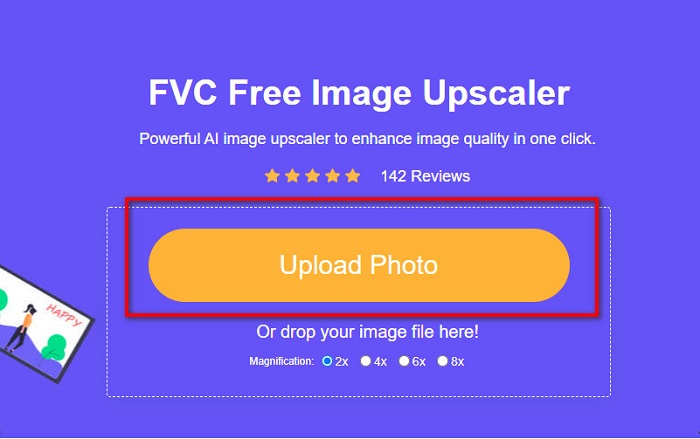
Trinn 1. Åpne nettleseren din og skriv FVC Free Image Upscaler i søkefeltet. Du kan klikke på den oppgitte lenken for å bli dirigert til nettstedet. Klikk på Upload Photo for å starte appen.
Trinn 2. I hovedgrensesnittet til programvaren klikker du på Upload Photo for å importere bildet du vil endre størrelsen på.
Trinn 3. I neste grensesnitt velger du forstørrelsesforhåndsinnstillingen du vil ha for bildefilen din. Du kan velge mellom 2x, 4x, 6x og 8x forstørrelse. Gå deretter videre til neste trinn.
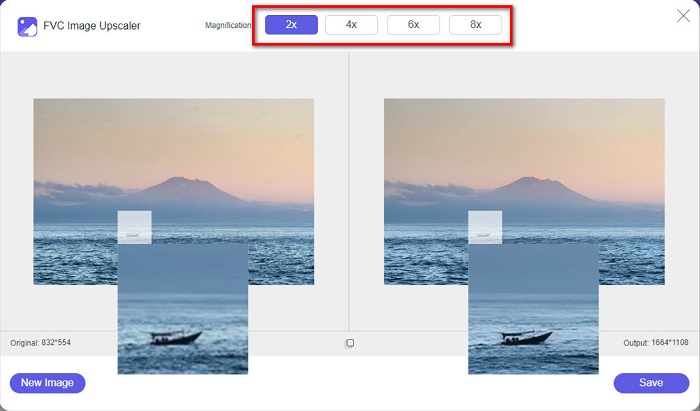
Trinn 4. Til slutt klikker du på Save‑knappen for å lagre resultatet på datamaskinen. Du vil se forskjellen mellom den opprinnelige filen og bildet med endret størrelse. På bare et øyeblikk vil bildet ditt være lagret.
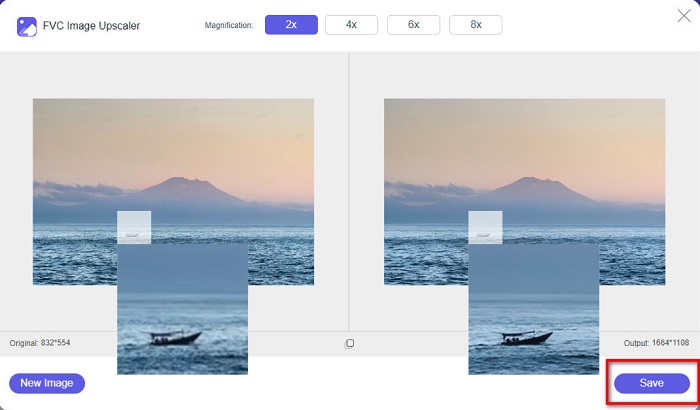
Og det er det! Like enkelt som ABC, bildet ditt er nå forbedret og endret størrelse.
Relatert til:
Hvordan gjøre bilder skarpere på nett og uten nett på 4 enkle måter
Hvordan endre bildestørrelse – Adobe Resize Image [på nett og uten nett]
Del 4. Vanlige spørsmål om hvordan du endrer størrelse på bilde for Facebook
Hva er det beste bildeforholdet for Facebook?
Når det gjelder fotoforhold, er det best å bruke et vertikalt bilde med et sideforhold på 4:5 og 1200 x 1500 px. Og skal du ha et kvadratisk bilde, må oppløsningen være 1080 x 1080 px.
Hva er størrelsen på et Facebook-innlegg?
Den anbefalte bildestørrelsen for et Facebook-innlegg er 1200 x 630 piksler for å unngå pikselering og ha en raskere innlastingstid.
Hva er det beste bildeformatet å laste opp på Facebook?
Det beste og anbefalte bildeformatet å laste opp på Facebook er JPG-format. Det er best å laste opp et JPG-format med en RGB-farge på mindre enn 15 MB.
Konklusjon
Vi har løsningene ovenfor hvis du vil endre størrelsen på et bilde for Facebook. Ved å lese denne artikkelen grundig håper vi at du har lært alt det nødvendige du må gjøre. Du kan garantert endre størrelsen på alle bilder du vil, ved hjelp av iPhone‑, Android‑ eller nettapper. Men for bedre resultater, bruk FVC Free Image Upscaler, som også gjør at du kan spare plass på enheten din.
-
 Beste Photo Resizer-app online, offline, Android og iPhone
 Hva er de beste appene for bilderesizer? Klikk på siden for å lære de fem mest kraftfulle appene for bildeforbedring du kan bruke til å forbedre eller endre størrelse på filen.
-
 Hvordan endre størrelse på bilde - Adobe Endre størrelse på bilde [online og offline]
 Hvis du søker etter Adobe Resize image, så har vi løsningen for deg. Se dette innlegget grundig for å lære hvordan du endrer størrelse på bilder ved hjelp av Adobe på PC-en.
-
 Topp 4 offline og online GIF-forstørrelser du ikke må gå glipp av
 Dette innlegget er for deg hvis du leter etter de beste GIF-forstørrelsene. Vi listet opp de beste online og offline GIF-forstørrelsene for datamaskinen din.
