


 Video Converter Ultimate
 Skjermopptaker
 Videoreparasjon
[2021] Hvilken av de 4 er den beste gratis AVI til MOV-konvertereren online og offline
AVI er et ukomprimert format utviklet av Microsoft. Selv om filen ikke har begrensninger, kan formatet likevel ikke spilles av på Mac fordi det er proprietært for Microsoft. Så den beste måten å spille av AVI-format på er å konvertere det til en MOV-fil. Hvis du vil vite hvordan du konverterer AVI til MOV, må du fortsette å lese for å lære hvordan du gjør det og hvilket verktøy som er best egnet til jobben.

Del 1. Den ultimate måten å konvertere AVI til MOV
Som man sier, start dagen med kaffe eller te for å få en god start. På samme måte her: la oss starte med den kraftige videokonverteren utviklet av FVC. Video Converter Ultimate kan konvertere alle formater til et nytt, for eksempel er det enkelt å konvertere AVI til MOV hvis du bruker dette verktøyet. I tillegg kan du konvertere ikke bare én, to eller tre filer samtidig, men flere. Faktisk har det ingen grense for hvor mange filer som kan konverteres. Dessuten kan du også forbedre videoen i verktøylinjen i dette verktøyet etter konverteringen. Så hvis du ser etter et verktøy som overgår alle konverterere på listen eller i nettsøket, kan du si til deg selv at letingen er over. Hvis du er i tvil om dette verktøyet, bør du teste det først og følge disse trinnene for hvordan du bruker den ultimate konverteren som gir ultimate konvertering.
Trinn 1. Last ned verktøyet og installer det på harddisken din. Endre oppsettet for verktøyet og klikk Fullfør for å lagre endringene du har gjort.
Gratis nedlastingFor Windows 7 eller nyereSikker nedlasting
Gratis nedlastingFor MacOS 10.7 eller nyereSikker nedlasting
Trinn 2. Etter installasjon og oppsett vil verktøyet starte automatisk, og et grensesnitt som dette skal vises på skjermen din.
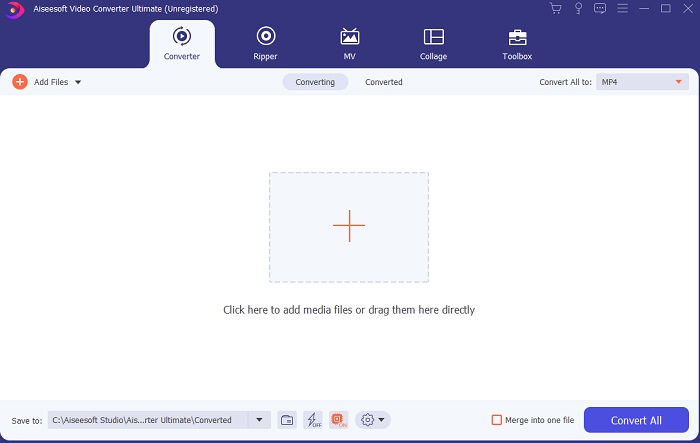
Trinn 3. Klikk på det store plusstegnet i midten for å legge til filen for å konvertere AVI til MOV eller til et annet format.
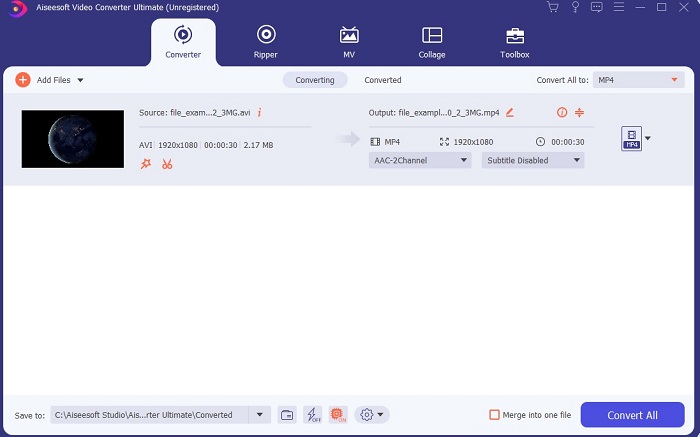
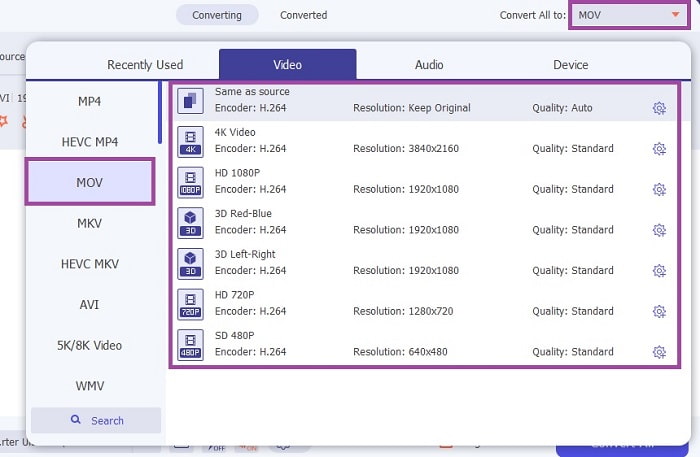
Trinn 4. Endre format ved å klikke på nedtrekksknappen og velg MOV eller hvilket format du vil konvertere til. Hvis filen er klar til å konverteres, klikker du på Convert All for å starte konverteringen.
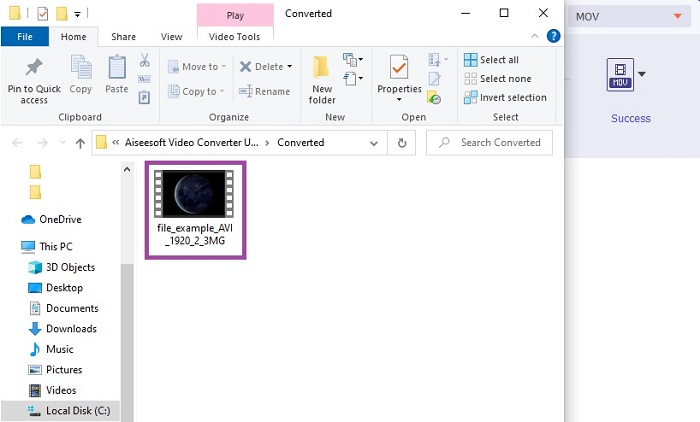
Trinn 5. Dette vil ta mindre enn ett minutt å konvertere. Når det er ferdig, vil et filutforsker-vindu dukke opp på skjermen din, og du kan klikke på den konverterte filen for å se den. Senere kan du forbedre videoen til bedre kvalitet ved hjelp av verktøylinjen.
Del 2. Andre mulige måter å konvertere AVI til MOV online
1. FVC gratis online videokonverterer
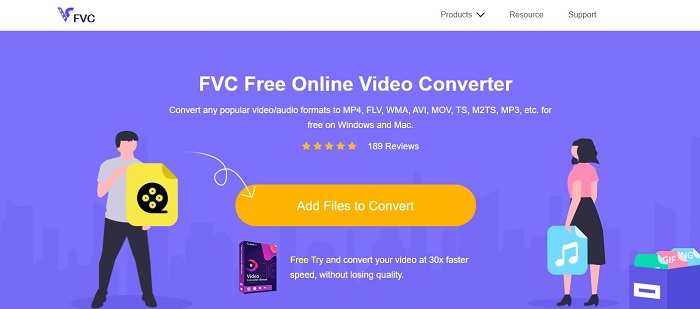
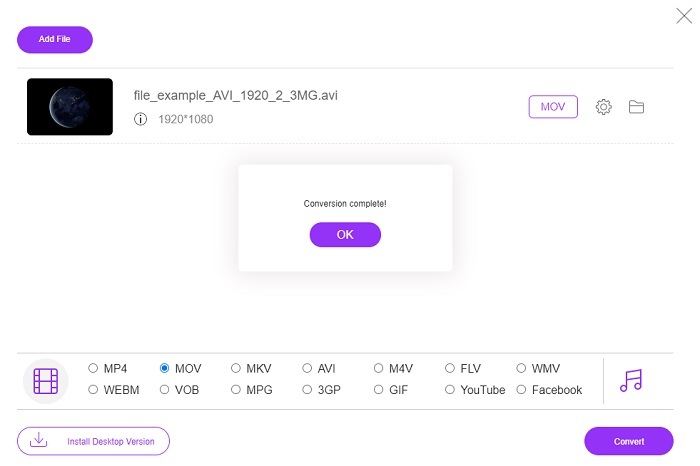
I motsetning til verktøyet ovenfor er dette verktøyet gratis. FVC Free Video Converter er gratisversjonen av verktøyet ovenfor, men de viktigste funksjonene som videoforbedring og mer er ikke tilgjengelige her. Men de grunnleggende konverteringsfunksjonene kan utføres med dette verktøyet. Hvis du vil vite hvordan denne gratis AVI til MOV-konvertereren på nett fungerer, må du følge de enkle trinnene nedenfor for å sikre en vellykket konverteringsprosess.
Trinn 1. Klikk på denne lenken og klikk på Add Files to Convert for å starte den på din PC eller Mac.
Last ned skrivebordsversjonen for å konvertere filer i batch.
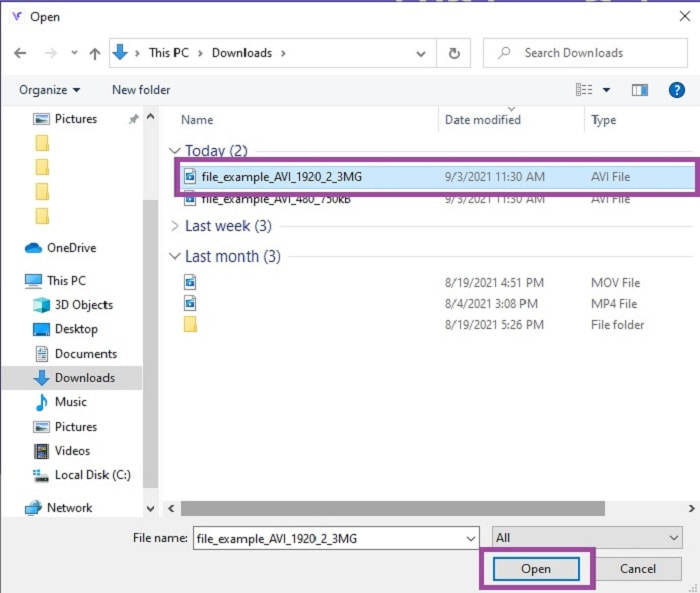
Trinn 2. Etter å ha klikket, må du velge hvilke filer du vil konvertere. Klikk deretter Open for å starte.
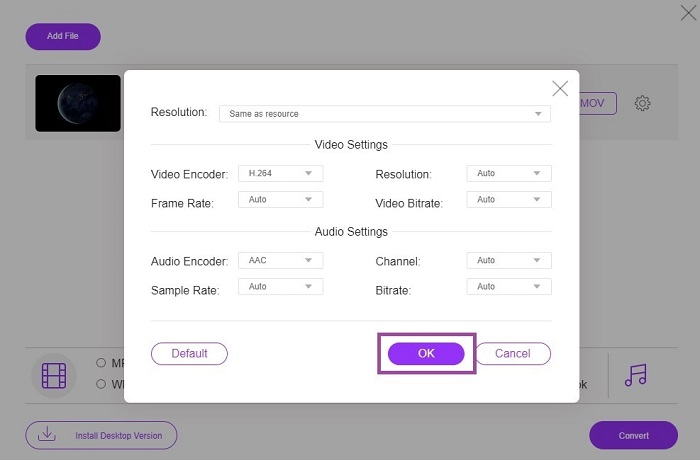
Trinn 3. Klikk på tannhjulet for å endre video- og lydinnstillinger hvis du ønsker det. For å lagre endringene du har gjort, klikker du på OK.
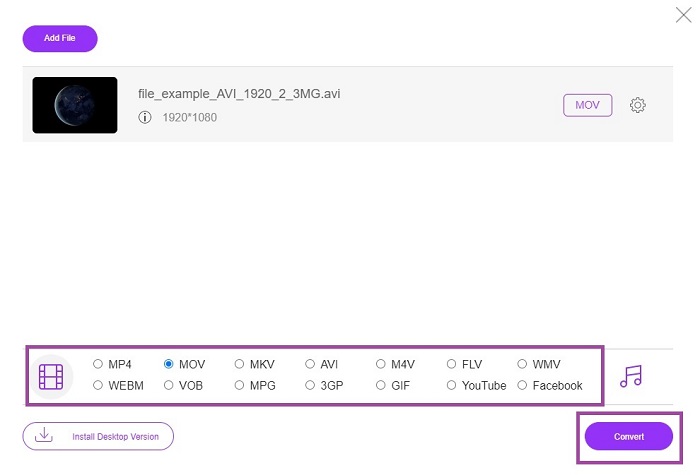
Trinn 4. Hvis filen vises i grensesnittet, må du nå velge hvilket format du vil konvertere den til. Gå tilbake til hovedgrensesnittet og klikk på Convert for å starte prosessen.
Trinn 5. Når konverteringen er ferdig, kan du senere sjekke filen i filbehandleren.
2. CloudConvert
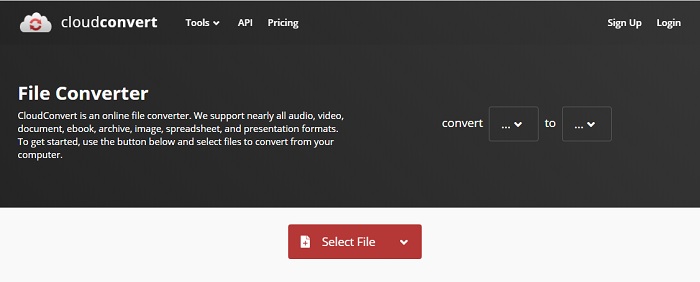
Hvis du ser etter en AVI til MOV-konverterer for Mac på nett, kan du prøve CloudConvert. Det lar brukere konvertere alle typer video, lyd, dokumenter, PDF-er og andre filer til nye formater. Men til tross for kraftig konvertering har dette verktøyet ingen redigeringsfunksjoner. Det konverterer altså videoen uten å forbedre kvaliteten. Alt i alt er det bra til å konvertere, men FVC Free Online Video Converter er bedre enn dette.
3. FreeConvert.com
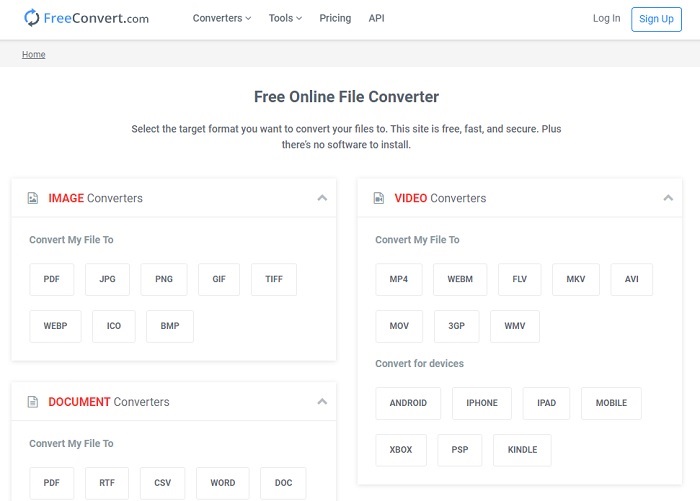
Et annet imponerende nettverktøy til konvertering er FreeConvert.com. Hvis verktøyet ovenfor gir kraftig komprimering, har dette verktøyet også det som trengs for å være på listen. Det tilbyr også grunnleggende redigeringsfunksjoner som trimming og beskjæring, komprimering av filer og konvertering for ulike enheter. Men ulempen med dette verktøyet er at formatene er svært begrenset. Dermed får du ikke full frihet til å velge på grunn av de begrensede funksjonene det tilbyr.
Videre lesning
Hvordan konvertere M2TS til MOV
Hvordan konvertere MOV til MP4
AVI vs. MOV
Basert på Resource Interchange File Format (RIFF), ble AVI-formatet introdusert av Microsoft i 1992. Det kan lagre video/lyd av høy kvalitet siden det bruker mindre komprimering. Men det forårsaker også den store filstørrelsen til en AVI-fil, som kan være et problem når det er begrenset plass.
MOV-formatet kan brukes til å lagre en film, et TV-program, et kort videoklipp eller en hjemmefilm. Den er faktisk lagret i QuickTime File Format (QTFF), som ble introdusert av Apple i 1991. MOV-filer brukes ofte når folk vil lagre en video med høy kvalitet.
Del 3. Vanlige spørsmål om AVI til MOV
Kan QuickTime konvertere AVI til MOV?
QuickTime er en innebygd mediespiller for Mac. Den kan også konvertere AVI til MOV i QuickTime, men det er ikke det beste eller mest ideelle alternativet til å konvertere medieformater, selv om den klarer jobben.
Hvilken er bedre? AVI eller MOV?
Hvert format har sine egne unike funksjoner for å skille seg ut, men disse to er en av de beste. AVI er et proprietært format utviklet av Microsoft for å synkronisere videoavspilling og god kvalitet også. Men ettersom Apple ønsker å konkurrere, utvikler de MOV som er det opprinnelige formatet til QuickTime. For å lagre flere spor med dataene deres som lyd, video og undertekster separat, men i en enkelt beholder.
Er AVI og MOV tapsfri eller tapsfri?
De er ikke komprimeringen fordi AVI ble laget for å være ukomprimert, så dette er en tapsfri, men MOV er en lossy som er komprimert og mindre i størrelse.
Konklusjon
Til slutt: å konvertere en AVI-fil er ikke noen spøk, så du må ta det seriøst fordi den er ukomprimert. Hvis du velger feil konverteringsverktøy, er det en sjanse for at noe av koden går tapt under prosessen. Men du trenger ikke å bekymre deg, for FVC Video Converter Ultimate er her for å redde dagen. Hvis du vil ha en vellykket konverteringsprosess, må du bruke dette verktøyet og ingen andre. I tillegg til at det er raskt og trygt, kan dette verktøyet utføre flere konverteringer samtidig. I stedet for å vente på at den første filen skal bli ferdig, kan du konvertere alle AVI-filene og gjøre dem om til MOV-format på én gang – eller hvilket som helst annet format du ønsker.
-
 FLV til MOV - Hvordan konvertere FLV til MOV på Mac / PC / gratis online
 Hvordan konvertere FLV til MOV? Hvordan konverterer jeg FLV til MOV på Mac? Er det noen gratis måte å konvertere YouTube FLV til MOV online? Dette innlegget deler 3 FLV til MOV-omformere for å endre FLV-filer til MOV.
-
 5 brukbare metoder for å fikse QuickTime Kan ikke åpne MOV-filer
 MOV-formatet er hovedsakelig laget for avspilling i QuickTime Player. Noen ganger kan du imidlertid oppdage at de ikke spiller i den. Lær hvordan du fikser QuickTime vil ikke spille MOV-filer fra dette innlegget.
-
 Eksepsjonell guide for hvordan du spiller MOV -filer på Android -mobilenheter
 Har du et problem hvorfor MOV -filene dine ikke spilles på din Android mediespiller? Les deretter denne artikkelen, den vil gi deg 2 forskjellige metoder for å fikse MOV -filer og gjøre dem spillbare.

