


 Video Converter Ultimate
 Skjermopptaker
 Videoreparasjon
Hvordan konvertere MOV til MKV gratis online og offline på Mac
Har du problemer med å spille av MOV-filer i VLC Media Player? VLC Media Player gjenkjenner knapt MOV-filer. Derfor må du konvertere MOV-filen din til et format som VLC Media Player kan spille av nativt, nemlig MKV-filen. Heldigvis har vi funnet de beste og enkleste konvertererne for å konvertere MOV-filen din til MKV-filformat. Hvis du vil vite mer om å konvertere MOV til MKV gratis, les denne artikkelen for flere detaljer.

Del 1. Konvertering av MOV til MKV ved hjelp av FVC Video Converter Ultimate på Mac
FVC Video Converter Ultimate er en offline konverter som er tilgjengelig på Mac. Denne filkonverteren er en av de mest fremragende konverterne som finnes på nettet. Den lar deg konvertere en rekke filformater, inkludert MOV, MKV, AVI, MP4, M4V, WMV, VOB og over 1000 flere. Og hvis du vil lage en 3D-video, har denne konverteren den funksjonen. Dessuten tilbyr dette verktøyet ultrarask konvertering som kan konvertere MOV til MKV på Mac lynraskt.
Her er trinnene for å konvertere MOV-filen din til MKV ved hjelp av FVC Video Converter Ultimate:
Trinn 1. På Mac-en din laster du ned FVC Video Converter Ultimate ved å klikke på Last ned-knappen nedenfor for macOS. Åpne deretter programmet.
Gratis nedlastingFor Windows 7 eller nyereSikker nedlasting
Gratis nedlastingFor MacOS 10.7 eller nyereSikker nedlasting
Trinn 2. Etter at du har åpnet programmet, klikker du på knappen Legg til filer eller +-symbolet. Deretter vises datamaskinens filer, hvor du skal velge MOV-filen din. Deretter blir filen din lastet opp til programmets hovedgrensesnitt.
Last ned skrivebordsversjonen for å konvertere filer i batch.
Trinn 3. Etter at du har lastet opp MOV-filen din, klikker du på knappen Konverter alle til for å velge utdataformatet. Klikk deretter på MKV-formatet.
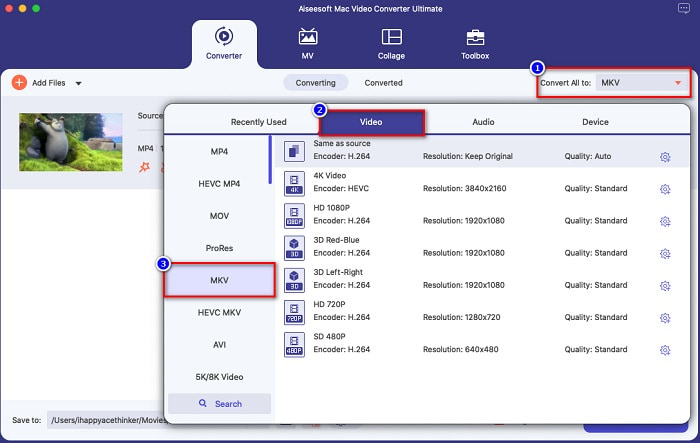
Trinn 4. For å fullføre, klikker du på knappen Konverter alle, slik at MOV‑til‑MKV-filen din begynner å konverteres. Vent deretter noen sekunder, og det er alt!
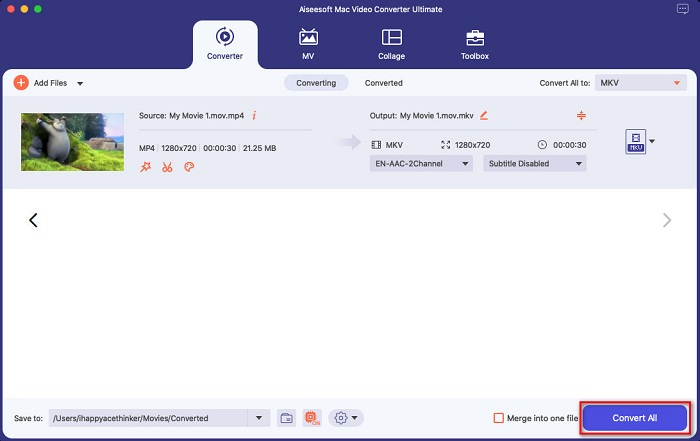
Du kan enkelt konvertere MOV til MKV på Mac ved å følge disse enkle og enkle trinnene.
Fordeler
- Kan konvertere 4K, 1080P og 720P videoformater.
- Tilbyr batchkonvertering for å slå sammen flere filer til én,
- Støtter over 1000+ filformater tilgjengelig på nettet.
- Den har en funksjon for å redigere, forbedre og komprimere filene dine.
Ulemper
- For å bruke spesialfunksjonene må du først kjøpe den.
Del 2. Konvertering av MOV til MKV ved hjelp av online- og gratisverktøy
Bruk FVC Free Online Video Converter [Online]
Når du søker etter MOV til MKV‑konvertere i nettleseren din, vil du se en liste over nettbaserte konvertere på resultatsiden. Her introduserer vi den beste gratis MOV til MKV‑konverteren, FVC Free Online Video Converter. Denne nettbaserte konverteren kan konvertere mange standard filformater som er tilgjengelige på internett. Den er også enkel å bruke, slik at nybegynnere ikke vil ha problemer med å bruke den. Men siden det er et internettavhengig verktøy, kan du noen ganger oppleve en treg konverteringsprosess. Likevel er det bevist å være en av de beste og mest praktiske nettbaserte konverterne som finnes på nettet.
Slik bruker du FVC Free Online Video Converter:
Trinn 1. Søk etter FVC Free Online Video Converter i nettleseren din, eller klikk denne lenken for å gå direkte til nettsiden.
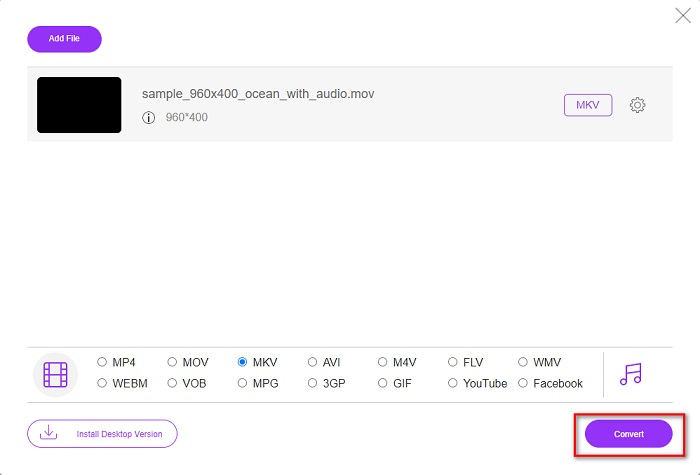
Trinn 2. Start programmet, og klikk deretter på knappen Legg til filer for å konvertere. Deretter vises skrivebordsfilene dine, hvor du velger MOV-filen din.
Last ned skrivebordsversjonen for å konvertere filer i batch.
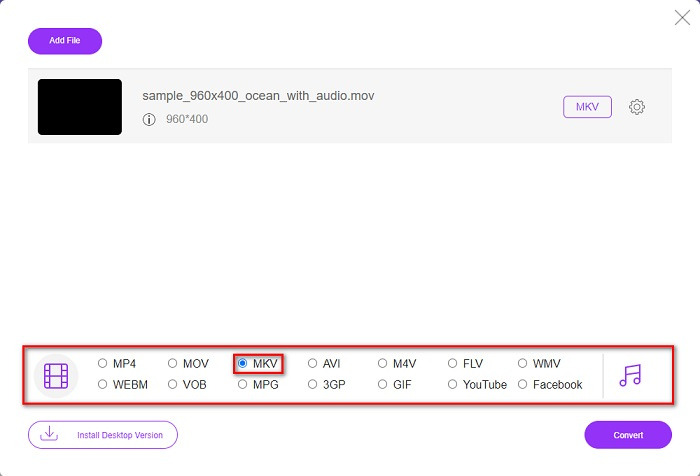
Trinn 3. Etter at filen din er lastet opp, velger du utdataformatet som ligger nederst i programmets andre grensesnitt. Klikk på MKV-filformatet.
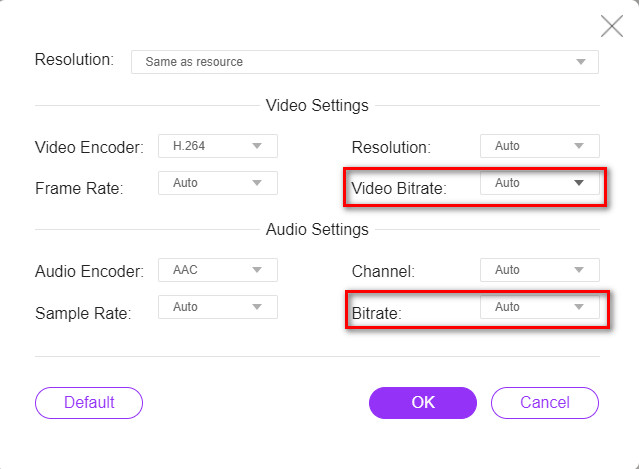
Valgfritt. Hvis du vil endre videobithastigheten og lyd-bithastigheten til filen din, klikker du på knappen Innstilling ved siden av boksen for utdataformat. Endre deretter video- eller lyd-bithastigheten til det du ønsker. Klikk så på OK-knappen for å lagre endringene.
Trinn 4. For å begynne å konvertere MOV-filen din til en MKV-fil, klikker du på knappen Konverter. Vent deretter til konverteringsprosessen er ferdig.
Bruk håndbrems [Freeware]
Hvis du vil konvertere MOV til MKV ved hjelp av freeware, kan dette verktøyet være løsningen for deg. HandBrake er en freeware‑konverter som lar deg konvertere nesten alle standard filformater til MKV, MP4 og WebM. Denne konverteren er fantastisk fordi du kan gjøre en batch-skanning av MOV-filene dine. Men den har et vanskelig grensesnitt å bruke, så du må kanskje bruke litt tid på å bli kjent med kontrollene og funksjonene.
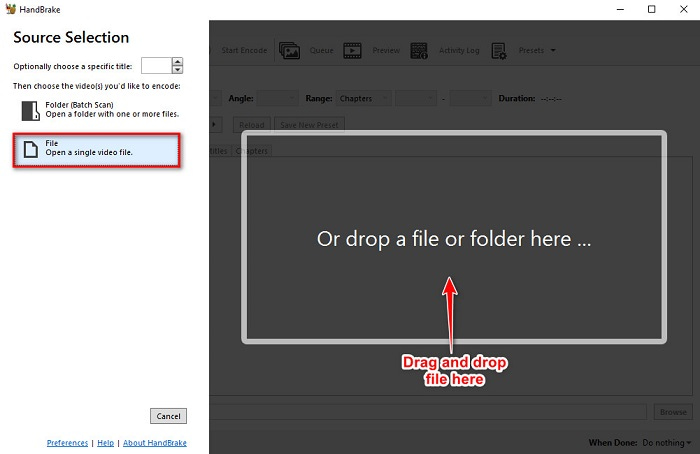
Trinn 1. Last ned HandBrake gratis ved å søke etter det i nettleseren din, og åpne deretter appen. Klikk på knappen File for å laste opp MOV-filen din. Eller du kan dra og slippe filen din i det rektangulære feltet.
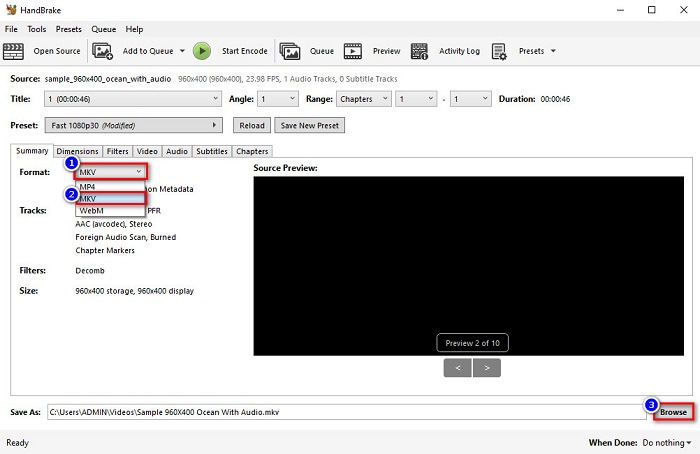
Trinn 2. Velg deretter MOV som utdataformat på nedtrekks-knappen. Klikk deretter på knappen Browse for å velge hvor utdatafilen skal lagres.
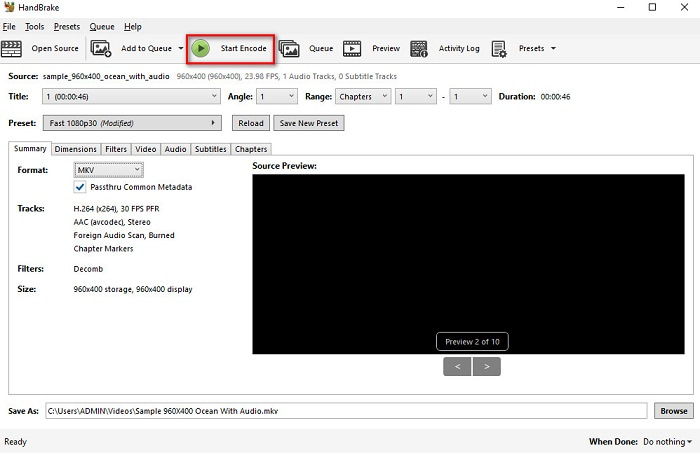
Trinn 3. Og til slutt, klikk på knappen Start Encode slik at MOV-filen din blir endret til MKV.
Og det er hvordan du kan konvertere MOV til MKV ved hjelp av en online og freeware-konverterer.
Del 3. Forskjeller mellom MOV og MKV
MOV-fil er et multimediaformat utviklet av Apple og er et av de vanligste filformatene som finnes på alle Apple-enheter eller -programmer. Dessuten kan denne filen lagre filmer, korte videoklipp og til og med TV-serier. QuickTime-mediespilleren støtter denne typen filformat i stor utstrekning. Videre har denne filen en av de høyeste kvalitetene i forhold til filstørrelse. Hvis QuickTime Player ikke kan åpne MOV-videoer, klikk her for å finne løsninger.
På den annen side er en MKV-fil eller Matroska-fil en multimediefilbeholder som lagrer lyd-, video- og undertekstspordata. Denne typen fil vil ikke være utdatert fordi den er laget for å være fremtidssikker. Videre kan dette formatet håndtere flere undertekststrømmer og lydspor på forskjellige språk.
MOV vs. MKV
MOV-formatet kan brukes til å lagre en film, et TV-program, et kort videoklipp eller en hjemmefilm. Den er faktisk lagret i QuickTime File Format (QTFF), som ble introdusert av Apple i 1991. MOV-filer brukes ofte når folk vil lagre en video med høy kvalitet.
Matroska multimediebeholderformatet, utgitt i 2002, er et åpen kildekode-format som kan inkludere en rekke video-, lyd-, bilde- og undertekstspor. Så du kan bruke den til å lagre korte videoklipp, TV-serier og filmer enkelt. Det er ganske populært for anime-fansubing.
Del 4. Vanlige spørsmål om konvertering av MOV til MKV
Kan du spille av MKV-filer med QuickTime-spiller?
Dessverre kan du ikke spille av en MKV-fil i QuickTime-mediespillere fordi QuickTime ikke støtter MKV-filer. Men hvis du vil spille av en MKV-fil på Mac-en din, kan du konvertere MKV til MOV. Klikk på denne lenken for å vite mer om konvertering av MKV til MOV.
Kan du konvertere MOV til MKV tapsfritt?
Ja, absolutt. Ved å bruke FVC Video Converter Ultimate kan du konvertere MOV-filen din til MKV tapsfritt.
Er MOV bedre enn MKV?
Hvis du er en mac-bruker, vil du finne at MOV er bedre enn MKV-filer rett og slett fordi MOV er en fil som støttes bredt av macOS. Men hvis du er en Windows-bruker, kan MKV-filen være et bedre valg for deg.
Konklusjon
Så hvis du vil konvertere MOV-filen til MKV, bruk måtene som er presentert ovenfor. Alle MOV til MKV gratis omformere har distinkte funksjoner mot hverandre. Videre, hvis du leter etter en omformer med mange fantastiske funksjoner som kan gjøre batchkonvertering, redigere MOV-videoene dine og mange fantastiske ting som andre omformere ikke kan tilby, så bruk FVC Video Converter Ultimate. Last den ned nå gratis.
-
 2 enkle måter å konvertere MOV-filer til FLV på Windows / Mac
 Hvordan konvertere MOV til FLV gratis? Her er de beste videokonvertere på skrivebordet og online for å konvertere MOV-filen til FLV på få sekunder uten å betale en krone.
-
 MOV til GIF - Hvordan konvertere MOV til Animert GIF på Mac, PC og gratis online
 Hva er en GIF? Hvordan konvertere video til GIF? Hvordan endre MOV til animert GIF online? Dette innlegget forteller 3 måter å konvertere MOV til GIF online, på Mac/PC.
-
 4 effektive måter å konvertere MOV til AVI på PC og Mac [2021]
 Vil du vite hva som er den beste MOV til AVI-konverteren på nettet? Og hvorfor FVC Ultimate Video Converter kan være noe for deg.

