


 Video Converter Ultimate
 Skjermopptaker
 Videoreparasjon
 Sikker nedlasting
3 metoder for å effektivt fikse feilkode 232011
Leter du etter en måte å løse feilkode 232011 på? Dette er en vanlig feil og en viktig årsak til frustrasjon for mange seere. Når den oppstår, kan feilen ødelegge den sømløse opplevelsen av nettvideoer, noe som fører til avspillingsproblemer og avbrudd. Men fortvil ikke – det finnes flere effektive metoder for å rette opp i dette problemet og forbedre din totale strømmeopplevelse. I denne veiledningen ser vi på hvordan du enkelt kan fikse denne feilen med tre metoder, og vi gir deg tips til hvordan du kan unngå at den oppstår. Les denne artikkelen nå og nyt favorittvideoene dine uten problemer.

Del 1. Hva er feilkode 232011? Hvorfor det skjer
Feilkode 232011 er en vanlig feil som oppstår i ulike programvarer og nettjenester. Den ligner mer på en feil 150: video kan ikke spilles av.
Det oppstår vanligvis når det er et problem med nettverkstilkoblingen eller innstillingene, og hindrer applikasjonen eller tjenesten i å få tilgang til de nødvendige ressursene.
Her er omfattende informasjon om hvorfor denne feilen oppstår:
◆ Problemer med nettverksforbindelsen: En mulig årsak til denne feilen er problemer med nettverksforbindelsen. Den kan oppstå hvis det er problemer med brukerens internettforbindelse, for eksempel svak eller ustabil forbindelse, nettverksbelastning eller brannmurbegrensninger som blokkerer nødvendig kommunikasjon.
◆ Serverproblemer: Feilkode 232011 kan også oppstå hvis det er problemer på serversiden. Dette kan omfatte nedetid på serveren, vedlikeholdsarbeid eller tekniske problemer med serveren som drifter applikasjonen eller tjenesten.
◆ Feil konfigurasjon: En annen mulig årsak er gale konfigurasjonsinnstillinger. Dette kan skje hvis nettverksinnstillinger er feil konfigurert, IP-adresser eller portnumre er feil, eller hvis det brukes uforenlige protokoller mellom klient og server.
◆ Programvarekompatibilitetsproblemer: Feilkode 232011 kan også forekomme på grunn av kompatibilitetsproblemer mellom ulike programvarekomponenter. For eksempel kan den skyldes konflikter med nettleser‑programtillegg eller utvidelser, utdatert eller uforenlig programvareversjon, eller korrupte installasjonsfiler.
Del 2. Slik løser du feilkode 232011
Det er flere metoder for å løse feilkode 232011 effektivt siden det er et vanlig problem for mange av oss. Her er måtene du kan gjøre for å løse dette problemet.
Metode 1: Tømme nettleserbufferen og informasjonskapsler
Å tømme nettleserbufferen og informasjonskapsler er avgjørende for å fikse videofeilproblemer forårsaket av datakorrupsjon. Ødelagt hurtigbuffer eller informasjonskapsler forstyrrer nettsidens funksjon, inkludert feil som 23201. Buffer lagrer langsiktige nettstedressurser, og informasjonskapsler inneholder brukerpreferanser. Fjerning av disse filene fjerner derfor problemer, slik at nettleseren kan hente ferske, feilfrie data fra nettstedet. Slik kan du tømme nettleserbufferen og informasjonskapsler:
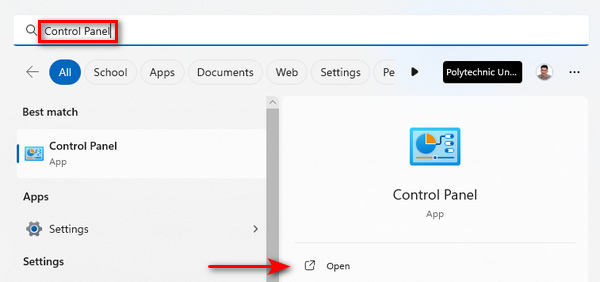
Trinn 1. Begynn med å skrive inn Kontrollpanel i søkefeltet og åpne det.
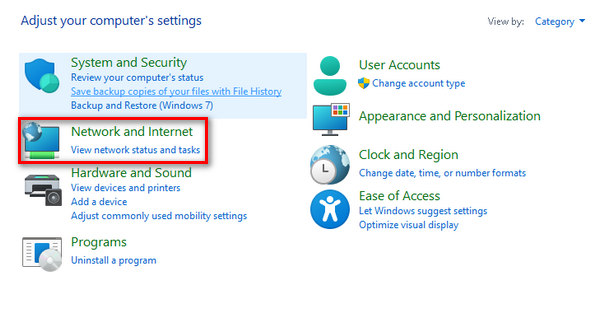
Trinn 2. Inne i Kontrollpanel finner du og velger Nettverk og Internett-alternativene.
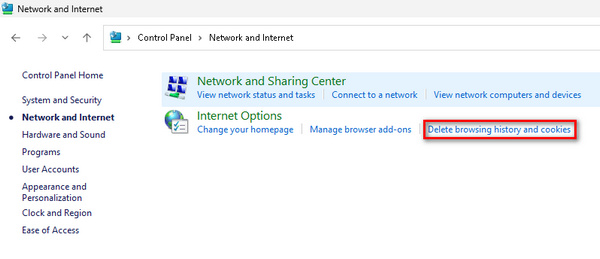
Trinn 3. Finn Slett nettleserlogg og Informasjonskapsler, og klikk på dette.
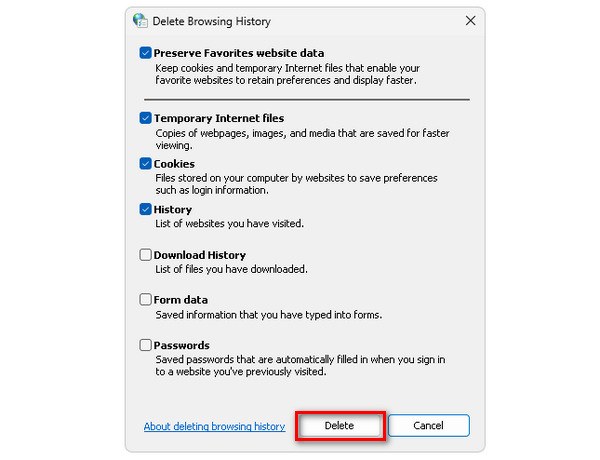
Trinn 4. Til slutt vil en fane vises, der du kan merke av boksene for elementene du vil slette. Når du har valgt, klikker du på knappen Slett for å fullføre prosessen.
Å tømme cache og informasjonskapsler forbedrer ikke bare datamaskinens generelle ytelse, men fungerer også som en løsning for potensielle forstyrrelser, inkludert å fikse feilkode 232011.
Metode 2: Bruke inkognitoleser
Trinn 1. Klikk på de tre prikkene øverst til høyre i nettleservinduet.
Trinn 2. Velg et Nytt inkognitovindu fra rullegardinmenyen.
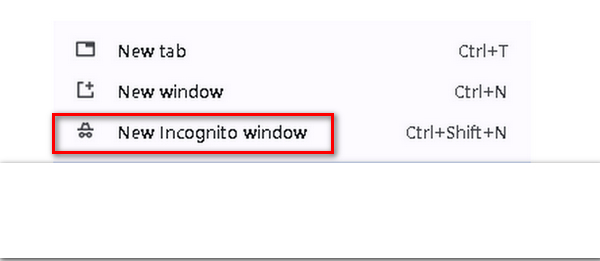
Trinn 3. Et nytt vindu åpnes, slik at du kan bruke denne «friske» nettleseren til å spille av videoen som viser feilkode 232011.
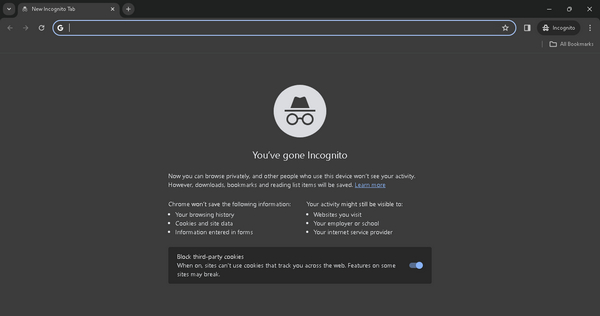
Faktisk kan bruk av inkognitomodus bidra til å løse feilkode 232011 ved å tilby et rent nettlesermiljø uten bufrede data eller motstridende utvidelser.
Metode 3: Bruke Video Repair Tool
Hvis ingen av disse metodene løser nettleserproblemene, og problemet oppstår når du spiller av videoen din frakoblet, kan du bruke et tredjeparts verktøy for videoreparasjon for å fikse det raskt. Et av de beste videoreparasjonsverktøyene du kan bruke til å løse dette problemet, er FVC Video Repair. Dette verktøyet lar deg rette vanlige videoproblemer, inkludert videofeilkode 232011. I tillegg støtter det ulike videoformater som MP4, MOV og 3GP, noe som gir stor fleksibilitet. Det brukervennlige grensesnittet, drevet av den nyeste KI-teknologien, gjør det enkelt å bruke selv for dem uten teknisk erfaring. For å bruke det, følger du trinnene nedenfor:
Trinn 1. Gå først til den offisielle nettsiden. Last ned og installer programmet på enheten din.
Gratis nedlastingFor Windows 7 eller nyereSikker nedlasting
Gratis nedlastingFor MacOS 10.7 eller nyereSikker nedlasting
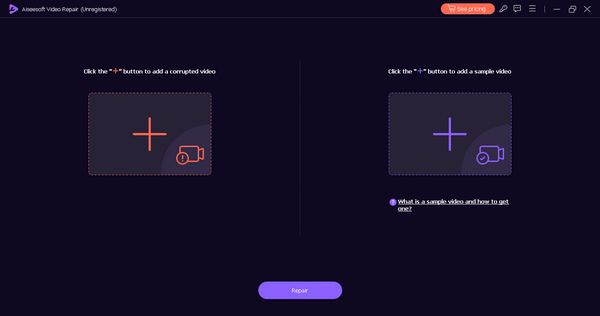
Trinn 2. Deretter legger du til videoen som inneholder videofeilkode 232021 ved å klikke på den røde pluss-knappen. Klikk deretter på den blå pluss-knappen for å legge til eksempelvideoen.
Trinn 3. Etter dette klikker du på knappen Reparer for å starte reparasjonsprosessen av videoen.
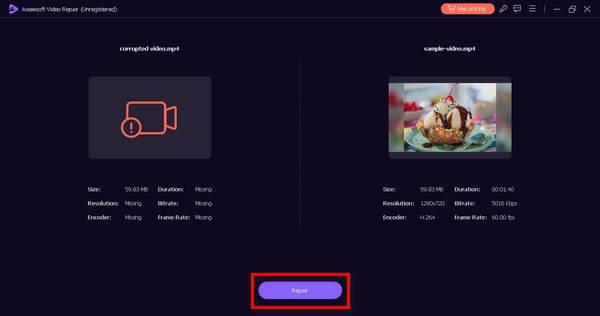
Trinn 4. Til slutt sjekker du om videoen ikke lenger viser feilmeldingen og om den kan spilles av ved å klikke på knappen Forhåndsvis. Når alt fungerer som det skal, kan du lagre den ved å klikke på knappen Lagre.
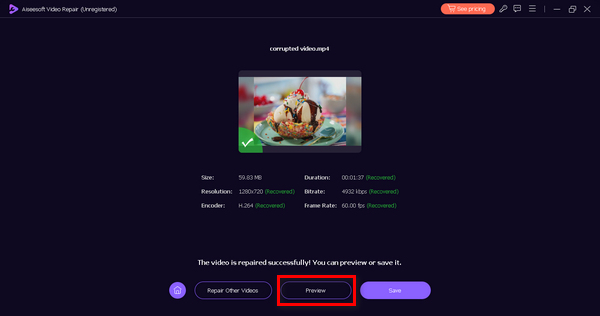
Denne offline-metoden kan sikkert fikse feilkoden 232011. Bare ikke glem å gi en prøvevideo for en sømløs reparasjon.
Del 3. Tips for å forhindre feilkode 232011
For å forbedre videostrømmingsopplevelsen og forhindre at du møter feilkode 232011, anbefales det å følge tipsene nedenfor. Disse anbefalingene er utformet for å løse potensielle problemer knyttet til internett-tilkobling, nettleserytelse og andre faktorer som kan forstyrre den sømløse avspillingen av videoer.
Tips 1. Sørg for en stabil internettforbindelse for å unngå avbrudd under videoavspilling. Dette er også løsningen for å fikse videoglitch.
Tips 2. Hold nettleseren din oppdatert for å dra nytte av de nyeste forbedringene og feilrettingene, noe som forbedrer videostrømmingen.
Tips 3. Tøm jevnlig hurtigbuffer og informasjonskapsler i nettleseren for å forhindre at oppsamlede data påvirker lasting og avspilling av video.
Tips 4. Deaktiver eller fjern unødvendige nettleserutvidelser som kan forstyrre videoavspilling.
Tips 5. Kontroller internett-hastigheten din med nettverktøy for å sikre at den oppfyller kravene for jevn strømming.
Del 4. Vanlige spørsmål om feilkode 232022
Hva er feilkoden 233011 på 123movies?
Feilkode 233011 på 123movies er et plattformspesifikt problem, og betydningen kan bare bestemmes ved å referere til de offisielle støtteressursene til 123movies. Brukere oppfordres til å besøke nettstedet deres og kontakte kundestøtten deres for å få hjelp og avklaring på denne spesielle feilen.
Hva er feilkoden 232011 på 9anime?
Feilkode 232011 på 9anime er unik for 9anime-plattformen. For å forstå den spesifikke årsaken bak denne feilkoden, bør brukere sjekke de offisielle 9anime-støttekanalene eller kontakte kundestøtten deres for veiledning om å løse problemet.
Hva er feilkoden 232011 på Kissanime?
I likhet med de andre plattformene er feilkode 232011 på Kissanime plattformspesifikk. For nøyaktig informasjon om betydningen og løsningen av denne feilkoden, bør brukere konsultere de offisielle støtteressursene fra Kissanime eller kontakte deres kundestøtte for å få hjelp.
Hvordan fikser jeg feilkode 232011 på Netflix?
Hvis du støter på feilkode 232011 på Netflix, kan du prøve å oppdatere siden, tømme nettleserbufferen eller starte enheten på nytt. Sjekk også internetthastigheten din og deaktiver eventuelle VPN- eller proxy-tjenester, da de kan forstyrre strømming.
Konklusjon
Avslutningsvis er det avgjørende å løse feilkode 232011 for å få sømløs videostrømming. Denne veiledningen gir effektive løsninger og forebyggende tips for å forbedre seeropplevelsen din. Ved å følge disse trinnene kan du feilsøke og forhindre avbrudd, slik at du kan nyte nettvideoer uten avbrudd.
-
 Hva er 0xc10100bf-feil i video og hvordan fikser du det
 Spilles ikke videoen din på grunn av feil 0xc10100bf, og du leter etter måter å fikse det på? I denne artikkelen lærer du hva det er og hvordan du kan fikse det.
-
 Slik fikser du videofeilkode 224003: Din ultimate fikseguide
 Lær hvordan du feilsøker denne videoen kan ikke spilles av feilkode 224003 og løs problemet for en sømløs brukeropplevelse. Kom tilbake på sporet med guiden vår!
-
 Feilsøking feilkode 232404 [2025-fikser]
 Oppdag pålitelige løsninger for denne videofilen som ikke spiller av feilkode 232404. Løs enkelt ved å bruke vår ekspert-lignende guide for å få deg tilbake på jobb.
