


 Video Converter Ultimate
 Skjermopptaker
 Videoreparasjon
Vær en omfattende kritikk i å løse ut av synkronisering [lyd og video]
Du har et nettbasert fremføringsprosjekt for klassen i morgen. Du leter etter de beste appene eller programmene du kan bruke til å ta opp videoen din for å levere rapporten du skal levere i morgen. Men i stedet for å finne en løsning på problemet ditt, oppstår kaos og trøbbel og får deg til å overtenke fordi lyd og bilde er ute av synk. Du trenger ikke bekymre deg for situasjonen din, for du har flaks i dag; denne artikkelen dekker alt du trenger å lære for å løse problemet ditt.

Del 1. Hvorfor er ikke lyden synkronisert med videoen?
Lyd og video kan være ute av synkronisering av flere årsaker, inkludert følgende: Sendingen eller tilkoblingen mellom kabel-/satellittmottakeren kan være problemet når du ser på et TV-program. En upålitelig DVD- eller Blu-ray DiscTM-spiller eller selve platen kan ha skylden hvis du har en av disse enhetene koblet til TV-en. Hvis hjemmekinoanlegget ditt er koblet til TV-en din via optisk kabel, kan du legge merke til en lydforsinkelse som må korrigeres manuelt. På den annen side kan TV-ens innstillinger ha skylden.
Del 2. 3 beste utprøvde verktøy: Hvordan synkronisere lyd og video
1. Bruk Video Converter Ultimate
Det er mange måter og programvare tilgjengelig på nettet som kan hjelpe med problemet gitt, og dette er et av de beste verktøyene vi anbefaler å bruke. Last ned FVC Video Converter Ultimate på datamaskinen din, en programvare med ulike funksjoner som forbedrer et videoklipp. En av funksjonene som tilbys kan fikse et videoklipps problem med lyd- og videosynkronisering i Windows 10 - for eksempel - ved å justere forsinkelsen. Følg trinnene nedenfor for å vite hvordan du bruker programvaren:
Trinn 1: For å laste ned programvaren til datamaskinen din, klikk på knappen Gratis nedlasting. Installer deretter programvaren og tilpass oppsettet slik du ønsker. Hvis alt er i orden, starter du programvaren etter installasjonen.
Gratis nedlastingFor Windows 7 eller nyereSikker nedlasting
Gratis nedlastingFor MacOS 10.7 eller nyereSikker nedlasting
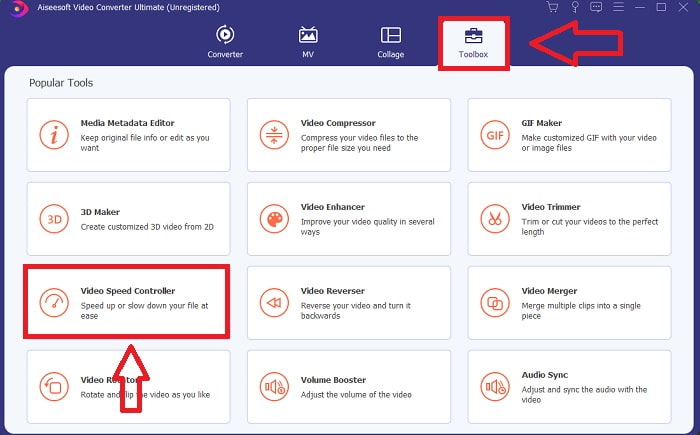
Trinn 2: På hovedgrensesnittet klikker du på funksjonen Verktøykasse og fortsetter med Lydsynk.
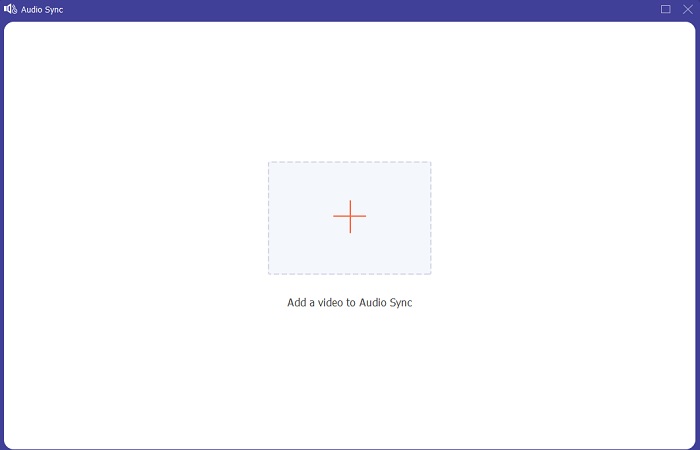
Trinn 3: Legg til en hvilken som helst fil ved å klikke på +-knappen etter eget ønske, og gå videre til redigering av videoklippet.
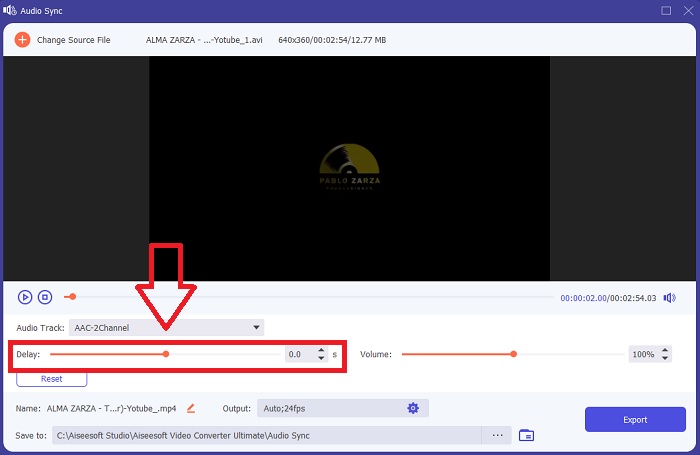
Trinn 4: Juster glidebryteren for lyden for å synkronisere den med videoklippet. Du kan også endre avspillingsenhet og tilpasse volumet på videoklippet.
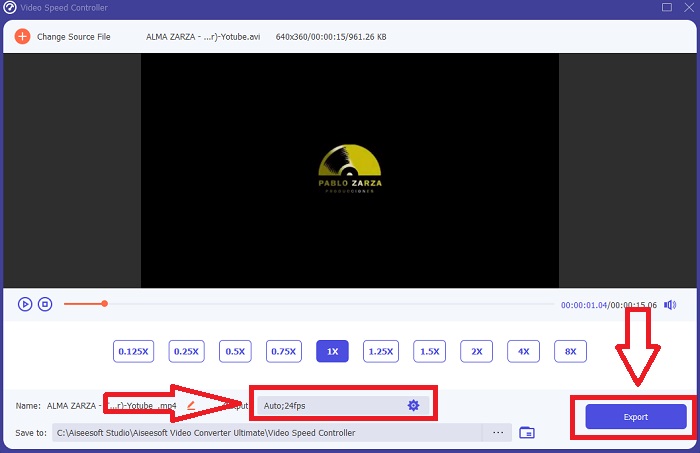
Trinn 5: Når du er ferdig med å redigere synkroniseringen av videoklippet ditt, klikker du på Eksporter og velger hvor filen din skal lagres.
2. Bruk VLC Media Player
VLC-mediespilleren er et program som er tilgjengelig på alle operativsystemer; Windows, Mac, iPhone og Android. Selv om den er tilgjengelig på alle enheter, har hver av dem ulike måter å fikse lyddelay og synkronisere lyden i videoklipp på. Denne mediespilleren er kjent for sitt til tider ustabile operativsystem, men du kan også bruke den til å fikse lyd- og videosynk permanent.
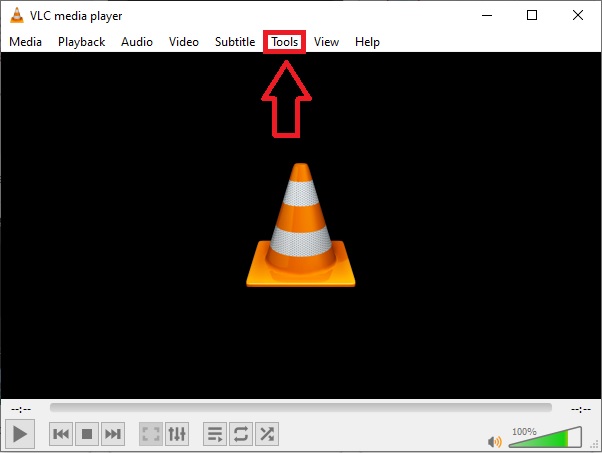
Trinn 1: Åpne VLC-mediespilleren i Windows, og klikk på fanen Verktøy. Etter at du har klikket på fanen Verktøy, klikker du på Innstillinger.
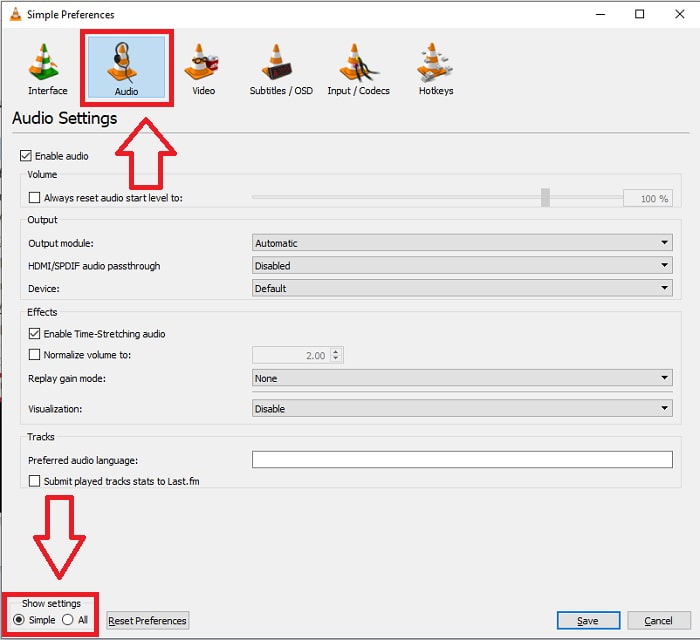
Trinn 2: Et nytt grensesnitt vil vises på skjermen. Fortsett prosessen ved å klikke på fanen Lyd. Nederst i venstre hjørne velger du Alt for å få tilgang til avanserte innstillinger.
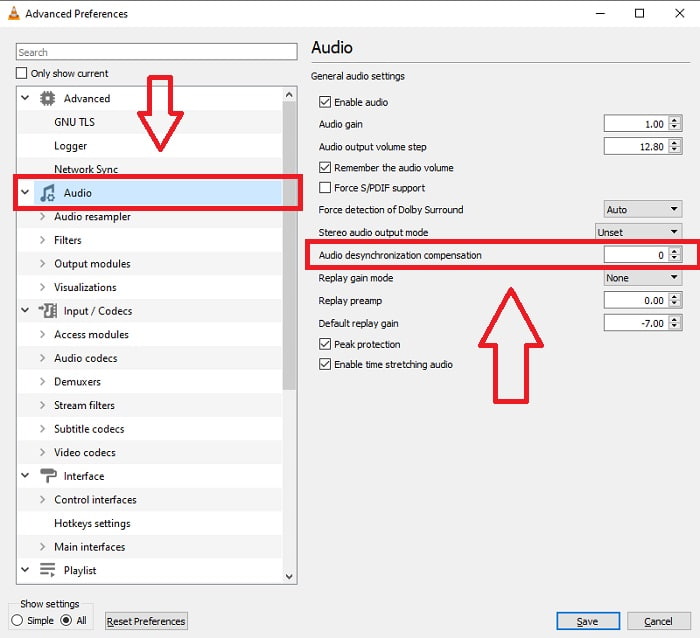
Trinn 3: De avanserte innstillingene gir deg full oversikt. Fortsett ved å finne Lyd i fanen for avanserte innstillinger. Etter at du klikker på den, vil du se de generelle lydinnstillingene og kan justere Kompensasjon for lydforsinkelse. Hvis lyden ligger bak videoen, endrer du verdien til en positiv verdi for å kompensere. Negative verdier skal brukes hvis lyden ligger foran videoen. VLC ute av synk vil bli permanent fikset med denne prosessen.
Relatert:
Hvordan fikse at VLC Player ikke spiller MKV
Hvordan fikse at VLC ikke spiller av DVD
3. Bruk Premiere Pro
Når det gjelder å lage kringkastingsklar video i høy oppløsning, er Premiere Pro verktøyet man foretrekker. Denne programvaren kan brukes til å importere alle typer medier, inkludert video og lyd. Den kan deretter brukes til å redigere det mediet og eksportere det i formatet som trengs for distribusjon. Ulike videoer og stillbilder kan redigeres sammen i Premiere Pro for å lage videoer. Videoer kan få titler, filtre og andre effekter. Denne programvaren er til stor hjelp når lyd og bilde er ute av synk, spesielt for stasjonære og bærbare datamaskiner. Her er trinnene som er gitt for å utføre prosedyren riktig.
Trinn 1: Sørg for å legge lyd- og videofilene dine lagvis på tidslinjen, som vist i illustrasjonen.
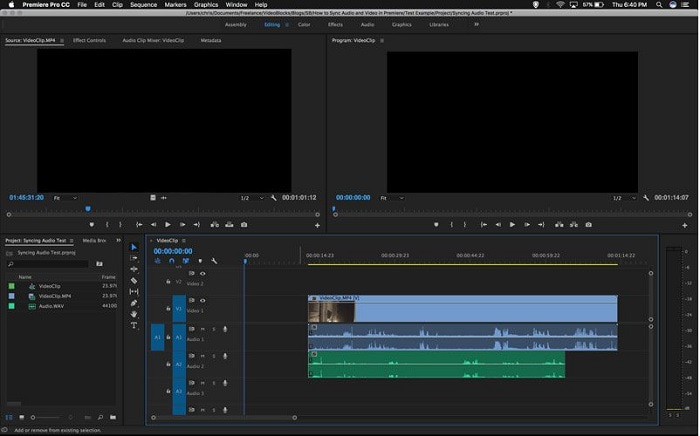
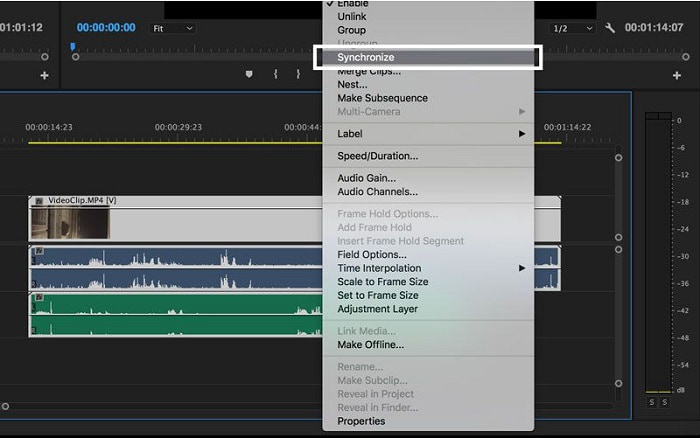
Trinn 2: Høyreklikk for å velge både lyd- og videosporet. Det vil dukke opp en rullegardinboks. Velg Synkroniser fra rullegardinmenyen som vises.
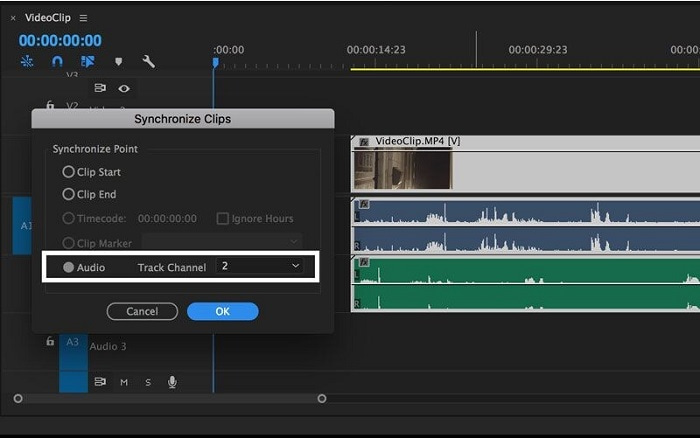
Trinn 3: Velg nå Lyd som synkroniseringspunkt. Velg sporet du vil synkronisere. Til slutt sletter du hjelpesporen og velger Koble-alternativet for å koble klippene.
Del 3. Vanlige spørsmål om lyd og video ute av synkronisering
Hvis jeg endrer samplingsfrekvensen, vil lydkvaliteten forringes?
Hvis du bare vil lytte til lyden i videoklippet ditt og ikke gjøre noen endringer, må du endre samplingsfrekvensen for å følge med. Du vil kun kunne synkronisere videoens lyd ved å justere videoklippets lydforsinkelse i FVC Video Converter Ultimate. Du vil ikke lenger være bekymret for forringelse av lydkvaliteten når du justerer samplingsfrekvensen. Med denne programvaren vil du ikke bekymre deg for lyd som ikke er synkronisert i videoen. Denne programvaren inneholder en funksjon som kan løse det gitte problemet; den har også andre funksjoner som kan være til nytte for alle brukere og som kan brukes på en enkel måte.
Hva er lyddesynkroniseringskompensasjon?
Angi en positiv eller negativ lyddesynkroniseringskompensasjonstidsforsinkelse i millisekunder i VLC-innstillingene ved å klikke på Lyd og deretter merke av for Avanserte alternativer.
Hva er den andre grunnen til at video og lyd ikke er synkronisert?
Den andre grunnen til at video og lyd ikke er synkronisert, er på grunn av den ustøttede videoutgangen som lydenheten ikke kan bruke, og omvendt.
Konklusjon
Avslutningsvis er forsinkelse mellom lyd og video et vanskelig scenario som mange opplever i den digitale verden. Særlig under pandemien har dingser og nettbaserte verktøy blitt populære, men hvordan skal du fungere eller utføre oppgavene dine skikkelig hvis det oppstår hindringer i disse nettbaserte aktivitetene, som problemet med hvordan synkronisere lyd og video? når det oppstår forsinkelse. For å oppsummere er alle de beskrevne metodene og alternativene for å avklare alle bekymringer presentert her i artikkelen. Vi anbefaler å bruke Video Converter Ultimate for å unngå slike unødvendige situasjoner i fremtiden.
-
 Topp 5 Slow Motion videospillere på datamaskinen (Windows / Mac / Linux)
 Slow motion er en veldig nyttig funksjon i mange situasjoner. For å se videoer med langsom hastighet for å vite mer detaljert informasjon i de flyktige bildene, kan du lære de 5 beste slowmotion-videospillerne i denne artikkelen.
-
 [2 beste løsninger] Hvordan spille AVI-filmer på iPhone/iPad enkelt
 Kan ikke spille av AVI-filmer på iPhone/iPad og vil ikke laste ned tredjeparts videospillere? Du kan lære 2 effektive måter å konvertere AVI-videoer til å spille på iPhone.
-
 Kan Wii / Wii U spille DVDer uten hjemmebrygging? 2 løsninger for deg
 Når du setter inn DVD-plater i Wii, vil du oppdage at Wii ikke kan lese og spille av DVD-er på grunn av regional lockout. I denne artikkelen vil du lære hvordan du enkelt spiller DVDer på Wii/Wii U uten Homebrew-hacket.
