


 Video Converter Ultimate
 Skjermopptaker
 Videoreparasjon
Hvordan konvertere 3GP til WMV på en profesjonell måte [Online & Offline]
3GP er et populært mobilformat som overfører data via mobiltelefoner uten å bruke særlig båndbredde og samtidig sparer plass. Dette formatet er dessuten standardisert for opptak av video på mobiltelefoner av tredje generasjon, men du kan likevel spille av videoen på både andre og fjerde generasjon. Selv om det fungerer utmerket på telefoner, er det i hovedsak begrenset til smarttelefoner. Derfor er det ikke overraskende om .3gp-filen ikke fungerer like bra på en stasjonær PC. Du kan likevel lære å konvertere 3GP til et format som har langt bredere støtte på datamaskiner, som for eksempel WMV. Vil du lære hvordan du kan konvertere 3GP til WMV på en profesjonell måte? I så fall, la oss se nærmere på det med én gang.

Del 1. Hva er 3GP
Det er et ISO-basert format som lagrer mediestrømmer som H.263 eller H.264 for video og AMR eller AAC for lyd, perfekt for komprimering med tap. Dessuten er dette 3. generasjonsformatet lagringsvennlig for lagring av data på bærbare stasjoner på telefonene våre, selv på IOS. Selv om 3GP fortsatt er tilgjengelig, begynte dette formatets effektivitet å falle, og av den grunn ble 3GPP med på scenen og ble en bedre versjon av det.
Del 2. Hva er WMV
Det er et proprietært multimediaformat utviklet av Windows for streaming av videoer på nettet. I motsetning til alle andre formater, som 3GP, bruker WMV en multifold-koder for å gjøre filen enda mer komprimert. På grunn av muligheten til å bruke mange kodere, er det mer tilgjengelig å effektivt dele videoer i dette formatet. Det er imidlertid en ulempe ved å bruke mange kodere, spesielt ved redigering og avspilling, fordi ikke alle mediespillere og redaktører støtter et bredt spekter av kodeker. Selv om formatet bruker en kompressor, vil ikke mediekvaliteten endres eller reduseres.
Del 3. Profesjonell måte å konvertere 3GP til WMV med Video Converter Ultimate
Ønsker du å få tak i en profesjonell 3GP til WMV‑konverter gratis nedlasting på plattformen din? FVC Video Converter Ultimate tilbyr en profesjonell konverteringsprosess uten at du trenger å legge ned mye arbeid. Denne konverteren tar deg til et nytt nivå av konvertering som ingen andre konvertere, verken på nett eller lokalt, kan tilby. I tillegg støtter dette komplette verktøyet over 200 medieformater å velge mellom, i motsetning til mange andre verktøy.
Så lenge du har denne konverteren, forvent alltid en profesjonell utgang på det konverterte medieformatet. Vil du bruke den profesjonelle konverteren til å konvertere 3GP-filene dine? Hvis det er tilfelle, kan du følge trinnene nedenfor for å konvertere med det ultimate verktøyet.
Trinn for hvordan du konverterer en 3GP‑fil til WMV med FVC Video Converter Ultimate
Trinn 1. Nedenfor ser du nedlastingsknappene; velg knappen som tilsvarer plattformen du bruker. Klikk for eksempel på Windows‑nedlastingsknappen hvis du er Windows‑bruker. Men hvis du bruker Mac, klikker du på den andre. Etter nedlastingen installerer du konverteren og kjører den ved å klikke Start nå. Viktigst av alt: Etter at du har startet programmet, bør du gjøre deg kjent med grensesnittet før du går videre til neste trinn.
Gratis nedlastingFor Windows 7 eller nyereSikker nedlasting
Gratis nedlastingFor MacOS 10.7 eller nyereSikker nedlasting
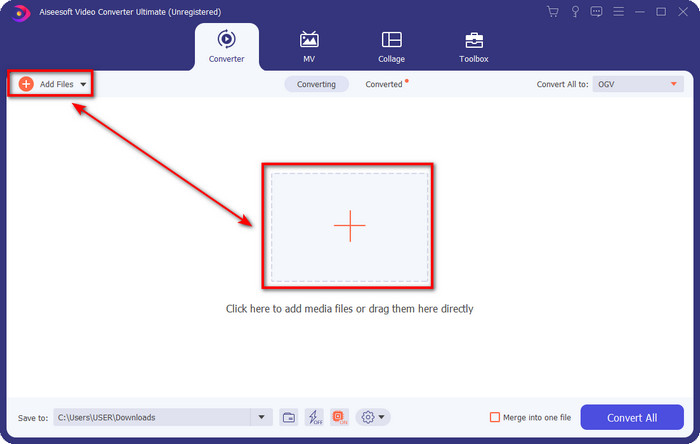
Trinn 2. Du vil se Add Files øverst til venstre i grensesnittet; klikk på den, og en mappe åpnes. Bla deg frem til .3gp‑filen på datamaskinen din, og last den opp ved å trykke Open.
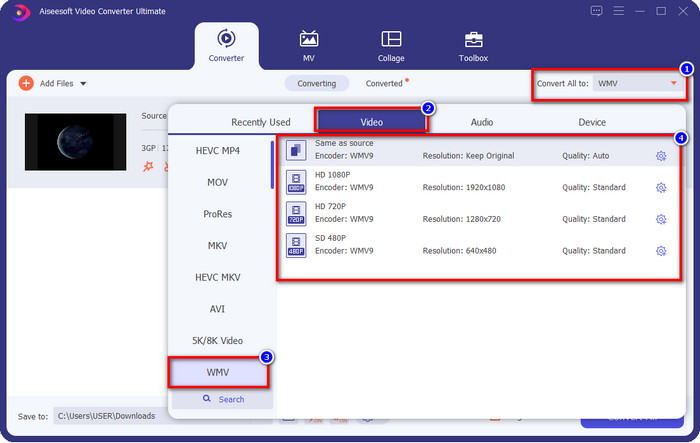
Trinn 3. Klikk Convert All to for å velge WMV‑formatet du ønsker, eller WMV som endelig utdataformat.
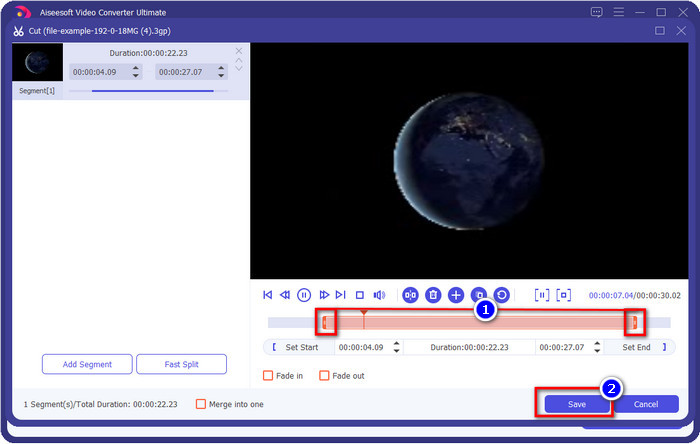
Valgfritt. Før vi konverterer 3GP‑fil til WMV, skal vi kort gå gjennom noen av de andre funksjonene dette verktøyet tilbyr. Trenger du å klippe? Ikke noe problem. Trykk på scissor-knappen, dra slide bar på begge sider hvis du vil, og trykk Save for å bruke klippingen du har gjort.
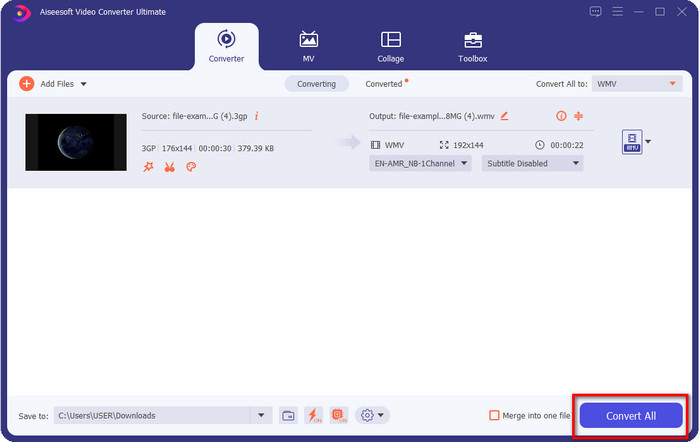
Trinn 4. Start konverteringsprosessen ved å klikke på knappen Convert All. Konverteringen blir ferdig i løpet av kort tid, og vips – WMV‑filen lagres på datamaskinen din.
Del 4. Online måte å konvertere MXF til WMV med Free Video Converter Online
Et annet FVC‑produkt, men denne gangen en nettbasert løsning, er FVC Free Video Converter Online. Denne profesjonelle nettbaserte konverteren har et ryddig og oversiktlig grensesnitt sammenlignet med andre nettkonvertere. Dessuten trenger du ikke laste ned konverteren til enheten din for å bruke den; du kan i stedet åpne nettleseren og gå direkte til konverteren. Selv om nettversjonen er bra, finnes det en del avanserte funksjoner dette verktøyet ikke kan tilby. Likevel er dette et godt valg hvis du vil konvertere 3GP til WMV på nett; følg trinnene nedenfor for å bruke verktøyet.
Trinn for hvordan du gratis konverterer 3GP til WMV på nett med FVC Free Video Converter Online
Trinn 1. Klikk på denne lenken for å åpne den nettbaserte konverteren.
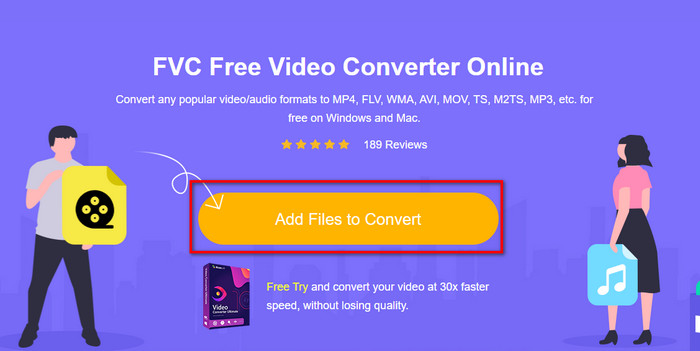
Trinn 2. Etter at du har klikket, trykker du på Add Files to Convert for å starte konverteren. Hvis det er første gang du bruker dette verktøyet, må du installere en liten oppstartsmodul ved å klikke Add Files to Convert, men den er ikke like stor som det komplette programmet. Finn 3GP‑filen du vil konvertere, og klikk Open.
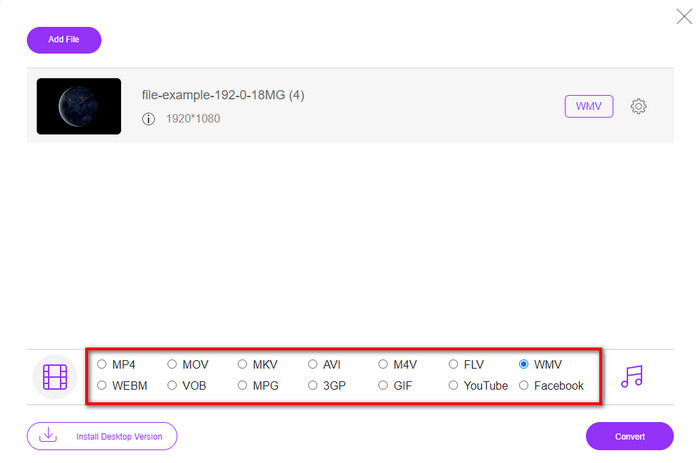
Trinn 3. Etter at du har lastet opp 3GP‑filen, er det på tide å velge et av formatene som vises nedenfor, eller klikke WMV.
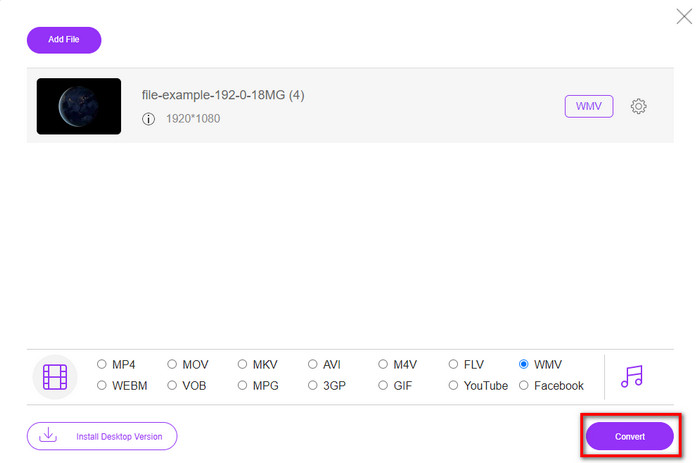
Trinn 4. Har du allerede valgt et format? Hvis ja, klikker du Convert for å starte konverteringen av filen.
Del 5. Vanlige spørsmål om 3GP til WMV-konvertering
Er det en god idé å bruke en 3GP til WMV-konverter på nettet?
Hvis du ikke vil laste ned en konverter på enheten din, er det ideelt å bruke en konverter på nettet. Men husk, ikke alle online eller offline konverterere er trygge å bruke. Mesteparten av tiden har de virus hvis du installerer dem eller ikke gjør oppgaven effektivt. Men hvis du vil ha sikkerhet for konverteringen din, anbefaler vi å bruke FVC-konverteringsproduktene fordi dette er 101%-fri for skadelig programvare og garanterer at konverteringsprosessen blir vellykket.
Er det mulig å slå sammen flere 3GP-videoer?
Ja, med hjelp av FVC sine sammenslåingsverktøy kan du slå sammen flere videoer som er i 3GP‑format. Så hvis du nå vil vite hvordan du slår sammen flere 3GP‑videoer, bør du lese denne artikkelen for å lære hvordan du gjør det.
Har 3GP-videoer god kvalitet?
3GP har fin kvalitet, men den kan ikke lagre høyoppløsningskvalitet, så forvent at videokvaliteten til en 3GP er lav.
Konklusjon
Avslutningsvis er konverterne som er listet opp i denne artikkelen nøye utvalgt etter en bestemt standard for profesjonell kvalitet på resultatet. I tillegg har vi selv brukt verktøyene her for å kunne presentere og formidle kun faktiske opplysninger om egenskapene deres. Hvis du ikke ønsker å laste ned en konverter på datamaskinen din for å spare plass og likevel vil ha et profesjonelt resultat, anbefaler vi på det sterkeste at du bruker FVC Free Video Converter Online. Men hvis du vil transkode 3GP‑filene dine på en enda mer profesjonell måte, anbefaler vi varmt at du bruker FVC Video Converter Ultimate. Fortsatt ikke overbevist av det vi har sagt? I så fall bør du prøve det selv for å oppleve den profesjonelle konverteringen dette verktøyet tilbyr og lære hvordan du konverterer 3GP til WMV.
-
 Topp 4 mest effektive måter å konvertere 3GP til AVI-format [2025]
 Kan jeg konvertere 3GP-filene mine til AVI? Vel, du kan enkelt konvertere det hvis du prøver disse tilgjengelige verktøyene, da vi samlet alle mulige løsninger på 3GP til AVI-konverteringsproblemet.
-
 Beste 3GP til FLV-konverterer å bruke for å konvertere 3GP til FLV [2025]
 Har du noen gang prøvd å konvertere 3GP til FLV, men du vet ikke hva slags omformer du vil bruke? Les denne artikkelen for å lære alle detaljene om konvertering av 3GP til FLV.
-
 2 beste mulige måter å konvertere ikke-støttet 3GP til DivX [2025]
 Mange brukere spør hvordan man konverterer 3GP til DivX. Så nå gir vi en artikkel for det for å hjelpe deg med å konvertere .3gp-filen problemfritt.
