


 Video Converter Ultimate
 Skjermopptaker
 Videoreparasjon
Omfattende veiledning om hvordan du konverterer AMV til WMV med trinn [Løst]
Vil du kunne se AMV‑videofiler på Windows eller bruke dem til netttstrømming? I så fall bør du lese denne artikkelen for å lære hvordan du kan konvertere AMV til WMV, forbedre kvaliteten og gjøre filene kompatible. I denne oversikten blir du kjent med programvaren du kan bruke til å konvertere AMV‑filene dine. Så uten videre, spenn setebeltet og lær mye mer om AMV‑ og WMV‑formatene.

Del 1. Konverter AMV til WMV med FVC Video Converter Ultimate
FVC Video Converter Ultimate er vårt førstevalg for å konvertere AMV til WMV fordi programmet lar deg transkode medier og enhetsspesifikke formater. I tillegg kan det konvertere ikke bare én, to eller tre filer samtidig, men mange flere. Dessuten er denne omformeren laget for å gi brukerne sine kun førsteklasses resultater. Vil du vite hvorfor? Les nøkkelfunksjonene nedenfor.

FVC Video Converter Ultimate
4 355 888+ nedlastinger- Det kan hjelpe deg med konverteringsproblemet ditt på AMV til WMV, AVI, FLV, SWF, MP4, AVI.
- Den støtter ultrarask konvertering for å konvertere formatet enda raskere.
- Rediger AMV-videoene dine med de unike redigeringsfunksjonene dette verktøyet gir.
- Hjelp deg å bli en ekspert innen noen få klikk.
- Den støtter alle plattformer som Windows og macOS.
Gratis nedlastingFor Windows 7 eller nyereSikker nedlasting
Gratis nedlastingFor MacOS 10.7 eller nyereSikker nedlasting
Er du overrasket over funksjonene til verktøyet? I så fall, la oss lese prosedyren for å konvertere AMV-filer og kopiere trinnene for å lykkes med å konvertere.
Trinn 1. Last ned FVC Video Converter Ultimate til datamaskinen ved å klikke på nedlastingsknappen nedenfor. Klikk deretter på installasjonsfilen for å installere, og trykk på Start Now for å starte verktøyet.
Gratis nedlastingFor Windows 7 eller nyereSikker nedlasting
Gratis nedlastingFor MacOS 10.7 eller nyereSikker nedlasting
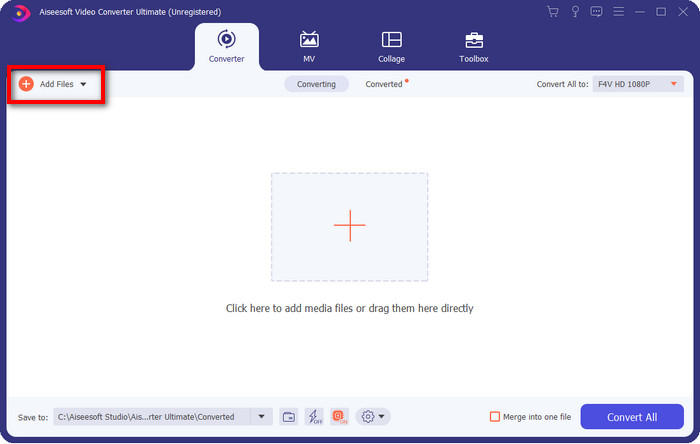
Trinn 2. Etter at du har startet programmet, kan du legge til én eller flere filer ved å klikke på alternativet Add Files. Datamaskinens mappevindu vises på skjermen; velg AMV‑filen og trykk Open for å laste den opp.
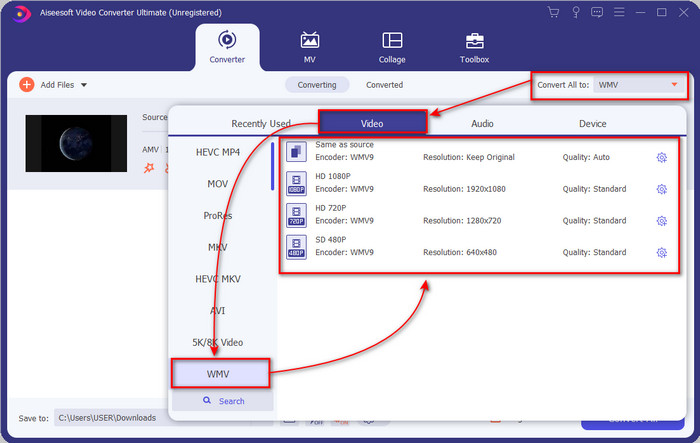
Trinn 3. Når du klikker på alternativet Convert All to, vises en formatliste. Finn formatet WMV og velg oppløsningen, koderen og kvaliteten du ønsker.
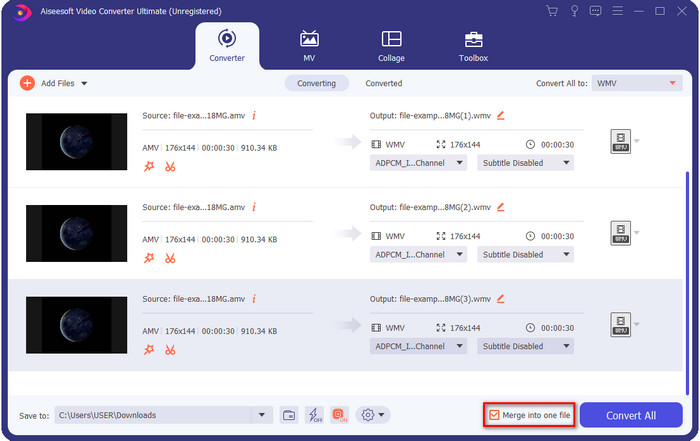
Valgfritt. Vil du gjøre AMV‑filene dine om til én samlet WMV‑fil? Da bør du krysse av i boksen for å slå sammen til én fil.
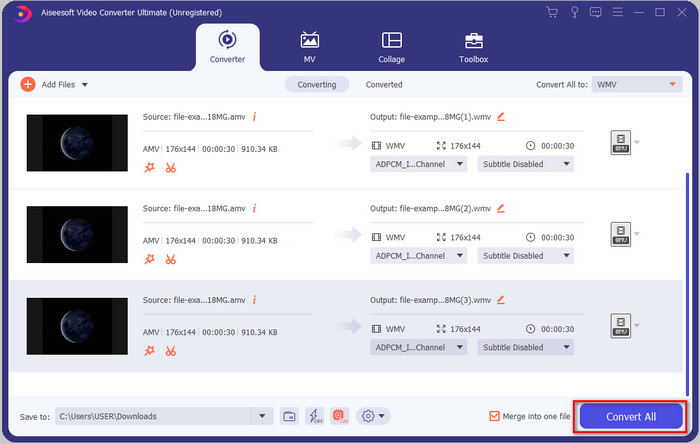
Trinn 4. Trykk på Convert All for å starte konverteringen. Etter prosessen vises det en mappe på skjermen med den konverterte WMV‑filen.
Del 2. Konverter AMV til WMV Online
Vil du ikke laste ned en offline‑omformer fordi du har for lite lagringsplass? Da kan du bruke FVC Free Online Video Converter. Da slipper du å laste ned et komplett konverteringsprogram; du trenger bare en liten oppstarter som knapt tar plass på datamaskinen. Dessuten kan denne nettbaserte omformeren konvertere AMV til WMV og justere oppløsningen. Hastigheten på konverteringen avhenger imidlertid av hvor rask internettforbindelsen din er. Har du nett? Da bør du prøve dette og oppleve nettbasert konvertering.
Trinn 1. Klikk på denne lenken for å åpne hovedsiden til omformeren.
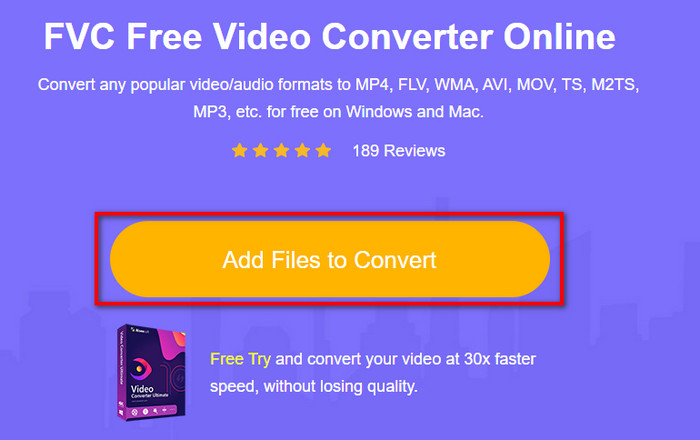
Trinn 2. Når du klikker på Add Files to Convert, åpnes et mappevindu der du kan finne AMV‑filen og trykke Open.
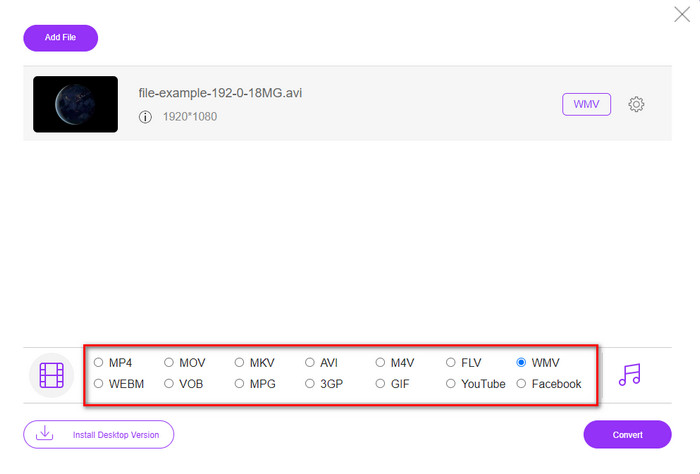
Trinn 3. Velg WMV-formatet som vises på skjermen.
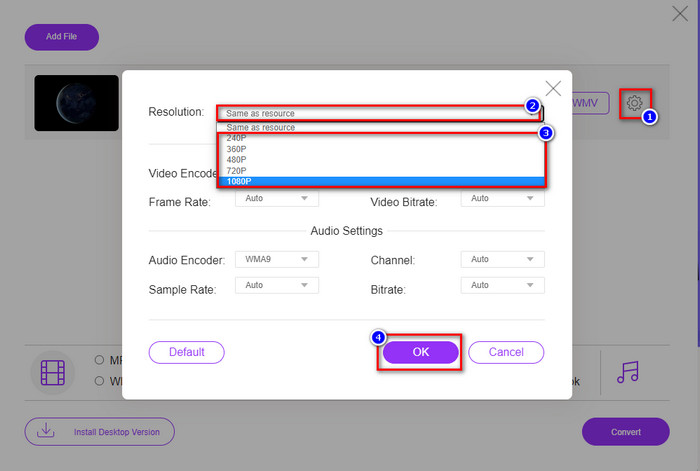
Valgfritt. Som nevnt tidligere kan du justere oppløsningen her. Klikk på tannhjulknappen for å endre oppløsningen. Øverst klikker du på nedtrekksknappen; en liste over oppløsninger vises. Velg én og trykk OK for å fortsette.
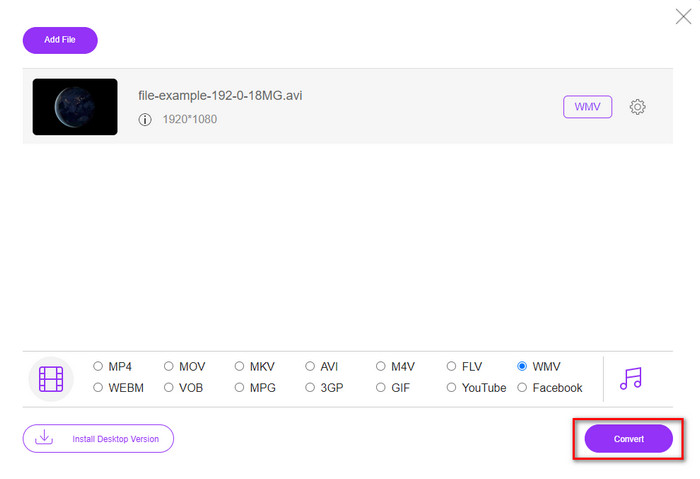
Trinn 4. Hvis du nå vil starte konverteringen, kan du klikke på knappen Convert, og prosessen begynner.
Del 3. Hva er forskjellen mellom AMV og WMV
Først av alt ble disse to mediebeholderne populære på grunn av deres unike muligheter som format. Men i dag skal vi studere hva som er fordelene og ulempene med selve formatet. Dessuten vil vi spesifisere tre aspekter ved å gjøre det til et spørsmål å vite mer om AMV og WMV.
Hvilket format har bedre medieoppløsning?
Mellom de to formatene, uten tvil, har WMV en bedre kvalitet. En WMV-fil kan lagre og streame en videooppløsning på opptil 300 000 piksler for en mer detaljert visuell utgang. Men du kan stille inn hastigheten til 528x576 skjermoppløsning. Og for AMV er kvaliteten den kan inneholde 96x96 til 320x240, som er ganske lav sammenlignet med den lave oppløsningen til WMV. En grunn til at AMV har en mindre oppløsning er at den må passe på skjermen til den kinesiske mediespilleren.
Hvilket format har en mindre filstørrelse?
Denne seieren vil gå med AMV fordi dette formatet er superkomprimert. Selv om WMV har en kompressor, er størrelsen på AMV mer økonomisk vennlig, spesielt på datamaskinens stasjon, enn WMV.
Hvilket format er mer kompatibelt?
Når det gjelder kompatibilitet, kan vi si at de har ulike styrker, fordi WMV er laget først og fremst for Windows‑programmer. Hvis du er Mac‑bruker, kan du ikke bare bruke dette formatet og spille det av i QuickTime eller redigere det i iMovie. I stedet må du konvertere WMV til MOV for å gjøre det kompatibelt. Når det gjelder AMV, ble dette formatet opprinnelig brukt på bærbare, kinesiske mediespillere. I dag kan du bruke andre bærbare mediespillere i stedet for å kjøpe en egen AMV‑spiller. Det kan imidlertid være veldig vanskelig å finne en AMV‑spiller, fordi det er få spillere som støtter denne typen format og koder. Vi kan si at WMV oppnår langt bedre kompatibilitet enn AMV, spesielt når vi overfører filer til Windows.
Og nå som vi vet årsaken, er det nødvendig å konvertere filen til et nytt format i dette tilfellet. Av den grunn må du lære hvordan du konverterer AMV til WMV for å gjøre mediefilen kompatibel med Windows-programvare.
Del 4. Vanlige spørsmål om AMV- og WMV-konvertering
Hvordan snu AMV til MOV?
Det finnes mange teknikker og metoder vi kan søke opp og prøve når vi leter på nettet. Men det er vanskelig å velge hvilket verktøy som er best til å konvertere AMV til MOV. For å gjøre det enkelt, klikk på denne lenken og les om hvordan du konverterer AMV til MOV og gjør det kompatibelt med macOS.
Kan jeg bruke en VLC-mediespiller til å se og spille av AMV?
Ja, du kan laste ned VLC‑mediespilleren på datamaskinen din for å spille av AMV‑filer uten å måtte laste ned ekstra kodeker. Men hvis du vil vite mer om VLC og alternativer til programmet, kan du lese denne artikkelen ved å klikke på denne lenken.
Hvorfor trenger jeg å komprimere AMV?
Vi komprimerer mediefilene våre og AMV‑filene fordi vi trenger å frigjøre lagringsplass på harddisken. Vil du lære hvordan du komprimerer AMV‑filer? Klikk da på denne lenken.
Konklusjon
Disse to løsningene gir fortreffelighet for å gjøre konverteringen fra AMV til WMV enkel og vellykket. Dessuten er dette de beste løsningene vi kan finne på nettet. Så nå er det i din hånd å velge hvilken omformer du bruker for å konvertere AMV-filen til WMV. For å oppnå suksess må du bruke FVC-verktøyene ovenfor.
-
 Beste metode å bruke for å konvertere AMV til AVI [Godkjent]
 Har du problemer med å konvertere videofilen i AMV-format til AVI? Her er noen tips gitt som du bare finner i denne artikkelen.
-
 [Bevist] 2 måter å konvertere AMV til FLV offline og online
 Har du noen gang vurdert å prøve en omformer for å konvertere AMV-filene dine til FLV-filformat. For å løse problemet med å se en AMV-video, les denne artikkelen for å finne ut hvilke konvertere du bør bruke.
-
 Gratis | De 3 beste metodene for å konvertere MP4 til WMV uten å miste kvalitet
 Dette innlegget deler hvordan du konverterer MP4-video til WMV-format på Mac eller Windows. Vi vil også tilby deg flere alternativer, inkludert både stasjonær programvare og nettbaserte online-omformere. Klar til å vite de beste MP4 til WMV konverteringsverktøyene?
