


 Video Converter Ultimate
 Skjermopptaker
 Videoreparasjon
Hvordan konvertere AVI til WMV ved hjelp av gratis omformere [Hurtige trinn]
AVI- eller Audio Video Interleave-filer, utviklet først av Microsoft Corporation, har et avansert videoformat. Dette filformatet har høy bildekvalitet, men filstørrelsen er svært stor. En vanlig måte å spille av videoen din eller bruke filen på hvilken som helst plattform er å konvertere AVI-filen til en WMV-fil. Derfor, hvis du vil vite mer om hvordan du kan konvertere AVI til WMV, kan du lese videre mens vi går gjennom ulike konvertere, med tilhørende trinn.

Del 1. Konverter AVI til WMV på Windows 10/11
Operativsystemet Windows 10 støtter ulike filer som du kan finne på nettet. Filer som AVI og WMV støttes begge av Windows 10. Derfor vil det være enkelt å konvertere AVI-filen din til en WMV-fil, spesielt hvis du bruker denne lynraske konverteren, FVC Video Converter Ultimate. Denne konverteren er en av de pålitelige konverterne som er populære i dag. I tillegg lar denne konverteren deg redigere, forbedre og komprimere filen din. Den er også brukervennlig og kan raskt konvertere AVI-filer til WMV på Windows 10.

FVC Video Converter Ultimate
5 689 200+ nedlastinger- Lar deg konvertere ulike filformater inkludert AVI til WMV, MP4, MOV, VOB, etc.
- Har funksjoner som lar deg slå sammen flere filer til én.
- Du kan redigere, forbedre og komprimere filen.
Gratis nedlastingFor Windows 7 eller nyereSikker nedlasting
Gratis nedlastingFor MacOS 10.7 eller nyereSikker nedlasting
Her er trinnene for hvordan du konverterer AVI-filen til WMV-filformat:
Trinn 1. For å installere FVC Video Converter Ultimate på Windows 10, klikk på nedlastingsknappen nedenfor. Følg deretter installeringsprosessen og start programmet.
Gratis nedlastingFor Windows 7 eller nyereSikker nedlasting
Gratis nedlastingFor MacOS 10.7 eller nyereSikker nedlasting
Trinn 2. Etter at du har åpnet programmet, klikker du på knappen Add files øverst til venstre på skjermen, eller på +-knappen, for å legge til AVI-filene dine i programmets hovedgrensesnitt. Datamaskinens filer vil vises; velg deretter AVI-filen du vil konvertere til WMV. Klikk på Open-knappen for å laste opp filen.
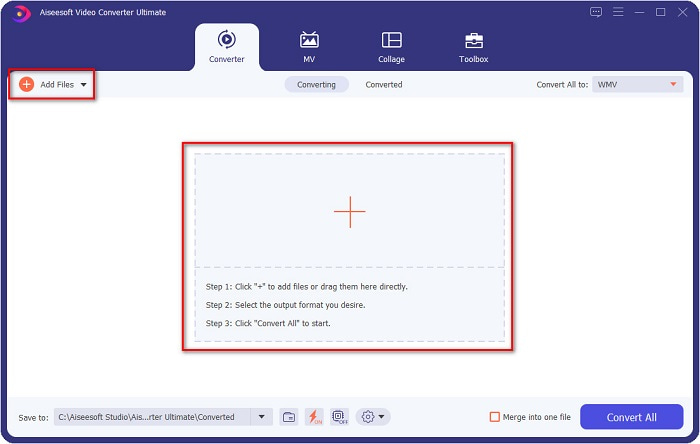
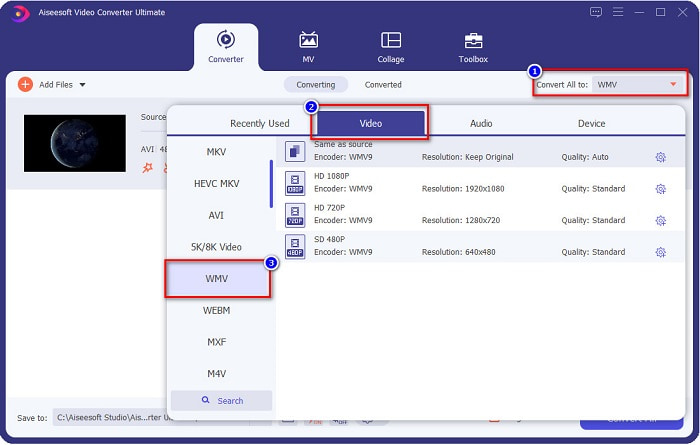
Trinn 3. For å endre filformat, klikk på knappen Convert All to øverst til høyre i programmets grensesnitt. En liste over filformater vil vises, velg deretter WMV under kategorien Video.
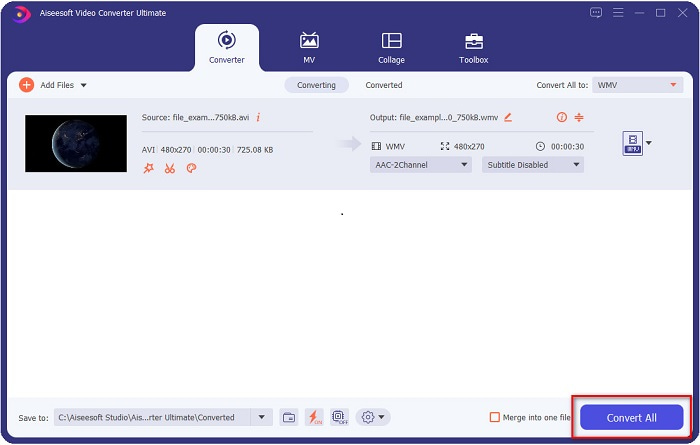
Trinn 4. Etter at du har valgt WMV-filformatet, klikker du på knappen Convert All for å konvertere AVI-filen til en WMV-fil. Vent noen sekunder, og det er alt! Så enkelt kan du konvertere AVI-filen din til WMV.
Del 2. Hvordan konvertere AVI til WMV gratis
Når du konverterer AVI-filene dine til WMV, kan du også bruke gratis nedlastbare konverteringsverktøy. En velkjent konverter er Freemake Video Converter. Denne offline-konverteren lar deg konvertere over 500+ formater som AVI til WMV, MP3, MP4, DVD og mer. Imidlertid er grafikkgrensesnittet (GUI) ikke særlig bra, og grensesnittet er heller ikke lett å bruke. Likevel brukes det fortsatt av mange når det gjelder filkonvertering.
Hurtigguide for hvordan du konverterer AVI-filen til WMV-fil ved hjelp av Freemake Video Converter:
Trinn 1. Last ned appen ved å søke etter Freemake Video Converter i nettleseren din. Etter nedlasting, åpne programmet.
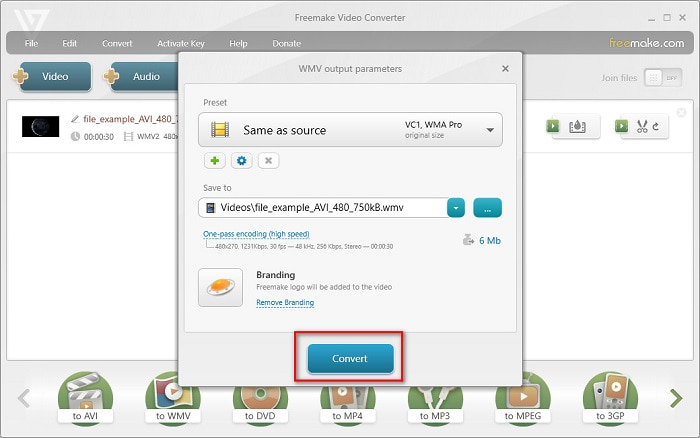
Trinn 2. Når du har åpnet programmet, klikker du på knappen Video; velg AVI-filen din når datamaskinens filer vises. Trykk på Open for å legge AVI-filen til i køen.

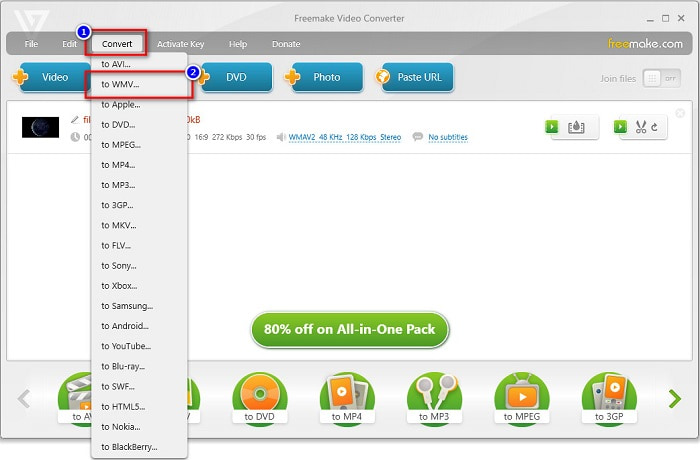
Trinn 3. Etter å ha valgt AVI-filen din, klikker du på alternativet Convert øverst i programmets grensesnitt. En liste over filformater vil vises, velg deretter WMV.
Trinn 4. Et nytt grensesnitt vil vises der du nå skal konvertere filen. Klikk på knappen Convert for å starte konverteringen av AVI-filen til WMV.
Del 3. Konvertering av AVI-filer til WMV-filer online
Det kan ikke nektes at det er mer praktisk å konvertere filer på nettet. Derfor prøvde vi noen nettbaserte konvertere for å konvertere AVI til WMV på nettet, og valgte FVC Free Video Converter Online som den beste å anbefale. Denne konverteren lar deg konvertere store filer uten begrensninger. Du kan imidlertid oppleve treg konvertering fordi denne konverteren er avhengig av internett. Det betyr at hvor raskt du kan konvertere, avhenger av internettilkoblingen. Likevel har FVC Free Video Converter Online blitt brukt av mange og er bevist å være en av de beste nettbaserte konverterne.
Trinn for hvordan du konverterer AVI-filen din til WMV ved hjelp av FVC Free Video Converter
Trinn 1. Søk etter FVC Free Video Converter Online i nettleseren din.
Trinn 2. Når du er på nettsiden, klikker du på knappen Add Files to Convert. Last deretter ned oppstarteren som vises når du klikker på knappen Add Files to Convert. Velg deretter AVI-filen din.
Last ned skrivebordsversjonen for å konvertere filer i batch.
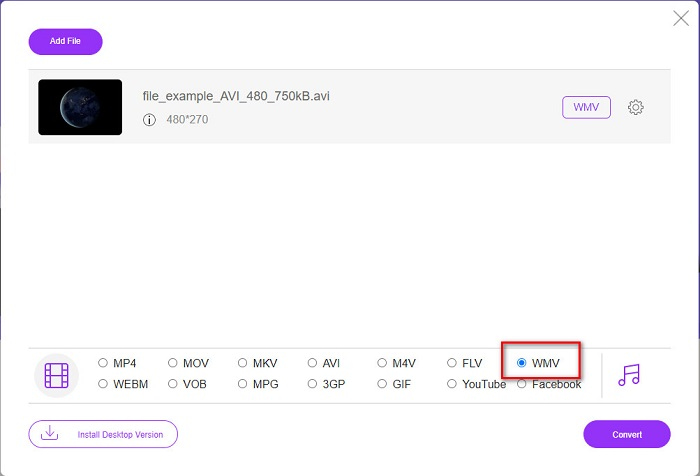
Trinn 3. Etter at du har valgt filen, vil du i det andre grensesnittet til programmet se en liste over filformater; klikk deretter WMV.
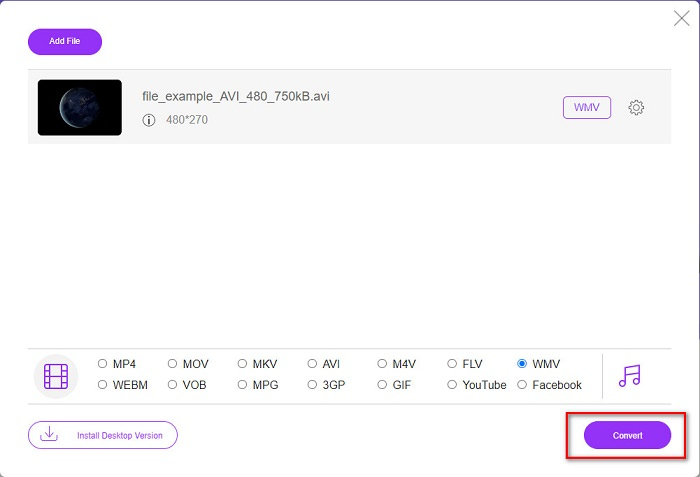
Trinn 4. Til slutt klikker du på knappen Convert nederst til høyre i programmets grensesnitt. Datamaskinens filer vil vises, der du kan velge hvor den konverterte filen skal lagres. Deretter vil konverteringen av AVI til WMV starte.
Del 4. Mer om AVI og WMV
AVI eller Audio Video Interleave-filer er standard videoformater for Windows-maskiner. Disse filene inneholder lyd og video og bruker ulike kodeker, inkludert DivX og XviD. Dette filformatet er imidlertid minimalt komprimert. Derfor blir filstørrelsen ganske stor. På den annen side støtter WMV eller Windows Media Video mange programvareenheter, og Windows Media Player komprimerer denne typen filer. Dessuten spilles denne filtypen vanligvis av i Windows-systemer. Les Best WMV Players hvis du vil spille av WMV-filer på en enkel måte.
AVI kontra WMV
Basert på Resource Interchange File Format (RIFF), ble AVI-formatet introdusert av Microsoft i 1992. Det kan lagre video/lyd av høy kvalitet siden det bruker mindre komprimering. Men det forårsaker også den store filstørrelsen til en AVI-fil, som kan være et problem når det er begrenset plass.
Produsert av Microsoft, WMV var et av de vanligste videoformatene tilbake på 2000-tallet. Den kan sees over nettet og spilles av forskjellige mediespillere på Windows. Og det er også standard videofilformat for Windows Media Player. Men det har blitt overtatt av andre formater nylig.
Del 5. Vanlige spørsmål om konvertering av AVI til WMV-filformat
Ødelegger det å endre AVI til WMV kvaliteten på filen?
Når du konverterer AVI til WMV, bør ikke kvaliteten på filene dine bli påvirket. Noen omformere støtter imidlertid ikke pikselvideoer av høy kvalitet, noe som fører til at kvaliteten synker.
Kan du komprimere AVI-filer?
Ja. Du kan bruke videokompressorer som er tilgjengelige på nettet. Du kan også konvertere AVI-filen din til WMV-format for å redusere filstørrelsen. I tillegg kan du bruke FVC Video Converter Ultimate til å komprimere AVI-filene dine.
Vil filstørrelsen på AVI-filen min endres etter konvertering?
Det er noen tilfeller i filstørrelsen til AVI-filen din som kan være forskjellig fra originalen. For når filene konverteres, vil de komprimerte filene være ukomprimerte, noe som resulterer i at filstørrelsen endres litt.
Konklusjon
For å oppsummere, viser online- og offlineverktøyene presentert ovenfor lovende konverteringsfunksjoner som kan tilfredsstille dine behov når det gjelder å konvertere AVI til WMV-filer. Men hvis du leter etter en omformer som inneholder mange funksjoner som vil hjelpe deg med å møte dine behov, anbefaler vi å bruke FVC Video Converter Ultimate – er du fortsatt i tvil om det? Prøv det nå og få det beste ut av filene dine!
-
 Concrete Guide for å hjelpe deg med å konvertere AVI til FLV gratis
 For å konvertere AVI til FLV, trenger du en kraftig videokonverterer. Heldigvis kan du lære to og trinnvise veiledninger fra denne enkeltartikkelen.
-
 Hvordan konvertere AVI-videoer til animerte GIF-filer på Windows / Mac
 Vil du velge de interessante AVI-segmentene for å lage GIF-memer? Denne artikkelen vil fortelle deg de to beste metodene for å klippe AVI-videoene og konvertere AVI til animerte GIF-filer gratis.
-
 Bestem deg for hvilken som er den ideelle AVI til MP3-konverteringsprogramvaren [PC og Mac]
 Vil du vite hvordan du konverterer AVI til et MP3-lydformat? I listen nedenfor vil du også møte forskjellige verktøy og trinn som passer dine behov.

