


 Video Converter Ultimate
 Skjermopptaker
 Videoreparasjon
 Sikker nedlasting
Raskeste måter å konvertere FLAC og WAV (frakoblet / online)
Free Lossless Audio Codec, ofte kjent som FLAC, er et lydfilformat som ligner bemerkelsesverdig på MP3. Det gir brukerne utmerket lydkvalitet samtidig som det opptar relativt lite plass på harddisken. Dessuten er denne typen format tapsfritt, noe som betyr at en stor del av lyddataene dine beholdes til tross for komprimeringen. På den annen side finnes det tilfeller der du må konvertere FLAC-filer til et annet format som WAV hvis du vil få en best mulig og overlegen lytteopplevelse. Bør du velge mellom de to? Finn ut nedenfor hvordan du kan få begge deler ved å bruke de beste verktøyene for FLAC til WAV-konvertering som finnes.

Del 1. Konverter FLAC og WAV offline
Video Converter Ultimate er et førsteklasses verktøy for å konvertere filer til ethvert lydformat, inkludert WAV og FLAC. Dette programmet tilbyr en batchkonverteringsfunksjon som lar deg konvertere en samling lydfiler i én operasjon. I tillegg kan du maksimere kvaliteten på hver sang du vil jobbe med, siden programmet lar brukerne justere tekniske utdata som samplingsfrekvens og bithastighet. Hvis du ønsker å batchkonvertere WAV til FLAC eller omvendt, kan du lese den korte veiledningen vi har forberedt nedenfor.
Trinn 1. Start programmet på enheten din ved å velge riktig knapp for Gratis nedlasting nedenfor. Følg deretter instruksjonene på skjermen for å starte programmet. Du kan gjøre deg kjent med grensesnittet så snart det er installert.
Gratis nedlastingFor Windows 7 eller nyereSikker nedlasting
Gratis nedlastingFor MacOS 10.7 eller nyereSikker nedlasting
Trinn 2. Trykk på Legg til-ikonet på hovedskjermen og importer lydfilen du vil jobbe med. Deretter blir du sendt til en forhåndsvisning av den importerte filen. Du kan laste opp en mappe hvis du ønsker å konvertere i bulk. Velg i katalogen din mappen som inneholder alle lydfilene du trenger.
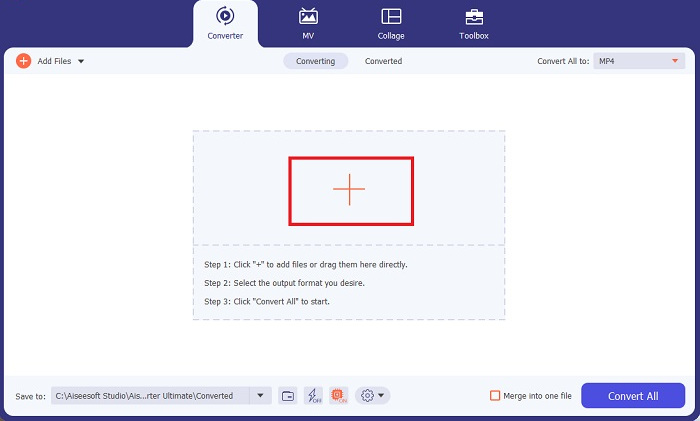
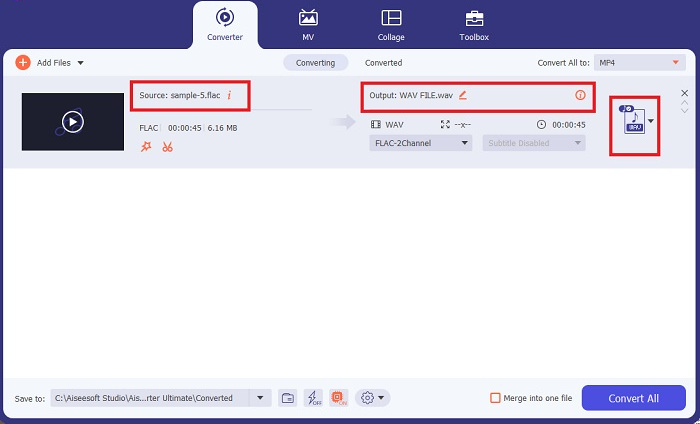
Trinn 3. Nå kan du endre utdataformat ved å klikke på Converter-knappen øverst på programskjermen. Velg deretter WAV fra fanen Audio Output. Samtidig kan du justere samplingsfrekvens og bithastighet for utdatafilen slik at den samsvarer med ønsket kvalitet.
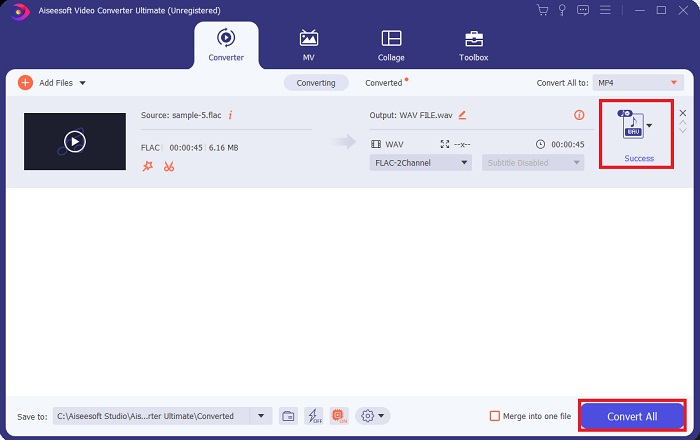
Trinn 4. Som siste trinn starter du konverteringsprosessen ved å klikke på knappen Convert All nedenfor. Deretter åpner programmet automatisk utdatamappen slik at du kan sjekke filens nye format.
Fordeler
- Det kan batchkonvertere FLAC til WAV lydfilformat.
- Programmet fungerer bra med både Windows og Mac OS.
- Den har en rask konverteringshastighet.
Ulemper
- Det krever en betalt abonnementsavgift etter den gratis prøveperioden.
- Programmet fungerer ikke på Linux OS-enheter.
Del 2. Konverter FLAC til WAV eller WAV til FLAC Online
Selv om søkemotoren din kan vise deg et hav av nettbaserte FLAC til WAV- eller WAV til FLAC-konvertere, er dette hva vi kan gjøre for å gjøre det enklere for deg. Free Audio Converter Online er et utmerket alternativ hvis du vil slippe å installere et skrivebordsprogram. Denne nettbaserte konverteren fungerer sømløst og gir sikkerhet og beskyttelse for personopplysningene dine mens konverteringen utføres. I tillegg kan du dra nytte av programvarens funksjon for batchkonvertering, omtrent som når du bruker et skrivebordsprogram.
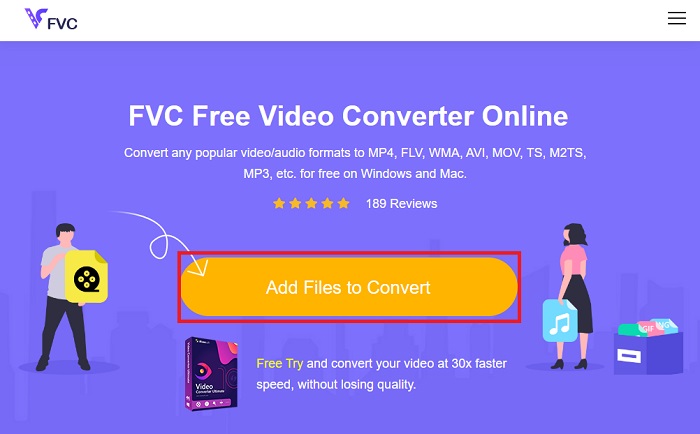
Trinn 1. Klikk på lenken ovenfor for å komme til hovedsiden til Free Online Video Converter. Velg Add Files to Convert på hovedskjermen og last opp lydfilen din.
Trinn 2. Forhåndsvisningen av originalfilen din vises på skjermen. I det samme panelet blar du nedover og velger ønsket utdataformat.
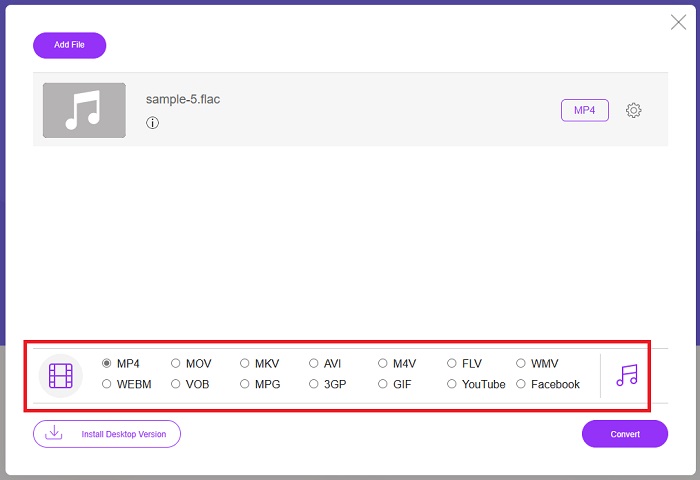
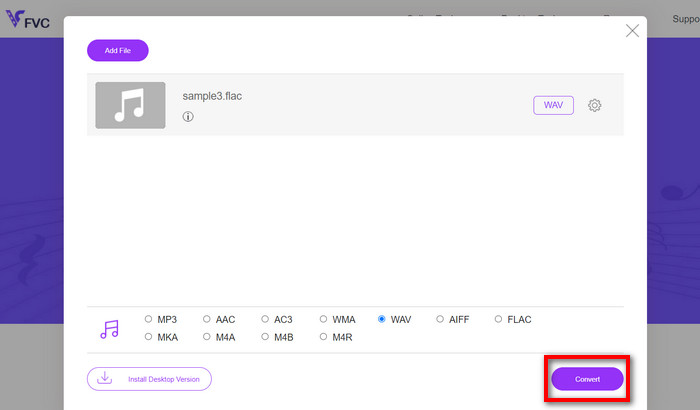
Trinn 3. Trykk på Convert-knappen for å endre FLAC til WAV-format. Hvis du ønsker å konvertere en annen fil, gjentar du denne veiledningen fra start.
Fordeler
- Det fungerer på alle søkemotorer som Google Chrome, Safari, Firefox og mer.
- Den tilbyr forskjellige populære lydfilformater som MP3, AAC og WMA.
- Brukere kan glede seg over ubegrensede konverteringer per dag.
Ulemper
- Konverteringshastigheten er avhengig av internettforbindelsens styrke.
Mer lesing:
Konverter FLAC til MP3 for å bevare lydkvaliteten
Enkle trinn for å konvertere WAV til OGG for optimal lydstørrelse
Del 3. Vanlige spørsmål om FLAC- og WAV-konvertering
Vil konvertere en fil fra FLAC til WAV reduseres i kvalitet?
Konvertering av lydfilene dine fra FLAC til WAV vil ikke forringes i kvalitet siden oppløsningen er ukomprimert. Men anta at du konverterer en fil fra WAV til FLAC. I så fall kan du legge merke til små endringer, spesielt for de som har ørene ganske godt i detalj. Hvis du trenger hjelp til å bestemme hvilken du skal beholde, her er et perspektiv du kan se på; FLAC-lydformater er et godt valg for å lagre en masse sanger, mens størrelsen på WAV-filer er større, men egnet for lydredigering.
Er WAV lydformatet med høyest oppløsning?
WAV er Waveform Audio File Format-forkortelsen utviklet av IBM og Microsoft. Dette formatet regnes som det høyeste oppløsningsformatet i den digitale musikkindustrien fordi det inneholder rå og kompromissløse lydfrekvenser.
Hva er den beste online FLAC til WAV-konverteren?
Uten tvil er FVC Free Online Video Converter den beste gratis FLAC til WAV-konvertereren online. Du trenger ikke tilegne deg teknisk dyktighet for å transformere video- og lydfiler ved hjelp av programvaren. Den kan gjøre jobben din effektivt fordi den er brukervennlig og har uovertruffen konverteringshastighet. Dessuten gir dette nettprogrammet, om ikke alle, men de fleste av de populære lydformatene vi kjenner.
Konklusjon
Konvertering kan skje begge veier, fra FLAC til WAV og WAV til FLAC. Siden begge filformater er utbredt i digital musikk i dag, kan valget av hvilket du skal bruke, avhenge av oppgaven du skal bruke dem til. Med verktøyene som er nevnt ovenfor, kan du når som helst veksle frem og tilbake mellom formatene. Følg trinnene ovenfor for å endre FLAC til WAV eller WAV til FLAC, så bør du ikke støte på noen problemer.
-
 Finn ut hvordan du konverterer MP3 til et WAV -format
 Vil du vite hvordan du konverterer MP3 til WAV? Bestem hvilket av verktøyene som gir den beste konverteringen du kan få.
-
 WAV Player - Topp 5 WAV Player-apper for Android, iPhone, PC og Mac
 Hvordan spiller jeg WAV-filer på Android-telefonen? Hvilken spiller kan spille WAV? Dette innlegget deler 5 beste gratis WAV-spillere for Android, iPhone, Mac og PC.
-
 Topp 3 FLAC-metadataredigerere på Mac og Windows [Oppdatert 2023]
 Vil du endre FLAC-metadata? I dette tilfellet må du lese denne artikkelen siden vi gir tilstrekkelig kunnskap om den nyeste FLAC-metadataredigereren du kan bruke.
