


 Video Converter Ultimate
 Skjermopptaker
 Videoreparasjon
Fenomenal Mini DV til AVI Converter Tilgjengelig på Windows og Mac OS
DV-filers primære formål er å inneholde digitalvideo fra videokameraer eller videokameraer fra produsentene Panasonic og Sony fra slutten av 1995. Denne kodeken og kassettstandarden ble kjent for overgangen fra analog til digital produksjon. Men nå om dagen kan du ikke spille av DV-filer i standard mediespiller, eller engang dele dem på nettet. Hvis du nå vil spille av denne filen, bør du vurdere å konvertere filen til et mer støttet og avspillbart format som AVI. Dessuten vil detaljene nedenfor hjelpe deg å forstå DV, konvertere DV-filer til AVI og spille den av i en mediespiller hvis du ikke vil konvertere.

Del 1. Battle of the Formats: DV VS AVI
DV-fil og AVI er nesten like ettersom disse to formatene kan inneholde video og lyd. Men formålet deres og hvordan de lagrer mediefilen er langt fra hverandre. I så fall, la oss finne ut hva forskjellene mellom DV og AVI er ved å sammenligne deres 3 unike evner.
Formatets kompatibilitet
AVI får mer støtte og er et av de mest kompatible formatene for å spille av og redigere video. Dette formatet kan inneholde videoavspilling i et synkronisert format. I motsetning til dette er DV-filer ikke støttet av en rekke videoredigeringsprogrammer og mediespillere på PC og Mac. Derfor er dette en av grunnene til at du trenger en mini DV til AVI-konverter.
Støttet komprimering
AVI er et tapsfritt filformat for robust og avansert lagring av mediefiler. Dette formatet vil imidlertid spise opp mye av harddisklagringen din fordi det er ukomprimert. Mens DV bruker en tapskomprimering for videoen, men lydfilen er ukomprimert. Grunnen til at formatet er tapsmessig er fordi det bruker DCT som grunnlag for bilde-for-bilde brukt til å komprimere video.
Lydkvalitet
Audiofidelity DV-filen støtter mellom gjennomsnittlig og beste lydkvalitet fordi den bruker en sampling PCM-lyd opp til 48 kHz med en 20-bits lengde på et ord. AVI bruker en ukomprimert PCM og kvaliteten på lyden er utmerket. Likevel kan det være bedre om du bruker DV som enkoder for å oppnå DV-AVI som komprimerer.
Nå som vi forstår hva disse formatene er, er det nå rett tid for å konvertere DV til AVI på Mac eller PC ved å lese veiledningen nedenfor.
Del 2. Best Fenomenal Converter Tool for å konvertere DV til AVI på Mac og Windows
FVC Video Converter Ultimate
Har du problemer med å velge en konverter som gir et fenomenalt resultat? Hvis det er tilfellet, vil vi anbefale at du bruker FVC Video Converter Ultimate. Denne programvaren har blitt et av de mest populære valgene for brukere som ofte konverterer formater. Og navnet «ultimate» er ikke bare et navn, det gjenspeiles også i ytelsen som gis. Generelt sett er dette verktøyet fullt ut egnet for alle som trenger en hjelpende hånd med konverteringsproblemer. Før vi går videre til trinnene, la oss først se på fordelene du får ved å laste ned denne programvaren.

Video Converter Ultimate
30000+ nedlastinger- Konverter DV-videofilen din til 200+ tilgjengelige formater.
- Støtter alle operativsystemer som PC og Mac.
- Verktøykassen inneholder avanserte funksjoner som å lage GIF-er, redigere videoer, slå sammen og mer.
- Intuitivt grensesnitt for alle.
- Den støtter 30 ganger raskere konvertering sammenlignet med andre omformere online eller offline.
Gratis nedlastingFor Windows 7 eller nyereSikker nedlasting
Gratis nedlastingFor MacOS 10.7 eller nyereSikker nedlasting
Så uten videre, la oss fortsette til veiledningen nedenfor, og la oss konvertere DV til AVI uten å miste kvaliteten på videoen.
Trinn for hvordan konvertere DV til AVI med FVC Video Converter Ultimate:
Trinn 1. Trykk på nedlastingsknappen nedenfor, og velg operativsystemet du bruker. Installer programvaren på disken og klikk Start Now for å gå videre til neste trinn.
Gratis nedlastingFor Windows 7 eller nyereSikker nedlasting
Gratis nedlastingFor MacOS 10.7 eller nyereSikker nedlasting
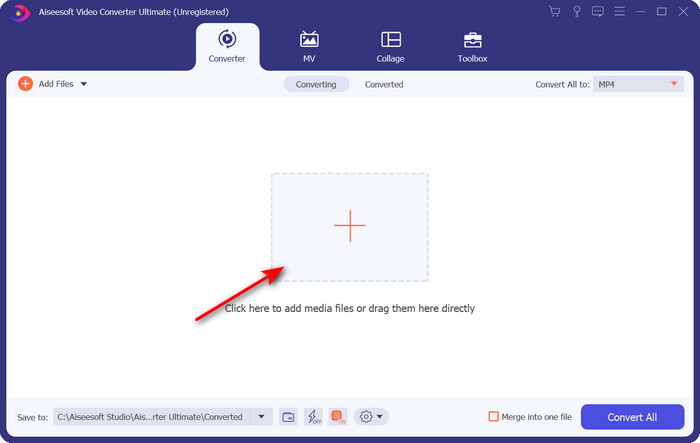
Trinn 2. Åpne programvaren og klikk på +-knappen som ligger midt i grensesnittet til verktøyet. En mappe vises, og for å laste opp .dv-filen klikker du på Open.
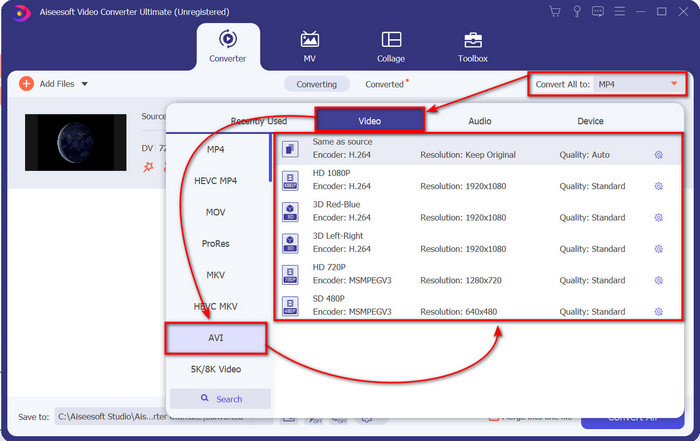
Trinn 3. For å endre .dv-filen til en .avi, klikk på nedtrekksknappen og søk etter AVI-formatet.
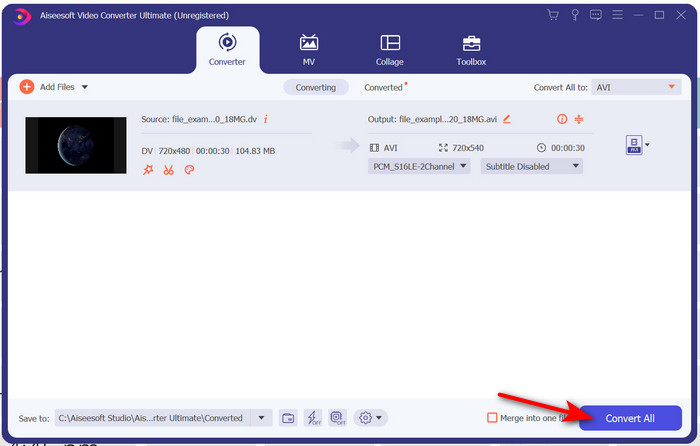
Trinn 4. Når du har valgt formatet, er det nå riktig tidspunkt å gjøre om DV til AVI ved å klikke på Convert All.
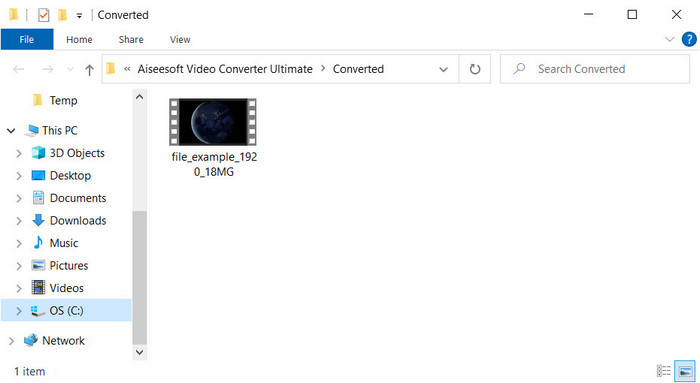
Trinn 5. Konvertering av en fil tar mindre enn ett minutt, så ventetid er knapt nødvendig. En ny mappe vil vises med de konverterte filene.
Del 3: Spill av DV-filene dine med DV-videospilleren tilgjengelig på PC og Mac
Blu-ray-spiller
Vil du ikke konvertere mini DV til AVI, kan du i stedet prøve å bruke denne mediespilleren som støtter denne typen format, nemlig Blu-ray Player. Denne mediespilleren støtter over 300 formater og kodeker for å spille av video på datamaskinen uten problemer. I tillegg har denne mediespilleren de mest avanserte funksjonene en mediespiller bør tilby for å gjøre seeropplevelsen din bedre. Du kan også bruke en CD, DVD eller Blu-ray-plate for å spille av video på datamaskinen; kort sagt bruker alle en bærbar mediespiller. Så hvis du ikke vil styre med å konvertere .dv-filen, følger du disse trinnene for å spille av videoen.
Trinn for hvordan spille av DV-filen med hjelp av Blu-ray Player:
Trinn 1. For å laste ned denne mediespilleren, klikk på knappen nedenfor, installer deretter spilleren og start den.
Gratis nedlastingFor Windows 7 eller nyereSikker nedlasting
Gratis nedlastingFor macOS 10.7 eller nyereSikker nedlasting
Trinn 2. Klikk Open File, finn .dv-filen i mappen din og trykk Open.
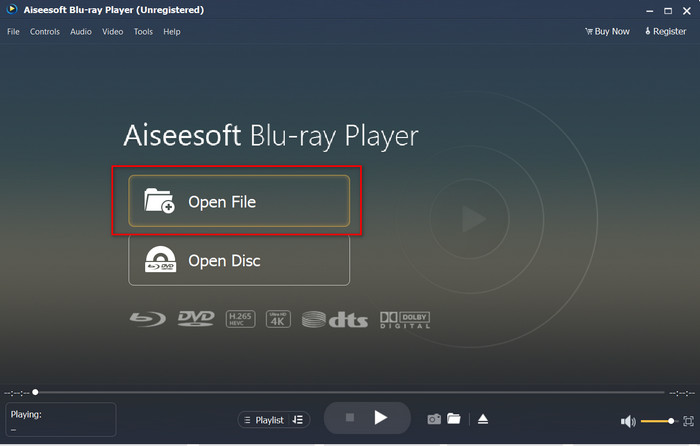
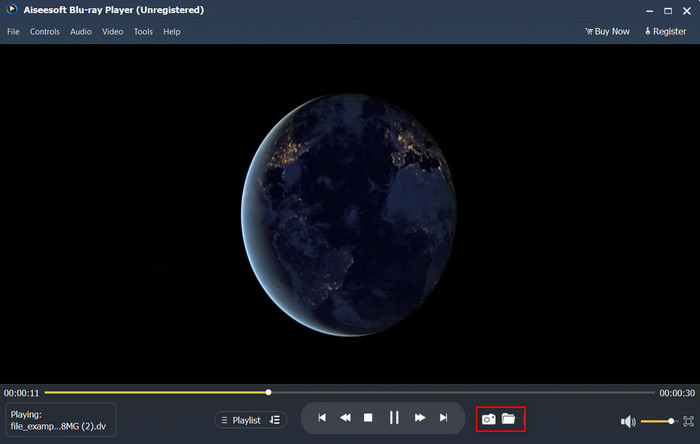
Trinn 3. DV-filen vil automatisk spilles av på skrivebordet. I tillegg kan du klikke på kamera-knappen hvis du vil ta et skjermbilde av det du ser på. Hvis du vil se bildene du har tatt, klikker du på mappe-knappen.
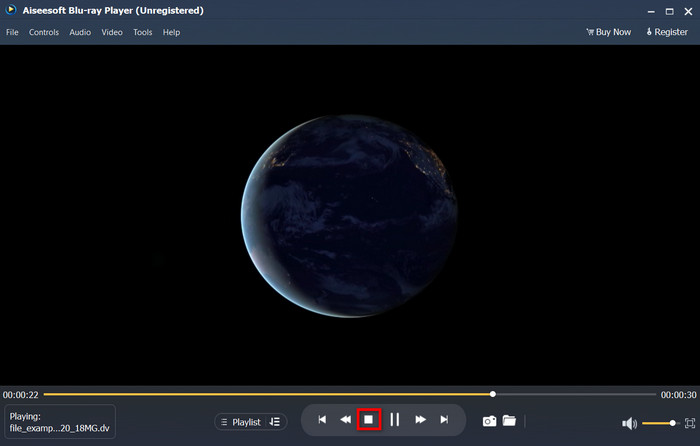
Trinn 4. Hvis du vil slutte å se på .dv-filen, klikker du på kube-knappen.
Trinn 5. For å se en annen fil i et annet format, følger du trinn 2 og 3 og nyter deretter den høyoppløselige videoen.
Relatert:
Del 4. Vanlige spørsmål om DV til AVI-konvertering
Mister kvaliteten ved konvertering av DV-filer?
Konvertering av et hvilket som helst format til en ny versjon bør ikke redusere kvaliteten på det originale videoformatet. Noen omformere støtter imidlertid ikke konvertering av 1080 eller 4k videokvalitet fordi det vil ta tid. Så hvis du ikke vil miste kvalitet, bruk FVC Video Converter Ultimate. Forvent intet mindre fordi denne programvaren ikke berører kvaliteten din og vil gi deg muligheten til å gjøre den høyere eller beholde den.
Kan jeg spille .dv på VLC?
Når det gjelder i dag, støtter ikke VLC noen .dv-filer å spille av; men hvis du komprimerer AVI og bruker DV-AVI i stedet, kan du spille av videoen på VLC.
Hvilket format er den beste erstatningen for DV?
Hvis du vil vite den beste erstatningen for en DV-fil, prøv å bruke MP4-filen. Dette formatet er kjent som multifunksjonsformatet fordi det er kompatibelt med alle skrivebord og enheter hvis de ønsker å spille av videoen eller redigere den. Men kvaliteten på MP4 og DV er langt forskjellig fra hverandre hvis vi skulle sammenligne dem. Likevel er kompatibilitetsmessig MP4 det beste medieformatet du kan bruke som erstatning.
Konklusjon
For å oppsummere presenterte vi bare én DV til AVI-konverter, fordi dette er den eneste programvaren som fungerer virkelig godt til å konvertere denne filtypen. Da vi fortsatte å lese denne artikkelen, fant vi en annen måte å spille av .dv-filen på ved å bruke denne DV-spilleren. Vi presenterer altså to verktøy som gjør jobben sin, enten du vil spille av .dv-filen eller konvertere den. Hvis du velger FVC Video Converter Ultimate, kan du forvente et fenomenalt kvalitetsresultat på kort tid. Men hvis du bestemmer deg for å bare spille av DV-filen, bør ditt førstevalg være Blu-ray Player.
-
 De 5 beste valgene for å konvertere MPEG til AVI-format [online og offline]
 Har du vanskelig for å lete etter en konverter for MPEG? Prøv deretter å lese denne artikkelen mens vi lærer hvordan du endrer MPEG til AVI-format med detaljerte trinn.
-
 4 fantastiske omformere til gratis konverter WMV til AVI Online [2021]
 Leter du etter en WMV til AVI-konverter? Og i så fall, prøv å lese denne artikkelen mens vi siler ut alle verktøyene vi kan finne på nettet for å hjelpe deg med denne nevnte oppgaven.
-
 4 nyeste online og offline konverterere for å konvertere F4V til AVI-format
 Har du ingen anelse om hvilken konverter du bør bruke for å konvertere F4V til AVI eller et annet videoformat? Les deretter denne artikkelen mens vi lærer hvordan du konverterer med verktøyet som er tilgjengelig.
