


 Video Converter Ultimate
 Skjermopptaker
 Videoreparasjon
4 enkleste måter å konvertere F4V-fil til AVI Media-filformat
Macromedia introduserte F4V, og senere utviklet Adobe den for å konkurrere med moderne videolagring av høy kvalitet. Det er også opprettet som et erstatningsformat til FLV siden FLV har en begrensning. Ytterligere forklaring er at F4V-filen bruker ISO-basemediefilformat med en H.264-kodek for å redusere filstørrelsen. Selv om formatet inneholder utdata av høy kvalitet, har F4V lavere kompatibilitet enn det andre formatet. Og ikke bare det, men dette formatet har også blitt faset ut fordi Adobe Flash Player allerede har trukket seg tilbake.
Så hvis du har det samme problemet som andre, fordi deres .f4v‑filer ikke kan spilles av på mediespilleren deres, kan du lese videre nedenfor. Vi har samlet ulike verktøy som hjelper deg med å spille av uavspillbare .f4v‑filer ved å konvertere formatet til AVI. La oss nå gå videre og se hvordan du kan konvertere F4V til AVI-format med de tilgjengelige nett- og skrivebordsverktøyene.

Del 1. Lær hvordan du konverterer F4V til AVI med den fenomenale F4V til AVI-konverteren
Hvis du ser etter den beste konverteren som kan hjelpe deg med problemet ditt, er FVC Video Converter Ultimate det rette valget. Vi har testet verktøyet selv og lest noen av kommentarene; «ultimate» er ikke bare et navn, men programvarens ytelse og funksjoner er også ultimate. En av de mest imponerende funksjonene dette verktøyet tilbyr, er dessuten rask konvertering og maskinvareakselerasjon, slik at brukerne av programmet slipper å vente lenge.
I tillegg, hvis du vil lage GIF-er, øke eller senke avspillingshastigheten på videoer, spille dem baklengs, forsterke lyden osv. Ettersom dette verktøyet tilbyr avanserte funksjoner, må du fortsatt betale for det før du kan bruke det, men du trenger ikke å bekymre deg, for du vil ikke bruke mer enn hundre dollar. Så hvis du fortsatt vurderer om du skal kjøpe dette verktøyet, kan du lese trinnene nedenfor og konvertere F4V-filen til AVI ved å følge disse stegene.
Trinn 1. Før du kan bruke dette kraftige verktøyet, må du laste det ned på datamaskinen din. Installer det deretter og gjør et raskt oppsett; klikk på Start Now for å åpne programmet.
Gratis nedlastingFor Windows 7 eller nyereSikker nedlasting
Gratis nedlastingFor MacOS 10.7 eller nyereSikker nedlasting
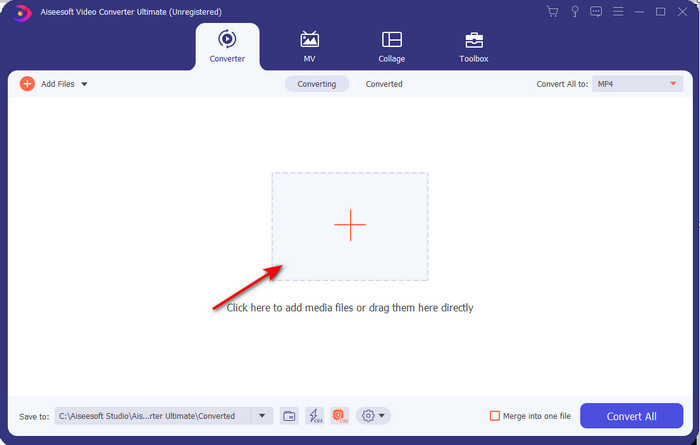
Trinn 2. Hvis verktøyet allerede er åpent, går du til Add Files eller klikker på +-knappen. Deretter vises en mappe der du finner .f4v-filtypen og klikker på Open.
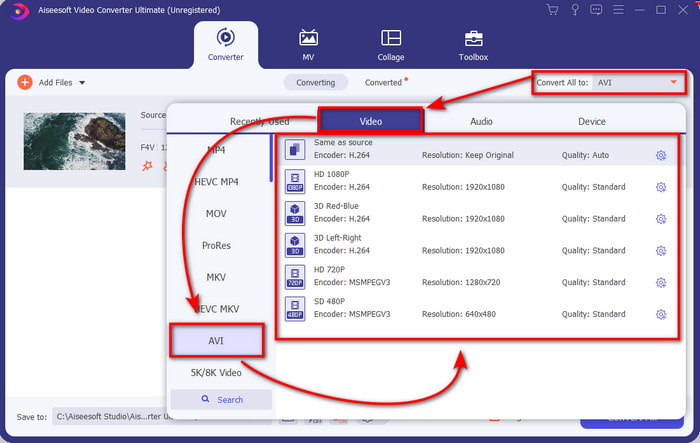
Trinn 3. Etter at du har lagt inn filen, klikker du på Convert All to øverst til høyre i grensesnittet og velger AVI-formatet.
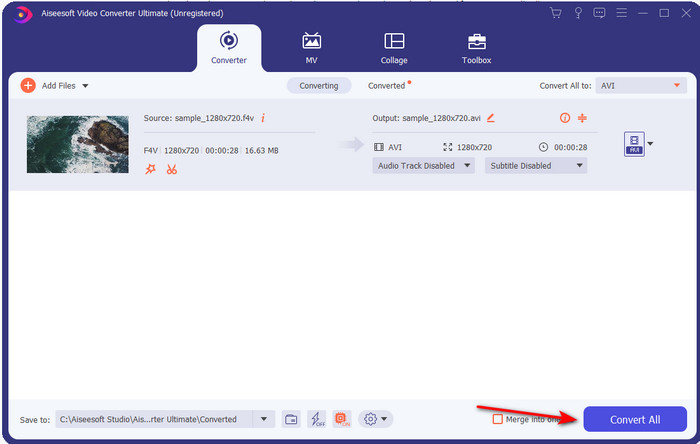
Trinn 4. For å starte konverteringsprosessen klikker du nå på Convert All. Vent noen minutter mens filen din blir konvertert fra F4V til AVI.
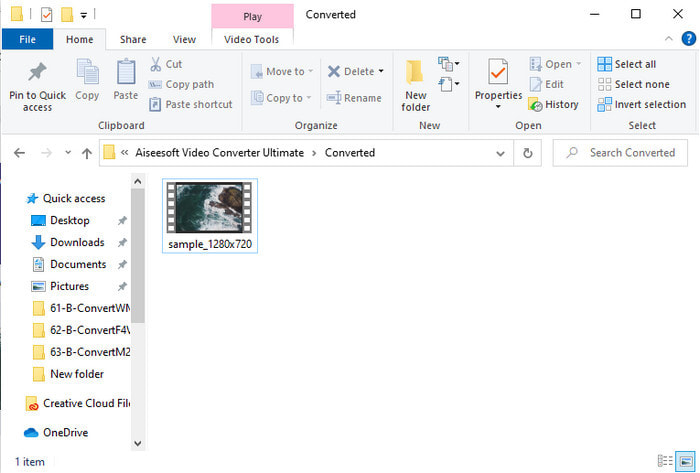
Trinn 5. En mappe åpnes automatisk på datamaskinen din med den konverterte .f4v-filen du nettopp laget her. Klikk på videofilen for å se videoen som tidligere ikke kunne spilles av på datamaskinen, eller overfør den til telefonen din hvis du vil.
Del 2. Lær hvordan du konverterer F4V til AVI Online med 3 Available Web Converter
1. FVC Free Video Converter Online
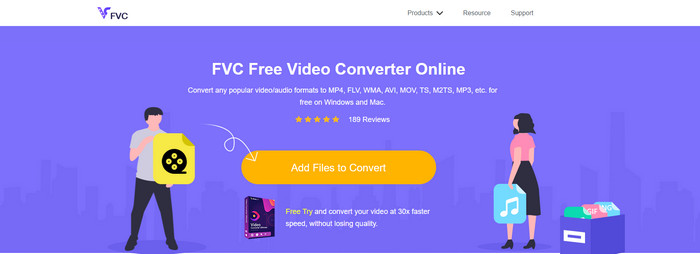
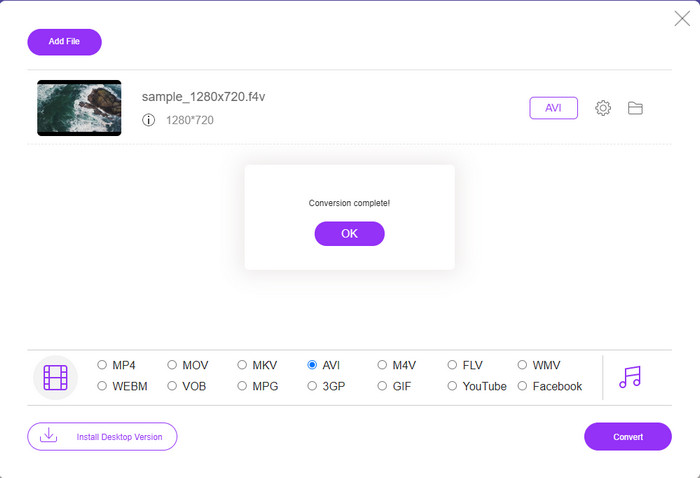
Hvis du vil vite hvilken nettbasert konverterer som er best, kan FVC Free Video Converter Online være svaret. Alle funksjonene du gjerne vil bruke, er tilgjengelige her, ettersom du kan endre bithastighet og bilder per sekund (fps) på videoen for å gjøre den høyere i kvalitet før du konverterer den. Millioner av internettbrukere har allerede rost den generelle ytelsen til dette nettverktøyet. Dette nettverktøyet støtter også et middels stort utvalg av formater du kan velge og laste opp. Du kan imidlertid ikke få videoen din til å se like fantastisk ut som med Ultimate‑verktøyet. Likevel, hvis du vil prøve å konvertere F4V til AVI-format, følger du trinnene nedenfor.
Trinn 1. Klikk på denne lenken for å gå til FVC Free Video Converter Online.
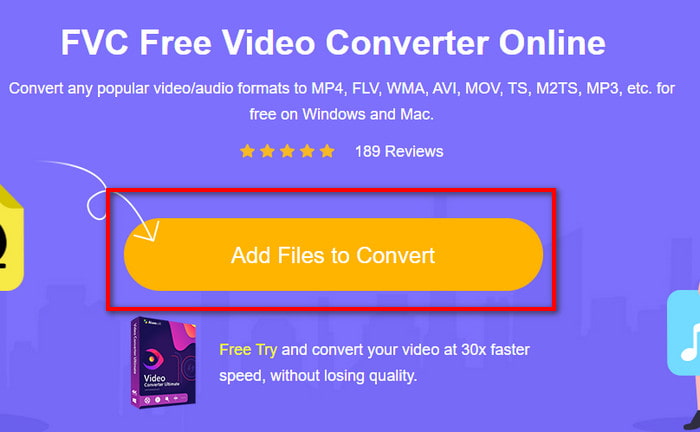
Trinn 2. Trykk deretter på Add Files to Convert for å starte verktøyet, og velg filen du vil konvertere til et nytt format i mappen ved å klikke på Open.
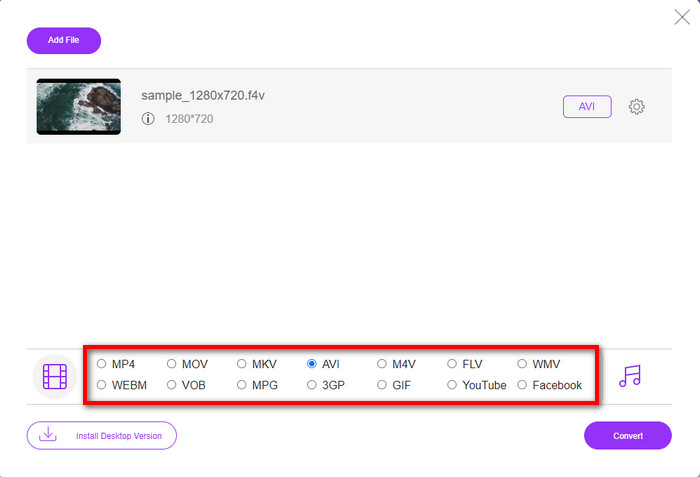
Trinn 3. Når filen er lagt inn, velger du AVI-formatet nederst blant formatene du vil konvertere til.
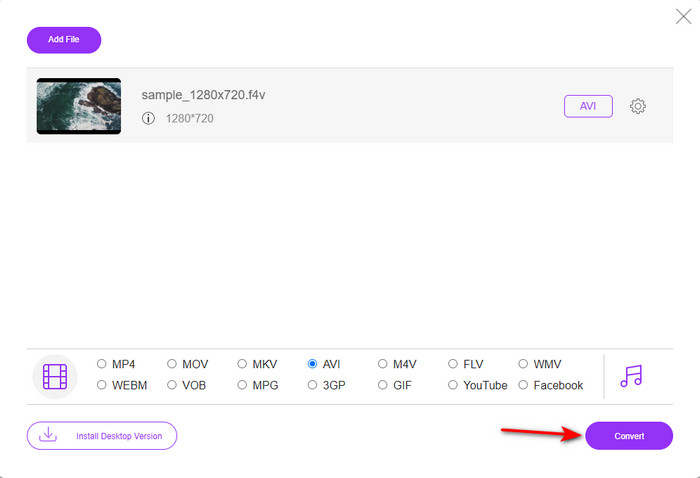
Trinn 4. Etter at du har valgt AVI-formatet, er det nå riktig tidspunkt å starte konverteringen ved å klikke på Convert-knappen.
Trinn 5. Vent noen minutter til filen er lastet ned, og deretter vises en mappe med den konverterte filen.
2. Zamzar
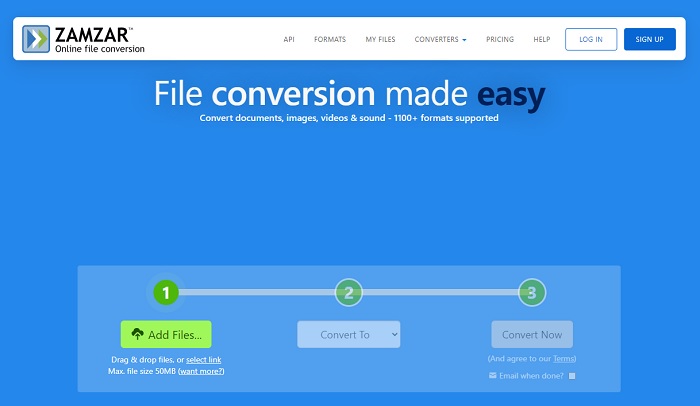
En annen konverteringsløsning du kan bruke på nettet, er Zamzar. Akkurat som andre konverterere trenger dette verktøyet en internettforbindelse for å kunne brukes eller åpnes. Alle nettverktøyene som presenteres her, krever internett for å kunne gjennomføre konverteringen. Ettersom mange brukere benytter dette, har Zamzar blitt populært fordi det støtter mange formater du kan bruke og velge mellom. Det er også gratis å bruke, men det er en begrensning på filstørrelsen verktøyet kan konvertere. Så hvis .f4v-filen din er større enn 50 MB, kan du ikke konvertere den her, slik det er angitt nedenfor. Og hvis filen din er mindre enn det, kan du prøve å bruke dette til å konvertere F4V til AVI på nettet ved å følge fremgangsmåten nedenfor.
Trinn 1. Åpne nettleseren din og søk etter Zamzar.
Trinn 2. Trykk på Add Files og finn filen du vil konvertere. Velg deretter AVI-formatet under «Convert to», og klikk deretter på Convert.
Trinn 3. Vent på prosessen; deretter vises et nytt grensesnitt, og du klikker på Download for å lagre filen.
3. Konverter filer
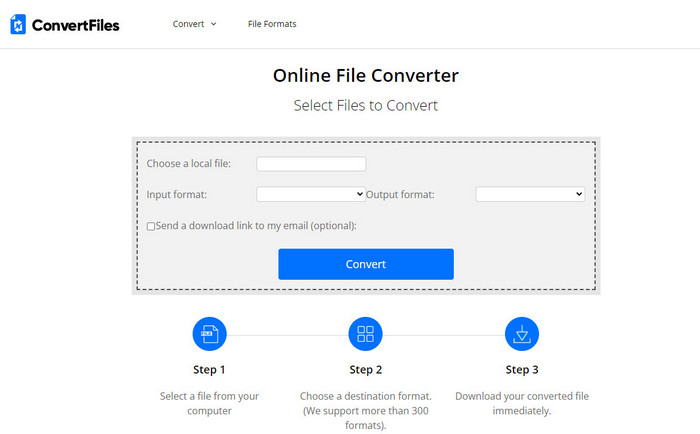
Hvis du vil ha en enklere konverteringsprosess som bare tar noen minutter, kan du prøve å bruke ConvertFiles. Verktøyet fungerer bra både under og etter konverteringen. Men reklamene ødelegger mye for dette verktøyet fordi det er mange av dem i grensesnittet. I tillegg tar prosessen lengre tid enn med andre konverterere på nett og på skrivebord. Filstørrelsen du kan legge inn her, er derimot mye større enn hos Zamzar. Så hvis du vil bruke dette verktøyet til å konvertere F4V-filen til AVI, følger du disse trinnene.
Trinn 1. Gå til nettleseren din og søk etter ConvertFiles, og åpne siden.
Trinn 2. Klikk på Choose a Local File for å åpne mappen og finne filen, og under Output Format klikker du på AVI. Klikk deretter på Convert for å starte konverteringen.
Trinn 3. Etter konverteringen klikker du på den blå uthevede URL-en som fører deg til en ny side. Klikk på denne lenken for å laste ned det konverterte formatet.
Del 3. Hvilket format er bedre; F4V vs. AVI
Vel, F4V og AVI gjør jobben sin som container i beste fall. Imidlertid er det mange av disse formatene til felles, og formålet deres er ikke det samme. Hvis du for eksempel vil lagre en video av høy kvalitet innenfor en liten filstørrelse og holde og beskytte DRM MPEG-4-videodataene, er F4V det beste valget. Men anta at du vil lagre en video av høy kvalitet som støtter synkronisert medieavspilling. I så fall må du velge AVI-formatet fordi det har en annen beholder for både lyd og video. Til tross for det er AVI-filstørrelsen for stor å håndtere av mange enheter og til og med stasjonære datamaskiner fordi den er ukomprimert.
Del 4. Vanlige spørsmål om F4V til AVI-konvertering
Reduserer konvertering av F4V oppløsningen etter konvertering?
Oppløsningen til videoen må beholde sin opprinnelige kvalitet selv etter at du konverterer den til et nytt format. I noen tilfeller opplever mange brukere at kvaliteten på deres F4V har blitt dårligere. En av grunnene må være at kvaliteten du angir er lav, eller at verktøyet du bruker ikke støtter 1080 eller 4k videoer.
Hvorfor kan ikke F4V spilles på mediespilleren min?
Dette formatet kan spilles av i flere mediespillere, men ikke alle mediespillere støtter dette formatet. Så hvis du vil se videoen i dette formatet, er det beste valget å konvertere den til et nytt format eller finne en ny tredjeparts mediespiller for å se F4V-videoene dine.
Må jeg komprimere F4V for å gjøre den mindre i størrelse?
Filstørrelsen på F4V er ikke så stor sammenlignet med AVI-formatet. Hvis du prøver å komprimere denne filbeholderen, vil det uansett være en sjanse for at videokvaliteten reduseres. Her kan du lære hvordan du kan komprimere F4V-videoene dine.
Konklusjon
Når vi avslutter denne artikkelen, har vi nå et innblikk i hva F4V er og hvorfor du trenger å konvertere det. All online og offline programvare som er nevnt i denne artikkelen fungerer bra. Selv om alle verktøyene er flotte, skiller FVC Video Converter Ultimate seg fortsatt ut blant resten. Fordi denne programvaren gjør det bra til og med, har du ikke en internettforbindelse, og dette verktøyet kan fullføre konverteringsprosessen på et øyeblikk. Så nå, hvis du vil oppleve den fenomenale konverteringen vi snakker om, last den ned nå.
-
 Hvordan konvertere TS til AVI / MKV / MOV / WMV online og gratis på Win / Mac
 Vil du raskt konvertere TS-filer til AVI / MKV / MOV / WMV? Denne artikkelen viser online og offline videokonvertere med komplett guide. Kanskje du kan få den beste gratis TS-omformeren her.
-
 [Gratis og online] 7 måter å konvertere MTS til AVI på Mac/Windows-datamaskin
 Hvordan konvertere MTS til AVI med letthet? I denne guiden finner du 7 gratis og enkle måter å konvertere MTS-filer til AVI på Windows eller Mac uten tap av kvalitet.
-
 Opplæring i å konvertere MP4 til AVI-filer med 7 gratis videokonverterere
 Vil du få alle gratis måter å konvertere AVI til MP4-video? Du bør ikke gå glipp av denne artikkelen. Her er 7 måter å konvertere AVI-filer til MP4 gratis på Windows, Mac, iPhone, Android og online.
