


 Video Converter Ultimate
 Skjermopptaker
 Videoreparasjon
 Sikker nedlasting
Raske triks for å konvertere M4V til 3GP enkelt
Vil du konvertere M4V til 3GP? M4V er et container‑videoformat som er utviklet eksklusivt for Apple‑produkter. Så hvis du har en M4V‑videofil og vil spille den av på 3G‑aktiverte enheter, er den beste løsningen å konvertere den. Dette innlegget forklarer en enkel prosess for å konvertere M4V‑filen din til 3GP‑format raskt og uten anstrengelse på enhetene dine. Les derfor denne artikkelen og få med deg all informasjonen.

Del 1: Utmerket programvare for å konvertere M4V til 3GP
Den beste frakoblede konverteren for deg er Video Converter Ultimate. Dette nyttige programmet lar deg konvertere M4V til 3GP enkelt og umiddelbart. Det støtter mer enn 1000 formater, som MP4, FLV, MTS, DIVX, XVID, VOB, MOV, MKV osv. Med hjelp av denne offline‑programvaren kan du konvertere filer opptil 30 ganger raskere enn med andre konvertere. I tillegg har den et enkelt grensesnitt og enkle metoder for å konvertere M4V til 3GP, noe som er praktisk for alle brukere.
Dessuten er Video Converter Ultimate tilgjengelig på nesten alle medieplattformer, som Windows og Mac. I tillegg har den en annen funksjon du kan glede deg over. Du kan velge Toolbox-funksjonene hvis du vil forbedre M4V-videoen din før eller etter konvertering. Det kan forbedre videoen din på mange måter. Hvis du vil endre hastigheten på videoen din, kan du klikke på videohastighetskontrollfunksjonen. Hvis du er interessert i å korrigere fargen på videoen din, kan du bruke fargekorrigeringsfunksjonen.
Funksjoner
◆ Konverter ulike videofilformater, for eksempel M4V, MP4, FLV, AVI, TS, SWF, etc.
◆ Flott til å lage en musikkvideo og tilbyr en rekke temaer.
◆ Den tilbyr en verktøykasse for å forbedre videoen.
◆ Lage en collage er tilgjengelig.
◆ Konverter bildeformater som JPG, PNG, WEBP, BMP, TIF og mer.
◆ Kombiner mange videoklipp i ett stykke.
◆ Kan justere videohastigheten til en video.
Fordeler
- Tilgjengelig for alle brukere.
- Pålitelig til å tilpasse 3D-video fra 2D.
- Tilgjengelig på nesten alle medieplattformer, som Mac og Windows.
- Konverteringshastigheten er 30 ganger raskere.
- Forbedre video på flere måter.
- Den støtter 1000+ filformater.
Ulemper
- For å nyte flere flotte funksjoner, kjøp abonnementet.
Følg disse enkle trinnene nedenfor for å konvertere M4V til 3GP umiddelbart.
Trinn 1: Last ned Video Converter Ultimate på Windows eller Mac. Gå deretter gjennom installasjonsprosessen og start programmet.
Gratis nedlastingFor Windows 7 eller nyereSikker nedlasting
Gratis nedlastingFor MacOS 10.7 eller nyereSikker nedlasting
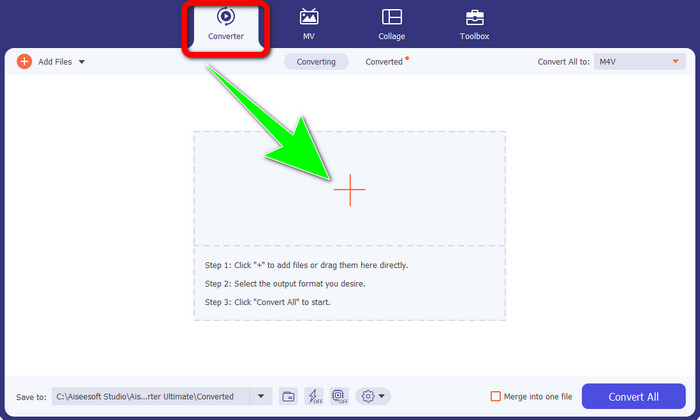
Trinn 2: Etter at du har startet programmet på Windows eller Mac, velger du Converter-fanen og klikker på +-ikonet for å legge inn M4V‑filen du vil konvertere.
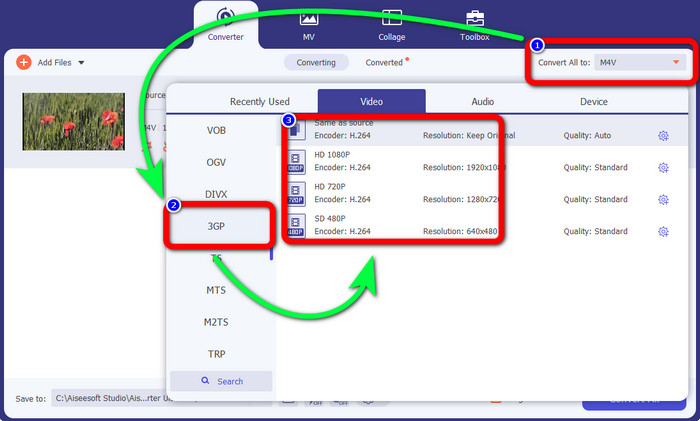
Trinn 3: Når du har lagt til M4V‑filen din, klikker du på knappen Convert all to. Alternativene for format vises, og du velger filformatet 3GP. Du kan også velge hvilken oppløsning du ønsker.
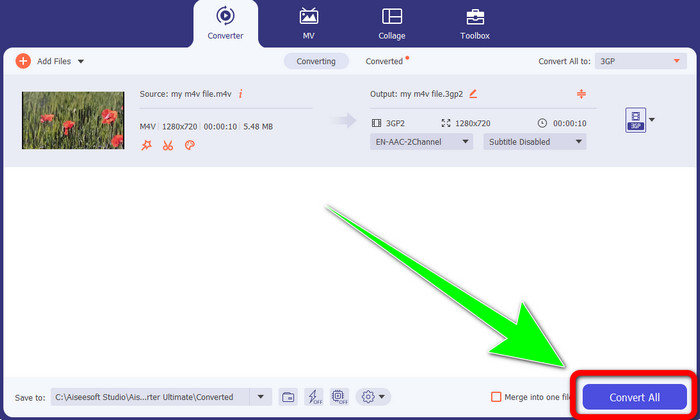
Trinn 4: Til slutt, når du er ferdig med å velge 3GP‑filformatet, klikker du på knappen Convert All og lagrer det endelige resultatet. Dette programmet støtter batch‑konvertering, så du kan legge til flere filer og konvertere dem samtidig.
Del 2: Online verktøy for å konvertere M4V til 3GP
Etter å ha blitt kjent med den beste frakoblede konverteren, kan vi gå videre til den beste nettbaserte konverteren for deg. Dette nettprogrammet er FVC Free Video Converter Online. Dette verktøyet lar deg konvertere M4V til 3GP uten problemer på bare noen få klikk. Det støtter også ulike video‑ og lydformater, som MP4, WMA, MOV, FLV, TS, MP3 osv. I tillegg er dette nettverktøyet gratis, og du kan bruke det både på Windows og Mac. Hvis du vil konvertere M4V‑filen din til 3GP‑format, følger du den detaljerte veiledningen nedenfor.
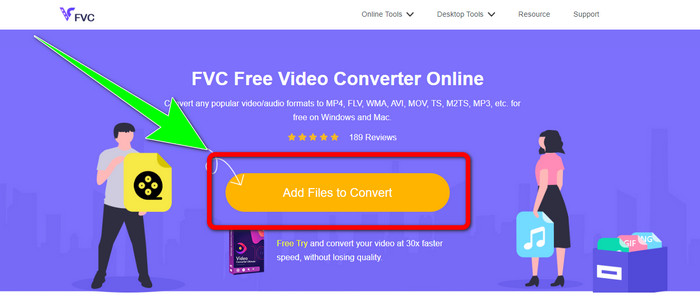
Trinn 1: Gå til nettstedet til FVC Free Video Converter Online. Klikk på knappen Add Files to Convert og importer M4V‑filen din.
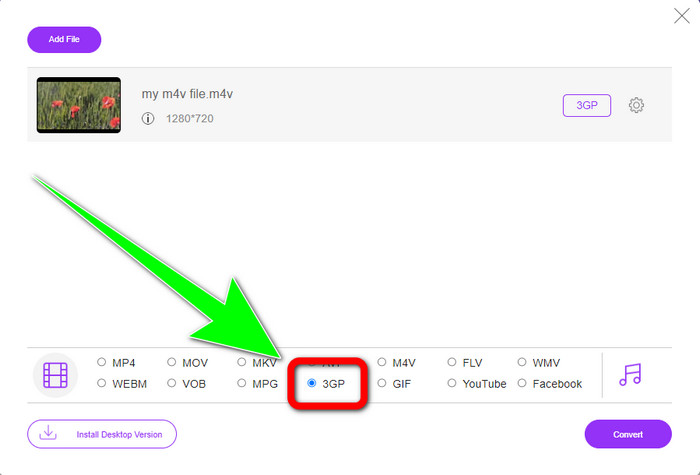
Trinn 2: Klikk på filformatet 3GP blant formatvalgene.
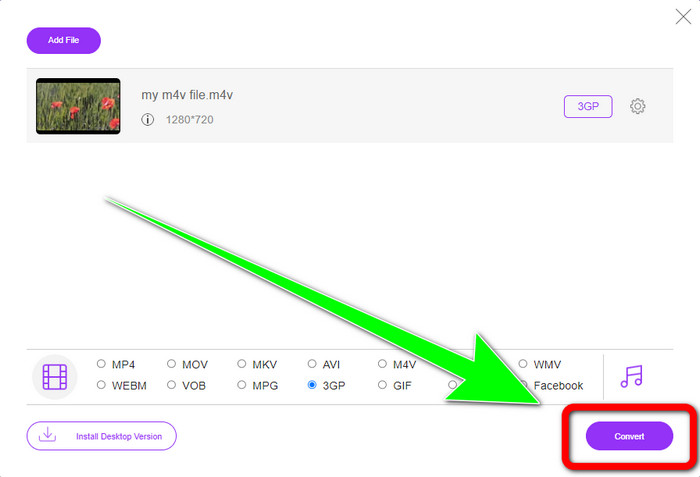
Trinn 3: Etter at du har valgt 3GP‑filformatet, kan du klikke på knappen Convert for å konvertere M4V‑filen din til 3GP‑format. Vent deretter på at konverteringsprosessen fullføres, og lagre videoen din.
Del 3: Hvilken M4V til 3GP Converter å velge
Lurer du på hvilket program som er best av de to? Helt ærlig er begge utmerkede. Hvis du planlegger å laste ned en kraftig videokonverter, er det mest anbefalte programmet du kan bruke Video Converter Ultimate. Det har en batch‑konverteringsprosess som lar deg konvertere flere filer i én og samme operasjon. Det tilbyr også et intuitivt grensesnitt som passer for ikke‑profesjonelle brukere. I tillegg til å konvertere har det flere funksjoner du kan dra nytte av, som videoredigering, laging av collager, musikkvideoer og mer. På den andre siden, hvis du foretrekker å bruke en nettbasert konverter, bør du bruke FVC Free Video Converter Online. Denne programvaren tilbyr også batch‑konvertering. Den er også perfekt for nybegynnere. Du trenger ikke å betale, fordi denne konverteren er 100 % gratis. Med disse opplysningene kan vi si at begge konverterne er utmerkede og pålitelige.
Del 4: Sammenligningstabell mellom M4V og 3GP
| M4V | 3GP | |
| Filtype | MPEG4-video | 3GP multimedieformat |
| Beskrivelse | M4V er en type videobeholder som brukes til å lagre både lyd- og videoinformasjon for iTunes-filer. Apple FairPlay DRM kan brukes til å beskytte filer av denne typen mot uautorisert visning og kopiering; i dette tilfellet bør lyd- eller videofiler kjøpes fra iTunes Store. Fordi formatet er basert på MPEG-4-struktur, kan nåværende spillere nesten alltid se ubeskyttede filer. | En multimediebeholder kjent som 3GP ble opprettet i 1998 for GSM-baserte (Global System for Mobile Communications) telefoner. Det er best for mobiltelefoner fordi beholderen bruker lite data, båndbredde og lagring. For filer sendt via MMS fungerer den som en standard container. |
| Utviklet av | Apple inc. | Tredje generasjons partnerskapsprosjekt |
| Fordeler | Festet til Apples beskyttelse. | Kompatibel med nesten enheter, |
| Ulemper | Kun kompatibel med nesten Apple-enheter og -programmer | Lagrer video i lav oppløsning. |
Del 5: Vanlige spørsmål om konvertering av M4V til 3GP
Hvordan konverterer jeg M4V til 3GP uten å miste kvalitet?
Hvis du ønsker å konvertere M4V‑filen din til 3GP‑format uten å miste kvalitet, må du bruke Video Converter Ultimate. Dette programmet vil sørge for at videokvaliteten din ikke forringes. Du kan også bruke dette verktøyet til å konvertere M4V til DIVX.
Er M4V filer kompatible med andre enheter/systemer?
Absolutt ja. Du kan bruke en rekke M4V‑spillere til å spille av denne typen video på ulike enheter. M4V‑spillere gir store fordeler, for eksempel kompatibilitet med flere systemer som Android, Linux, iOS, Windows og Mac.
Er M4V mindre enn MP4?
Størrelsen avhenger av hva som er inni. Som lyd- og videokodek, bildefrekvens, oppløsning og mer.
Konklusjon
Dette er metodene for å konvertere M4V til 3GP ved hjelp av både frakoblede og nettbaserte verktøy. Hvis du vil konvertere ulike filformater på Windows eller Mac, kan du bruke Video Converter Ultimate. Og hvis du ser etter et utmerket nettbasert verktøy, er FVC Free Video Converter Online det beste valget.
-
 Hvordan konvertere DIVX til 3GP på Windows, Mac og Online
 Hvordan konvertere DIVX til 3GP? Hvis du leter etter et svar, les denne artikkelen. Vi vil vise deg flotte prosedyrer ved hjelp av forskjellige omformere.
-
 4 beste måter å konvertere SWF til 3GP på Windows, Mac & Online
 Her er de mest nyttige metodene for å konvertere SWF til 3GP umiddelbart. Dette innlegget vil også vise deg noen effektive Windows- og Online-verktøy du kan bruke.
-
 Finn de beste og enkle metodene for å konvertere TS til 3GP
 Denne artikkelen vil tilby en fantastisk TS til 3GP-konverterer gratis nedlasting du kan prøve på enheten din. Les denne artikkelen for å finne flere viktige detaljer du trenger.
