


 Video Converter Ultimate
 Skjermopptaker
 Videoreparasjon
 Sikker nedlasting
Raskeste metode for hvordan du konverterer MXF til M4V på skrivebord og online
MXF-fil er et industristandardformat for lyd og video. Dette filformatet støttes imidlertid ikke av Apple QuickTime Player, så det er umulig å spille av MXF-filen din med dette programmet. Hvis du ikke kan spille av MXF-filen din i Apple QuickTime Player, må du konvertere den til et annet filformat, for eksempel M4V. Heldigvis har vi den beste løsningen for deg. Denne artikkelen gir deg de mest effektive og nyttige metodene for å konvertere MXF til M4V ved hjelp av pålitelige konverterere både offline og online. I tillegg vil vi gi deg en idé om hvordan du gjør videoene dine mer attraktive ved å redigere dem. Les denne artikkelen med én gang og få informasjonen du trenger.

Del 1: Flott metode for å konvertere MXF til M4V Online
En av de beste nettbaserte konvertererne du kan bruke til å konvertere MXF til M4V, er FVC Free Video Converter Online. Denne nettløsningen kan konvertere ulike videofiler, som MOV, MKV, AVI, FLV, MP4, WEBM, VOB og mer. Du kan også konvertere mange filer i én operasjon, siden denne konverteren støtter batchkonvertering. I tillegg kan du, før du konverterer videoene dine, redigere oppløsning, bithastighet og bildefrekvens etter eget ønske. Den har også et brukervennlig grensesnitt og en enkel måte å konvertere filer på. Slik kan alle bruke denne nettbaserte konverteren, både avanserte og uerfarne brukere. Dessuten er denne nettbaserte konverteren tilgjengelig i alle nettlesere, som Google Chrome, Mozilla Firefox, Microsoft Edge og flere, noe som gjør den lett tilgjengelig for brukerne.
Dessuten, bortsett fra videokonvertering, kan du også konvertere en rekke lydformater, inkludert AAC, MP3, M4A, M4B, FLAC og mer. Den har også en lydinnstilling som lar deg justere samplings- og bithastighetene deres. Med disse funksjonene kan du se at FVC Free Video Converter Online er pålitelig.
Funksjoner
◆ Konverter ulike videoformater, for eksempel MP4, AVI, M4V, MXF, MOV, WMV, MKV, FLV og mer.
◆ Kan redigere videoens oppløsning, bithastighet og bildefrekvens.
◆ Tilbyr batchkonverteringsprosess.
◆ Konverter lydfiler som MP3, AAC, AC3, M4B, FLAC og mer.
◆ Kan redigere lydens samplingshastighet og bithastighet.
Se trinnene nedenfor for å lære om konvertering av MXF-filen til M4V-format ved å bruke FVC Free Video Converter Ultimate.
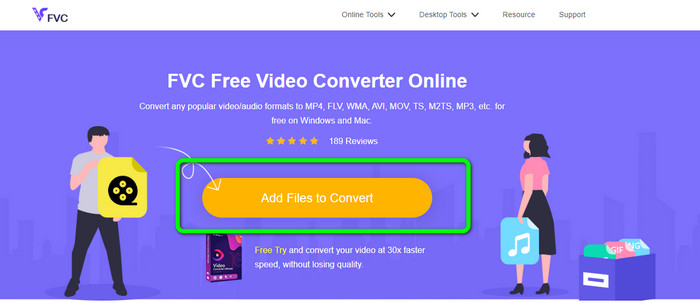
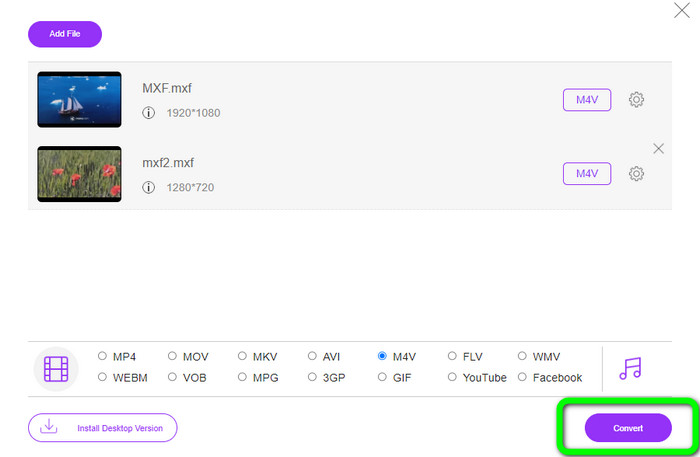
Trinn 1: Gå til nettleseren din og besøk nettstedet til FVC Free Video Converter Online. Når du er på hovedsiden, klikk på Add Files to Convert for å laste opp MXF-videofilen du vil konvertere.
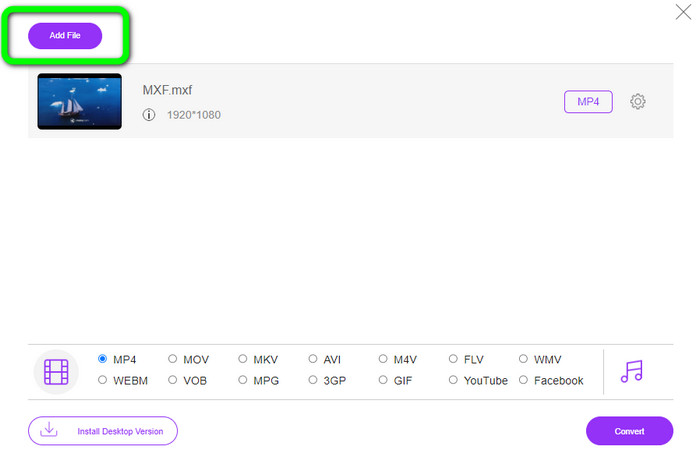
Trinn 2: Denne konverteren tilbyr en batchkonverteringsprosess. Så hvis du vil laste opp flere MXF-filer, klikker du på Add File-knappen.
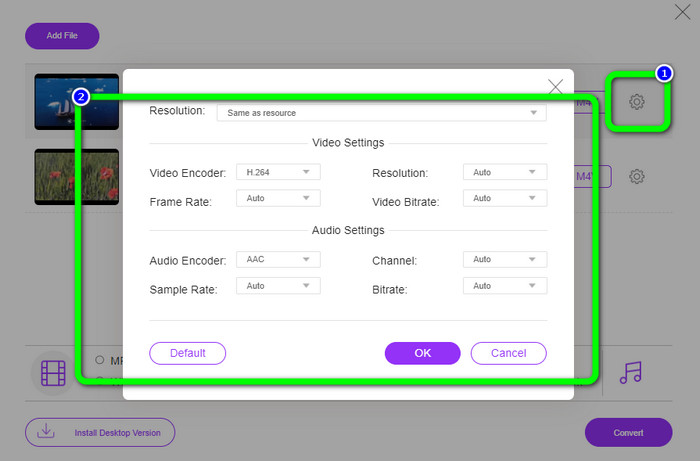
Trinn 3: I denne delen kan du redigere videoen din ved å klikke på Setting-ikonet. Etter å ha klikket på dette ikonet, kan du redigere videoens bildefrekvens, oppløsning og bithastighet. Du kan også endre lydens samplingsfrekvens og bithastighet. Klikk deretter på OK-knappen.
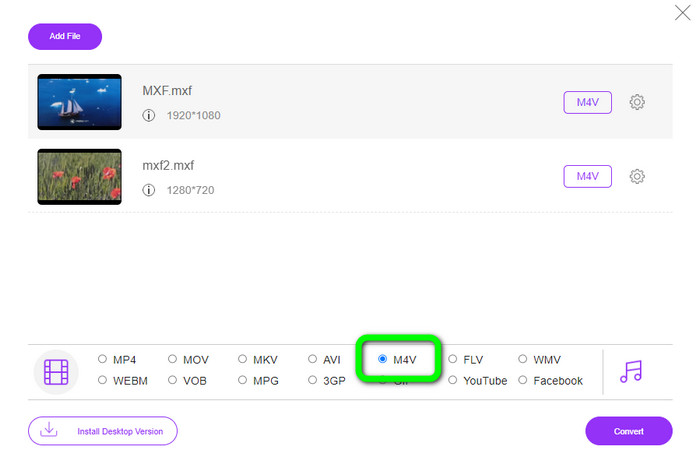
Trinn 4: Etter å ha redigert videoene dine, kan du endre utdataformatet ved å klikke på M4V-formatet fra formatvalgene nederst i grensesnittet.
Trinn 4: Til slutt trykker du på Convert-knappen. Vent på konverteringsprosessen og lagre videoen på ønsket plassering.
Del 2: Raskeste måten å konvertere MXF til M4V tapsfritt
Hvis du vil ha et nedlastbart verktøy for å konvertere MXF til M4V uten kvalitetstap, er Video Converter Ultimate det beste valget. Denne kraftige konverteren kan konvertere ulike filer raskt fordi den har en rask konverteringsprosess – ikke 10x, ikke 20x, men 30x raskere enn gjennomsnittlig konverteringshastighet. I tillegg har den en annen flott funksjon du kan dra nytte av. Du kan konvertere flere filer samtidig fordi denne konverteren tilbyr batchkonvertering. Dessuten, i tillegg til MXF og M4V, støtter dette programmet en rekke videoformater, inkludert MP4, FLV, AVI, MKV, MOV, WMV, VOB og mer. Video Converter Ultimate er dessuten tilgjengelig både på Windows og Mac, noe som er flott for både Mac- og Windows-brukere.
Videre har denne nedlastbare applikasjonen flere flotte funksjoner i tillegg til å konvertere videoer. Hvis du ønsker å lage en musikkvideo for din partner, familie, venner, etc., kan du bruke dette verktøyet. Video Converter Ultimate tilbyr en musikkvideoskaper der du kan lage fantastiske filmer med musikk. Den tilbyr også gratis temaer, for eksempel glade, elegante, enkle, snørike netter, romantiske og mer. Dessuten, hvis du har en video med stor filstørrelse, kan du komprimere den ved hjelp av videokompressoren. Med hjelpen til dette verktøyet kan du enkelt endre størrelsen på videoen din.
Funksjoner
◆ Konverter 100+ videofilformater, inkludert M4V, MXF, FLV, AVI, MP4, XVID, VOB, MOV, SWF, MKV og mer.
◆ Konverter flere filer samtidig.
◆ Tilbyr musikkvideoprodusent.
◆ Lag en fantastisk collage.
◆ Tilby videoredigeringsverktøy, for eksempel videotrimmer, kompressor, forsterker, fargekorrigering, etc.
◆ Konverter bildefilformater som BMP, PNG, JPG og mer.
Følg de detaljerte trinnene nedenfor for å konvertere MXF til M4V tapsfritt ved å bruke FVC Video Converter Ultimate.
Trinn 1: Last ned Video Converter Ultimate på enheten din ved å klikke på Download-knappen. Det er to nedlastingsknapper nedenfor. Hvis du er Windows-bruker, klikker du på Windows-versjonen. Og klikk på Mac-versjonen hvis du er Mac-bruker. Start deretter programmet.
Gratis nedlastingFor Windows 7 eller nyereSikker nedlasting
Gratis nedlastingFor MacOS 10.7 eller nyereSikker nedlasting
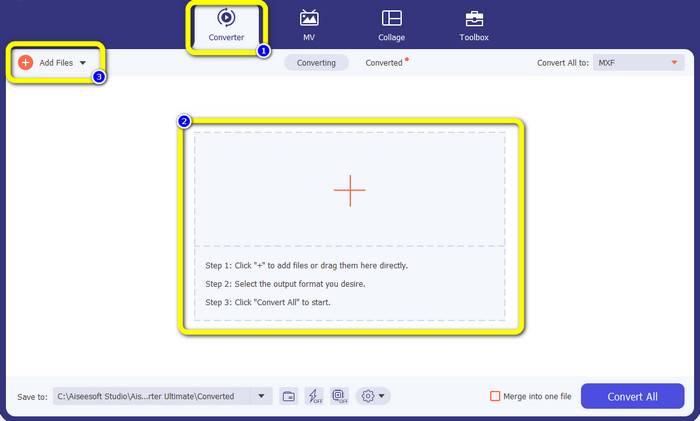
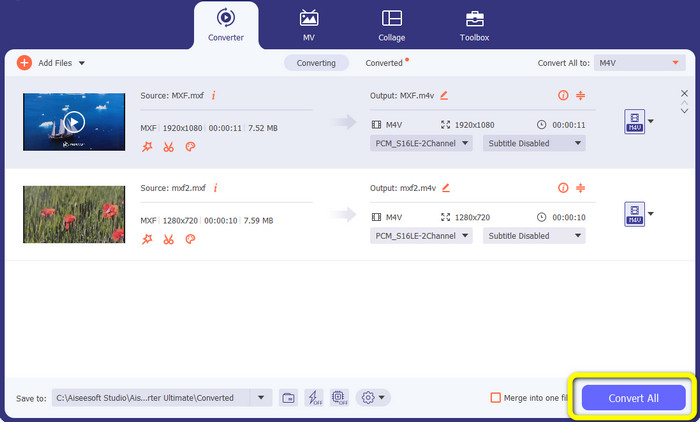
Trinn 2: Deretter velger du Converter-panelet. Klikk på +-ikonet eller Add File-knappen for å importere MXF-videofilen.
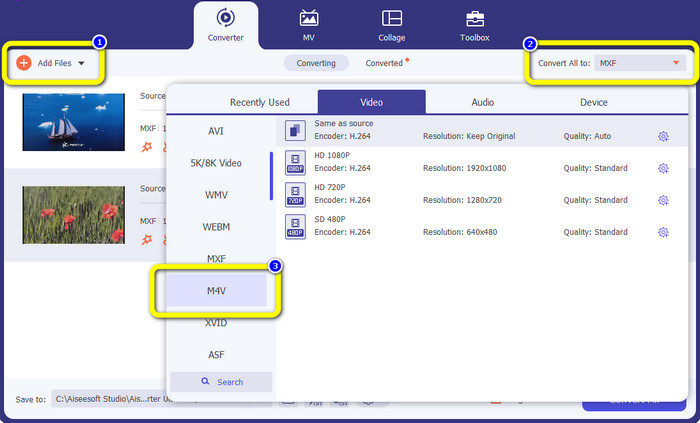
Trinn 3: Hvis du vil konvertere flere filer samtidig, klikker du på Add File-knappen. Klikk deretter på Convert All-knappen og velg M4V-filformatet. Du kan også velge ønsket oppløsning for videoen din.
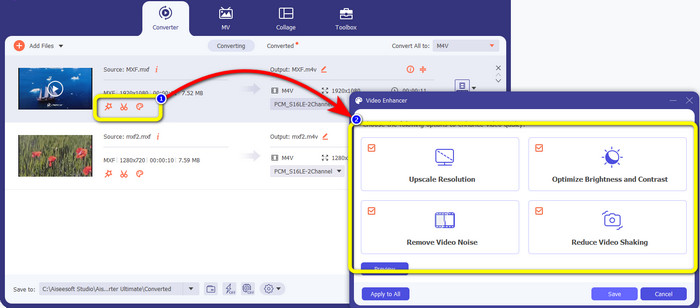
Trinn 4: Hvis du vil redigere videoene dine før du konverterer dem, kan du gjøre det. Klikk på redigeringsverktøyene i den første boksen. Velg deretter ikonet for video enhance. Kryss deretter av i alle boksene for å forbedre oppløsning, optimalisere lysstyrke og kontrast, samt redusere videostøy og risting.
Trinn 5: Når du er ferdig med å redigere og endre utdataformatet for videoene dine, klikker du på Convert All-knappen og lagrer videoen på enheten din.
Del 3: Hva er MXF?
SMPTE-foreningen opprettet MXF-mediebeholderen for forretningsbruk. MXF implementerer en del av dataskjemaet Advanced Authoring Format (AAF) og har nylig dukket opp som industristandarden for ikke-lineær profesjonell videoredigering. MXF-filer kan enkelt konverteres til et hvilket som helst vanlig videoformat og komprimeres med nesten hvilken som helst kodek. Det er viktig å merke seg at implementeringen av dette formatet av Sony, Panasonic og Canon hadde mange inkompatibiliteter, en stor svakhet ved denne beholderen. Standardens revisjon fra 2009 tar opp disse problemene.
Del 4: Hva er M4V?
M4V er en type videobeholder som brukes av iTunes-filer til å lagre både lyd- og videodata. Det er best å kjøpe lyd- eller videofiler fra iTunes Store hvis de er Apple FairPlay DRM-beskyttet mot uautorisert visning og kopiering. Fordi formatet er basert på MPEG-4-struktur, kan praktisk talt alle moderne spillere vise ubeskyttede filer.
Mer lesing:
Beste MXF til WMV-konvertere for å konvertere MXF til WMV gratis
Topp 4 beste løsninger for å konvertere MXF til MKV [Løst]
Del 5: Vanlige spørsmål om konvertering av MXF til M4V
Hvor stor er en MXF-fil?
MXF støtter filstørrelser på opptil 2 gigabyte. I tillegg støtter MXF lengre filer. Maksimal mediefilfangsttid for OMF-formatet er tre timer. MXF kan håndtere 12 timer med lyd på to kanaler ved 48 kHz.
Hvem bruker MXF-filer?
Flere produksjonsreklamer, inkludert SONY MSW 2000-serien med IMX-videoopptakere, brukte den. Dessuten støtter Avid-redigeringsutstyr en viss variant av MXF.
Hvordan konverterer jeg MXF til MOV?
Du kan bruke FVC Free Video Converter Online. Last opp MXF-filen din, velg MOV-formatet fra formatvalgene og klikk på Convert-knappen. På denne måten kan du konvertere MXF til MOV umiddelbart.
Konklusjon
Det finnes mange måter å konvertere MXF til M4V på. Men hvis du vil ha de beste og mest verdifulle konvertererne, kan du bruke programmene som er nevnt ovenfor: Video Converter Ultimate og FVC Free Video Converter Online. Disse to konvertererne kan konvertere filer raskere enn mange andre konverterere, og du kan bruke dem gratis.
-
 Ulike metoder for hvordan du endrer MOV til M4V-filformat
 Ønsker du en effektiv metode for å konvertere MOV-filen til M4V-format? Da vil denne artikkelen oppfylle ønsket ditt. Her er de beste omformerne du kan bruke.
-
 Utmerkede teknikker for å umiddelbart konvertere GIF til M4V
 Denne guideposten gir deg de mest effektive strategiene for å konvertere GIF til M4V. I tillegg vil vi introdusere deg for de to beste omformerne du kan prøve.
-
 Topp 2 eksepsjonelle måter å konvertere M2TS til M4V
 Tror du det er mulig å konvertere M2TS-filen til et annet format? Vi vil vise deg hvordan du konverterer M2TS til M4V filformat hvis du vil ha den beste løsningen.
