


 Video Converter Ultimate
 Skjermopptaker
 Videoreparasjon
 Sikker nedlasting
Enkel instruksjon om hvordan du konverterer OGV til MKV
Vil du vite hvordan du konverterer OGV til MKV og åpner den i en annen mediespiller? Da er du heldig, for dette innlegget vil introdusere deg for utmerkede programmer med enkle trinn for å konvertere ulike filer. Du trenger heller ikke å bekymre deg; disse verktøyene er verdt å bruke, og du vil ikke bli skuffet. Så det er best å gå videre til hoveddelen, for vi vil ikke at du skal vente lenger. La oss oppdage disse metodene og lese denne artikkelen med én gang.

Del 1: Informasjon om OGV- og MKV-format
Før du konverterer OGV-filen til MKV-format, la oss først gi deres verdifulle informasjon.
Hva er OGV?
Et gratis, åpen kildekode, ikke-patentert multimediebeholderformat og kodek er Ogg Vorbis (OGV). Den tilhører Ogg-formatet og kodekfamilien, som den ideelle organisasjonen Xiph.Org Foundation opprettet for å ta på seg patenterte kodeker. OGV kan time-direct multiplex (TDM) tekst (teksting) og metadata. I tillegg, for tapsfri og tapsfri komprimering, støtter den streaming.
Hva er MKV?
MKV er en åpen kildekode-beholder som kan inneholde mediemateriale som har blitt komprimert ved hjelp av ulike kodeker. Den har mange fordeler i forhold til den tradisjonelle AVI-beholderen, inkludert muligheten til å inkludere lydspor og undertekster på mange språk som kan byttes uten å sette avspilling på pause og hurtig filsøk og tilbakespoling. I tillegg er formatet enkelt å endre, noe som gjør det enkelt å trekke ut lyd- og videodata.
Del 2: Hvordan konvertere OGV til MKV tapsfritt
Hvis du er her for å lære hvordan du konverterer OGV til MKV uten kvalitetstap, er du på rett sted. Den beste nedlastbare konvertereren du kan finne er Video Converter Ultimate. Det er en av de mest pålitelige konvertererne for Windows- og Mac-datamaskiner. Dette verktøyet støtter også over 100 formater, som FLV, MP4, M4V, MOV, SWF, AVI, MTS og flere. Det er heller ikke begrenset til videokonvertering. Du kan konvertere bildefiler her, siden det støtter JPG, PNG, GIF, WEBP osv. Det beste er at du kan konvertere filer opptil 30 ganger raskere enn andre verktøy med normal konverteringshastighet. I tillegg støttes batchkonvertering i dette verktøyet, noe som betyr at du kan legge til flere videofiler og konvertere dem i én enkelt prosess.
Videre er det flere ting du kan gjøre på OGV-filen din. Hvis du vil endre størrelsen på videoen din fordi filstørrelsen er for stor, kan du bruke denne applikasjonen fordi den tilbyr en videokomprimeringsfunksjon der du kan endre størrelsen på videoen. Det er flere funksjoner du kan glede deg over for å forbedre OGV-filen din før eller etter konvertering til MKV-format.
Funksjoner
◆ Konverter videoformater, som MP4, M4V, AVI, FLV og 1000+ mer.
◆ Gi ulike temaer for å lage en musikkvideo.
◆ Det er mulig å lage en collage.
◆ Kan kombinere lyd og video.
◆ Tilbyr ulike funksjoner for å forbedre videoer, for eksempel videoforsterker, vannmerkefjerner, videohastighetskontroller, etc.
◆ Det lar deg endre hastigheten på en video.
Fordeler
- Har et forståelig grensesnitt, som er perfekt for nybegynnere.
- Konverteringsprosessen er 30 ganger raskere.
- Den tilbyr batchkonvertering.
- Konverter filer uten å miste kvalitet.
Ulemper
- Du må få pro-versjonen for å oppleve ekstraordinære funksjoner.
For å konvertere OGV til MKV-filformatet ved hjelp av Video Converter Ultimate, følg de detaljerte veiledningene nedenfor.
Trinn 1: Last ned Video Converter Ultimate på Mac og Windows. Kjør programmet etter at installasjonen er fullført.
Gratis nedlastingFor Windows 7 eller nyereSikker nedlasting
Gratis nedlastingFor MacOS 10.7 eller nyereSikker nedlasting
Trinn 2: Etter at du har startet programmet, velger du fanen Converter. Det finnes to måter å legge til OGV-filen på. Du kan klikke på knappen Add Files eller klikke på Plus-tegnet.
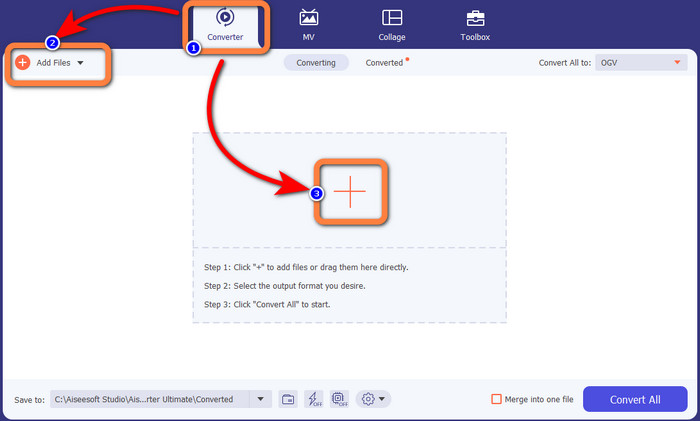
Trinn 3: Gå til formatvalgene ved å klikke på rullegardinpilen ved siden av Convert All to, og velg MKV som filformat for neste trinn.

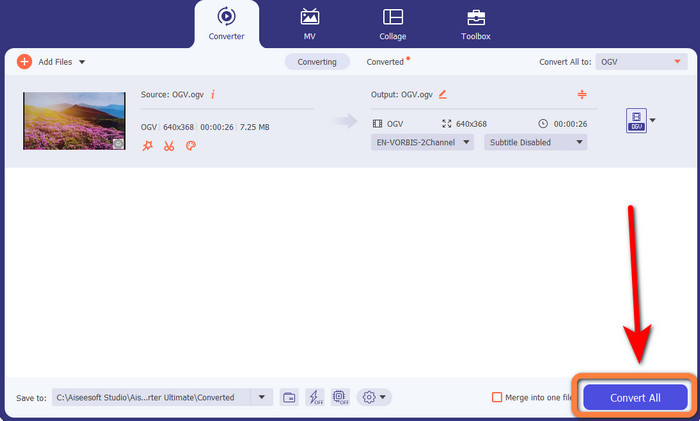
Trinn 4: Det siste trinnet er å konvertere filen ved å klikke på knappen Convert All. Deretter kan du lagre videoen som en MKV-fil.
Del 3: Enkle nettløsninger for å konvertere OGV til MKV
Bruker Converthelper
Hvis du er imponert over Video Converter Ultimate, er det betryggende at du også vil bli fornøyd med å bruke Converthelper. Dette nettbaserte verktøyet lar deg konvertere OGV til MKV enkelt og effektivt. Det støtter også ulike filer, som WMA, FLV, AVI, MP4, 3GP og flere. Det har dessuten enkle fremgangsmåter for å konvertere filer, så selv en nybegynner vil ikke ha problemer med å bruke dette nettprogrammet. I tillegg kan denne gratis videokonverteren også konvertere videoene dine uten å miste kvalitet. På den måten kan du være sikker på at videoen ser lik ut når det gjelder bildekvalitet. Det finnes imidlertid tilfeller der Converthelper ikke fungerer optimalt, spesielt hvis du har en langsom internettforbindelse. Det har også en treg konverteringsprosess, noe som er tidkrevende for brukere. Prøv å konvertere OGV-filen din til MKV med dette programmet.
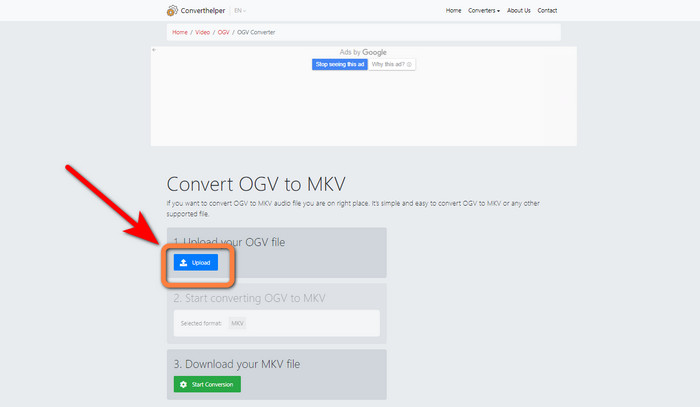
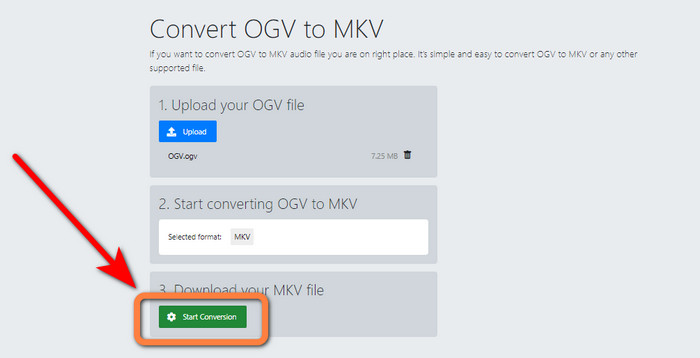
Trinn 1: Gå inn på nettstedet til Converthelper. Klikk deretter på knappen Upload og importer OGV-filen.
Trinn 2: Gå videre til punkt nummer 2. Velg MKV som filformat fra formatvalgene.
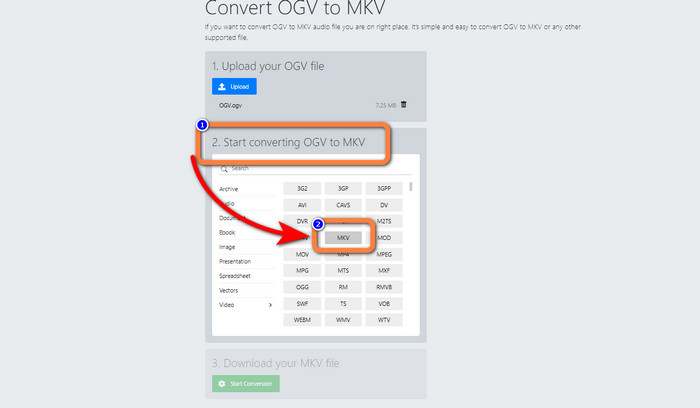
Trinn 3: Til slutt klikker du på knappen Start Conversion og venter på at konverteringsprosessen skal bli ferdig. Dette verktøyet lar deg også konvertere OGV til FLV.
Bruker FreeConvert
FreeConvert lar deg konvertere OGV til MKV umiddelbart. Du kan også bruke dette verktøyet til å konvertere andre filformater, som MP4, WMV, AVI, WEBM, 3GP, MOV osv. Det har også enkle trinn for å konvertere filer, noe som er perfekt for nybegynnere. I tillegg til konvertering kan FreeConvert også komprimere videoer, bilder, lyd, dokumenter og mer. Du kan også redigere videoen din med redigeringsverktøy som videobeskjæring og videoklipping. Ulempen er at det ved konvertering kun støtter en maksimal filstørrelse på 1 GB. Dermed kan du bare konvertere et begrenset antall filer. Du må kjøpe et abonnement hvis du vil øke maksimal filstørrelse. Det er også et nettbasert program, så det er nødvendig å ha internettilgang. Følg trinnene nedenfor for å konvertere OGV til MKV.
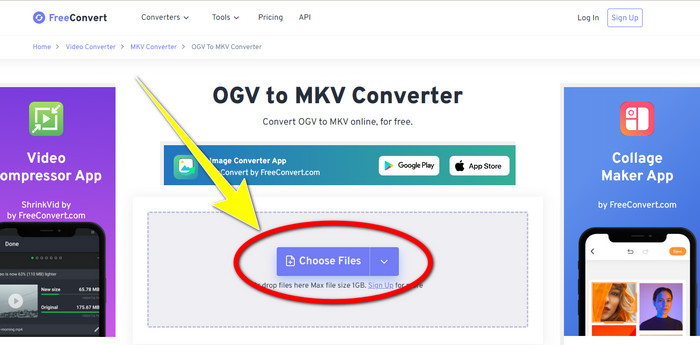
Trinn 1: Gå til nettstedet til FreeConvert. Klikk på knappen Choose File for å legge til OGV-filen.
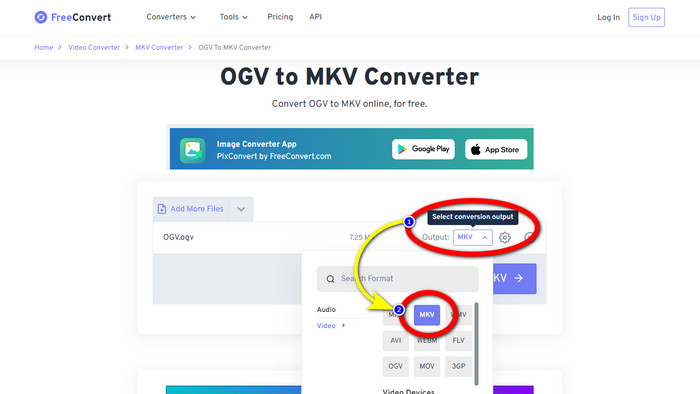
Trinn 2: Neste trinn er å gå videre til knappen Output. Klikk på den for å se formatvalgene og velg filformatet MKV.
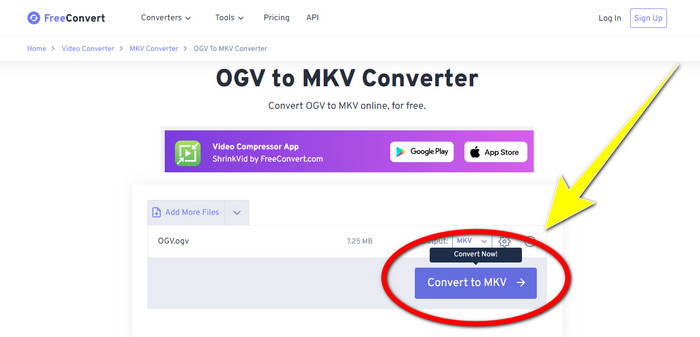
Trinn 3: Etter at du har valgt MKV som filformat, klikker du på knappen Convert to MKV. Deretter starter konverteringsprosessen, og den endelige videoen lagres.
Del 4: Vanlige spørsmål om konvertering av OGV til MKV
1. Kan jeg bruke FFmpeg til å konvertere OGV til MKV?
Selvsagt kan du det. Last ned FFmpeg. Det er et kommandobasert verktøy som kan konvertere ulike videofiler, inkludert OGV, MKV, MOV, MP4, AVI og flere.
2. Er MKV et vanlig format?
De fleste nåværende enheter er kompatible med formatet. Tallrike lyd- og undertekstspor kan lagres i én fil ved å bruke MKV- eller Matroska-videoformatet. Den er utrolig godt likt for å holde filmer. Ganske liten filstørrelse og video av høy kvalitet.
3. Er OGV en OGG?
Nei. OGG er et åpen kildekode-format som brukes av containeren OGV. Et av hovedmålene med OGGs utvikling var å være fri for restriksjoner på programvarepatenter. En videostrøm med eller uten lyd som har blitt komprimert ved hjelp av Opus-, Vorbis-, Theora- eller Speex-metoden, lagres med OGV-filtypen.
Konklusjon
Å bruke nettverktøy til å konvertere OGV til MKV er effektivt, men du kan ikke ignorere at irriterende annonser stadig dukker opp under konverteringen. Hvis du vil konvertere filer uten å bli forstyrret av reklame, kan du bruke Video Converter Ultimate.
-
 Topp 4 beste løsninger for å konvertere MXF til MKV [løst]
 Bli kjent med disse fire flotte metodene for å enkelt konvertere MXF til MKV online og offline. Appene som er inkludert i dette innlegget kan hjelpe deg med å konvertere filer uten problemer.
-
 4 måter å konvertere MPG til MKV ved hjelp av online/offline-konverterere
 Leter du etter en brukervennlig omformer som kan konvertere MPG-filer til MKV? Denne artikkelen viser de beste og enkleste måtene å raskt konvertere MPG til MKV-filer
-
 Enkleste måter å konvertere MOV til MKV gratis på Mac
 Vil du konvertere MOV til MKV gratis på Mac? Les denne artikkelen for å vite de enkleste og enkleste måtene å konvertere MOV-filen til MKV.
