


 Video Converter Ultimate
 Skjermopptaker
 Videoreparasjon
Beste online og offline konverterere for å konvertere SWF til MKV-filer
SWF-fil er et format for Adobe Flash som inneholder videoer og vektorgrafikk-baserte animasjoner. Denne typen fil kan vanligvis ikke håndtere ulike undertekststrømmer. Mange ser etter et filformat som kan håndtere flere undertekststrømmer og lydspor på forskjellige språk. Hvis du derfor er en av dem som leter etter en løsning for å endre SWF til MKV, presenterer vi de beste konvertererne for deg!

Del 1. Konverter SWF til MKV offline ved å bruke FVC Video Converter Ultimate
FVC Video Converter Ultimate er et gratis offline verktøy som lar deg konvertere ulike filformater som SWF til MKV, MP4, WMV, MOV, AVI, FLV og mange flere. Denne konverteren har mange flotte funksjoner som kan hjelpe deg med å forbedre filene dine. Du kan klippe, legge til effekter, legge til vannmerke og legge til undertekster. Det som er fantastisk, er at du også kan batchkonvertere SWF-filene dine. Dessuten støtter den ultrarask konvertering, slik at du kan konvertere filer på bare noen få sekunder. Trinnene nedenfor vil garantert hjelpe deg med å konvertere SWF til MKV-fil.
Trinn 1. Last ned konverteren ved å klikke på Last ned-knappen nedenfor for Windows eller Mac. Når nedlastingen er fullført, åpner du programmet for å starte prosessen.
Gratis nedlastingFor Windows 7 eller nyereSikker nedlasting
Gratis nedlastingFor MacOS 10.7 eller nyereSikker nedlasting
Trinn 2. Etter at du har åpnet konvertereren, klikker du på Legg til filer-knappen eller +-knappen for å laste opp SWF-filen din i programmets første grensesnitt.
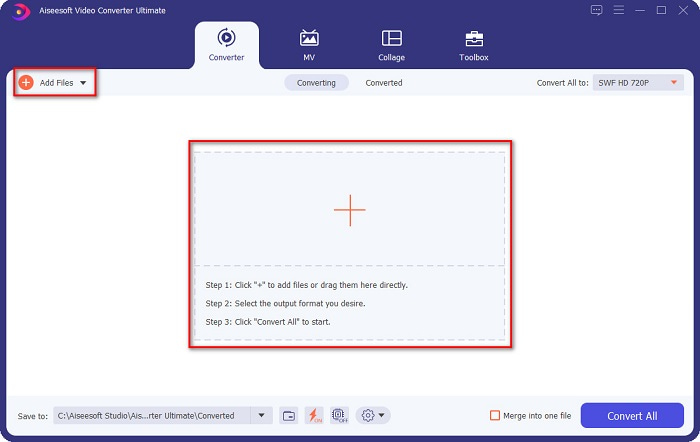
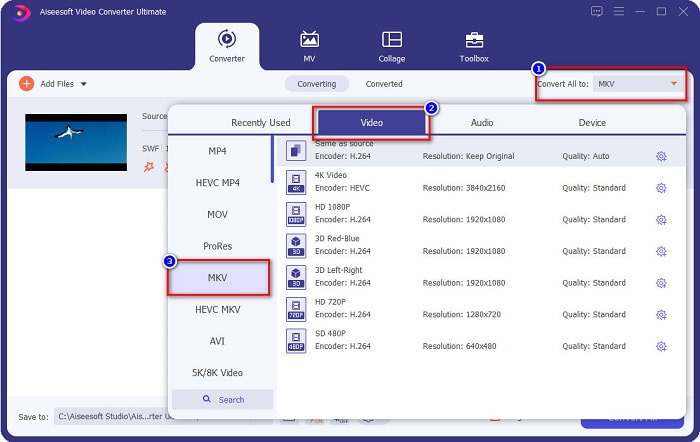
Trinn 3. Klikk deretter på Konverter alle til-knappen. Når du har klikket på «Konverter alle til»-knappen, vil en liste over filformater vises. Velg deretter filformatet MKV.
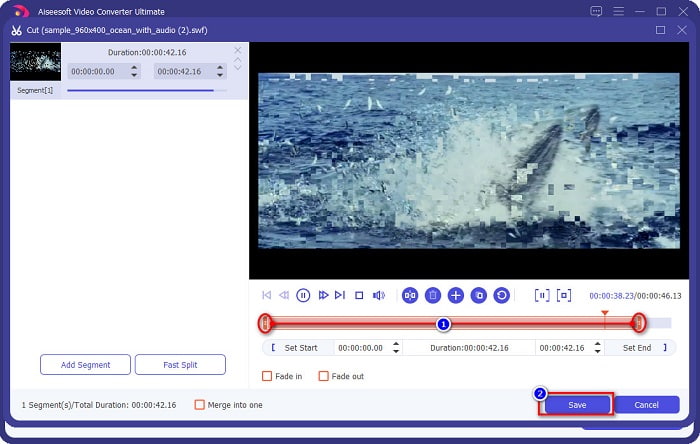
Valgfritt. Hvis du vil kutte ned lengden på filen, klikker du på saks-knappen. Du kan klippe lengden ved å justere avspillingshodene til ønsket varighet. Klikk deretter på Lagre-knappen for å lagre endringene.
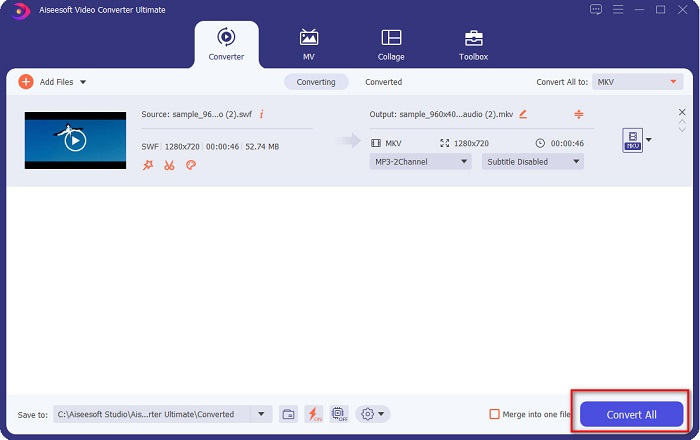
Trinn 4. Til slutt klikker du på Konverter alle-knappen for å konvertere SWF-filen din til en MKV-fil. Det var det! Etter noen sekunder vil filen din være klar.
Del 2. Konverter SWF til MKV online ved å bruke gratis online omformere
Det kan ikke nektes at det er mer praktisk å konvertere filer ved hjelp av et nettbasert verktøy fordi du ikke trenger å laste ned noe. Derfor tilbyr vi gratis online verktøy som er et av de beste i dag.
FVC Gratis Online Video Converter
Fremgangsmåte for hvordan du konverterer med FVC Free Online Video Converter:
Trinn 1. For å bruke denne konverteren søker du etter FVC Free Online Video Converter, eller klikker på denne lenken, så blir du sendt direkte til nettstedet deres.
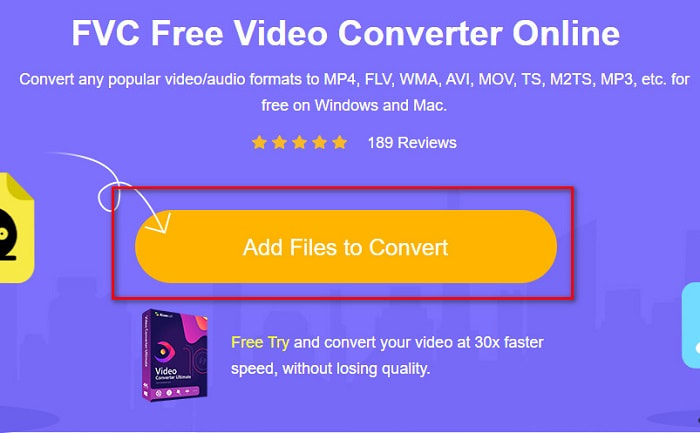
Trinn 2. Når du har kommet til nettstedet, klikker du på Add Files to Convert. Start deretter konverteren, og velg SWF-filen din når datamaskinens filer vises.
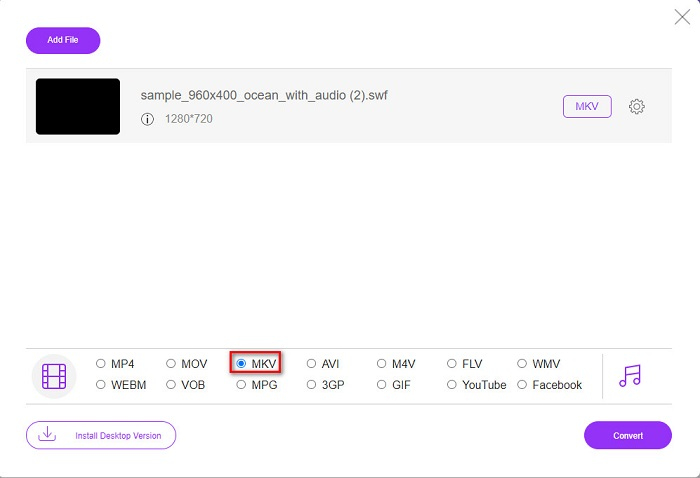
Trinn 3. De tilgjengelige filformatene er listet opp under programmets andre grensesnitt. Klikk på MKV-filen, og gå deretter videre til neste trinn.
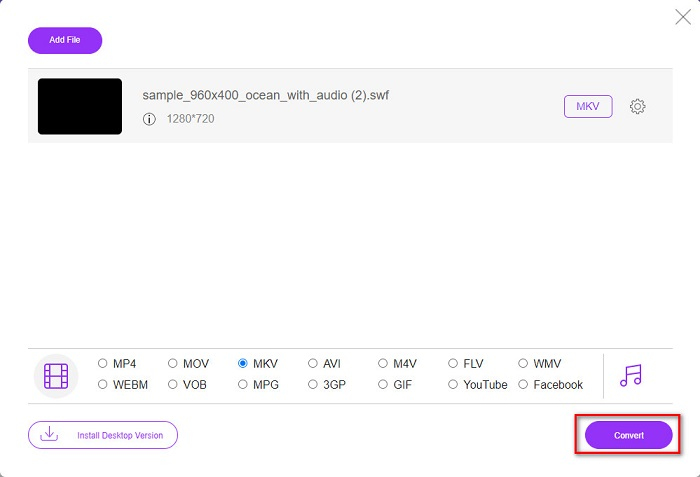
Trinn 4. For å fullføre klikker du på Convert-knappen for å starte konverteringen. Vent deretter til konverteringen er ferdig.
Aconvert.com
En annen gratis online-konverterer du bør prøve, er Aconvert.com. Dette verktøyet kan konvertere ulike filer på nettet. Det er også lett å bruke og lar deg konvertere raskt, avhengig av internett-hastigheten din. Siden denne konverteren er et nettbasert verktøy, kan du oppleve treg konvertering og annonser som kan virke forstyrrende. Likevel lar denne konverteren deg konvertere SWF til MKV uten problemer.
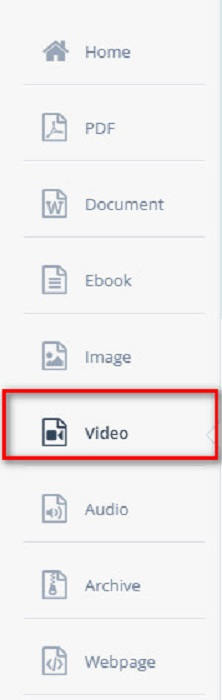
Trinn 1. Søk etter Aconvert.com i nettleseren din. Klikk deretter på Video-panelet på venstre side av programmets grensesnitt.
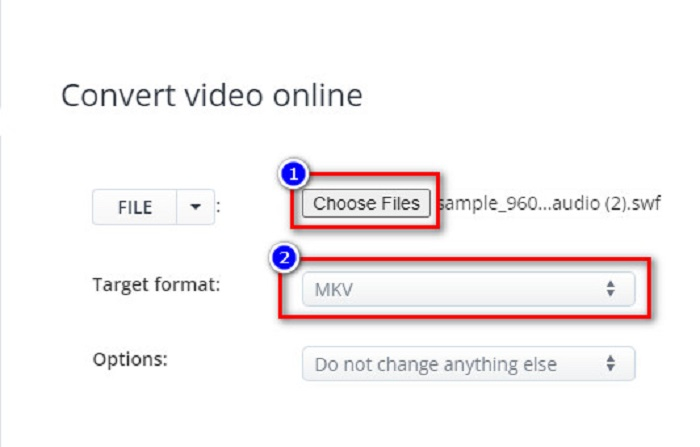
Trinn 2. Klikk deretter på Choose Files-knappen, og velg SWF-filen din. Klikk deretter på MKV-filen under Target Format.
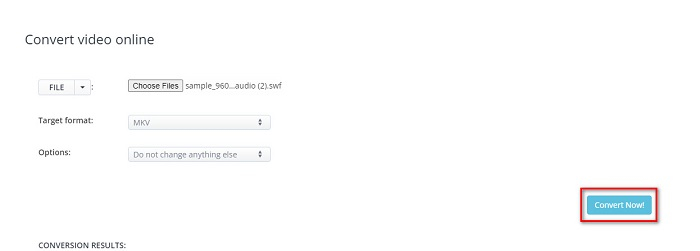
Trinn 3. Til slutt klikker du på Convert Now!-knappen for å starte konverteringen av SWF-filen til MKV.
FreeConvert.com
FreeConvert.com er en online-konverterer for å konvertere SWF-filen din til MKV-filformat. Den er enkel å bruke, men inneholder mange forstyrrende annonser. Likevel støtter denne konverteren ulike filformater som er tilgjengelige på nettet.
Trinn 1. Søk etter FreeConvert.com i nettleseren din for å komme til nettstedet deres. Klikk deretter på Choose Files-knappen. Datamaskinens filer vil vises, og du velger SWF-filen din.

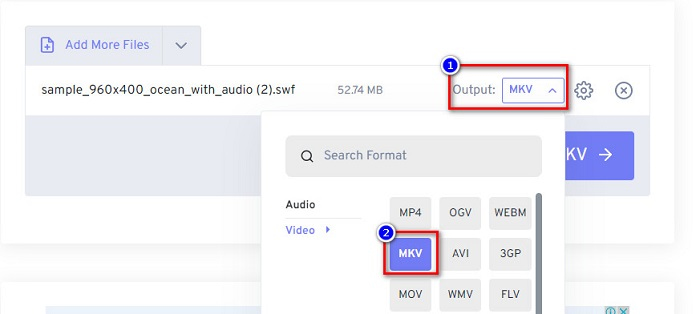
Trinn 2. Klikk på nedtrekks-knappen ved siden av ordet Output for å velge ønsket utdataformat. Klikk på MKV som utdatafilformat.
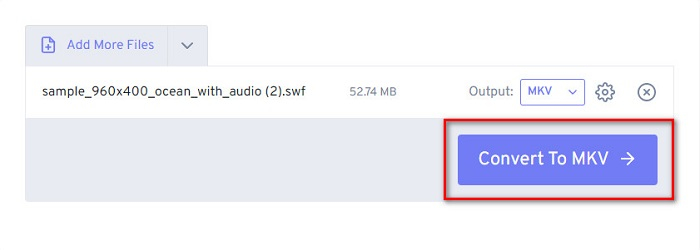
Trinn 3. Klikk deretter på Convert to MKV-knappen for å begynne å konvertere filen din.
Del 3. Utvidet kunnskap om SWF og MKV
SWF eller Shock Wave File er et Adobe Flash-filformat. Macromedia utviklet det, men senere eid av Adobe. Dette filformatet brukes vanligvis over nettet, men du kan åpne det ved å aktivere Adobe Flash i nettleseren din. SWF-filer inneholder ikke bare videoer, men også vektorbaserte animasjoner. Dessuten har denne typen filformater komprimert lyd, video og animasjoner, slik at det kan være tilgjengelig på nettet.
Til sammenligning er MKV-fil eller Matroska et filformat som støttes av forskjellige lyd- og videokodeker. Den brukes vanligvis til å lagre korte videoklipp og filmer. Selv om filstørrelsen på MKV er større, er MKV-filen en fremtidssikker fil, og dette betyr at denne filtypen er designet for ikke å være utdatert.
Del 4. Vanlige spørsmål om konvertering av SWF til MKV
Kan du konvertere SWF til MKV tapsfritt?
Ja. Du kan konvertere SWF-filene dine til MKV-filer uten å miste kvaliteten. Noen omformere kan endre SWF til MKV tapsfritt, som FVC Video Converter Ultimate. Denne omformeren kan konvertere filer uten at kvaliteten påvirkes.
Kan du spille SWF på Windows?
Ja det kan du. Du må imidlertid fortsatt laste ned en skjult flash-spiller for adobe fordi adobe flash fases ut.
Støtter Windows Media Player SWF-filer?
Nei. Windows Media Player støtter ikke SWF-filer. Du må likevel ha en .swf-codec for å kunne spille den av i Windows Media Player. Det enkleste er imidlertid å konvertere SWF-filen din til en fil som MP4, som støttes bredt av ulike mediespillere. For mer informasjon om konvertering av SWF til MP4 kan du lese denne artikkelen SWF til MP4: Free Convert SWF to MP4 Online and PC.
Konklusjon
Denne artikkelen viser deg hvordan du konverterer SWF til MKV ved hjelp av de offline- og online-konvertererne som er presentert ovenfor. Det er ingen tvil om at nettbaserte verktøy er mer praktiske å bruke, men du kan oppleve treg konvertering når du bruker dem. I tillegg har FVC Video Converter Ultimate flere funksjoner som er fordelaktige for filen din og for selve konverteringen – er du fortsatt i tvil? Last den ned nå og opplev de unike funksjonene denne konverteren kan tilby!
-
 [Gratis og enkelt] Eksepsjonelle verktøy for å konvertere SWF til MOV
 Har du prøvd å konvertere SWF til MOV fordi du ikke kan redigere videoer? Hvem har skylden for inkompatibiliteten til videoredigereren din? Fortsett å lese for løsningen din.
-
 4 skjulte omformere som brukes til å konvertere SWF til FLV online og uten nett gratis
 Vil du vite mer om de skjulte omformerne du kan bruke til å konvertere .swf-filen til .flv? Hvis det er tilfelle, må du lese denne artikkelen for å få en idé om å gjøre det.
-
 Mest nyttige verktøy for å konvertere SWF til WMV (online og offline)
 Sliter du med å finne en spiller for SWF-filene dine? Du trenger ikke bekymre deg fordi du bare kan konvertere den til WMV-format for en bedre videokrevende opplevelse. Les denne artikkelen for å vite mer om denne konverteringsprosessen.
