


 Video Converter Ultimate
 Skjermopptaker
 Videoreparasjon
 Sikker nedlasting
4 enkle metoder for å konvertere WEBM til DIVX
Konvertering av videofiler er den beste løsningen når videoen ikke støttes i et bestemt program. I dette innlegget lærer du de enkleste metodene du kan bruke for å gjøre om WEMB-filen din til DIVX-format. Du kan finne mange WEBM til DIVX-konvertere på nett og som skrivebordsprogrammer, men noen av dem er lite effektive og kompliserte å bruke. Derfor har vi testet en rekke applikasjoner for å vise deg de mest nyttige og gode konverterne med lett forståelige fremgangsmåter som du kan laste ned på Mac, Windows og bruke på nettet. Er du spent på å lære disse gode metodene? Da er det bare å lese videre i denne informative artikkelen.

Del 1: Konverter WEBM til DIVX offline med den beste kvaliteten
Det er vanskelig å konvertere ulike filer, spesielt når du ikke kjenner til prosessen og programmet du bør bruke. Vil du konvertere WEBM-filen til DIVX med utmerket kvalitet? Last da ned Video Converter Ultimate på Windows og Mac. Denne applikasjonen er enkel å bruke når du konverterer ulike filer, fordi den har grunnleggende arbeidsmetoder og et brukervennlig grensesnitt, noe som gjør at prosessene ikke blir kompliserte. I tillegg støtter den over 1000 formater, inkludert WEBM, DIVX, ASF, OGV, MTV, GIF, MPEG, DPG, MOV, M4V, MP4, FLV osv. Dessuten kan Video Converter Ultimate forbedre videoene dine fordi den har gode verktøy for videoredigering. Vi kan gjøre mer med WEBM-videoen din. For å komprimere videoen går du til Verktøykasse og velger Videokompressor. For å legge til vannmerker i WEBM-videoen, velger du verktøyet for videovannmerke.
Funksjoner
◆ Konverter mange videoer opp til 1000+ filformater.
◆ Konverter filer 30 ganger raskere enn andre konverteringsprogrammer.
◆ Tilbyr collagemakere med gratis filtre og temaer.
◆ Kan lage en musikkvideo.
◆ Tilbyr en verktøykasse for forbedring av en video, for eksempel en videokompressor, fargekorrigering, lydsynkronisering, forsterker og mer.
Fordeler
- Den har et brukervennlig grensesnitt og passer for nybegynnere.
- Det er en gratis nedlastingsapplikasjon.
- Det tillater batchkonvertering.
- Kan konvertere filer uten å miste kvalitet.
Ulemper
- For å bruke pro-versjonen, kjøp et abonnement.
Konverter WEBM til DIVX ved å bruke Video Converter Ultimate.
Trinn 1: Installer Video Converter Ultimate på datamaskinen din. Start deretter programmet.
Gratis nedlastingFor Windows 7 eller nyereSikker nedlasting
Gratis nedlastingFor MacOS 10.7 eller nyereSikker nedlasting
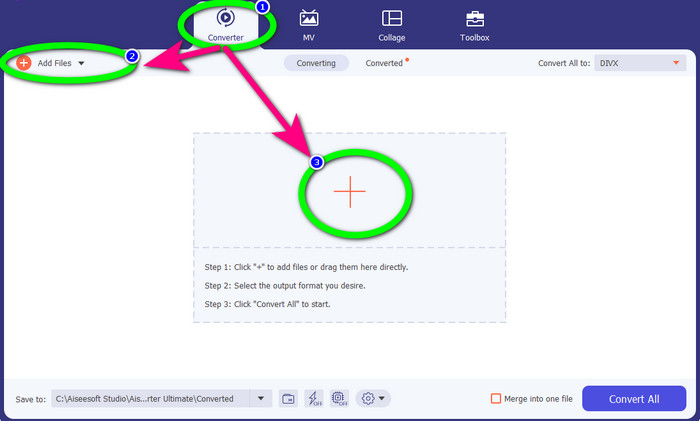
Trinn 2: Når grensesnittet vises, velger du fanen Converter og klikker på knappen Add Files eller Plus-ikonet for å legge til WEBM-filen.
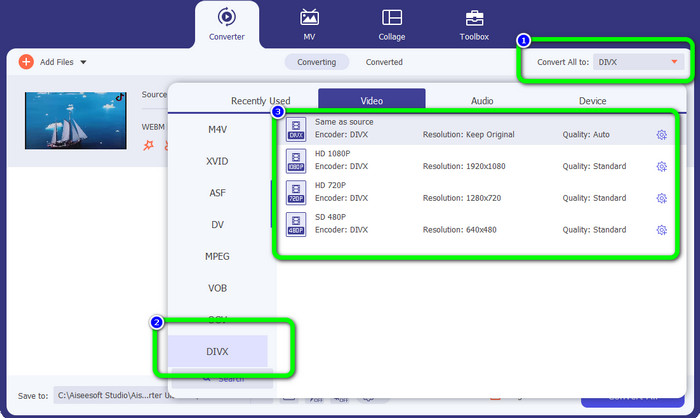
Trinn 3: Etter at du har lagt til WEBM-filen, klikker du på knappen Convert All to. Velg ønsket format, som er DIVX-filformatet. Du kan også velge videokvalitet fra 480p til 1080p.
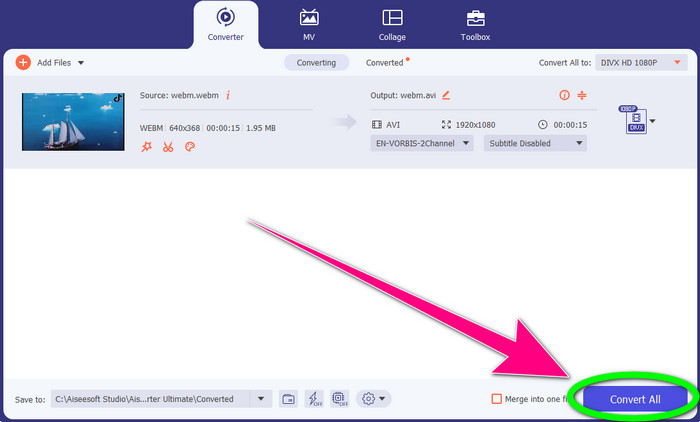
Trinn 4: Du kan til slutt klikke på knappen Convert All for å konvertere WEBM-filen til DIVX-format.
Del 2: 3 måter å konvertere WEBM til DIVX Online
Ved å bruke WEBM.to
Leter du etter en WEBM til DIVX-konverter på nett? WEBM.to er verktøyet du ikke vil gå glipp av. Det kan konvertere ulike filer i nettleseren din, som Google Chrome, Mozilla Firefox, Microsoft Edge osv. Det støtter filformater som MOV, FLV, M4V, TS, MT2S og flere. På samme måte som konverteren ovenfor er WEBM.to enkel å bruke fordi den kun fokuserer på filkonvertering. Til slutt er filen din trygg her, fordi den automatisk blir slettet etter 24 timer. Konverteringsprosessen er imidlertid treg. Den fungerer heller ikke bra hvis du ikke har en stabil internettforbindelse. La oss konvertere WEBM-filen din til DIVX ved hjelp av dette nettverktøyet.
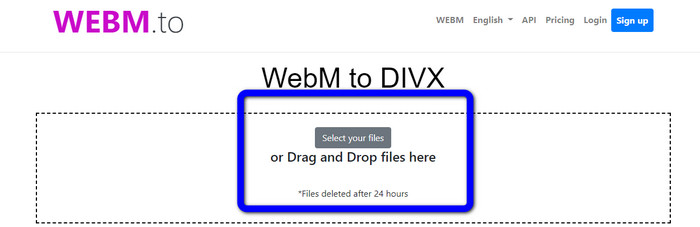
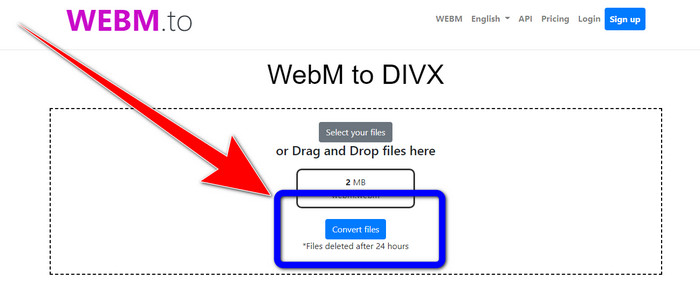
Trinn 1: Gå til nettstedet til WEBM.to. Klikk på knappen Select your files for å importere WEBM-filen din. Du kan også dra filen inn i boksen.
Trinn 2: Klikk på knappen Convert Files etter at du har lagt til WEBM-filen. Vent til filkonverteringen er ferdig, og lagre den endelige videoen.
Bruker Evano
Du kan også bruke Evano til å konvertere WEBM til DIVX. Dette nettbaserte verktøyet er også pålitelig. Det kan konvertere ulike filformater, som MP4, AVI, DIVX, XVID, 3GP, FLV, VOB, MOV osv. Dermed kan du konvertere WEBM til FLV ved hjelp av dette verktøyet. I tillegg er EVANO ikke bare en konverter, men også en lydredigerer og -optimaliserer, så du kan gjøre mer med dette verktøyet. Men denne applikasjonen har en begrensning i gratisversjonen. Du kan bare konvertere filer med en maksimal filstørrelse på 100 MB. Det betyr at du må kjøpe et abonnement for å få ubegrenset filstørrelse. Du må også ha en rask internettforbindelse. Det er en nettbasert applikasjon, og internettforbindelse er sterkt anbefalt. Følg trinnene nedenfor for å konvertere WEBM til DIVX med Evano.
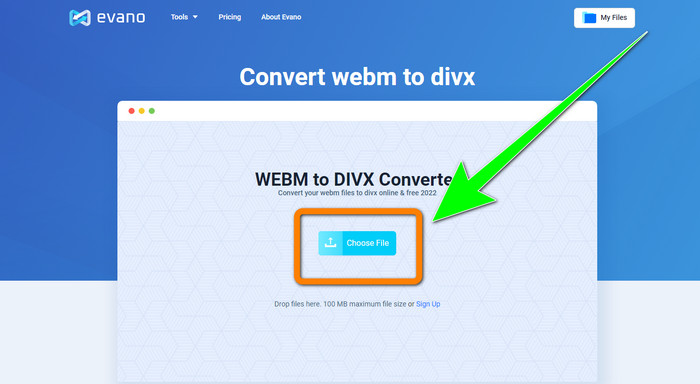
Trinn 1: Gå til nettstedet til Evano. Trykk på knappen Choose File for å legge til WEBM-filen.
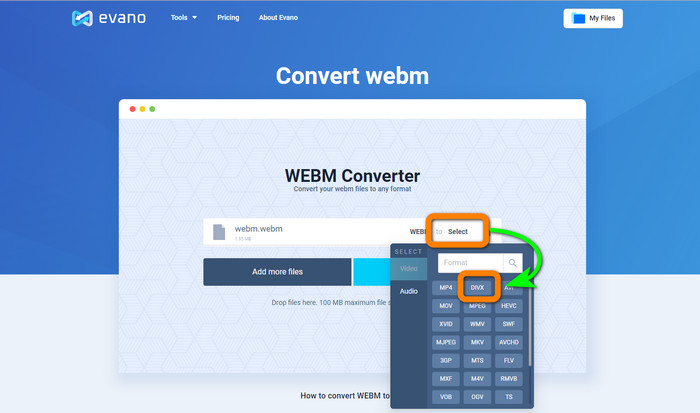
Trinn 2: Klikk på knappen Select for å gå videre til formatvalgene. Velg deretter DIVX-filformatet.
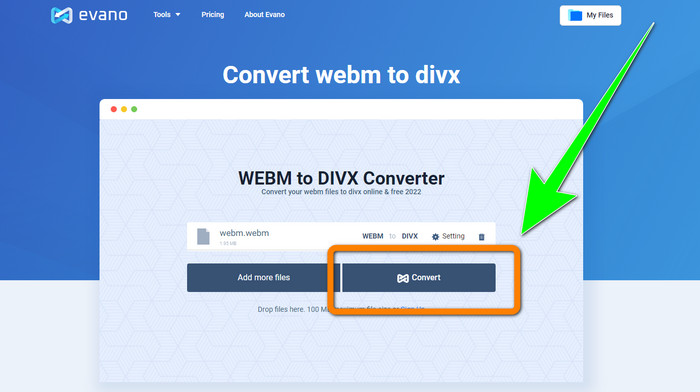
Trinn 3: For det siste trinnet klikker du på knappen Convert. Vent tålmodig på konverteringsprosessen og lagre videoen i DIVX-filformat.
Bruker FileProInfo
FileProInfo er en av de nettbaserte konverterne du enkelt kan bruke til å konvertere WEBM til DIVX. Med hjelp av dette nettverktøyet trenger du ikke bekymre deg for hvordan du skal konvertere filen til andre formater. Du kan også bruke dette verktøyet til å konvertere WEBM til MKV. Dessuten har det enkle metoder for filkonvertering. I tillegg kan du, foruten konvertering, bruke dette verktøyet til plagiatsjekk, komplette nettsideanalyser, ping-verktøy for nettsteder og mer. Det hender imidlertid at FileProInfo ikke fungerer. Når det gjelder selve konverteringsprosessen, er den også veldig treg. Som andre nettbaserte konvertere har det en maksimal filstørrelse på 150 MB. La oss derfor gå videre til å konvertere WEBM-filen til DIVX ved hjelp av dette nettverktøyet.
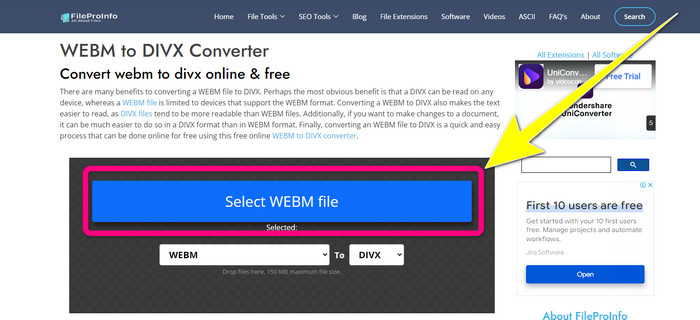
Trinn 1: Gå til nettstedet FileProInfo. Klikk i den blå boksen for å legge inn WEBM-filen.
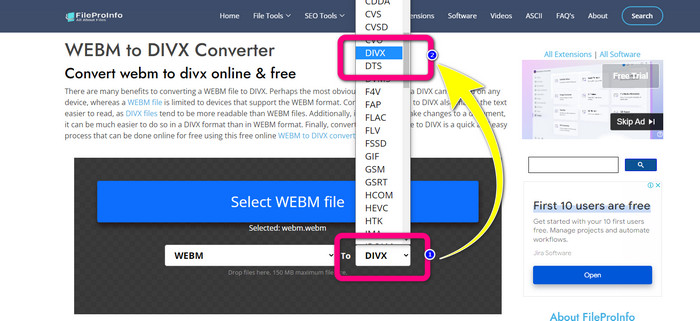
Trinn 2: Etter at du har lagt inn WEBM-filen, går du videre til formatvalgene og velger DIVX-filformatet.
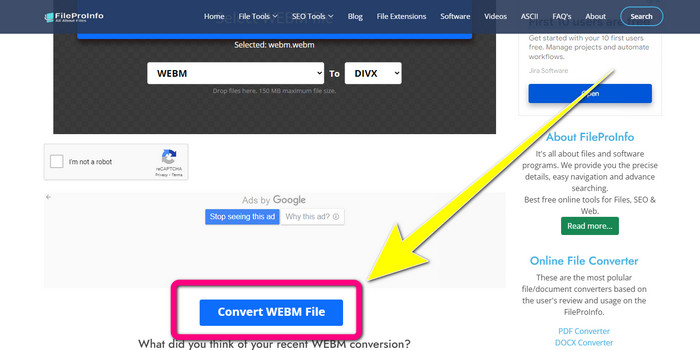
Trinn 3: Rull ned og klikk på knappen Convert WEBM file.
Del 3: WEBM vs. DIVX
| WEBM | DIVX | |
| Video filutvidelse | Et åpen kildekode, ikke-royalty multimediaformat kalt WebM brukes til strømming av internettinnhold. Den inkluderer komprimerte lydstrømmer ved hjelp av Oupus- eller Vorbis-kodekene og komprimerte videostrømmer med enten VP8 eller VP9. På grunn av sin lette design og sanntidsdistribusjonsevne, har den blitt et av de mest populære filformatene for streaming av videoer på nettet. | En høykvalitets, høykomprimert videokodek som støtter oppløsninger på opptil 1080 HD og komprimerer videoer til en brøkdel av standardstørrelsen uten å ofre mye av kvaliteten. |
| Utviklet av | Google Inc. | DIVX Network Inc. |
| Fordeler | Lojalitetsfri og åpen kildekode, Støtter de fleste kodeker. | Liten i størrelse, gratis å bruke |
| Ulemper | Mangel på interaktive elementer | |
| Tilknyttede programmer | VLC Media Player, Mozilla Firefox, Google Chrome, Windows Media Player | XBox 360, bilstereo, DVD-spillere, Blu-ray-spillere |
Del 4: Vanlige spørsmål om konvertering av WEBM til DIVX
1. Hva er fordelene med å konvertere WEBM til DIVX?
DIVX-filformatet er mer lesbart og allment akseptert enn WEBM-filen. Konvertering til DIVX-filer kan også hjelpe med sikkerheten.
2. Hva er bedre, WEBM eller MP4?
Når det gjelder videofilstørrelse, er WEBM mindre enn MP4. Men når det gjelder kvalitet og kompatibilitet, er MP4 bedre.
3. Har WEBM en lyd?
Ja, selvfølgelig. WebM-prosjektet med åpen kildekode promoterer WebM, et digitalt multimediebeholderfilformat som kan inneholde både lyd og video. WEBM er bare et containerformat. Et undersett av Matroska multimediebeholderformat er inneholdt i det.
Konklusjon
Dette er de beste applikasjonene du kan bruke til å konvertere WEBM til DIVX med effektive metoder. Hva venter du på? Last ned og bruk Video Converter Ultimate nå. Det kan konvertere filene dine raskere og enklere.
-
 Enkelt å lære metoder for hvordan du konverterer Xvid til DivX
 Leter du etter den beste løsningen for å konvertere Xvid til DivX gratis? Denne artikkelen vil hjelpe deg med å løse problemet. Så les innlegget fortløpende.
-
 Hvordan konvertere MPG til DivX uten å ha kvalitetstap
 Leter du etter et problemfritt program du kan bruke til å konvertere MPG til DivX? Denne artikkelen vil gi deg forskjellige effektive metoder du må prøve.
-
 Hvordan konvertere DIVX til 3GP på Windows, Mac og Online
 Hvordan konvertere DIVX til 3GP? Hvis du leter etter et svar, les denne artikkelen. Vi vil vise deg flotte prosedyrer ved hjelp av forskjellige omformere.
