


 Video Converter Ultimate
 Skjermopptaker
 Videoreparasjon
 Sikker nedlasting
Utmerkede triks for enkelt å konvertere WMV til M4V du kan prøve
Er du en av brukerne som ser etter utmerkede og enkle metoder for å konvertere WMV til M4V? Det finnes mange konvertere du kan finne på nettet. Men noen av dem støtter ikke WMV- og M4V-filformater. Hvis det er problemet ditt, kan denne artikkelen gi deg den enkleste løsningen ved hjelp av gode programmer. Du vil også oppdage funksjonene deres for å få en idé om de andre funksjonene disse programmene har. Les artikkelen fra topp til bunn for å finne flere viktige detaljer.

Del 1: Introduksjon til WMV og M4V
WMV filformat
| Navn | WMV |
| Filutvidelse | .wmv |
| Beskrivelse | WMV (Windows Media Video) akronym står for en gruppe videokodeker som Microsoft først lanserte på sitt Windows Media-rammeverk. Den ble først laget for å konkurrere med RM-formatet på nettstrømapper. Den holder komprimerte videofiler og hjelper til og med Blu-ray/DVD-er med å levere innhold. |
| Filkategori | Video |
| Utviklet av | Microsoft |
| Tilknyttede programmer | VLC Media Player MPlayer Mediespiller klassisk Windows media spiller |
| MIME-type | video/x-ms-asf video/Mpeg |
| Tekniske detaljer | Multimedieinnholdet som er kodet, er inneholdt i en WMV-fil ved bruk av Advanced Systems Format (ASF) containerformat. ASF-filer bør bruke.ASF-filtypen i stedet for.WMV-filtypen, selv om ASF-en kan inneholde multimedia i andre kodinger enn WMV-filstandarden tillater. |
M4V filformat
| Navn | M4V |
| Filutvidelse | .m4v |
| Beskrivelse | Apple opprettet M4V-filformatet, et videobeholderformat som ligner MP4-standarden. Hovedforskjellen er at M4V-filformater kan ha DRM-kopibeskyttelse. I iTunes Store koder Apple videofiler med M4V-formatet. |
| Filkategori | Video |
| Utviklet av | Apple inc. |
| Tilknyttede programmer | VLC Media Player KMPlayer Mediespiller klassisk Zoom spiller |
| Tekniske detaljer | M4V-filer kan beskyttes ved å bruke Apples FairPlay-kopibeskyttelse for å forhindre uautorisert replikering. Bare datamaskiner godkjent (gjennom iTunes) med kontoen som ble brukt til å kjøpe videoen kan spille av en FairPlay-beskyttet M4V-fil. |
Del 2: Beste måten å konvertere WMV til M4V for Mac og Windows
Den beste måten å konvertere WMV til M4V på er med FVC Video Converter Ultimate. Denne konverteren kan lastes ned både på Windows og Mac. Den kan konvertere over 100 videoformater, som WMV, M4V, MP4, AVI, FLV, MKV, MOV og flere. Når du konverterer, kan du konvertere flere filer samtidig fordi dette programmet håndterer batchkonvertering. Du vil heller ikke bli skuffet når det gjelder selve konverteringsprosessen. Denne konverteren tilbyr en høyhastighetskonvertering, der du kan konvertere filer 30 ganger raskere enn gjennomsnittlig hastighet.
Videre har Video Converter Ultimate en annen hovedfunksjon. Hvis du er interessert i å konvertere bildefilene dine, kan du gjøre det.
Funksjoner
◆ Konverter forskjellige videofilformater, for eksempel M4V, WMV, FLV, AVI, MP4, MOV, VOB, etc.
◆ Tilbyr videoredigeringsverktøy, som en videoforsterker, kompressor, cropper, trimmer, reverser, etc.
◆ Kan lage en collage.
◆ Lage en musikkvideo er tilgjengelig.
◆ Tillater batchkonvertering.
◆ Endre hastigheten på videoen.
◆ Konverter bildefilformater som PNG, JPG, BMP, WEBP og mer.
La oss konvertere WMV til M4V på Mac ved å bruke FVC Video Converter Ultimate. Bruk de enkle veiledningene nedenfor.
Trinn 1: Last ned og installer FVC Video Converter Ultimate på Mac-en din ved å klikke på nedlastingsknappen nedenfor med Mac-versjonen.
Gratis nedlastingFor Windows 7 eller nyereSikker nedlasting
Gratis nedlastingFor MacOS 10.7 eller nyereSikker nedlasting
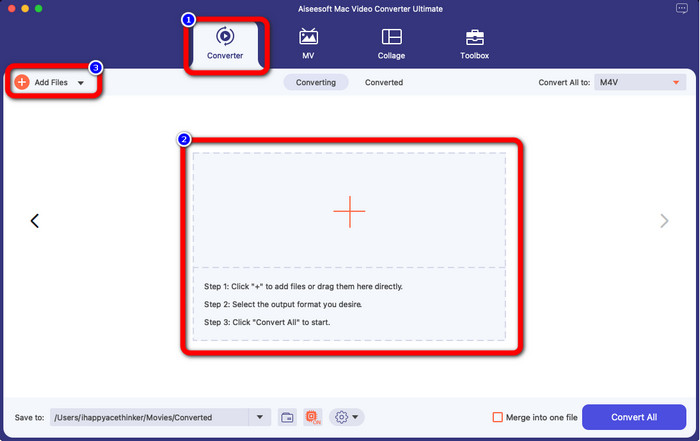
Trinn 2: Start programmet og velg panelet Converter. Klikk deretter på +-ikonet eller knappen Add Files for å legge inn WMV-videofilen din.
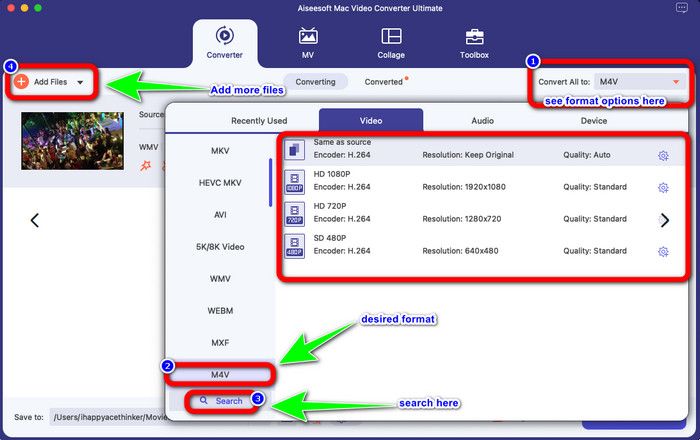
Trinn 3: Etter at du har lagt til videoen, klikker du på knappen Convert All to for å se formatvalgene, og velger filformatet M4V. Du kan også søke etter ønsket format i søkefeltet nederst i grensesnittet. Du kan fortsatt klikke på knappen Add Files for å legge til flere videoer for å utføre batchkonvertering.
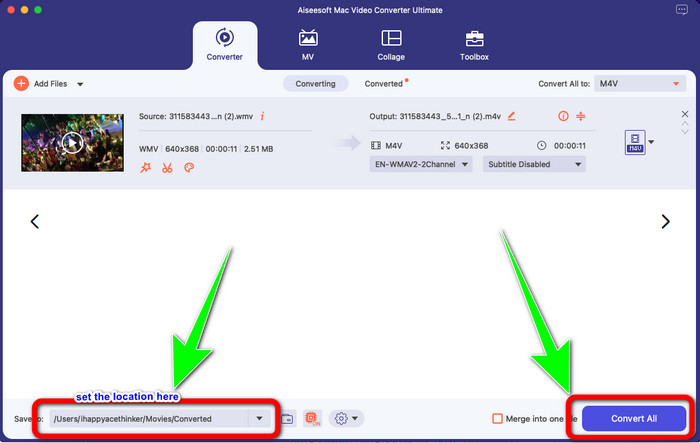
Trinn 4: Når du har valgt ønsket filformat, M4V, kan du velge hvor du vil lagre videoen din. Deretter klikker du på knappen Convert.
Del 3: Gratis måte å konvertere WMV til M4V
For å konvertere WMV til M4V gratis kan du bruke Convertfiles. Dette nettbaserte programmet kan også konvertere flere filer. Det har enkle instruksjoner med et brukervennlig grensesnitt, som passer for alle brukere. I tillegg til å konvertere videoer kan du også konvertere bilder, lyd, presentasjoner og mer. Men noen ganger fungerer ikke denne konverteren så bra. Den har en treg konverteringsprosess, og reklamene er irriterende.
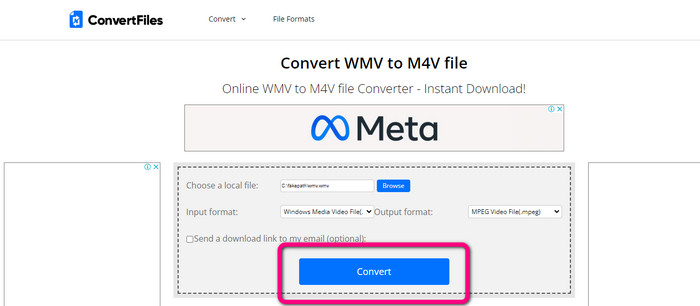
Trinn 1: Gå til nettstedet til Convertfiles.
Trinn 2: Last opp WMV-filen du vil konvertere.
Trinn 3: Under Output format velger du M4V-filen. Klikk deretter på knappen Convert.
Del 4: Utmerket metode for å konvertere WMV til M4V Online
En annen metode for å konvertere WMV til M4V på nett er å bruke FVC Free Video Converter Online. Med hjelp av dette nettverktøyet er det enkelt å konvertere WMV. Det konverterer også flere andre filer, som AVI, MP4, FLV, MKV, VOB osv. Selv om det er en gratis nettbasert konverter, trenger du ikke å bekymre deg for videokvaliteten. Du kan lagre den konverterte videoen i original kvalitet. I tillegg kan du også endre bithastighet, bildefrekvens og oppløsning for videoen din.
Funksjoner
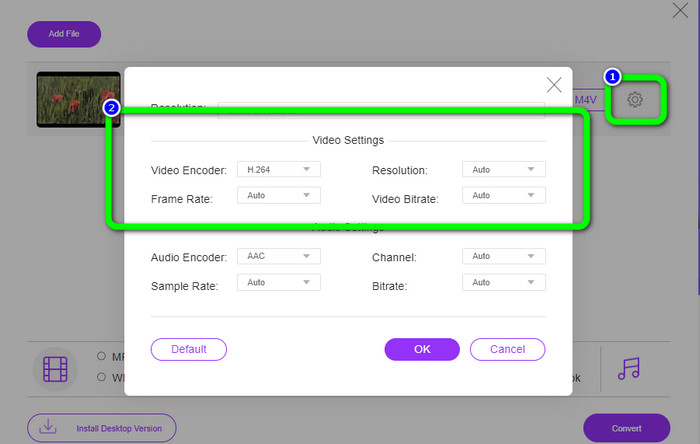
◆ Kan endre videoens bithastighet, bildefrekvens og oppløsning.
◆ Tilbyr batchkonvertering.
Følg de detaljerte trinnene nedenfor for å konvertere WMV til M4V ved hjelp av FVC Free Video Converter Online.
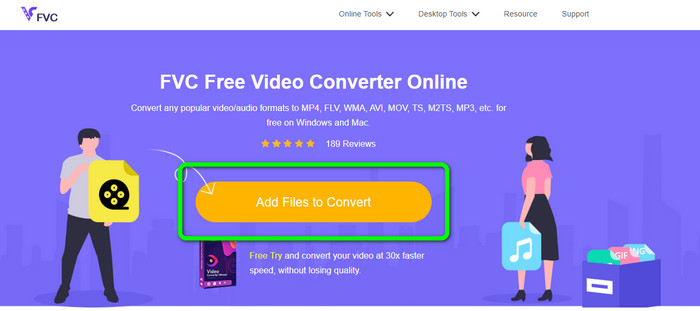
Trinn 1: Gå til nettstedet til FVC Free Video Converter Online. Klikk deretter på knappen Add Files to Convert.
Trinn 2: Hvis du vil endre videoens bithastighet, bildefrekvens og oppløsning, klikker du på ikonet Settings. Trykk deretter på OK når du er ferdig.
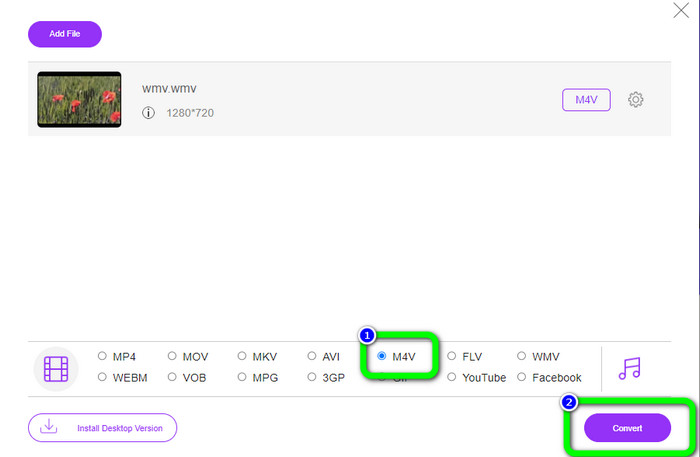
Trinn 3: Nederst i grensesnittet ser du formatvalgene. Velg M4V-filen som ønsket utdataformat, og klikk på Convert-knappen for å laste ned videoen.
Del 5: Vanlige spørsmål om konvertering av WMV til M4V
1. Kan alle enheter spille M4V?
Dessverre ikke. Den innebygde avspilleren på Android-enheter støtter ikke M4V-filer. Du kan laste ned en tredjeparts M4V-spiller som støtter M4V-formatet, eller konvertere det til et kompatibelt format.
2. Finnes det den beste konverteren for å konvertere WMV til M4V?
Hvis du vil ha den beste WMV-til-M4V-konverteren, kan du bruke FVC Free Video Converter Online. Den kan konvertere filene dine effektivt og uten anstrengelse.
3. Hva er bedre, M4V eller MOV?
M4V er bedre. Hvis du vil spille av filene dine på en bærbar enhet, som iPhone, iPod eller iPad, anbefales M4V sterkt. Men på noen enheter støttes kun MOV. I så fall kan du konvertere M4V til MOV.
Konklusjon
Med all den viktige informasjonen ovenfor kan du allerede konvertere WMV til M4V enkelt og raskt. Hvis du foretrekker en konverter med høy hastighet, kan du bruke FVC Video Converter Ultimate. Du kan også bruke FVC Free Video Converter Online hvis du vil ha en gratis nettbasert konverter.
-
 Hvordan komprimere M4V-filer til en mindre størrelse (gratis og online)
 Hvis du leter etter en enkel måte å redusere størrelsen på M4V-filen på, bør du komme og lese denne artikkelen. Her vil vi dele den enkleste måten å komprimere M4V-filer med deg
-
 Konkret guide for å bli med M4V-filer på Windows og Mac gratis
 Hvis du leter etter en løsning for å kombinere M4V-videofiler til én, må du aldri gå glipp av denne passasjen. Her vil vi snakke om de to beste metodene for å kombinere M4V-videofiler
-
 Raske og enkle tips for å konvertere WMV til MOV [Bevist]
 Vil du vite hva som er de beste og brukervennlige omformerne som konverterer WMV til MOV? Fortsett å lese denne artikkelen da den diskuterer alle mulige valg du må vurdere å bruke
