


 Video Converter Ultimate
 Skjermopptaker
 Videoreparasjon
En hurtigveiledning for å enkelt konvertere WMV til MKV på Mac og Windows
Hvis du er en filmentusiast, og ønsker et filformat som kan håndtere ulike lydspor med undertekster, kan det være lurt å konvertere WMV-filen din til MKV-fil. Og hvis du har problemer med å lete etter en WMV til MKV-omformer som er kompatibel med Windows og Mac, fant vi de beste omformerne du kan bruke online og offline. Denne artikkelen presenterer deg med de beste omformerne for å konvertere WMV til MKV på Mac og Windows.

Del 1. Hvorfor konvertere WMV til MKV
WMV eller Windows Media Video er et filformat som nesten alle mediespillere støtter bredt. Det er et filformat som kan lagre videoklipp, animasjoner, TV-episoder og filmer. I tillegg er det en komprimert fil; derfor har den en liten filstørrelse. Så hvorfor trenger du å konvertere WMV til MKV? MKV eller Matroska er en filbeholder som kan inneholde ubegrensede lyd-, video- og undertekstspor.
Dessuten er dette filformatet fremtidssikkert, noe som betyr at det ikke vil være utdatert i fremtiden. Den kan også håndtere flere undertekststrømmer og lydspor på en rekke språk. Derfor, hvis du er en filmentusiast, kan det være lurt å konvertere WMV-filen til MKV-filformat.
Del 2. Konverter WMV til MKV ved å bruke den beste frakoblede konverteren
This converter is proven to be the best offline converter available on the market. FVC Video Converter Ultimate is a free offline tool that could provide professional-like outputs without having a hard time. It also supports various file formats to convert your WMV file to MKV, AVI, MP4, MOV, FLV, and more. Still not pleased with what it can do? You can also edit your video using its advanced video editing features using this converter. Follow these simple steps below to know how to use this WMV to MKV converter for free.
Step 1. Download the application by clicking the Download button below. There are two options where you can choose to download it on Mac or Windows. Then open the application.
Gratis nedlastingFor Windows 7 eller nyereSikker nedlasting
Gratis nedlastingFor MacOS 10.7 eller nyereSikker nedlasting
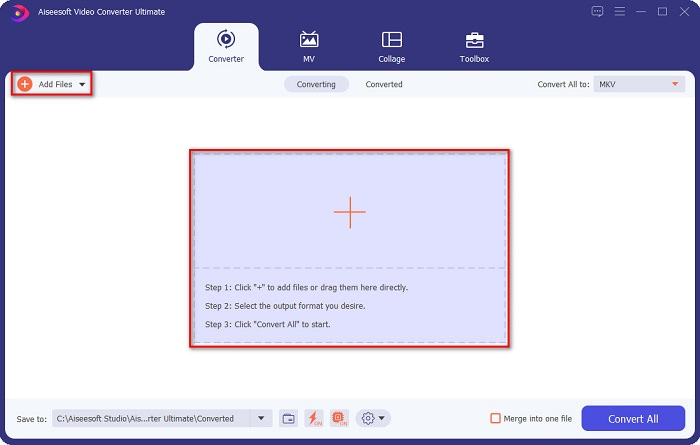
Step 2. After you open the application, click the Add Files button or the + button to upload your file on the software's first interface. Then a new window will appear where you will select your WMV file.
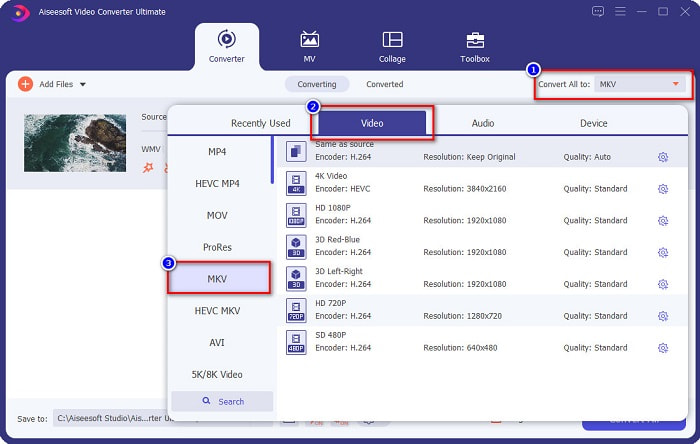
Step 3. Then click the Convert All to button to select your desired output format. In your case, choose the MKV format.
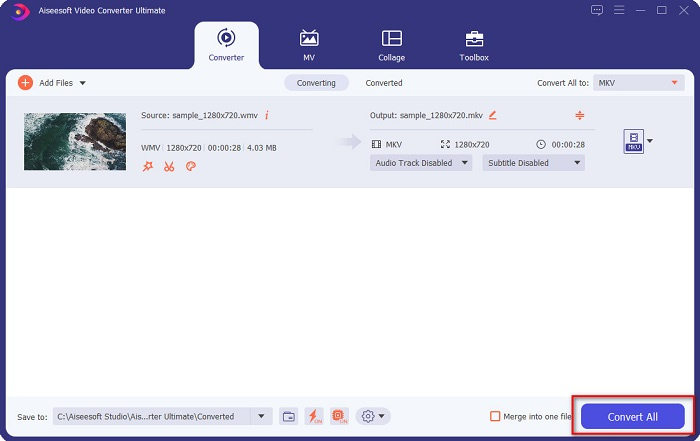
Step 4. Finally, click the Convert All button to convert your WMV to an MKV file. Then just wait for a few seconds. And that's it! By the way, you can also quickly convert WMV to MOV files by following these simple steps.
Del 3. Konverter WMV til MKV ved å bruke de 3 beste onlineverktøyene
Det er ingen tvil om at nettbaserte verktøy er det beste for enkelhets skyld fordi du ikke trenger å laste ned noe. Denne delen presenterer de beste WMV til MKV-konvertererne som er tilgjengelige på nettet.
FVC Gratis Online Video Converter
FVC Free Online Video Converter is an online converter that has an easy-to-use interface. It supports various file formats and can convert WMV to MKV, AVI, MOV, MP4, MP3, TS, and more. However, this transcoder is internet-reliant, which means it depends on the internet on how fast your conversion will be. Nonetheless, it is undoubtedly one of the best online WMV to MKV converters.
Her er trinnene for å konvertere WMV til MKV-filer gjennom FVC Free Online Video Converter:
Step 1. Go to their webpage by clicking this link, or search FVC Free Online Video Converter on your browser.
Step 2. For the next step, click the Add Files to Convert button, then launch the application. After the application has been launched, select your WMV file when your computer files appear.
Last ned skrivebordsversjonen for å konvertere filer i batch.
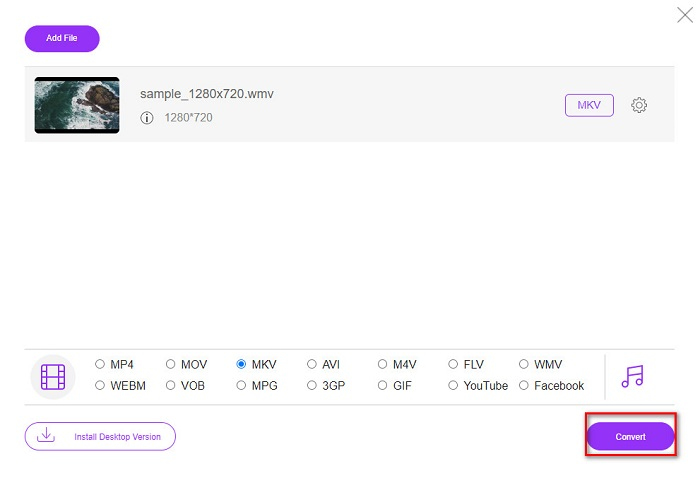
Step 3. And then, to select your desired output file format, click the MKV located below the software's second interface.
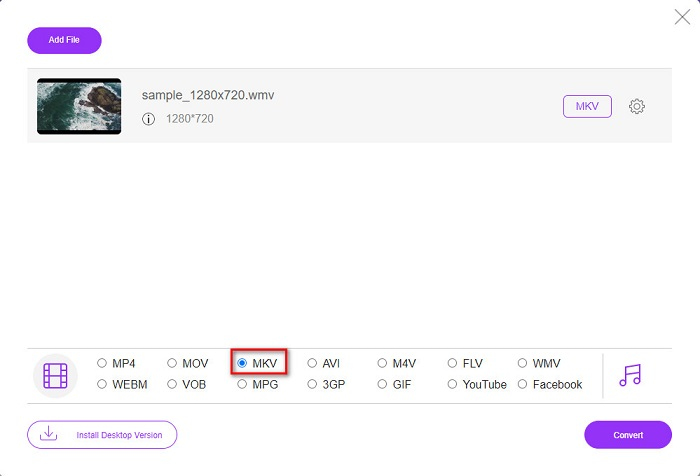
Step 4. To finish, click the Convert button, and your WMV to MKV file will start converting. Just wait for your conversion to finish, and that's it! By following these steps, you can easily convert WMV to MKV online.
Convertio
Another online converter that trends in the web is Convertio. This free online converter is also easy to use. But despite that, this converter contains ads that might disturb you. But still, this converter is very convenient to use when converting your WMV file to MKV.
Step 1. In your browser, search Convertio. Then, click the Choose Files button in the software's main interface to select your WMV file.

Step 2. And then, click the drop-down button to select the MKV file as your output format.
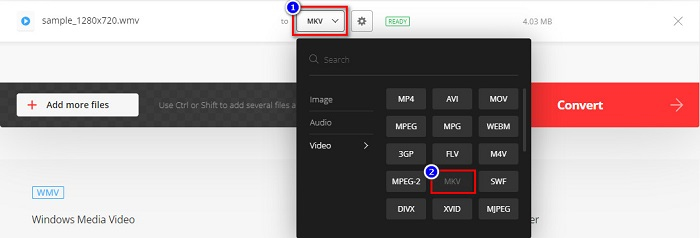
Step 3. For the last step, click the Convert button located at the bottom right corner of the software’s interface. And then, your file will start to convert.

MConverter
MConverter is an online WMV to MKV converter that supports various audio, video, and image files. It has simple steps to convert your WMV to an MKV file. However, there is a file size limit for using this converter. Nevertheless, it can effectively transform your WMV file to MKV with ease.
Step 1. Type MConverter on the browser you use, then you will be led to their web page.
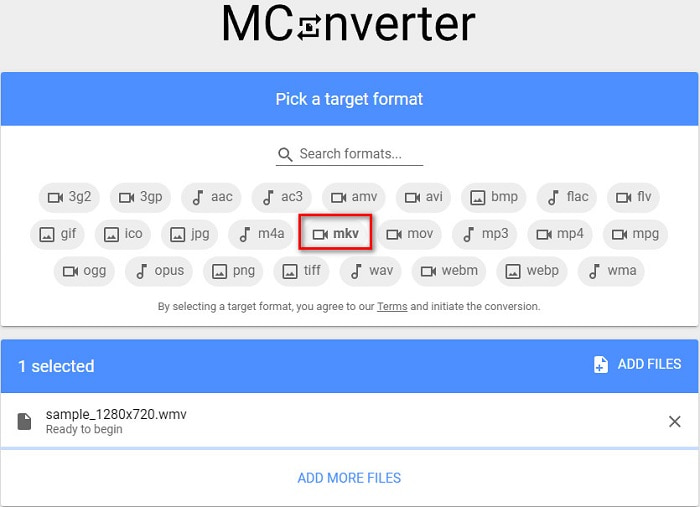
Step 2. And then, drop your WMV file on the rectangular box, or you can choose to click the browse word to select your WMV file.

Step 3. After selecting your WMV file, pick the MKV file as your output file format by clicking the MKV button. Right after you click MKV, your WMV to MKV conversion will begin. Then wait for your file to convert.
WMV vs. MKV
Produsert av Microsoft, WMV var et av de vanligste videoformatene tilbake på 2000-tallet. Den kan sees over nettet og spilles av forskjellige mediespillere på Windows. Og det er også standard videofilformat for Windows Media Player. Men det har blitt overtatt av andre formater nylig.
Matroska multimediebeholderformatet, utgitt i 2002, er et åpen kildekode-format som kan inkludere en rekke video-, lyd-, bilde- og undertekstspor. Så du kan bruke den til å lagre korte videoklipp, TV-serier og filmer enkelt. Det er ganske populært for anime-fansubing.
Del 4. Vanlige spørsmål om konvertering av WMV til MKV
Kan du spille MKV på Mac?
No. MacOS does not support MKV file format. However, you can use a third-party player or convert your MKV file to a file format that Mac supports. MP4 is one of the most common file formats that Mac supports. To know more about converting MKV to MP4, click this link.
Kan du komprimere filstørrelsen til MKV-filer?
Yes. You can compress your files using a compressor. FVC Video Converter Ultimate also has a feature that can compress files.
Støtter Window Media Player MKV-filer?
Windows Media Player does not support MKV files. You may encounter only audio plays or playback problems when playing an MKV file in Windows Media Player. To play MKV files in Windows Media Player, you need to download and install MKV codec.
Konklusjon
Det er mange måter å konvertere WMV til MKV på Mac og Windows for å oppsummere det. De online og offline verktøyene som er presentert ovenfor viser lovende ytelse når det gjelder å konvertere WMV-filene dine til MKV. Men hvis du vil ha en omformer som lar deg ha et fantastisk utdataformat, bruk FVC Video Converter Ultimate fordi den har alle spesialfunksjonene du trenger når du konverterer filer.
-
 WMV til MP3 – Hvordan konvertere video til lyd gratis [Skrivebord/online]
 Mens du ser på en WMV-video, finner du lyddelen fascinerende. Dermed vil du spille den på MP3-spilleren din. Men spilleren din støtter tydeligvis ikke WMV-format. Det får deg til å lure på om det er en måte å konvertere WMV til MP3.
-
 2 enkleste måtene å konvertere WMV-filer til FLV på PC / Mac
 Hvordan kan du konvertere WMV til FLV? For det første må du lese vår anbefaling og finne din favorittmetode, og deretter følge vår guide for å gjøre jobben raskt.
-
 [2 løsninger] Hvordan konvertere WMV-videoer til GIF-filer gratis
 Hvis du vil klippe de fantastiske delene av WMV -videoene og lage GIF -er fra dem, kan du lære om to enkle metoder for å overføre WMV -videoer til GIF -er i denne artikkelen.

