


 Video Converter Ultimate
 Skjermopptaker
 Videoreparasjon
 Sikker nedlasting
Flotte måter å bruke ultimate verktøy for å konvertere XviD til 3GP
Kan du ikke spille .xvid-filen på mobiltelefonen din? Da er den kanskje ikke støttet på enheten. For å kunne spille av videoen på telefonen må du konvertere XviD-filen til 3GP. Når det gjelder mobiltelefoner, er det mest populære formatet du kan bruke for å spille av videoer 3GP-formatet. Dette innlegget gir deg innsikt i de beste måtene å konvertere XviD til 3GP raskt og uten anstrengelse ved hjelp av de ultimate verktøyene du kan bruke på Windows, Mac og på nett. La oss lese og lære så mye vi kan.

Del 1: Beste måten å konvertere XviD til 3GP
Den beste måten å konvertere XviD til 3GP på er å bruke Video Converter Ultimate. Dette er en av de gode konvertererne du kan laste ned på Windows- og Mac-datamaskiner. Hvis du har dette programmet, trenger du ikke lenger bekymre deg for å konvertere mange filer, fordi Video Converter Ultimate kan konvertere over 1000 formater, inkludert FLV, MKV, DIVX, XviD, 3GP, M4V, MTS, SWF, MP4 og mer. I tillegg har det en konverteringshastighet som er 30 ganger raskere enn andre konvertere, noe som er nyttig for brukerne. Du kan også konvertere flere filer i én operasjon fordi det tilbyr batchkonvertering, så du slipper å konvertere hver fil manuelt. Dessuten, hvis du vil rotere XviD-videoen din, kan du bruke dette verktøyet fordi det har en funksjon for videorotering. Med hjelp av denne rotatoren kan du enkelt rotere videoen din. I tillegg kan du klippe videoen til perfekt lengde ved hjelp av verktøyet Video Trimmer. Med disse funksjonene kan du si at Video Converter Ultimate er det ultimate verktøyet for å konvertere og redigere videoene dine.
Funksjoner
◆ Konverter videoformater som XviD, 3GP, MP4, M4V, DIVX, FLV, AVI, SWF og 100+ mer.
◆ Har muligheten til å lage en musikkvideo.
◆ Det kan hjelpe å lage en collage.
◆ Den har flotte redigeringsverktøy som videoforsterkere, fargekorrigering, trimmer og mer.
◆ Juster videohastighetskontrolleren.
◆ Den kan endre filstørrelsen på filen ved hjelp av kompressoren.
Fordeler
- Den kan konvertere videofiler 30x raskere enn andre omformere.
- Egnet for ikke-profesjonelle brukere, og den har et enkelt grensesnitt.
- Kan konvertere bildeformater mellom JPG, PNG, WEBP, BMP og TIFF.
- Kan konvertere flere filer på en gang.
Ulemper
- Få den betalte versjonen for å nyte de flotte funksjonene.
La oss konvertere XviD-filen din til 3GP ved å bruke de nyttige metodene nedenfor.
Trinn 1: Du må laste ned Video Converter Ultimate på Windows eller Mac ved å klikke på Last ned-knappen nedenfor. Installer programmet og start det.
Gratis nedlastingFor Windows 7 eller nyereSikker nedlasting
Gratis nedlastingFor MacOS 10.7 eller nyereSikker nedlasting
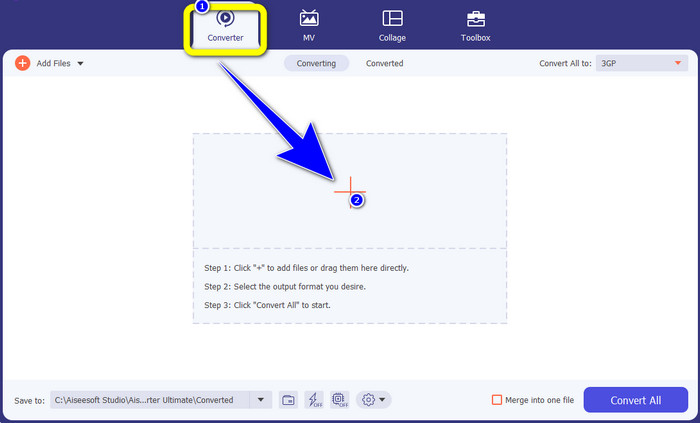
Trinn 2: Det finnes fire alternativer øverst i grensesnittet: Converter, MV, Collage og Toolbox. Velg Converter-panelet og klikk på Plus-ikonet for å legge til XviD-filen du vil konvertere.
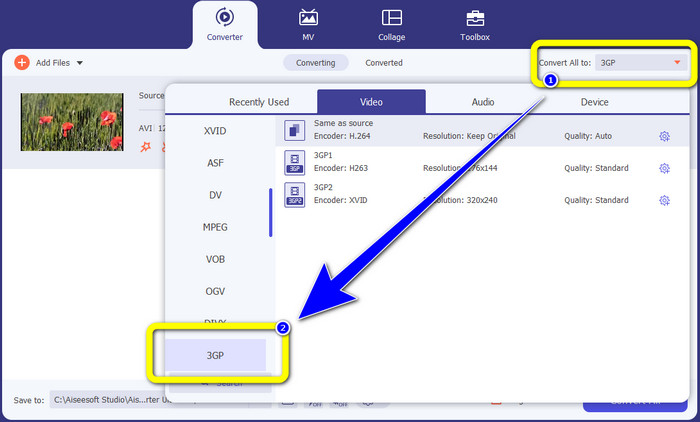
Trinn 3: Etter at du har lagt til XviD-filen, ser du til høyre i grensesnittet og klikker på Convert all to-knappen. Formatalternativene vises, og du velger filformatet 3GP.
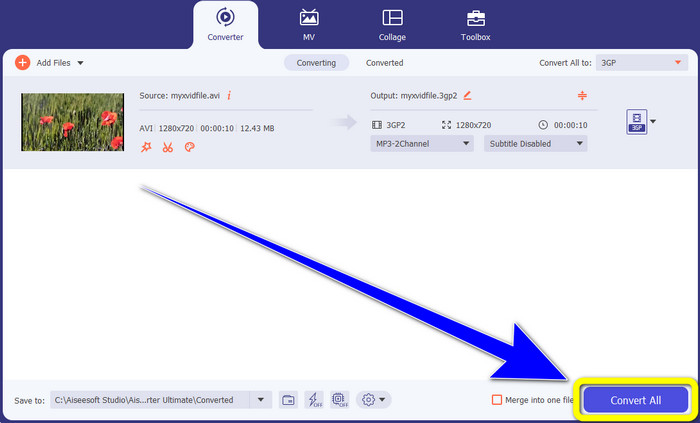
Trinn 4: I det fjerde og siste trinnet klikker du på Convert All-knappen for å konvertere XviD-filen til 3GP. Vent på konverteringsprosessen og lagre videoen.
Del 2: Konverter XviD til 3GP Online
Bruke FVC Free Video Converter Online
I tillegg til den beste konverteren du har oppdaget i den første delen, finnes det også nettbaserte konvertere du kan bruke gratis. Det beste nettverktøyet er FVC Free Video Converter Online. Denne nyttige programvaren lar deg konvertere XviD til 3GP enkelt. Den støtter lyd- og videoformater som MP4, M4V, WMV, AVI, MOV, VOB, WEBM, MP3, AAC, AC3, WMA, FLAC osv. Dessuten er denne konverteren lett å bruke fordi den bare har tre enkle trinn å følge for å konvertere ulike filer. På denne måten vil ingen brukere ha vanskeligheter med å bruke denne nettbaserte konverteren. Hvis du ønsker å vite hvordan du enkelt konverterer XviD til 3GP ved hjelp av FVC Free Video Converter Online, kan du følge disse tre enkle trinnene nedenfor.
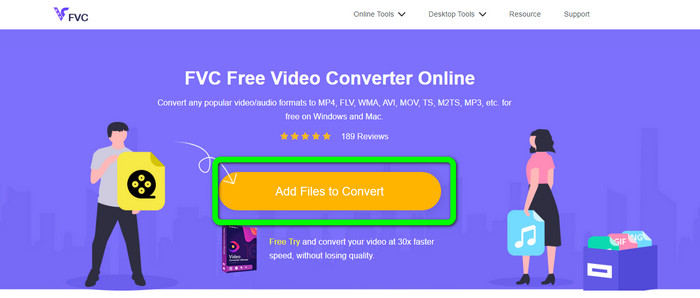
Trinn 1: Gå til nettstedet til FVC Free Video Converter Online. Klikk på knappen Add Files to Convert og last opp XviD-filen du vil konvertere til 3GP-format.
Trinn 2: Når du har lastet opp filen, vil du se formatalternativene nederst i grensesnittet. Velg filformatet 3GP.
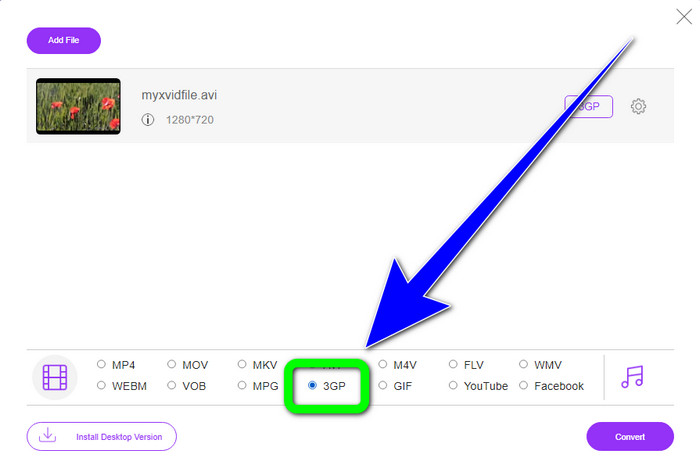
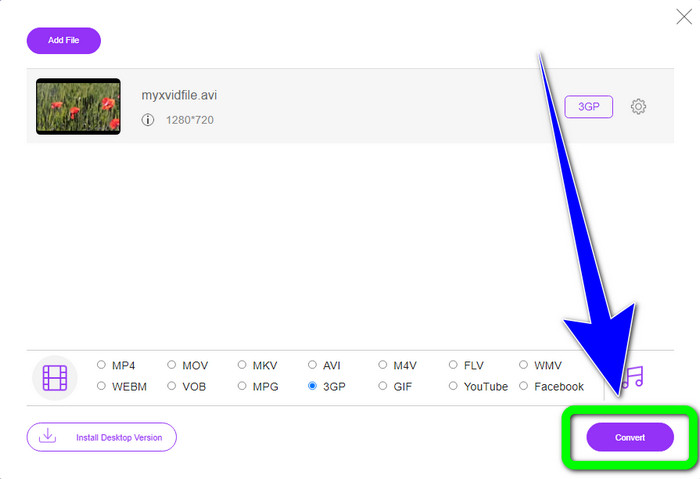
Trinn 3: Du må klikke på Convert-knappen for å konvertere XviD-filen til 3GP. Vent på at filen blir konvertert, og lagre den endelige filen på Windows eller Mac.
Bruker OnlineConvertFree.com
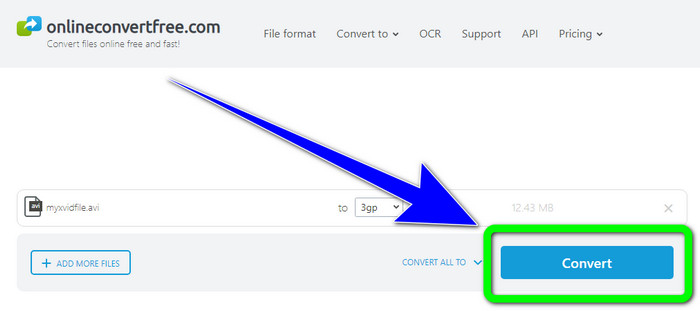
Onlineconvertfree.com er et annet nettverktøy du kan bruke til å konvertere XviD til 3GP. Dette programmet er også bra til å konvertere lyd, bilder, dokumenter og videofiler, noe som gjør det praktisk for alle. Det støtter også flere formater, som AVCHD, MT2S, MPEG, MKV, M4V, MP4, FLV, DIVX, XviD, 3GP og mer. Du trenger heller ikke å bekymre deg for filen din, fordi den er sikret i denne programvaren. Videofilen din blir automatisk slettet etter 24 timer. Du kan også bruke dette verktøyet til å konvertere XviD til FLV.
Du må imidlertid vurdere at Onlineconverterfree.com er et nettbasert verktøy, der du må ha en rask internettforbindelse for å betjene det. Lagringsgrensen for denne programvaren er også bare 100 Mb, så du må kjøpe et abonnement for å øke lagringsgrensen. Følg trinnene nedenfor for å konvertere XviD til 3GP ved å bruke Onlineconverter.com.
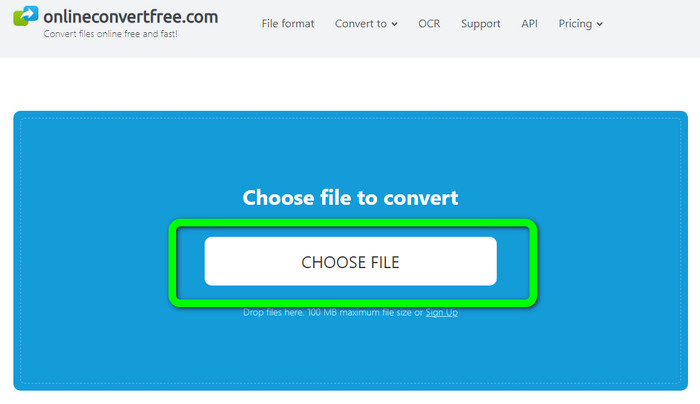
Trinn 1: Gå til nettstedet Onlinecovnerter.com. Klikk på Choose File-knappen for å sette inn XviD-filen.
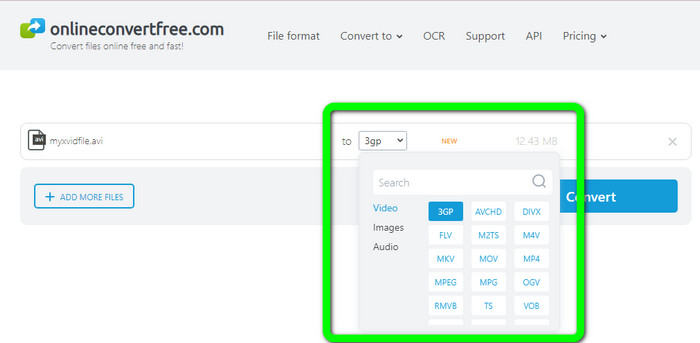
Trinn 2: Klikk på 3GP-filen fra formatalternativene.
Trinn 3: For det siste trinnet klikker du på Convert-knappen. Vent på konverteringsprosessen og lagre det endelige resultatet på enheten din. Klikk her for å lære hvordan du konverterer M4V til 3GP.
Del 3: Utvidet kunnskap om XviD
Hva er XviD?
Denne kodeken, XviD, er basert på MPEG-4-standarden. Selv om den forvrider farger, har den en flott definisjon i dynamiske scener. Fordi det er en åpen kildekode-kodek, kan interesserte parter bidra til utviklingen, og oppmuntre til kontinuerlige oppdateringer. En DVD-film kan komprimeres tilstrekkelig til å passe inn på en CD samtidig som DVD-kvaliteten opprettholdes takket være komprimeringen som er aktivert i Xvid. Xvid-programmet komprimerer og dekomprimerer videodata til MPEG-4 ASP. .xvid-utvidelsen brukes til å holde komprimert video. Når det kommer til videofiler, er Xvid sammenlignbar med ZIP. Xvid komprimerer video i et forhold på 200:1 eller høyere. Dette muliggjør raskere nettverksoverføring og mer effektiv disklagring.
Del 4: Vanlige spørsmål om konvertering av XviD til 3GP
1. Hvor lenge bør jeg vente med å konvertere XviD til 3GP?
Konverteringsprosessen vil avhenge av konverteren du bruker og videoens filstørrelse. Last ned Video Converter Ultimate på Windows eller Mac hvis du vil ha en raskere omformer. Denne applikasjonen har en 30x raskere konverteringshastighet enn andre omformere.
2. Er det en gratis omformer jeg kan bruke med ubegrenset fillagring?
Absolutt, ja! Den beste gratis konvertereren du kan bruke er FVC Free Video Converter Online. Dette nettverktøyet lar deg konvertere ubegrenset med filer, så du trenger ikke å bekymre deg for maksimal filstørrelse.
3. Hva er bedre, Xvid eller 3GP?
Begge er bedre. Hvis du vil spille av en video på en 3G-enhet, er det mer egnet å spille av en video med en 3GP-videofil. Og hvis du vil spille av videoene dine på videospillere, er en video med en XviD-fil perfekt.
Konklusjon
Denne artikkelen har gitt deg de beste teknikkene for å konvertere XviD til 3GP. For å konvertere flere filer på Windows og Mac kan du laste ned Video Converter Ultimate. Hvis du vil ha en gratis nettbasert konverterer, kan du også bruke FVC Free Video Converter Online.
-
 Finn de beste og enkle metodene for å konvertere TS til 3GP
 Denne artikkelen vil tilby en fantastisk TS til 3GP-konverterer gratis nedlasting du kan prøve på enheten din. Les denne artikkelen for å finne flere viktige detaljer du trenger
-
 Konverter MTS til 3GP ved å bruke disse Ultimate Converters
 Ønsker du en ukomplisert prosess for å konvertere MTS til 3GP? Ikke bekymre deg mer! Denne artikkelen vil tilby MTS til 3GP-omformere du kan bruke online og offline
-
 WebM til 3GP: Mest effektive måter å bruke disse verktøyene på
 Leter du etter en enestående WebM til 3GP-konverter? Denne artikkelen vil sikre at du får de beste effektive metodene for å konvertere WebM til 3GP
