


 Video Converter Ultimate
 Skjermopptaker
 Videoreparasjon
 Sikker nedlasting
Trinn-for-trinn om hvordan du legger til albumkunst til MP3 ved å bruke den beste programvaren på skrivebordet
Å legge til albumbilde kan være svært nyttig, spesielt hvis du vil hjelpe lytteren til å føle sterkere tilknytning til musikken de hører på. Med et slikt albumbilde kan brukerne få et glimt av hva musikken handler om, særlig den digitale musikken. I noen tilfeller har ikke en MP3-fil et skikkelig albumbilde, eller det er ikke knyttet til filen. Hvis du opplever det samme, er det viktig å lære hvordan du legger til albumbilde i MP3‑musikk på datamaskinen. For å vite mer om dette temaet, kan du lese videre i denne artikkelen, der vi gir deg konsis kunnskap om problemet.

Del 1. Slik legger du til albumgrafikk til MP3 med Video Converter Ultimate [Anbefalt Tag Editor]
Leter du etter kraftig programvare for å legge til albumbilde i MP3? FVC Video Converter Ultimate er tagg‑redigereren vi anbefaler til denne oppgaven. Denne programvaren er ikke anbefalt uten grunn. I motsetning til annen programvare er det ofte begrenset hvilke formater for albumbilde du kan laste opp og bruke som omslag til MP3‑musikken din, men ikke med dette verktøyet. Med denne ultimate programvaren kan du legge til albumbilde på MP3, WAV, WMA, AAC, FLAC og over 1000 video‑ og lydformater. Imponerende, ikke sant? Dette verktøyet er førstevalget når du vil legge til et bildeomslag på albumet ditt. Vil du vite hvordan du bruker denne ultimate programvaren? I så fall kan du lese og nøye følge veiledningen vi har inkludert nedenfor.
Trinn 1. Klikk på nedlastingsknappen nedenfor, og velg hvilket operativsystem du bruker. Etter at du har lastet ned programvaren, fortsetter du med å installere verktøyet. Når alt er klart, klikker du på Start nå for å åpne programvaren på datamaskinen.
Gratis nedlastingFor Windows 7 eller nyereSikker nedlasting
Gratis nedlastingFor MacOS 10.7 eller nyereSikker nedlasting
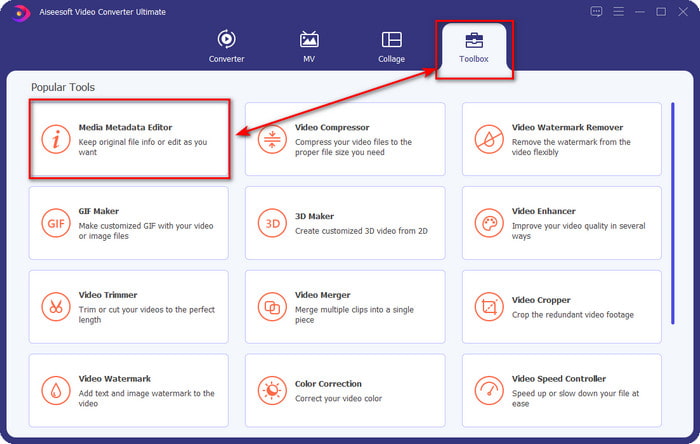
Trinn 2. Gå videre til delen Verktøykasse og klikk på Media Metadata Editor under den.
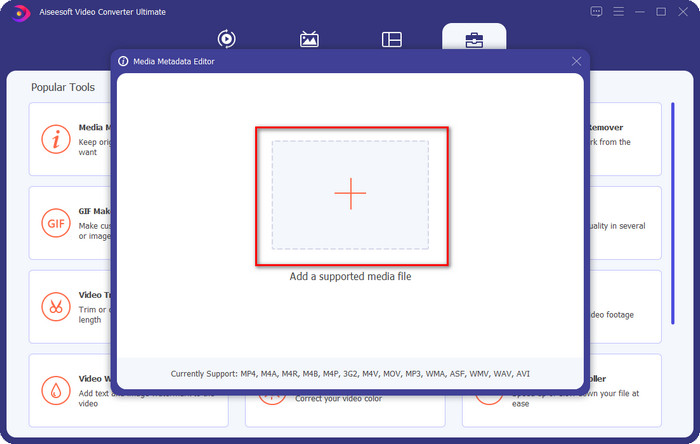
Trinn 3. Velg musikkfilen du vil legge til albumbilde i ved å klikke på +-knappen. For å sette inn musikkfilen du har valgt, klikker du på Åpne.
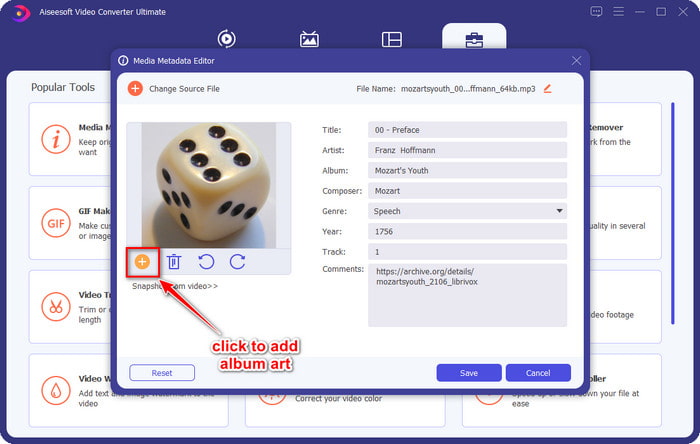
Trinn 4. Klikk deretter på +-knappen nede til venstre i grensesnittet, finn albumomslaget du vil bruke, og klikk Åpne. Legg til annen metadata du ønsker i tekstboksen hvis du trenger det.
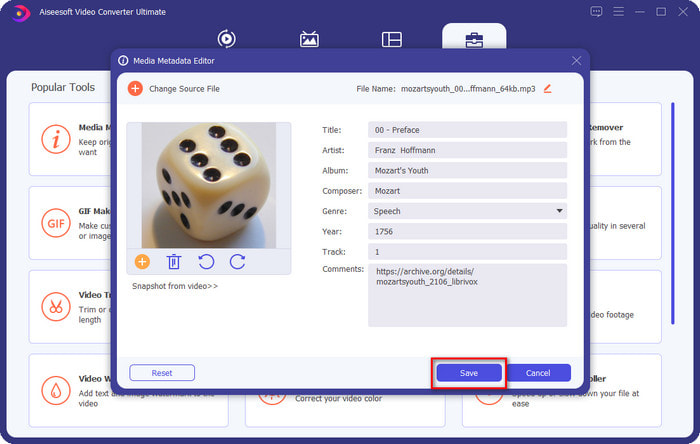
Trinn 5. Når du er ferdig med å legge til albumbilde og metadata i MP3‑filen, kan du nå klikke på Lagre for å knytte albumbildet til MP3‑filen du har lastet opp. Enkelt, ikke sant? Alt blir mulig og enkelt hvis du bruker det ultimate verktøyet til å løse problemet.
Del 2. Hvordan legge til albumkunst til MP3 ved hjelp av VLC Media Player Free Metadata Editor]
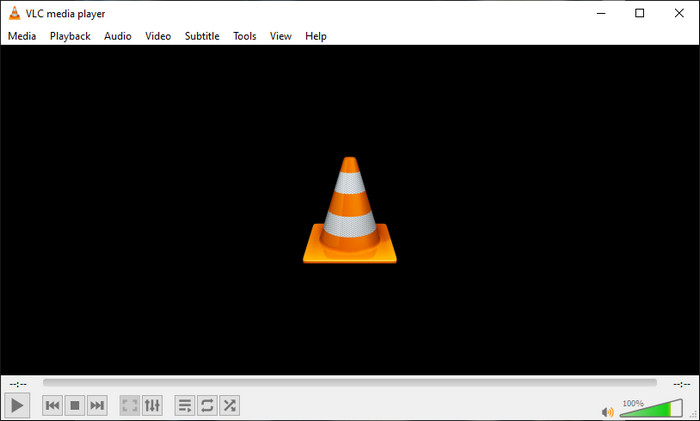
VLC Media Player er den beste mediespilleren de fleste av oss har. Dette verktøyet kan spille av alle typer videofiler, og det kan også redigere metadata, som å legge til albumbilde i musikkfiler. Med denne mediespilleren kan du fritt justere eller legge til metadata. Hvis du vil ha en veiledning om hvordan du legger til albumbilde i MP3 på Windows 10/11 eller Mac med dette verktøyet, er trinnene nedenfor for deg.
Trinn 1. Last ned mediespilleren på datamaskinen og åpne den.
Trinn 2. På hovedgrensesnittet klikker du på Verktøy og deretter på Informasjon.
Trinn 3. Høyreklikk på VLC‑ikonet nederst til høyre, legg til albumbildet og klikk Lagre.
Del 3. Slik legger du til albumkunst til MP3 i iTunes [Innebygd Metadata Editor på Mac]
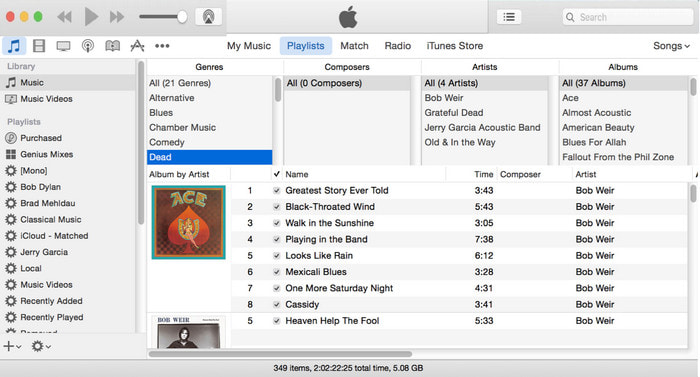
For Mac‑brukere er iTunes vår foretrukne metadata‑redigerer for å legge til bildeomslag på MP3‑filene våre. Denne innebygde appen kan hjelpe oss med å redigere metadataene i filene vi har på Mac. Programvaren er imidlertid ikke lenger tilgjengelig på noen Mac‑versjoner, fordi den nå er delt opp i tre separate apper som fungerer på samme måte som iTunes. Men på noen Mac med eldre versjon finnes den fortsatt. Hvis du er en av Mac‑brukerne som vil vite hvordan du legger til albumbilde i MP3 i iTunes, kan du følge trinnene nedenfor.
Trinn 1. Åpne iTunes‑applikasjonen på Mac‑en din.
Trinn 2. Klikk på Music, deretter Library, og høyreklikk på musikkfilen som ikke har albumbilde.
Trinn 3. I alternativene ovenfor klikker du på Artwork, deretter Add Artwork, velger bildet du vil laste opp, og klikker OK for å bruke det.
Del 4. Vanlige spørsmål om hvordan legge til albumomslag på MP3
Kan jeg legge til albumgrafikk til MP3 på Audacity?
Dessverre kan du ikke legge til bildekunsten på MP3-filen du har ved hjelp av Audacity. Dette verktøyet støtter ikke bilde- eller videoformater fordi dette er ment å brukes som musikkredigerer. Men du kan fortsatt bruke Audacity som en metadataredigerer hvis du vil redigere MP3-metadataene dine.
Hvorfor mangler albumomslaget fra lydfilen min?
Det er tre grunner til at albumgrafikken mangler i lydfilen. Den første grunnen er at filen du må laste ned ikke inkluderer albumgrafikk, spesielt hvis dette er piratkopiering. Det meste av musikkfilen vi har lastet ned på nettet kommer ikke med albumgrafikk for å unngå copywriting-problemer. Deretter forsvant filen fordi bildet ikke var riktig vedlagt. Noen brukere støter på dette problemet, og det er vanskelig å håndtere det, så det er viktig å bruke en profesjonell albumgrafikkadder. Til slutt er bildet ødelagt; hvis filen du har lastet opp ikke er tilgjengelig som albumgrafikk eller musikkfilen du har er ødelagt, kan dette være årsaken bak det.
Hva er de beste metadataene jeg kan bruke?
Hvis metadata‑redigererne vi har nevnt ovenfor er for begrensede, kan du klikke på denne lenken for å gå til en ny artikkel og finne alle de beste metadata‑redigererne du kan bruke.
Konklusjon
Nå som vi har ideen om å legge til albumgrafikk på MP3, er det på tide å velge hvilket verktøy vi synes passer oss best. Hvis du er en Mac-bruker og ikke vil laste ned noen programvare på skrivebordet ditt, må du velge iTunes. Men iTunes fases ut på den oppdaterte versjonen av Mac. Hvis du vil laste ned et gratisverktøy som kan hjelpe deg med å legge coveret til musikken din, så er VLC et godt valg. Verktøyet er imidlertid ikke et profesjonelt verktøy. Så hvis du vil ha ekspertprogramvare som kan imøtekomme deg i denne oppgaven tilgjengelig på både operativsystemer, Windows og Mac, så bruk den ultimate programvaren. Last ned programvaren på skrivebordet ditt for å ha det profesjonelle verktøyet tilgjengelig ved å klikke på nedlastingsknappen presentert ovenfor.
-
 Slik kan du enkelt se metadata for bilder og videoer på iOS
 Vil du vite hvordan du kan se metadata på iPhone og iPad? Da kan det å lese denne artikkelen hjelpe deg med å løse dette problemet uten problemer.
-
 Beste teknikker for hvordan du redigerer iD3-tagger på iTunes [Effektive tips]
 Trenger du å vite hvordan du redigerer tagger på iTunes? Da er du på rett sted. Som vi diskuterte metodene, kan du følge for å redigere taggene ved hjelp av iTunes.
-
 Hvordan redigere egenskapene til WAV-filer på Windows 10/11 og Mac [Løst]
 Leter du etter en måte å redigere egenskapene til WAV-filene dine på Windows 10/11? Dette spørsmålet vil ha et svar hvis du fortsetter å lese denne artikkelen.
